Algorithm Programming - CE
This book contains the theoretical foundations for programming algorithm practicum for the Computer Engineering department at UI.
- Module 2 - Linked List
- Part 1 - Understanding Linked List
- Part 2 - Types of Linked List
- Part 3 - Searching
- Part 4 - Manual VS STL List
- Module 4 - Merge Sort and Quick Sort
- 1. Understanding Merge Sort
- 2. Merge Sort in C++
- 3. Understanding Quick Sort
- 4. Lomuto Quick Sort in C++
- 5. Hoare Quick Sort in C++
- Module 5 - Advanced Sorting Algorithms & The Heap Data Structure
- 1. Motivation: The Quest for the Ideal Sorting Algorithm
- 2. Prerequisite: An Introduction to the Tree Data Structure
- 3. The Heap Data Structure
- 4. Core Operations and the Heap Sort Algorithm
- 5. The Heap in Practice: The C++ Standard Template Library (STL)
- Module 6 - Tree
- Module 7 - Hash Map
- 1. Main Concept of Hash Map
- 2. Collision Handling
- 3. Load Factor and Rehashing
- 4. Example: Full Manual Implementation
- 5. Hashing Implementation with C++ STL
- 6. Custom Struct Keys
- Module 8 - Graph, Stack, and Queue
- 1. Graphs Concept
- 2. Graph Representations
- 3. Stack and Queue
- 4. Graph Traversal: Breadth-First Search (BFS)
- 5. Graph Traversal: Depth-First Search (DFS)
- 6. Example: Full Code Implementation
- Module 9 - Advanced Graph
- Module 10 - Dynamic Programming
Module 2 - Linked List
Theoretical basics of Linked Lists, their types, benefits, and example code.
Part 1 - Understanding Linked List
Definition of Linked List
A Linked List is a linear data structure consisting of elements called nodes. Each node has two main parts:
- Data – stores the value of the element.
- Pointer/Reference – points to the next node (or the previous node in a Doubly Linked List).
Differences Between Linked List and Array
| Aspect | Array | Linked List |
|---|---|---|
| Storage | Elements are stored contiguously in memory. | Nodes are stored in non-contiguous memory and linked by pointers. |
| Element Access | Direct access using an index, complexity O(1). | Access requires traversal from the start, complexity O(n). |
| Size | Static, size determined at declaration. | Dynamic, can grow or shrink as needed. |
| Insert/Delete | Expensive due to element shifting, complexity O(n). | More efficient, only pointer adjustments needed, complexity O(1) if position is known. |
Benefits of Linked List
Dynamic Size
- No need to define size in advance like an array.
- Can grow or shrink according to program needs.
Efficiency in Insert/Delete Operations
- Adding or removing elements does not require shifting data.
- Complexity can be O(1) if the pointer is known.
More Flexible Memory Usage
- Nodes can be stored in scattered memory locations.
- Useful in systems with fragmented memory.
Support for Complex Data Structures
- Forms the basis for other data structures such as Stack, Queue, Deque, and Graph.
- Enables creation of variants like Circular Linked List and Doubly Linked List.
Two-Way Traversal (in Doubly Linked List)
Applications of Linked Lists
Dynamic Memory Allocation
- Used to keep track of free and allocated memory blocks.
Undo/Redo Operations in Text Editors
- Stores changes and navigates through editing history.
Graph Representation
- Efficiently implements adjacency lists in graph structures.
Implementation of Other Data Structures
- Serves as a base for stacks, queues, and deques.
Advantages of Linked List
- Efficient insertion and deletion since shifting of elements is not required as in arrays.
- Dynamic size allows growth or shrinkage at runtime.
- Memory utilization is more efficient; no pre-allocation reduces wasted space.
- Suitable for applications with large or frequently changing datasets.
- Uses non-contiguous memory blocks, useful in memory-limited systems.
Disadvantages of Linked List
- Direct access to an element is not possible; traversal from the start is required.
- Each node requires extra memory to store a pointer.
- More complex to implement and manage compared to arrays.
- Pointer mismanagement can cause bugs, memory leaks, or segmentation faults.
Short Code Example
#include <iostream>
using namespace std;

struct Node {
    int data;
    Node* next;
};

void pushFront(Node*& head, int value) {
    Node* newNode = new Node(); // Buat node baru
    newNode->data = value;      // Isi data
    newNode->next = head;       // Hubungkan ke head lama
    head = newNode;             // Jadikan node baru sebagai head
}

void printList(Node* head) {
    Node* current = head;
    while (current != nullptr) {
        cout << current->data << " -> ";
        current = current->next;
    }
    cout << "NULL\n";
}

int main() {
    Node* head = nullptr;  // List kosong

    pushFront(head, 10);
    pushFront(head, 20);
    pushFront(head, 30);

    printList(head); // Output: 30 -> 20 -> 10 -> NULL

    return 0;
}
Code Explanation:
Nodeis the basic structure of a Linked List.pushFrontadds a new node at the beginning of the list.printListtraverses the list and displays all elements.
Part 2 - Types of Linked List
Types of Linked Lists
Based on the structure of linked lists, they can be classified into several types:
-
Singly Linked List
-
Doubly Linked List
-
Circular Linked List
1. Singly Linked List
The singly linked list is the simplest form of linked list, where each node contains two members: data and a next pointer that stores the address of the next node. Each node in a singly linked list is connected through the next pointer, and the next pointer of the last node points to NULL, denoting the end of the list.
Singly Linked List Representation
A singly linked list can be represented as a pointer to the first node, where each node contains:
-
Data: Actual information stored in the node.
-
Next: Pointer to the next node.
// Structure to represent the singly linked list
struct Node {
    int data;       // Data field
    struct Node* next; // Pointer to the next node
};
2. Doubly Linked List
The doubly linked list is a modified version of the singly linked list. Each node contains three members: data, next, and prev. The prev pointer stores the address of the previous node. Nodes are connected via both next and prev pointers. The prev pointer of the first node and the next pointer of the last node point to NULL.
Doubly Linked List Representation
Each node contains:
-
Data: Actual information stored.
-
Next: Pointer to the next node.
-
Prev: Pointer to the previous node.
// Structure to represent the doubly linked list
struct Node {
    int data;       // Data field
    struct Node* next; // Pointer to the next node
    struct Node* prev; // Pointer to the previous node
};
3. Circular Linked List
A circular linked list is similar to a singly linked list, except the next pointer of the last node points to the first node instead of NULL. This circular nature is useful in applications like media players.
Circular Linked List Representation
Each node contains:
-
Data: Actual information stored.
-
Next: Pointer to the next node; the last node points to the first node.
// Structure to represent the circular linked list
struct Node {
    int data;       // Data field
    struct Node* next; // Pointer to the next node
};
Part 3 - Searching
1. Searching in a Custom Singly Linked List
#include <bits/stdc++.h>
using namespace std;

// Linked list node
class Node
{
public:
    int key;
    Node* next;
};

// Add a new node at the front
void push(Node** head_ref, int new_key)
{
    Node* new_node = new Node();
    new_node->key = new_key;
    new_node->next = (*head_ref);
    (*head_ref) = new_node;
}

// Search for a value in the linked list
bool search(Node* head, int x)
{
    Node* current = head;
    while (current != NULL)
    {
        if (current->key == x)
            return true;
        current = current->next;
    }
    return false;
}

int main()
{
    Node* head = NULL;
    int x = 21;

    // Construct list: 14->21->11->30->10
    push(&head, 10);
    push(&head, 30);
    push(&head, 11);
    push(&head, 21);
    push(&head, 14);

    search(head, 21) ? cout << "Yes" : cout << "No";
    return 0;
}
Explanation:
Nodeclass represents each node in the linked list.pushadds a new node at the beginning.searchtraverses the list iteratively to find the key.
2. Searching in STL std::list
C++ Standard Template Library (STL) provides the list container which can be used to implement a linked list. Searching can be done using the std::find algorithm.
#include <iostream>
#include <list>
#include <algorithm>
using namespace std;

int main() {
    list<int> l = {14, 21, 11, 30, 10};
    int x = 21;

    auto it = find(l.begin(), l.end(), x);

    if (it != l.end())
        cout << "Yes";
    else
        cout << "No";

    return 0;
}
Explanation:
std::listis a doubly linked list implementation.std::finditerates through the list to locate the element.- Returns an iterator to the element if found, or
l.end()if not found.
Part 4 - Manual VS STL List
A doubly linked list is a data structure where each node contains a pointer to the next and previous nodes, allowing traversal in both directions. In C++, you can implement it manually or use the built-in STL std::list.
Differences between Manual Doubly Linked List and STL std::list:
| Feature | Manual Doubly Linked List | STL std::list |
|---|---|---|
| Implementation | You define the Node structure and pointers manually. |
Already implemented as a doubly linked list in the STL. |
| Memory Management | Manual allocation and deallocation using new and delete. |
Automatic memory management. |
| Operations | Insert, delete, traversal, and search must be implemented manually. | Provides built-in functions like push_back, push_front, erase, and find. |
| Complexity | More control but more prone to errors like memory leaks. | Safer and easier to use, less prone to bugs. |
1. Manual Doubly Linked List Example
#include <iostream>
using namespace std;

struct Node {
    int data;
    Node* next;
    Node* prev;
};

// Add a node at the end
void pushBack(Node*& head, int value) {
    Node* newNode = new Node{value, nullptr, nullptr};
    if (!head) {
        head = newNode;
        return;
    }
    Node* temp = head;
    while (temp->next) temp = temp->next;
    temp->next = newNode;
    newNode->prev = temp;
}

// Print the list
void printList(Node* head) {
    Node* temp = head;
    while (temp) {
        cout << temp->data << " ";
        temp = temp->next;
    }
    cout << endl;
}

int main() {
    Node* head = nullptr;
    pushBack(head, 10);
    pushBack(head, 20);
    pushBack(head, 30);

    printList(head); // Output: 10 20 30
}
2. STL std::list Example
#include <iostream>
#include <list>
using namespace std;

int main() {
    list<int> l;

    l.push_back(10);
    l.push_back(20);
    l.push_back(30);

    for (int x : l)
        cout << x << " "; // Output: 10 20 30
    cout << endl;
}
Explanation:
-
Manual doubly linked list requires defining nodes and managing pointers yourself.
-
std::listsimplifies everything: memory management and operations like insertion, deletion, and traversal are built-in.
Module 4 - Merge Sort and Quick Sort
1. Understanding Merge Sort
What is Merge Sort?
Merge Sort is an efficient, comparison-based sorting algorithm that uses a "divide and conquer" strategy. In simple terms, it repeatedly breaks down a list into several sub-lists until each sub-list contains only one item (which is considered sorted). Then, it merges those sub-lists back together in a sorted manner.
How Does it Work?
The process can be broken down into two main phases:
- Divide Phase: The main, unsorted list is recursively divided in half. This continues until all the resulting sub-lists have only one element.
- Conquer (Merge) Phase: Starting with the single-element lists, the algorithm repeatedly merges pairs of adjacent sub-lists. During each merge, it compares the elements from the two lists and combines them into a new, larger, sorted list. This continues until all the sub-lists have been merged back into a single, completely sorted list.
Visualization Explanation
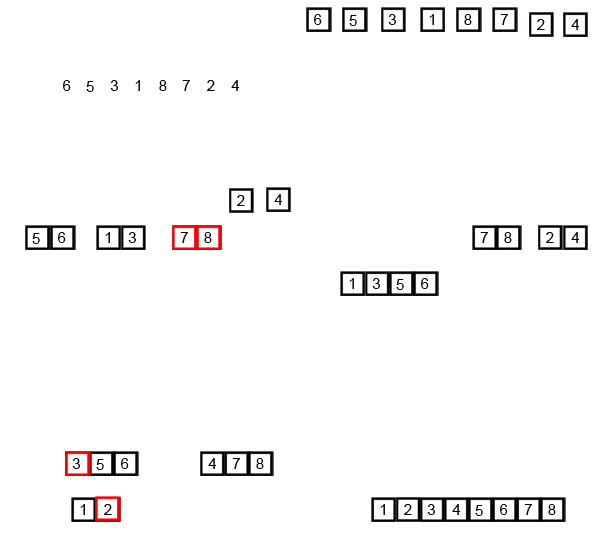
-
The Start: The animation begins with an unsorted list of numbers:
[6, 5, 3, 1, 8, 7, 2, 4]. -
The "Divide" Phase:
- First Split: The entire list is split into two halves:
[6, 5, 3, 1]and[8, 7, 2, 4]. - Second Split: Each of those halves is split again:
[6, 5],[3, 1]and[8, 7],[2, 4]. - Final Split: The splitting continues until we have eight separate lists, each containing just one number:
[6],[5],[3],[1],[8],[7],[2],[4]. At this point, the "divide" phase is complete. A list with one item is inherently sorted.
- First Split: The entire list is split into two halves:
-
The "Conquer (Merge)" Phase: Now, the algorithm starts merging these small lists back together in sorted order.
- First Merge: It merges adjacent pairs.
[5]and[6]are compared and merged to form[5, 6].[1]and[3]are merged to form[1, 3]. Similarly,[7, 8]and[2, 4]are created. We now have four sorted sub-lists:[5, 6],[1, 3],[7, 8], and[2, 4]. - Second Merge: The process repeats with these new, larger sorted lists.
[5, 6]and[1, 3]are merged. The algorithm compares the first element of each list (1vs5), takes the1, then compares3and5, takes the3
- First Merge: It merges adjacent pairs.
Benefits of Merge Sort
- Predictable Time Complexity: Its greatest strength is its consistent $O(n \log n)$ time complexity, regardless of the initial order of elements (worst, average, and best cases are the same). This makes it very reliable for large datasets.
- Stable Sort: Merge Sort is stable, meaning that if two elements have equal values, their relative order in the original array will be preserved in the sorted array.
- Excellent for External Sorting: It's highly effective for sorting data that is too large to fit into memory (e.g., files on a hard drive) because it reads and processes data in sequential chunks.
- Parallelizable: The "divide" step is easy to parallelize, meaning different parts of the array can be sorted simultaneously on different processor cores, speeding up the process significantly.
Drawbacks of Merge Sort
- Space Complexity: Its main disadvantage is that it requires extra space. It needs an auxiliary array of the same size as the input array, giving it a space complexity of O(n). This can be a limiting factor in memory-constrained environments like embedded systems.
- Slower for Small Datasets: For small lists, the overhead of recursion makes it slower than simpler algorithms like Insertion Sort. This is why many optimized sorting libraries use a hybrid approach.
- Recursive Overhead: The recursive function calls add some overhead to the execution stack, which, while usually minor, can be a consideration.
What is Merge Sort Used For?
Merge Sort's stability and efficiency with large datasets make it very useful in practice.
- Sorting Linked Lists: It is one of the most efficient ways to sort linked lists. Unlike arrays, linked lists are not easily accessible by index, but merging them is a very efficient operation.
- External Sorting: As mentioned, it's a go-to algorithm for sorting massive files that don't fit in RAM.
- Inversion Count Problem: The algorithm can be modified to solve other problems, such as counting the number of inversions in an array efficiently.
- Standard Library Implementations: It forms the basis of many highly optimized, built-in sorting functions in various programming languages, often as part of a hybrid algorithm like Timsort (used in Python and Java), which combines Merge Sort with Insertion Sort.
2. Merge Sort in C++
This section explains how the "divide and conquer" strategy of Merge Sort is implemented in C++. The logic is split into two primary functions: mergeSort() which handles the recursive division, and merge() which handles the conquering and sorting.
The C++ Code Implementation
Here is the complete code for a Merge Sort implementation using std::vector.
#include <iostream>
#include <vector>

// Utility function to print a vector
void printVector(const std::vector<int>& arr) {
    for (int num : arr) {
        std::cout << num << " ";
    }
    std::cout << std::endl;
}

// Merges two sorted subarrays into a single sorted subarray.
// First subarray is arr[left..mid]
// Second subarray is arr[mid+1..right]
void merge(std::vector<int>& arr, int left, int mid, int right) {
    // Calculate sizes of the two temporary subarrays
    int n1 = mid - left + 1;
    int n2 = right - mid;

    // Create temporary vectors to hold the data
    std::vector<int> L(n1), R(n2);

    // Copy data from the main array to the temporary vectors
    for (int i = 0; i < n1; i++)
        L[i] = arr[left + i];
    for (int j = 0; j < n2; j++)
        R[j] = arr[mid + 1 + j];

    // Merge the temporary vectors back into the original array arr[left..right]
    int i = 0; // Initial index for left subarray
    int j = 0; // Initial index for right subarray
    int k = left; // Initial index for the merged subarray

    while (i < n1 && j < n2) {
        if (L[i] <= R[j]) {
            arr[k] = L[i];
            i++;
        } else {
            arr[k] = R[j];
            j++;
        }
        k++;
    }

    // Copy any remaining elements from the left subarray
    while (i < n1) {
        arr[k] = L[i];
        i++;
        k++;
    }

    // Copy any remaining elements from the right subarray
    while (j < n2) {
        arr[k] = R[j];
        j++;
        k++;
    }
}

// The main recursive function that implements the "divide" phase
void mergeSort(std::vector<int>& arr, int left, int right) {
    // Base case: if the array has 1 or 0 elements, it's already sorted
    if (left >= right) {
        return;
    }

    // Find the middle point to divide the array
    int mid = left + (right - left) / 2;

    // Recursively call mergeSort for the two halves
    mergeSort(arr, left, mid);
    mergeSort(arr, mid + 1, right);

    // Merge the two now-sorted halves
    merge(arr, left, mid, right);
}

// Main driver function
int main() {
    std::vector<int> data = {6, 5, 3, 1, 8, 7, 2, 4};
    std::cout << "Original array: ";
    printVector(data);

    mergeSort(data, 0, data.size() - 1);

    std::cout << "Sorted array:   ";
    printVector(data);

    return 0;
}
Output
Original array: 6 5 3 1 8 7 2 4
Sorted array:   1 2 3 4 5 6 7 8
Code Breakdown
Code Breakdown
The mergeSort() Function: The Divider
This function is the engine that drives the "Divide" phase.
- Base Case: The recursion stops when
left >= right, which means the sub-array has one or zero elements and is considered sorted. - Divide: It calculates the
midpoint of the current array segment. The formulaleft + (right - left) / 2is used to prevent potential overflow on very large arrays. - Recurse: It calls itself for the left half (
lefttomid) and then for the right half (mid + 1toright). - Conquer: After the recursive calls return (guaranteeing the two halves are sorted), it calls
merge()to combine them into a single, sorted segment.
The merge() Function: The Conqueror
This function is the core of the algorithm where the actual sorting happens. It takes two adjacent, sorted sub-arrays and merges them.
- Setup: It creates two temporary vectors,
LandR, and copies the data from the two halves of the main array into them. - Merge Loop: It uses three index pointers:
ifor vectorL,jfor vectorR, andkfor the original arrayarr. It compares the elements atL[i]andR[j]and places the smaller of the two intoarr[k]. It then increments the pointer of the vector from which the element was taken, as well as the pointerk. - Copy Leftovers: After the main loop, one of the temporary vectors might still contain elements. The final two
whileloops copy these remaining elements back into the main array, ensuring all data is merged correctly.
3. Understanding Quick Sort
What is Quick Sort?
Quick Sort is a highly efficient, comparison-based sorting algorithm that also uses a "divide and conquer" strategy. It is one of the most widely used sorting algorithms due to its fast average-case performance. The core idea is to select a 'pivot' element from the array and partition the other elements into two sub-arrays, according to whether they are less than or greater than the pivot. The sub-arrays are then sorted recursively.
How Does it Work?
The process can be broken down into three main steps:
-
Pivot Selection: Choose an element from the array to be the pivot. Common strategies include picking the first element, the last element, the middle element, or a random element.
-
Partitioning: Reorder the array so that all elements with values less than the pivot are on one side, and all elements with values greater than the pivot are on the other. This crucial step can be performed in several ways, with the two most common being:
-
Lomuto Partition Scheme: This is a very intuitive method. It typically uses the last element as the pivot. It then scans the array with a single pointer, maintaining a "wall" that separates smaller elements from the rest. After the scan, the pivot is swapped into its final, sorted position. This scheme is easy to implement but can be inefficient with already-sorted data.
-
Hoare Partition Scheme: This is the original method and is generally faster. It often uses the first element as the pivot. It uses two pointers—one at each end of the array—that move toward each other, swapping elements as they go. This method correctly separates the values, but the pivot itself does not necessarily end up in its final sorted position.
-
-
Recursion: Recursively apply the above steps to the sub-arrays on both sides of the partition. This continues until the base case of an array with zero or one element is reached, at which point the entire array is sorted.
Visualization Explanation
Lomuto Partition Scheme
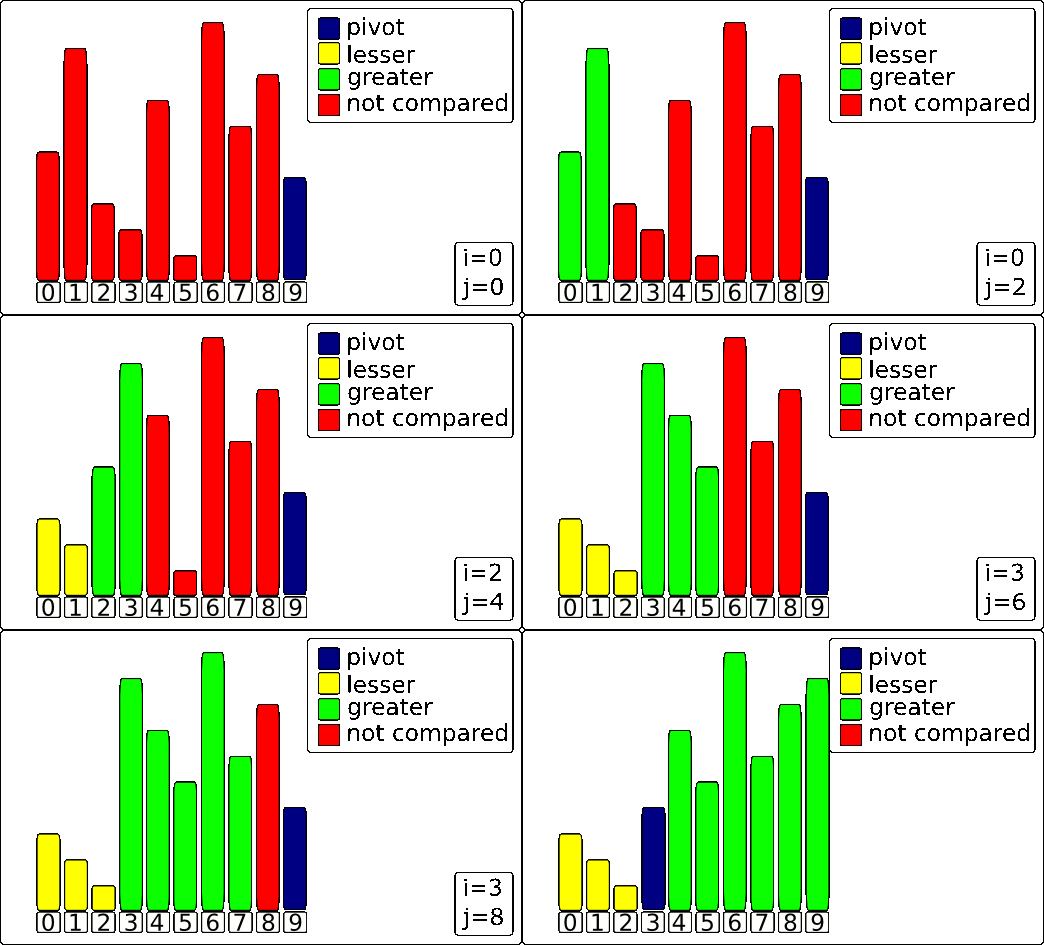
The algorithm uses three key components, which are represented by colors in the animation:
- The Pivot (blue bar): The value everything else is compared against. In this scheme, it's the last element.
- The Scanner
j(yellow highlight): This pointer moves through the array to inspect each element. - The Wall
i(green highlight): This pointer marks the boundary for elements that are smaller than the pivot.
The Process
Here's a step-by-step breakdown of the process shown in the GIF.
1. The Setup
The process begins by selecting the last element of the array as the Pivot (making it blue). The Wall (i) is placed just before the first element, and the Scanner (j) starts at the first element.
2. The Partitioning Loop
The Scanner (j) moves from left to right, one element at a time. For each element it inspects, one of two things happens:
-
If the element is LARGER than the Pivot: The element is already on the "correct" side of where the pivot will eventually be. The algorithm does nothing but advance the Scanner
jto the next element. -
If the element is SMALLER than the Pivot: This is the key action. The algorithm needs to move this smaller element to the left section of the array. It does this in two steps:
- The Wall (
i) is moved one position to the right to make room in the "smaller than pivot" section. - The smaller element at the Scanner's position (
j) is swapped with the element now at the Wall's new position (i).
- The Wall (
This loop continues until the Scanner has inspected every element except for the pivot itself.
3. Final Pivot Placement
After the loop finishes, all elements smaller than the pivot are now grouped together on the left side of the Wall. The final step is to place the pivot in its correct sorted position.
This is done by swapping the Pivot (the blue bar) with the element that is immediately to the right of the Wall (i+1).
The result is a perfectly partitioned array. The pivot is now in its final place, with every element to its left being smaller and every element to its right being larger. This process is then repeated recursively on the sub-arrays to the left and right of the pivot.
Hoare Partition Scheme
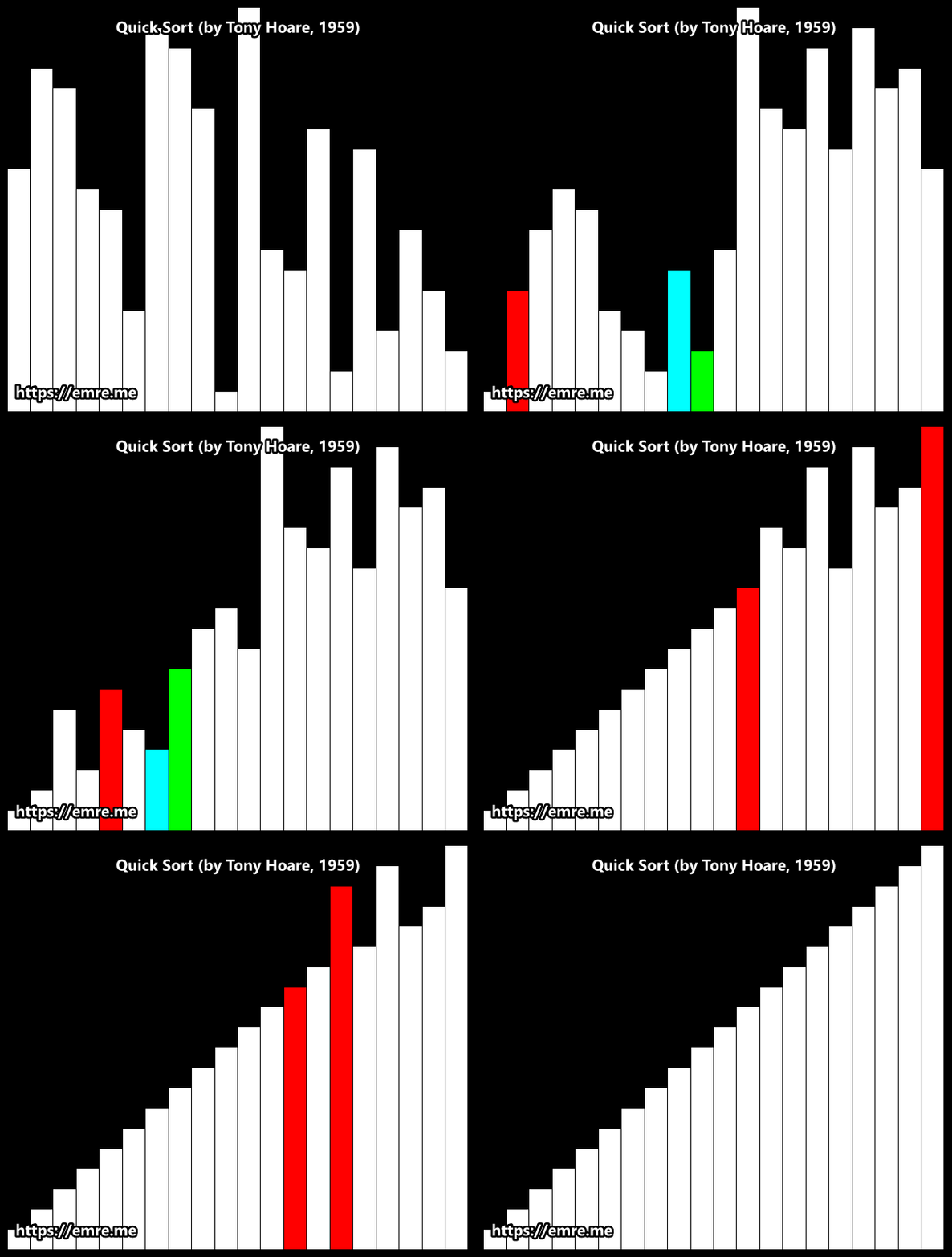
How It Works: A Breakdown
Here’s a breakdown of the process for any given array segment.
1. The Setup
- Pivot Selection: An element is chosen as the pivot. In this animation, it appears to be the first element of the segment being sorted.
- Two Pointers: Two pointers are established: a left pointer
iand a right pointerj, starting at opposite ends of the segment.
2. The Partitioning Loop ↔️
This is the main action you see in the animation. The two pointers begin moving towards the center of the array to find elements that are on the wrong side of the pivot.
- The left pointer
imoves to the right, skipping over all elements that are smaller than the pivot. It stops when it finds an element larger than or equal to the pivot. - The right pointer
jmoves to the left, skipping over all elements that are larger than the pivot. It stops when it finds an element smaller than or equal to the pivot. - The Swap: Once both pointers have stopped, if they haven't crossed each other, the two elements they are pointing at are swapped. This places both elements on their correct side of the partition.
This search-and-swap process repeats until the pointers cross.
3. The Result
When the pointers cross, the loop terminates. The array segment is now partitioned into two groups:
- A left partition where all values are less than or equal to the pivot's value.
- A right partition where all values are greater than or equal to the pivot's value.
Crucially, unlike other methods, the pivot itself does not necessarily end up in its final sorted position. The algorithm then recursively repeats this entire process on the two new sub-arrays.
Benefits of Quick Sort
- Fast on Average: It has an average-case time complexity of O(n log n), which is extremely fast in practice, often outperforming other sorting algorithms.
- In-place Sorting: It has a space complexity of O(log n) on average because it sorts the array "in-place," meaning it doesn't require a separate auxiliary array like Merge Sort.
- Low Overhead: The inner loop of the algorithm is very simple and can be implemented efficiently on most machine architectures.
Drawbacks of Quick Sort
- Worst-Case Performance: Its main weakness is a worst-case time complexity of O(n^2). This occurs when the chosen pivots are consistently the smallest or largest elements, which can happen with already-sorted or reverse-sorted data.
- Unstable Sort: Quick Sort is unstable. It does not guarantee that the relative order of equal elements will be preserved after sorting.
- Sensitive to Pivot Choice: The efficiency of the algorithm is highly dependent on the pivot selection strategy. A
4. Lomuto Quick Sort in C++
This section explains how the "divide and conquer" strategy of Quick Sort is implemented in C++. The logic is split into two primary functions: quickSort() which handles the recursive division, and partition() which rearranges the array using the popular Lomuto partition scheme.
The C++ Code Implementation
Here is the complete code for a Quick Sort implementation using std::vector.
#include <iostream>
#include <vector>
#include <utility> // For std::swap

// Utility function to print a vector
void printVector(const std::vector<int>& arr) {
    for (int num : arr) {
        std::cout << num << " ";
    }
    std::cout << std::endl;
}

// This function implements the Lomuto partition scheme. It takes the last
// element as pivot and places it at its correct position in the sorted array.
int partition(std::vector<int>& arr, int low, int high) {
    // Choose the last element as the pivot (key to Lomuto)
    int pivot = arr[high];

    // Index of the smaller element, acting as a "wall"
    int i = (low - 1);

    for (int j = low; j <= high - 1; j++) {
        // If the current element is smaller than the pivot
        if (arr[j] < pivot) {
            i++; // Move the wall to the right
            std::swap(arr[i], arr[j]);
        }
    }
    // Place the pivot in its correct position after the wall
    std::swap(arr[i + 1], arr[high]);
    return (i + 1);
}

// The main recursive function that implements Quick Sort
void quickSort(std::vector<int>& arr, int low, int high) {
    // Base case: if the array has 1 or 0 elements, it's already sorted
    if (low < high) {
        // pi is the partitioning index from the Lomuto partition
        int pi = partition(arr, low, high);

        // Separately sort elements before and after the partition
        quickSort(arr, low, pi - 1);
        quickSort(arr, pi + 1, high);
    }
}

// Main driver function
int main() {
    std::vector<int> data = {6, 5, 3, 1, 8, 7, 2, 4};
    std::cout << "Original array: ";
    printVector(data);

    quickSort(data, 0, data.size() - 1);

    std::cout << "Sorted array:   ";
    printVector(data);

    return 0;
}
Output
Original array: 6 5 3 1 8 7 2 4
Sorted array:   1 2 3 4 5 6 7 8
Code Breakdown
The quickSort() Function: The Recursive Driver
This function orchestrates the "Divide" phase of the algorithm.
- Base Case: The recursion continues as long as
low < high. Iflow >= high, it means the sub-array has one or zero elements, which is inherently sorted. - Partition: It calls the
partition()function. This function rearranges the sub-array and returns the indexpiwhere the pivot element is now correctly placed. - Recurse: It calls itself twice for the two sub-arrays created by the partition: one for the elements to the left of the pivot (
lowtopi - 1) and one for the elements to the right (pi + 1tohigh). Because this uses the Lomuto scheme, the pivot atpiis guaranteed to be in its final place and can be excluded from recursion.
The partition() Function (Lomuto Scheme)
This function implements the well-known Lomuto partition scheme. It is where the key logic of rearranging elements occurs and can be seen as the "Conquer" step, as it correctly places one element (the pivot) at a time.
- Pivot Selection: It selects the last element of the sub-array (
arr[high]) as the pivot. This is the defining starting point for this version of Lomuto. - Rearranging Loop: It maintains an index
i(the "wall") which represents the boundary for elements smaller than the pivot. It iterates through the sub-array with another indexj(the "scanner"). If it finds an elementarr[j]that is smaller than the pivot, it moves the wall (i++) and swapsarr[j]with the element at the new wall position, effectively expanding the "smaller than pivot" section. - Final Pivot Placement: After the loop finishes, all elements smaller than the pivot are at the beginning of the sub-array. The pivot (still at
arr[high]) is then swapped with the element atarr[i + 1]. This places the pivot exactly where it belongs in the sorted array. - Return Index: The function returns the new index of the pivot (
i + 1), so thequickSortfunction knows where to split the array for its next recursive calls.
5. Hoare Quick Sort in C++
This section explains how the "divide and conquer" strategy of Quick Sort is implemented in C++. The logic is split into two primary functions: quickSort() which handles the recursive division, and partition() which rearranges the array using the classic Hoare partition scheme.
The C++ Code Implementation
Here is the complete code for a Quick Sort implementation using the Hoare partition scheme.
#include <iostream>
#include <vector>
#include <utility> // For std::swap

// Utility function to print a vector
void printVector(const std::vector<int>& arr) {
    for (int num : arr) {
        std::cout << num << " ";
    }
    std::cout << std::endl;
}

// This function implements the Hoare partition scheme. It partitions the
// array and returns the split point.
int partition(std::vector<int>& arr, int low, int high) {
    // Choose the first element as the pivot (key to this Hoare implementation)
    int pivot = arr[low];
    int i = low - 1;
    int j = high + 1;

    while (true) {
        // Find an element on the left side that should be on the right
        do {
            i++;
        } while (arr[i] < pivot);

        // Find an element on the right side that should be on the left
        do {
            j--;
        } while (arr[j] > pivot);

        // If the pointers have crossed, the partition is done
        if (i >= j) {
            return j;
        }

        // Swap the elements to place them on the correct side
        std::swap(arr[i], arr[j]);
    }
}

// The main recursive function that implements Quick Sort
void quickSort(std::vector<int>& arr, int low, int high) {
    // Base case: if the array has 1 or 0 elements, it's already sorted
    if (low < high) {
        // pi is the split point from the Hoare partition
        int pi = partition(arr, low, high);

        // Recursively sort the two partitions
        quickSort(arr, low, pi);
        quickSort(arr, pi + 1, high);
    }
}

// Main driver function
int main() {
    std::vector<int> data = {6, 5, 3, 1, 8, 7, 2, 4};
    std::cout << "Original array: ";
    printVector(data);

    quickSort(data, 0, data.size() - 1);

    std::cout << "Sorted array:   ";
    printVector(data);

    return 0;
}
Output
Original array: 6 5 3 1 8 7 2 4
Sorted array:   1 2 3 4 5 6 7 8
Code Breakdown
The quickSort() Function: The Recursive Driver
This function orchestrates the "Divide" phase of the algorithm.
- Base Case: The recursion continues as long as
low < high. Iflow >= high, it means the sub-array has one or zero elements. - Partition: It calls the
partition()function, which rearranges the sub-array and returns a split point indexpi. - Recurse: It calls itself on the two partitions. Because the Hoare scheme's split point
piis not guaranteed to be the pivot's final position, the recursive calls arequickSort(arr, low, pi)andquickSort(arr, pi + 1, high)to ensure all elements are included in the sorting process.
The partition() Function (Hoare Scheme)
This function implements the classic Hoare partition scheme. It is generally more efficient than Lomuto because it performs fewer swaps on average.
- Pivot Selection: It selects the first element (
arr[low]) as the pivot. - Two Pointers: It uses two pointers,
iandj, which start at opposite ends of the array and move toward each other. - Rearranging Loop: The
ipointer moves right to find the first element greater than or equal to the pivot, while thejpointer moves left to find the first element less than or equal to the pivot. If the pointers haven't crossed, the two elements are swapped. - Return Index: The loop terminates when the pointers cross. The function returns the final position of the
jpointer, which serves as the split point for the two partitions. Unlike Lomuto, the pivot is not guaranteed to be at this returned index.
Module 5 - Advanced Sorting Algorithms & The Heap Data Structure
1. Motivation: The Quest for the Ideal Sorting Algorithm
In our study of advanced sorting algorithms, we have explored powerful techniques that offer significant performance improvements over basic O(n²) methods. However, these advanced algorithms often come with their own set of trade-offs. Let's recap two of the most prominent examples: Merge Sort and Quick Sort.
A Recap of Trade-offs
Merge Sort
-
Strength: Its greatest advantage is its guaranteed Θ(n log n) performance. This efficiency holds true for all cases—worst, average, and best—making it exceptionally reliable and predictable.
-
Weakness: It is not an in-place algorithm. Merge Sort requires auxiliary memory proportional to the size of the input array, giving it a space complexity of O(n). This can be a significant drawback when memory is limited.
Quick Sort
-
Strength: It is an in-place algorithm, requiring only a small, logarithmic amount of space on the recursion stack (O(log n)). In the average case, it is often faster in practice than other O(n log n) algorithms due to its low constant factors.
-
Weakness: Its primary disadvantage is its worst-case performance. If the pivot selection is poor (e.g., on an already sorted array), its performance degrades significantly to a slow Θ(n²), which is no better than basic sorting methods like Bubble Sort.
The Key Question
This analysis of trade-offs leads to a crucial question: Is there an algorithm that offers the "best of both worlds"? Can we find a sorting method that combines:
-
The guaranteed Θ(n log n) worst-case performance of Merge Sort.
-
The O(1) space efficiency (in-place nature) of Quick Sort.
The Answer: Heap Sort
The answer is yes, and one of the most classic algorithms that achieves this powerful combination is Heap Sort. It stands as a testament to how the right choice of an underlying data structure can lead to an algorithm with an excellent performance profile.
To fully understand how Heap Sort achieves this, we must first dive into the data structure that powers it: the Heap. The following sub-modules will build our understanding from the ground up, starting with the basic concepts of trees and leading to the full implementation and analysis of Heap Sort.
2. Prerequisite: An Introduction to the Tree Data Structure
Before we can understand the Heap, we must first be familiar with its underlying structure: the Tree. In computer science, a tree is a widely used data structure that simulates a hierarchical structure, with a set of connected nodes.
Core Components
Every tree is composed of a few fundamental components:
-
Node: The primary entity in a tree that contains data. It is also known as a "vertex".
-
Edge: A connection or link between two nodes.
-
Root: The topmost node in a tree. It is the only node that does not have a parent.
Consider the tree structure below:
-
Nodes: {A, B, C, D, E}
-
Edges: {(A-B), (A-C), (B-D), (B-E)}
-
Root: Node A
Hierarchical Terminology
The relationships between nodes in a tree are described using terminology borrowed from family trees:
-
Parent: A node that is directly above another node and connected to it. In our example, A is the parent of B and C.
-
Child: A node that is directly below another node and connected to it. In our example, D and E are children of B.
-
Leaf: A node that has no children. In our example, C, D, and E are leaf nodes.
Structure and Depth
We can measure the structure of a tree in several ways:
-
Level: The level of a node is defined by its distance from the root. The root is at Level 0. Its children are at Level 1, their children are at Level 2, and so on.
-
Depth/Height: The height of a tree is the number of edges on the longest path from the root to a leaf. Our example tree has a height of 2.
Focus on the Binary Tree
While a node in a tree can have any number of children, our focus for understanding heaps will be on a specific type: the Binary Tree.
A Binary Tree is a tree data structure in which each node has at most two children, which are referred to as the left child and the right child.
The reason we focus on Binary Trees is that the Heap data structure, which is the engine of Heap Sort, is a specialized type of Binary Tree. Mastering this concept is a fundamental step toward understanding heaps.
3. The Heap Data Structure
Now that we understand the concept of a binary tree, we can define a Heap. A Heap is a specialized tree-based data structure that satisfies two specific properties.
The Two Defining Properties of a Heap
For a binary tree to be considered a Heap, it must adhere to the following rules:
-
Structure Property: It must be an Essentially Complete Binary Tree.
This means that the tree is completely filled on all levels, with the possible exception of the last level, which must be filled from left to right without any gaps. This "no gaps" property is crucial, as it allows a heap to be stored efficiently in an array. -
Heap Property (Order Property): The nodes must be ordered in a specific way relative to their children. This ordering defines the type of heap.
Types of Heaps
There are two main types of heaps, distinguished by the Heap Property they enforce:
-
Max-Heap: The value of every node is greater than or equal to the value of each of its children.
-
Implication: In a Max-Heap, the largest element in the entire collection is always located at the root of the tree. This is the type of heap used for Heap Sort.
-
Example: A tree with root 10 and children 8 and 9 is a valid Max-Heap at the top level.
-
-
Min-Heap: The value of every node is less than or equal to the value of each of its children.
-
Implication: In a Min-Heap, the smallest element is always located at the root. This structure is commonly used to implement Priority Queues.
-
Example: A tree with root 2 and children 5 and 3 is a valid Min-Heap at the top level.
-
The Array Representation
The complete binary tree property is precisely what makes an array a perfect and highly efficient way to store a heap. The hierarchical relationships are not stored with pointers, but are instead calculated mathematically based on an element's index.
For an element at a zero-based index i in an array representing a heap:
-
The index of its parent is calculated as: floor((i - 1) / 2)
-
The index of its left child is calculated as: 2 * i + 1
-
The index of its right child is calculated as: 2 * i + 2
For example, for the node at index i = 3:
-
Its parent is at index floor((3 - 1) / 2) = floor(1) = 1.
-
Its left child would be at index 2 * 3 + 1 = 7.
4. Core Operations and the Heap Sort Algorithm
The Heap Sort algorithm is a two-phase process that masterfully uses the properties of the Max-Heap. Both phases rely on a core "helper" operation that maintains the heap property.
The Engine of the Heap: The siftdown Operation
To build and maintain a heap, we need a procedure to fix any violations of the heap property. The primary operation used in Heap Sort is siftdown (also known as heapify-down).
-
siftdown (or Heapify-Down): This operation is used when a node's value is smaller than one of its children, violating the Max-Heap property. The siftdown process corrects this by repeatedly swapping the parent with its largest child, effectively "sinking" the smaller element down the tree until the heap property is restored for that subtree. The time complexity for a single siftdown operation is proportional to the height of the tree, making it O(log n).
-
siftup (or Heapify-Up): While less critical for our Heap Sort implementation, this complementary operation is used when a newly inserted node is larger than its parent. It "bubbles" the element up the tree by swapping it with its parent until the heap property is restored. This is the key operation used when adding elements to a std::priority_queue.
With the siftdown operation as our main tool, we can now construct the two phases of Heap Sort.
Phase 1: makeheap (The Heapify Process)
The first step is to convert the unsorted input array into a valid Max-Heap.
-
Goal: Rearrange the elements of the array so that they satisfy the Max-Heap property.
-
Method (Bottom-Up): The most efficient way to do this is with a bottom-up approach. We treat the entire array as a complete binary tree and then iteratively fix it. The process starts from the last non-leaf node and moves upwards towards the root. For each node, we call siftdown to ensure its subtree is a valid Max-Heap. By the time we reach the root, the entire array is guaranteed to be a Max-Heap.
-
Analysis: While it involves multiple calls to siftdown (an O(log n) operation), a tight analysis shows that the makeheap phase can be completed in O(n) linear time, which is remarkably efficient.
Phase 2: The Sorting Process
Once the array is a Max-Heap, the largest element is at the root (array[0]). The sorting phase systematically extracts this largest element and places it in its correct final position.
This is done through a repeated process:
-
Swap: Swap the root element (array[0], the current maximum) with the last element in the heap portion of the array. The largest element is now in its final, sorted position at the end of the array.
-
Shrink: The effective size of the heap is reduced by one, "locking in" the sorted element at the end so it is no longer considered part of the heap.
-
Repair: The new root element (which was previously the last element) likely violates the Max-Heap property. Call siftdown on the root (array[0]) to repair the heap, ensuring the next largest element rises to the top.
This cycle is repeated n-1 times, until the entire array is sorted.
Complexity Analysis of Heap Sort
-
Time Complexity:
-
Phase 1 (makeheap): O(n)
-
Phase 2 (Sorting): Consists of n-1 calls to siftdown, each taking O(log n) time. Total time for this phase is O(n log n).
-
The overall complexity is dominated by the sorting phase, giving Heap Sort a guaranteed Θ(n log n) time complexity for worst-case, average-case, and best-case scenarios.
-
-
Space Complexity:
-
The algorithm operates directly on the input array, swapping elements within it. It requires no significant extra storage. Therefore, Heap Sort is an in-place algorithm with a space complexity of O(1).
-
5. The Heap in Practice: The C++ Standard Template Library (STL)
While understanding how to build Heap Sort from scratch is crucial for algorithmic knowledge, in modern C++, we often leverage the powerful abstractions provided by the Standard Template Library (STL). The concepts of a heap are primarily exposed through std::priority_queue.
std::priority_queue: A Ready-to-Use Heap
The C++ STL provides a container adapter called std::priority_queue that is an implementation of a Heap.
-
Default Behavior: By default, std::priority_queue<int> is a Max-Heap. This means that when you call top(), it returns the largest element, and when you pop(), it removes the largest element while maintaining the heap property.
-
Core Operations:
-
push(): Adds an element to the queue (heap). This internally performs a sift-up operation. Complexity: O(log n).
-
pop(): Removes the top element. Complexity: O(log n).
-
top(): Returns a reference to the top element without removing it. Complexity: O(1).
-
Working with Custom Data Types
What happens if we want to create a priority queue of custom objects, like a struct for patients in a hospital?
struct Patient {
    std::string name;
    int triage_level; // Level 1 is highest priority
};

// This will cause a compile error!
std::priority_queue<Patient> er_queue;
The compiler doesn't know how to compare two Patient objects. To solve this, we must provide our own custom comparison logic.
Custom Comparators: Functors and Lambda Expressions
We can tell std::priority_queue how to order our custom types using a custom comparator. There are two common ways to do this in modern C++:
-
Functor (Function Object): A struct or class that overloads the function call operator operator(). The priority_queue will create an object of this type and use its operator() to compare elements. This is a powerful, stateful way to define comparison logic.
struct ComparePatients { bool operator()(const Patient& a, const Patient& b) { // Because priority_queue is a Max-Heap, it puts the "larger" // element on top. We want level 1 to be the highest priority, // so we tell the queue that 'a' is "less than" 'b' if its // triage level is numerically greater. return a.triage_level > b.triage_level; } }; // Usage: std::priority_queue<Patient, std::vector<Patient>, ComparePatients> er_queue; - Lambda Expression: An inline, anonymous function that can be defined on the spot. Lambdas are often more concise and readable for simple, stateless comparison logic. They are commonly used with algorithms like std::sort.
auto compare_lambda = [](const Patient& a, const Patient& b) {
    return a.triage_level > b.triage_level;
};

// Usage with priority_queue is slightly more verbose
std::priority_queue<Patient, std::vector<Patient>, decltype(compare_lambda)> er_queue(compare_lambda);
By providing these comparators, we can leverage the highly optimized and safe implementation of a heap provided by the STL for any data type we need.
Module 6 - Tree
1. Introduction
Module 6: Tree
Author: YP
Learning Objectives
After completing this module, students are expected to be able to:
- Explain the basic concept of a Tree as a non-linear data structure.
- Identify the differences between root, parent, child, leaf, and subtree.
- Implement Traversal methods: Inorder, Preorder, Postorder, and Level Order.
- Understand the role of Stack and Queue in traversal algorithms.
- Apply the concept of Trees to real-world cases in daily life.
2. Tree Concept
2.1 Basic Theory
2.1.1 Definition of a Tree

A Tree is a non-linear hierarchical data structure composed of nodes and edges.
- Every Tree has a root (root node).
- The root can have children.
- A node with no children is called a leaf.
- Each node and its descendants can form a subtree.
2.1.2 Important Terms in a Tree

- Root → the topmost node.
- Parent → a node that has children.
- Child → a node derived from a parent.
- Leaf → a node without children.
- Subtree → a small tree formed from a node and its descendants.
2.1.3 Binary Tree

A Binary Tree is a tree data structure in which each node has at most two children (left and right).
- There are no special rules for placing node values.
- Used for hierarchical representation, data structures like heaps, expression trees, and implementing search or traversal algorithms.
- Nodes in a Binary Tree can have 0, 1, or 2 children.
Characteristics of a Binary Tree:
- Height of the tree: the number of levels from the root to the farthest leaf.
- Leaf node: a node that has no children.
2.2 Introduction to Stack and Queue
2.2.1 Stack

A LIFO (Last In First Out) data structure → the last data in is the first one out. Example: a stack of plates in a cafeteria. The last plate placed on top will be the first one taken.
Main operations:
- push(x) → adds data to the top of the stack.
- pop() → removes data from the top of the stack.
Application in Trees Used in DFS (Depth First Search) or Preorder, Inorder, Postorder traversals. When we enter a child node, the current node is stored on the stack. After finishing with the child, we pop from the stack to continue.
2.2.2 Queue

A FIFO (First In First Out) data structure → the first data in is the first one out. Example: a minimarket cashier line, the person who arrives first will be served first.
Main operations:
- enqueue(x) → inserts data at the back of the queue.
- dequeue() → removes data from the front of the queue.
Application in Trees Used in BFS (Breadth First Search) or Level Order traversal. When visiting a node, its children are added to the queue, then processed one by one in order.
2.3 Traversal in Trees
Traversal is the process of visiting each node in a tree.
2.3.1 Inorder (Left, Root, Right)
- visit the left, then the middle (root), then the right. The result is usually data sorted in ascending order.
// Inorder (Left - Root - Right)
void inorder(Node* root) {
   if (root == nullptr) return;
   inorder(root->left);
   cout << root->data << " ";
   inorder(root->right);
}
2.3.2 Preorder (Root, Left, Right)
- visit the middle first, then the left, then the right. Used to represent the structure of the tree.
// Preorder (Root - Left - Right)
void preorder(Node* root) {
   if (root == nullptr) return;
   cout << root->data << " ";
   preorder(root->left);
   preorder(root->right);
}
2.3.3 Postorder (Left, Right, Root)
- visit the left first, then the right, finally the middle. Suitable if you want to delete all contents of the tree.
// Postorder (Left - Right - Root)
void postorder(Node* root) {
   if (root == nullptr) return;
   postorder(root->left);
   postorder(root->right);
   cout << root->data << " ";
}
2.3.4 Level Order
- Visit nodes level by level from top to bottom, left to right.
- Usually uses a queue.
void levelOrder(Node* root) {
   if (root == nullptr) return;
   queue<Node*> q;
   q.push(root);
   while (!q.empty()) {
   Node* temp = q.front();
   q.pop();
   cout << temp->data << " ";
   if (temp->left) q.push(temp->left);
   if (temp->right) q.push(temp->right);
   }
}
2.3.5 Traversal Illustration Example
     50
    /  \
   /    \
  30     70
 / \    / \
20 40  60 80
- Inorder: 20, 30, 40, 50, 60, 70, 80
- Preorder: 50, 30, 20, 40, 70, 60, 80
- Postorder: 20, 40, 30, 60, 80, 70, 50
- Level Order: 50, 30, 70, 20, 40, 60, 80
References
- GeeksforGeeks, “Binary Search Tree (BST),” [Online]. Available: https://www.geeksforgeeks.org/binary-search-tree-data-structure/. [Accessed: 20-August-2025]
- Programiz, “Tree Data Structure in C++,” [Online]. Available: https://www.programiz.com/dsa/binary-search-tree. [Accessed: 20-August-2025]
Module 7 - Hash Map
1. Main Concept of Hash Map
Hashing is the process of converting data of any size (like a string, number, or object) into a fixed-length integer value. This integer value is called a "hash value," "hash code," or simply "hash."
The primary data structure that uses this concept is called a Hash Table.
1.1. Components of a Hash System
A hash-based search system consists of three main components:
- Hash Table: This is fundamentally an array (or a
std::vector). Each "row" or "slot" in this array is called a bucket. The size of this table (m) is a key factor in its performance. - Key: This is the data you want to store or look up. The key is fed into the hash function to find its proper location. For example, in a phone book, the name is the key.
- Hash Function: This is the "engine" or mathematical function that takes your key and computes an index (a row number from
0tom-1) within the array where your data should be stored.
The main goal of hashing is to achieve extremely fast data access. In the ideal case, the hash function provides a unique index for every key, allowing insertion, search, and deletion operations to be performed in constant time, or O(1).
Hash Map Analogy:
Imagine a large file cabinet (Hash Table) with 100 drawers numbered 0-99. To store a document for "Budi," you don't search one by one. You use a rule (Hash Function), for example, "Take the first letter ('B' -> 2), store it in drawer #2." When you need to find "Budi," you compute the same rule and immediately jump to drawer #2.
1.2. Good Hash Function Properties
The Hash Function is the most critical part of the Hash Table. A good function must have the following properties:
- Deterministic: The same input (key) must always produce the same output (hash value).
- Efficient: The hash function must be fast to compute (ideally
O(1)). - Uniform Distribution: This is the most important. The hash function must spread keys as evenly as possible across all slots (indices) in the table. This minimizes collisions.
If the hash function doesn't distribute data well (e.g., it hashes all names starting with 'A', 'B', and 'C' to the same slot), it will cause collisions, and the performance will degrade significantly.
1.3. Common Hash Function Methods
There are several methods to design a hash function, each with different properties. The goal is always to create a "well-distributed" hash that avoids clustering keys in the same buckets.
1.3.1. Division Method
This is the most common and simplest method. It takes the key (which must be a numeric value or convertible to one) and finds the remainder after dividing by the table size.
- Formula:
h(key) = key % tableSize - Pros: It is extremely fast, involving only a single modular arithmetic operation.
- Cons: The performance is highly dependent on the choice of
tableSize. IftableSizeis poorly chosen (e.g., a power of 10 or 2), and the input keys have a pattern (e.g., all keys are even), this can lead to massive collisions. This is why it is strongly recommended to maketableSizea prime number that is not close to a power of 2
1.3.2. Multiplication Method
This method is a popular choice because it is far less sensitive to the tableSize (which can be any value, often a power of 2 for efficiency).
- Formula:
h(key) = floor( tableSize * ( (key * A) % 1 ) ) - Explanation:
key * A: The key is multiplied by a constant A (where 0 < A < 1). A common and effective value for A is related to the golden ratio.( ... ) % 1:This operation extracts only the fractional part of the result. This fractional part is highly mixed and influenced by all digits of the key.tableSize * ( ... ): This fractional part is then scaled up to the range of the table.floor( ... ): The integer part is taken as the final index.
- Pros: This method effectively scrambles the input bits, meaning that similar keys (like 100 and 101) are likely to be mapped to very different indices. The choice of
tableSizeis not critical.
1.3.3. Mid-Square Method
This method is particularly effective at breaking up patterns in keys that are sequential or have similar prefixes/suffixes.
- Concept: The key is first squared. The resulting number is often very large. A set of digits is then extracted from the middle of this squared result to be used as the hash index.
- Why it works: The middle digits of a squared number are influenced by all the digits of the original key. Changes in either the beginning or end of the key will cause significant changes in the middle digits, effectively "folding" the key in on itself and scrambling any existing patterns.
- Pros: Good at breaking up non-random sequences in input keys.
1.3.4. Folding Method
This method is excellent for hashing keys that are very long, such as account numbers, ISBNs, or long strings, where other methods might lead to overflow or only use a portion of the key.
- Concept: The key is divided into several equally-sized parts. These parts are then combined using a simple operation.
- Operations:
- Addition: All parts are added together. The final result may need an extra modulo (
% tableSize) if it exceeds the table size. - XOR: All parts are combined using the bitwise XOR operation. This is very fast and naturally stays within bounds if the parts are sized correctly.
- Addition: All parts are added together. The final result may need an extra modulo (
- Pros: It ensures that all parts of a long key (beginning, middle, and end) contribute to the final hash value, making it highly distributive for long, structured keys.
2. Collision Handling
A Collision occurs when two or more different keys produce the same hash value (index). For example, "Budi" and "Dina" are both hashed to row #5. We can't overwrite Budi's data. We must have a strategy to handle this.
2.1. Separate Chaining

This is the most common strategy to avoid collisions.
- Concept: Instead of each table row storing a single value, each row stores a pointer to another data structure, usually a Linked List.
- How it Works:
- "Budi" hashes to row 5. We create a linked list at row 5 and add "Budi".
- "Dina" hashes to row 5. We add "Dina" to the linked list that already exists at row 5.
- Row 5 now contains:
[Budi] -> [Dina] -> NULL
- Search: To find "Dina," we compute its hash (5), go to row 5, and then traverse the linked list at that row until we find "Dina." The worst-case search time becomes
O(k)wherekis the number of elements in the chain.
2.1.1. Manual Implementation: Insertion
The insert function handles adding a new key-value pair. Its logic is:
- Hash the
keyto find the correct bucketindex. - Get the linked list (the chain) at that
index. - Traverse the list:
- If the
keyis already in the list, update itsvalueand stop. - If the end of the list is reached and the
keywas not found, add the new key-value pair to the end of the list.
- If the
void insert(std::string key, int value) {
    // Hash the key to get the bucket index
    int index = hashFunction(key);

    // Get the chain (linked list) at that index
    std::list<KeyValuePair>& chain = table[index];

    // Traverse the chain
    for (auto& pair : chain) {
        if (pair.key == key) {
            // Key found: update the value and return
            pair.value = value;
            return;
        }
    }

    // Key not found: add new pair to the end of the list
    chain.push_back(KeyValuePair(key, value));
}
2.1.2. Manual Implementation: Searching
The search function finds the value associated with a key. Its logic is:
- Hash the
keyto find the bucketindex. - Get the linked list at that
index. - Traverse the list:
- If the
keyis found, return itsvalue. - If the end of the list is reached and the
keywas not found, return a sentinel value (like -1) or throw an exception.
- If the
int search(std::string key) {
    // Hash the key to get the bucket index
    int index = hashFunction(key);

    // Get the chain at that index
    std::list<KeyValuePair>& chain = table[index];

    // Traverse the chain
    for (auto& pair : chain) {
        if (pair.key == key) {
            // Key found: return the value
            return pair.value;
        }
    }

    // Key not found
    return -1;
}
2.1.3. Manual Implementation: Deletion
The remove function deletes a key-value pair. Its logic is:
- Hash the
keyto find the bucketindex. - Get the linked list at that
index. - Traverse the list using an iterator. We must use an iterator because we need to know the position of the element to delete it.
- If the
keyis found:- Call the list's
erase()method, passing the iterator. - Stop and return.
- Call the list's
void remove(std::string key) {
    // Hash the key to get the bucket index
    int index = hashFunction(key);

    // Get a reference to the chain
    auto& chain = table[index];

    // Traverse the chain using an iterator
    for (auto it = chain.begin(); it != chain.end(); ++it) {
        // 'it' is an iterator (position pointer)
        // 'it->key' accesses the key of the element at that position
        if (it->key == key) {
            // Key found: erase the element at this position
            chain.erase(it);
            return;
        }
    }
    // If loop finishes, key was not found. Do nothing.
}
2.2. Open Addressing (Probing)
This is an alternative strategy where all data is stored within the table itself. No linked lists are used.
- Concept: If a collision occurs (the slot is full), we "probe" for the next empty slot according to a specific rule and place the item there.
- Types of Probing:
- Linear Probing: This is the simplest rule. If slot
h(key)is full, tryh(key) + 1, thenh(key) + 2,h(key) + 3, and so on, wrapping around the table if necessary. The problem of this type is it tends to create clusters of occupied slots, which degrades performance as the table fills up. - Quadratic Probing: If slot
h(key)is full, tryh(key) + 1^2, thenh(key) + 2^2,h(key) + 3^2, and so on. This helps spread out elements better than linear probing. - Double Hashing: Uses a second hash function to determine the "step size" for probing, which is the most effective at avoiding clusters.
- Linear Probing: This is the simplest rule. If slot
3. Load Factor and Rehashing
3.1. Load Factor (λ)
The Load Factor (λ) is a measure of how full the hash table is. It is a critical metric for performance.
- Formula:
λ = m/nn= total number of items stored in the table.m= total size of the hash table (number of buckets).
- Impact on Performance:
- Separate Chaining: λ can be greater than 1. A higher λ means longer linked lists, and search time degrades towards
O(λ)orO(n)in the worst case. - Open Addressing: λ cannot be greater than 1. As λ approaches 1, it becomes extremely difficult and slow to find an empty slot, and performance grinds to a halt
- Separate Chaining: λ can be greater than 1. A higher λ means longer linked lists, and search time degrades towards
3.2. Rehashing
To maintain good performance (close to O(1)), we must keep the load factor low. When the load factor exceeds a certain threshold (e.g., λ > 0.75), the table is "rehashed."
Rehashing is the process of creating a new, larger hash table and re-inserting all existing elements into it. Here is the process of rehashing:
- Trigger: The load factor exceeds a predefined threshold (e.g., 0.75).
- Allocate: Create a new, larger hash table (e.g.,
2 * m, or the next prime number). - Re-insert: Iterate through every element in the old table.
- Re-hash: For each element, compute its new hash value based on the new, larger table size.
- Insert: Place the element in its new correct slot in the new table.
- Deallocate: Free the memory of the old table.
Rehashing is an O(n) operation. It is slow and computationally expensive, but it happens infrequently. Its cost is "amortized" over many O(1) insertions, so the average insertion time remains O(1).
3.3 Rehashing Implementation
// We must track item count 'n' and table size 'm'

int n = 0; // Number of items
int m = 10; // Initial table size
std::vector<std::list<KeyValuePair>> table;
const float MAX_LOAD_FACTOR = 0.75;

void rehash() {
    // Get old table and size
    std::vector<std::list<KeyValuePair>> oldTable = table;
    int oldSize = m;

    // Allocate new, larger table
    m = m * 2;
    table.clear();
    table.resize(m);
    n = 0; // Reset item count

    // Re-insert all elements from old table
    for (int i = 0; i < oldSize; ++i) {
        for (auto& pair : oldTable[i]) {
            // Re-hash and insert into new table
            insert(pair.key, pair.value);
        }
    }
}

void insert(std::string key, int value) {
    // Check load factor before inserting
    if ((float)n / m > MAX_LOAD_FACTOR) {
        rehash();
    }

    // Hash the key (uses the new 'm' if rehashed)
    int index = hashFunction(key);

    // Traverse chain to find or update
    for (auto& pair : table[index]) {
        if (pair.key == key) {
            pair.value = value;
            return;
        }
    }

    // Not found, add new pair and increment item count
    table[index].push_back(KeyValuePair(key, value));
    n++;
}
4. Example: Full Manual Implementation
This chapter combines all the concepts from Chapters 2 and 3 into a single, complete MyHashMap class. This class handles insertion, searching, deletion, and automatic rehashing.
4.1. Manual Implementation Using Separate Chaining
#include <iostream>
#include <string>
#include <vector>
#include <list>

// Data Node: Struct to store Key-Value pairs
struct KeyValuePair {
    std::string key;
    int value;
    KeyValuePair(std::string k, int v) : key(k), value(v) {}
};

class MyHashMap {
private:
    int n; // Number of items
    int m; // Number of buckets (table size)
    std::vector<std::list<KeyValuePair>> table;
    const float MAX_LOAD_FACTOR = 0.75;

    // Hash Function (Simple Division Method)
    int hashFunction(std::string key) {
        int hash = 0;
        // A simple hash: sum ASCII values
        for (char c : key) {
            hash = (hash + (int)c);
        }
        return hash % m; // Use current table size 'm'
    }

    // Rehashing Function
    void rehash() {
        // Get old table and size
        std::vector<std::list<KeyValuePair>> oldTable = table;
        int oldSize = m;

        // Allocate new, larger table
        m = m * 2;
        table.clear();
        table.resize(m);
        n = 0; // Reset item count

        std::cout << ". New size: " << m << std::endl;

        // Re-insert all elements from old table
        for (int i = 0; i < oldSize; ++i) {
            for (auto& pair : oldTable[i]) {
                // Re-hash and insert into new table
                insert(pair.key, pair.value);
            }
        }
    }

public:
    // Constructor: Initialize table
    MyHashMap(int size = 10) { // Default size of 10
        n = 0;
        m = size;
        table.resize(m);
    }

    // Insert Function (with rehashing)
    void insert(std::string key, int value) {
        // Check load factor before inserting
        if ((float)(n + 1) / m > MAX_LOAD_FACTOR) {
            rehash();
        }

        // Hash the key (uses the new 'm' if rehashed)
        int index = hashFunction(key);

        // Traverse chain to find or update
        for (auto& pair : table[index]) {
            if (pair.key == key) {
                pair.value = value;
                return;
            }
        }

        // Not found, add new pair and increment item count
        table[index].push_back(KeyValuePair(key, value));
        n++;
    }

    // Search Function
    int search(std::string key) {
        int index = hashFunction(key);
        for (auto& pair : table[index]) {
            if (pair.key == key) {
                return pair.value;
            }
        }
        return -1; // Not found
    }

    // Remove Function
    void remove(std::string key) {
        int index = hashFunction(key);
        auto& chain = table[index];

        for (auto it = chain.begin(); it != chain.end(); ++it) {
            if (it->key == key) {
                chain.erase(it); // Remove element at position 'it'
                n--; // Decrement item count
                return;
            }
        }
    }
};
4.2. Manual Implementation Using Open Addressing
#include <iostream>
#include <string>
#include <vector>

// Define the state for each slot
enum class SlotState {
    EMPTY,    // The slot has never been used
    OCCUPIED, // The slot contains an active key-value pair
    DELETED   // The slot used to have data, but it was removed
};

struct HashSlot {
    std::string key;
    int value;
    SlotState state;

    // Constructor to initialize new slots as EMPTY
    HashSlot() : key(""), value(0), state(SlotState::EMPTY) {}
};

class MyHashMap {
private:
    int n; // Number of items
    int m; // Number of buckets (table size)
    std::vector<HashSlot> table;
    const float MAX_LOAD_FACTOR = 0.75;

    // Hash Function (Simple Division Method)
    int hashFunction(std::string key) {
        int hash = 0;
        for (char c : key) {
            hash = (hash + (int)c);
        }
        // Ensure hash is positive before modulo
        return (hash & 0x7FFFFFFF) % m;
    }

    // Rehashing Function
    void rehash() {
        std::cout << "[Info] Rehashing triggered. Old size: " << m;

        // Save the old table
        std::vector<HashSlot> oldTable = table;
        int oldSize = m;

        // Create a new, larger table.
        m = m * 2;
        table.clear();
        table.resize(m);
        n = 0; // Reset item count

        std::cout << ". New size: " << m << std::endl;

        // 6. Re-insert all active elements from the old table
        for (int i = 0; i < oldSize; ++i) {
            // Only re-insert items that are currently occupied
            if (oldTable[i].state == SlotState::OCCUPIED) {
                insert(oldTable[i].key, oldTable[i].value);
            }
        }
    }

public:
    // Constructor: Initialize table
    MyHashMap(int size = 10) { // Default size of 10
        n = 0;
        m = size;
        table.resize(m);
    }

    // Insert Function
    void insert(std::string key, int value) {
        // Check load factor before inserting
        if ((float)(n + 1) / m > MAX_LOAD_FACTOR) {
            rehash();
        }

        // Get the initial hash index
        int index = hashFunction(key);
        int firstDeletedSlot = -1; // To store the index of the first DELETED slot

        // Start probing (loop max 'm' times)
        for (int i = 0; i < m; ++i) {
            int probedIndex = (index + i) % m;
            auto& slot = table[probedIndex]; // Get a reference to the slot

            // Case 1: Slot is OCCUPIED and the key matches
            if (slot.state == SlotState::OCCUPIED && slot.key == key) {
                // Key already exists, just update the value
                slot.value = value;
                return;
            }

            // Case 2: Slot is EMPTY
            if (slot.state == SlotState::EMPTY) {
                // We found an empty slot, so the key is not in the table.
                // We should insert it here, OR in the first DELETED slot we found.
                int insertIndex = (firstDeletedSlot != -1) ? firstDeletedSlot : probedIndex;

                table[insertIndex].key = key;
                table[insertIndex].value = value;
                table[insertIndex].state = SlotState::OCCUPIED;
                n++; // Increment item count
                return;
            }

            // Case 3: Slot is DELETED
            if (slot.state == SlotState::DELETED) {
                // We can insert here, but we must keep searching
                // to see if the key already exists further down the probe chain.
                if (firstDeletedSlot == -1) {
                    firstDeletedSlot = probedIndex;
                }
            }
        }
    }

    // Search Function
    int search(std::string key) {
        // Get the initial hash index
        int index = hashFunction(key);

        // Start probing
        for (int i = 0; i < m; ++i) {
            int probedIndex = (index + i) % m;
            auto& slot = table[probedIndex];

            // Case 1: Slot is OCCUPIED and key matches
            if (slot.state == SlotState::OCCUPIED && slot.key == key) {
                return slot.value; // Item found
            }

            // Case 2: Slot is EMPTY
            if (slot.state == SlotState::EMPTY) {
                // If we hit an EMPTY slot, the key cannot be
                // further down the probe chain.
                return -1; // Not found
            }

            // Case 3: Slot is DELETED
            // We must continue probing, as the key we want
            // might have collided and be after this deleted slot.
            if (slot.state == SlotState::DELETED) {
                continue;
            }
        }

        // We looped through the entire table and didn't find it
        return -1;
    }

    // Remove Function
    void remove(std::string key) {
        int index = hashFunction(key);

        // Start probing to find the key
        for (int i = 0; i < m; ++i) {
            int probedIndex = (index + i) % m;
            auto& slot = table[probedIndex];

            // Case 1: Slot is OCCUPIED and key matches
            if (slot.state == SlotState::OCCUPIED && slot.key == key) {
                // Found it. Set state to DELETED.
                slot.state = SlotState::DELETED;
                n--; // Decrement item count
                return;
            }

            // Case 2: Slot is EMPTY
            if (slot.state == SlotState::EMPTY) {
                // Key is not in the table
                return;
            }

            // Case 3: Slot is DELETED
            if (slot.state == SlotState::DELETED) {
                // Keep probing
                continue;
            }
        }
    }
};
5. Hashing Implementation with C++ STL
In C++, instead of creating a Hash Table manually, you could use Standard Template Library (STL). The STL implementation automatically handles hash functions, collisions, and rehashing when the load factor gets too high.
5.1. std::unordered_map (Key-Value)
std::unordered_map is a Hash Map implementation for Key-Value pairs. The purpose of this template is to map Keys to Values. It acts like a dictionary, where you look up a word (key) to get its definition (value).
#include <iostream>
#include <string>
#include <unordered_map>

int main() {
    // Key: string (name), Value: int (grade)
    std::unordered_map<std::string, int> studentGrades;

    studentGrades["Budi"] = 90;
    studentGrades["Ani"] = 85;

    // Access value using key
    std::cout << "Budi's Grade: " << studentGrades["Budi"] << std::endl;
}
5.2. std::unordered_set (Unique Keys)
std::unordered_set is a Hash Set implementation that only stores unique keys. This template is used to check whether a key is on the list or not, like a guest book.
#include <iostream>
#include <string>
#include <unordered_set>

int main() {
    std::unordered_set<std::string> attendanceList;

    attendanceList.insert("Budi");
    attendanceList.insert("Ani");
    attendanceList.insert("Budi"); // Ignored, because "Budi" already exists

    // Check existence
    if (attendanceList.count("Budi") > 0) {
        std::cout << "Budi is present." << std::endl;
    }
}
5.3. Comparison: map vs. set
| Aspect | map |
set |
|---|---|---|
| Feature | std::unordered_map<Key, Value> |
std::unordered_map<Key> |
| What is Stored | Key-Value pairs | Key only |
| Element Type | std::pair<const Key, Value> |
Key |
| Main Purpose | Mapping Keys to Values | Storing unique Keys |
| Data Access | map[key] (get/set value) |
set.count(key) (check existence) |
6. Custom Struct Keys
A notable limitation of the C++ STL's std::unordered_map and std::unordered_set is their inability to natively support user-defined types (such as a struct or class) as keys. An attempt to instantiate a map with a custom struct, as shown below, will result in a compile-time error.
// This declaration will fail to compile
std::unordered_map<Mahasiswa, int> nilaiUjian;
This failure occurs because the STL hash containers have two fundamental requirements for their key types, which C++ cannot automatically generate for a custom struct:
- A Hashing Function: The container must have a mechanism to convert a
Keyobject (in this case,Mahasiswa) into asize_tvalue. This resulting "hash code" is what determines the bucket where the element will be stored. - An Equality Function: The container must know how to compare two Key objects for equality. This is not for sorting, but specifically for handling hash collisions. The map must be able to determine if the key it's looking for is truly present.
The compiler cannot, for instance, assume whether two Mahasiswa objects are equal if only their nim matches, or if both nim and nama must match. To resolve this, the programmer must explicitly "teach" C++ how to perform these two operations for the custom type.
6.1. Defining the Equality Operation
The first requirement is met by overloading the equality operator (operator==) for the custom struct. This is the standard C++ mechanism for defining identity and is used directly by the unordered_map to compare keys within a bucket.
struct Mahasiswa {
    std::string nama;
    int nim;
};

// This function defines what makes two Mahasiswa objects
// "equal" in the eyes of the hash map.
bool operator==(const Mahasiswa& a, const Mahasiswa& b) {
    return a.nama == b.nama && a.nim == b.nim;
}
6.2. Providing a Hashing Function via std::hash Specialization
The second requirement is met by providing a custom hash function. The standard mechanism for this is to create a template specialization of the std::hash struct, which resides in the std namespace.
This specialization "injects" our custom hashing logic into the STL, allowing unordered_map to find and use it automatically whenever it needs to hash a Mahasiswa object. This is achieved by defining operator() within the specialized struct.
#include <functional> // Required for std::hash

// We "inject" our hashing logic into the std namespace
namespace std {

// We declare a specialization of the 'hash' template for our type
template<>
struct hash<Mahasiswa> {

    // operator() is what the unordered_map will call.
    // It must be 'const' and return a 'size_t'.
    size_t operator()(const Mahasiswa& m) const {

        // Get the hash for each member individually.
        size_t hashNama = std::hash<std::string>{}(m.nama);
        size_t hashNim = std::hash<int>{}(m.nim);

        // Combine the individual hashes into one final hash.
        return hashNama ^ (hashNim << 1);
    }
};

} // End of namespace std
6.3. Usage Example
With both the equality operator and the std::hash specialization provided, the std::unordered_map now has all the components necessary to manage the Mahasiswa key. The following code will now compile and function as expected
int main() {
    std::unordered_map<Mahasiswa, int> nilaiUjian;

    Mahasiswa budi = {"Budi", 12345};
    nilaiUjian[budi] = 90;

    // The map can now hash "budi" to find a bucket
    // and use operator== to check for collisions.
}
Module 8 - Graph, Stack, and Queue
1. Graphs Concept

A Graph is a non-linear data structure consisting of nodes and edges. The nodes are formally called vertices, and the edges are lines or arcs that connect any two nodes in the graph.
Graphs are used to solve many real-world problems. They are used to represent networks, such as social networks, transportation networks (roads and cities), or computer networks.
1.1 Graph Terminology
- Vertex (or Node): The fundamental unit of the graph.
- Edge: A line that connects two vertices.
- Path: A sequence of vertices connected by edges.
- Cycle: A path that starts and ends at the same vertex. A graph with no cycles is acyclic.
- Connected Graph: An undirected graph where there is a path between any two vertices.
- Weighted Graph: Each edge is assigned a numerical value or "weight," often representing cost or distance.
- Unweighted Graph: Edges do not have weights.
1.2 Graph Analogy
- Each person is a Vertex (Node).
- The friendship or connection between two people is an Edge.
- If the friendship is mutual (i.e. Facebook), it's an undirected graph.
- If you can "follow" someone without them following you back (i.e. Twitter), it's a directed graph.
1.3 Types of Graph
1.3.1 Undirected Graph

In an Undirected Graph, edges represent a mutual, bidirectional relationship. An edge (u, v) is identical to an edge (v, u). There is no "direction" to the connection.
- Analogy: A friendship on Facebook or a two-way street. If
Ais friends withB, thenBis automatically friends withA. - Degree: The "degree" of a vertex is simply the total number of edges connected to it.
1.3.2 Directed Graph

In a Directed Graph (or Digraph), edges are one-way streets. An edge (u, v) represents a connection from u to v, but it does not imply a connection from v to u.
- Analogy: Following someone on Twitter or a one-way street.
Acan followB(an edgeA -> B), butBdoes not have to followAback. An edgeB -> Awould be a separate, distinct edge. - Degree: Degree is split into two types:
- In-degree: The number of edges pointing to the vertex.
- Out-degree: The number of edges pointing away from the vertex.
2. Graph Representations
A graph is an abstract concept. To store one in a computer's memory, we must translate this idea of vertices and edges into a concrete data structure. The choice of representation is critical, as it dictates the performance and space efficiency of our graph algorithms.
A good representation must efficiently answer two fundamental questions:
- "Is vertex
uconnected to vertexv?" - "What are all the neighbors of vertex
u?"
The two most common methods to solve this are the Adjacency Matrix and the Adjacency List.
2.1. Adjacency Matrix
An Adjacency Matrix is a 2D array, typically of size V x V, where V is the number of vertices. Each cell adj[u][v] in the matrix stores information about the edge between vertex u and vertex v.
2.1.1. Concept
Imagine a flight chart. The rows represent the "source" vertex and the columns represent the "destination" vertex.
- For an unweighted graph, we store a
1(ortrue) atadj[u][v]if an edge exists, and0(orfalse) if it does not. - For a weighted graph, instead of storing
0or1, we store the weight of the edge. - For an undirected graph, the matrix will be symmetric about the diagonal (i.e.,
adj[u][v] == adj[v][u]). - For a directed graph, the matrix is not necessarily symmetric.
matrix[u][v]can be1whilematrix[v][u]is0
2.1.2. Example
Consider this simple undirected graph with 4 vertices:
(0) --- (1)
| \       |
|  \      |
|   \     |
|    \    |
|     \   |
|      \  |
|       \ |
(3) --- (2)
Edges: (0,1), (0,2), (0,3), (1,2), (2,3)
The Adjacency Matrix for this graph would be:
  0 1 2 3
0[0,1,1,1]
1[1,0,1,0]
2[1,1,0,1]
3[1,0,1,0]
2.1.3 Implementation (C++)
In C++, you would implement this using a vector of vectors.
// Assume V is the number of vertices
int V = 4;

// 1. Initialize a V x V matrix with all zeros
std::vector<std::vector<int>> adjMatrix(
    V,
    std::vector<int>(V, 0)
);

// 2. Add an edge (e.g., between 0 and 2)
void addEdge(int u, int v) {
    adjMatrix[u][v] = 1;
    adjMatrix[v][u] = 1; // For undirected
}

// 3. To check for an edge (e.g., between 1 and 3):
bool hasEdge = (adjMatrix[1][3] == 1); // false

// 4. To find all neighbors of a vertex (e.g., vertex 0):
for (int j = 0; j < V; ++j) {
    if (adjMatrix[0][j] == 1) {
        // j is a neighbor of 0
        // This will find j=1, j=2, and j=3
    }
}
2.1.4. Pros and Cons
Pros:
- Fast Edge Lookup: Checking if an edge
(u, v)exists isO(1). You just access theadjMatrix[u][v]cell. - Simple to Implement: The logic is straightforward, as it's just a 2D array lookup.
Cons:
- Space Inefficient: This is the biggest drawback. The matrix always requires
O(V^2)space, regardless of how many edges the graph has. - Slow Neighbor Iteration: Finding all neighbors of a vertex requires iterating through its entire row, which is an
O(V)operation, even if the vertex only has one neighbor.
2.2. Adjacency List
An Adjacency List is an array (or std::vector) of lists. The main array has V entries, where each entry adj[u] corresponds to vertex u. The entry adj[u] then holds a list of all other vertices v that are neighbors of u.
2.2.1. Concept
Imagine a phone's contacts list. The main array (of size V) acts like your address book index. Each entry in this index (e.g., adj[u]) doesn't hold a single value, but rather points to a list of all that vertex's direct neighbors.
- For an unweighted graph, the list for
adj[u]simply stores the indices (likev1,v2) of all its neighbors. - For a weighted graph, the list for
adj[u]stores pairs, where each pair contains the neighbor's index and the edge's weight (e.g.,{v1, w1},{v2, w2}). - For an undirected graph, when you add an edge
(u, v), you must addvtoadj[u]'s list and addutoadj[v]'s list. - For a directed graph, When you add an edge
(u, v), you only addvtoadj[u]'s list.
2.2.2. Example
Using the same 4-vertex graph:
(0) --- (1)
| \       |
|  \      |
|   \     |
|    \    |
|     \   |
|      \  |
|       \ |
(3) --- (2)
The Adjacency List for this graph would be:
0: -> [1, 2, 3]
1: -> [0, 2]
2: -> [0, 1, 3]
3: -> [0, 2]
2.2.3. Implementation (C++)
In C++, you would implement this using a vector of lists (or a vector of vectors).
// Assume V is the number of vertices
int V = 4;

// 1. Initialize a vector of size V. Each element
//    is an empty list.
std::vector<std::list<int>> adjList(V);

// 2. Add an edge (e.g., between 0 and 2)
void addEdge(int u, int v) {
    adjList[u].push_back(v);
    adjList[v].push_back(u); // For undirected
}

// 3. To check for an edge (e.g., between 1 and 3):
// This is slower than the matrix.
bool hasEdge = false;
for (auto& neighbor : adjList[1]) {
    if (neighbor == 3) {
        hasEdge = true;
        break;
    }
} // hasEdge is false

// 4. To find all neighbors of a vertex (e.g., vertex 0):
// This is extremely fast.
for (auto& neighbor : adjList[0]) {
    // neighbor is a neighbor of 0
    // This will find neighbor=1, neighbor=2, and neighbor=3
}
2.2.4. Handling Weighted Graphs
To store weights, the list cannot just be of ints. It must store pairs (or a custom struct).
std::vector<std::list<std::pair<int, int>>> adjList(V);- The
pair<int, int>would store{neighbor, weight}. addEdgewould look like:adjList[u].push_back({v, weight});
2.3.5. Pros and Cons
Pros:
- Space Efficient: This is the primary advantage. The total space required is
O(V + E). - Fast Neighbor Iteration: Finding all neighbors of a vertex u is
O(deg(u))(wheredeg(u)is the degree, or number of neighbors). This is optimally fast.
Cons:
- Slow Edge Lookup: Checking if a specific edge
(u, v)exists isO(deg(u))in the worst case, because we must iterate through the listadj[u]to see ifvis in it.
2.3. Comparison: Matrix vs. List
| Operation | Adjacency Matrix | Adjacency List |
|---|---|---|
| Space | O(V²) |
O(V + E) |
| Add Edge | O(1) |
O(1) |
| Check Edge (u, v) | O(1) (Fast) |
O(deg(u)) (Slow) |
| Find Neighbors of u | O(V) (Slow) |
O(deg(u)) (Fast) |
| Remove Edge (u, v) | O(1) |
O(deg(u)) |
| Best For | Dense Graphs (where E ≈ V²) |
Sparse Graphs (most common case) |
3. Stack and Queue
Before diving into graph traversal, we must understand the two key data structures that power them: std::stack (for DFS) and std::queue (for BFS).
3.1 Introduction to std::stack

std::stack is a container adapter in the C++ STL. It's not a container itself, but a "wrapper" that provides a specific LIFO (Last-In, First-Out) interface on top of another container (like std::deque by default). It's like a stack of plates. You add new plates to the top and remove plates from the top.
Key Operations:
| Operation | Description |
|---|---|
push(item) |
Adds an item to the top of the stack. |
pop() |
Removes the item from the top of the stack. |
top() |
Returns a reference to the item at the top. |
empty() |
Returns true if the stack is empty. |
size() |
Returns the number of items in the stack. |
Example:
#include <stack>
#include <iostream>

int main() {
    std::stack<int> myStack;
    myStack.push(10); // Stack: [10]
    myStack.push(20); // Stack: [10, 20]
    myStack.push(30); // Stack: [10, 20, 30]

    std::cout << "Top: " << myStack.top() << std::endl; // Prints 30
    myStack.pop();   // Removes 30. Stack: [10, 20]
    std::cout << "Top: " << myStack.top() << std::endl; // Prints 20

    return 0;
}
3.2 Introduction to std::queue

std::queue is also a container adapter. It provides a FIFO (First-In, First-Out) interface. It's like a line at a ticket counter. The first person to get in line is the first person to be served.
Key Operations:
| Operation | Description |
|---|---|
| push(item) | Adds an item to the back of the queue. |
| pop() | Removes the item from the front of the queue. |
| front() | Returns a reference to the item at the front. |
| back() | Returns a reference to the item at the back. |
| empty() | Returns true if the queue is empty. |
| size() | Returns the number of items in the queue. |
Example:
#include <queue>
#include <iostream>

int main() {
    std::queue<int> myQueue;
    myQueue.push(10); // Queue: [10]
    myQueue.push(20); // Queue: [10, 20]
    myQueue.push(30); // Queue: [10, 20, 30]

    std::cout << "Front: " << myQueue.front() << std::endl; // Prints 10
    myQueue.pop();    // Removes 10. Queue: [20, 30]
    std::cout << "Front: " << myQueue.front() << std::endl; // Prints 20

    return 0;
}
4. Graph Traversal: Breadth-First Search (BFS)
Breadth-First Search (BFS) is a traversal algorithm that explores the graph "level by level." It starts at a source vertex, explores all of its immediate neighbors, then all of their neighbors, and so on.
4.1 BFS Analogy and Illustration
Imagine a ripple effect in a pond. When you drop a stone (the source vertex), the ripple expands:
- It first hits all the water molecules immediately next to it (Level 1 Neighbors).
- Then, the ripple expands to hit the next layer of molecules (Level 2 Neighbors).
BFS works exactly this way. It is excellent for finding the shortest path in an unweighted graph.
Example:
We want to trace BFS starting from node 0 on the following graph:
      0
     / \
    1---2
   /     \
  3       4
The traversal order will be 0, 1, 2, 3, 4.
4.2 The Role of std::queue
The FIFO (First-In, First-Out) nature of a queue is perfect for BFS.
- We add the
source(Level 0) to the queue. - We dequeue the
source, and add all its neighbors (Level 1) to the queue - We dequeue all the Level 1 nodes one by one, and as we do, we add their neighbors (Level 2) to the back of the queue.
This ensures we process all nodes at the current level before moving to the next level, just like the ripple effect.
4.3 BFS Implementation
BFS is implemented using an iterative approach with a std::queue. This approach is natural to the algorithm's "level-by-level" logic. The queue ensures that nodes are processed in the order they are discovered. We also use a visited array (or std::vector<bool>) to keep track of nodes we have already processed or added to the queue, which is crucial for preventing infinite loops in graphs with cycles.
void BFS(int s) { // 's' is the source vertex
    // 1. Create a visited array, initialized to all false
    std::vector<bool> visited(V, false);

    // 2. Create a Queue for BFS
    std::queue<int> q;

    // 3. Mark the source vertex as visited and enqueue it
    visited[s] = true;
    q.push(s);

    std::cout << "BFS Traversal: ";

    // 4. Loop as long as the queue is not empty
    while (!q.empty()) {
        // 5. Dequeue a vertex from the front and print it
        int u = q.front();
        q.pop();
        std::cout << u << " ";

        // 6. Get all neighbors of the dequeued vertex 'u'
        for (auto& neighbor : adj[u]) {

            // 7. If a neighbor has not been visited:
            if (!visited[neighbor]) {
                // Mark it as visited
                visited[neighbor] = true;
                // Enqueue it (add to the back of the queue)
                q.push(neighbor);
            }
        }
    }
    std::cout << std::endl;
}
Code Explanation:
- Initialize a
visitedarray (allfalse) and an emptyqueue. - Mark the starting node
sas visited and add it to the queue. - While the queue is not empty:
- Dequeue
anodeu(this is the current node). - Print
u. - Iterate through all neighbors of
u. - If a neighbor has not been visited, mark it as visited and enqueue it.
- Dequeue
5. Graph Traversal: Depth-First Search (DFS)
Depth-First Search (DFS) is a traversal algorithm that explores the graph by going as "deep" as possible down one path before backtracking.
5.1 DFS Analogy and Illustration
Imagine exploring a maze with only one path.
- You pick a direction (an edge) and follow it.
- You keep going, taking the first available turn at each junction (visiting the first unvisited neighbor).
- You continue until you hit a dead end (a node with no unvisited neighbors).
- At the dead end, you backtrack to the previous junction and try a different path.
DFS works this way. It is excellent for detecting cycles, topological sorting, and solving puzzles.
Example:
We want to trace BFS starting from node 0 on the following graph:
      0
     / \
    1---2
   /     \
  3       4
The traversal order will be 0, 1, 2, 4, 3.
5.2 The Role of std::stack
The LIFO (Last-In, First-Out) nature of a stack is perfect for DFS.
- Recursive DFS: The system's call stack is used implicitly. When you make a recursive call
DFSUtil(neighbor), you "push" the new function onto the stack. When you hit a dead end, the function returns, "popping" itself off the stack and automatically "backtracking" to the previous node. - Iterative DFS: We manually use a
std::stack. We push a node, then push its neighbors. The last neighbor pushed is on top, so it will be the first one we explore next, perfectly mimicking the "go deep" behavior of recursion.
5.3 DFS Implementation
5.3.1 Iterative Approach
This approach uses an explicit std::stack and avoids recursion.
void DFS(int s) {
    // 1. Create a visited array, initialized to all false
    std::vector<bool> visited(V, false);

    // 2. Create a Stack for DFS
    std::stack<int> stack;

    // 3. Push the source vertex onto the stack
    stack.push(s);

    std::cout << "DFS Traversal (Iterative): ";

    // 4. Loop as long as the stack is not empty
    while (!stack.empty()) {
        // 5. Pop a vertex from the top of the stack
        int u = stack.top();
        stack.pop();

        // 6. If it hasn't been visited yet:
        if (!visited[u]) {
            visited[u] = true;
            std::cout << u << " ";
        }

        // 7. Get all neighbors of 'u'
        for (auto& neighbor : adj[u]) {
            // 8. If the neighbor is unvisited, push it
            if (!visited[neighbor]) {
                stack.push(neighbor);
            }
        }
    }
    std::cout << std::endl;
}
Code Explanation:
- Initialize a
visitedarray (allfalse) and an emptystack. - Push the starting node
sonto the stack. - While the stack is not empty:
- Pop a node
ufrom the stack. - If
uhas not been visited:- Mark
uas visited and print it. - Iterate through all neighbors of
u. - If a neighbor has not been visited, push it onto the stack (to be processed next).
- Mark
- Pop a node
5.3.2 Recursive Approach
This is the most common and intuitive way to implement DFS. It uses a helper function.
// Private helper function for recursive DFS
void DFSUtil(int u, std::vector<bool>& visited) {
    // 1. Mark the current node as visited and print it
    visited[u] = true;
    std::cout << u << " ";

    // 2. Iterate over all neighbors
    for (auto& neighbor : adj[u]) {
        // 3. If a neighbor is unvisited:
        if (!visited[neighbor]) {
            // 4. Make a recursive call to "go deeper"
            DFSUtil(neighbor, visited);
        }
    }
    // 5. When all neighbors are visited, the function returns.
    //    This is the implicit "backtracking" step.
}

// Public wrapper function to start the DFS
void DFSRecursive(int s) {
    // 1. Create a visited array
    std::vector<bool> visited(V, false);
    std::cout << "DFS Traversal (Recursive): ";

    // 2. Call the helper function to start the recursion
    DFSUtil(s, visited);
    std::cout << std::endl;
}
Code Explanation:
- The
DFSRecursivefunction initializes thevisitedarray. - It calls the helper function
DFSUtilwith the starting nodes. - Inside
DFSUtil(the recursive part):- Marks the current node
uas visited and prints it. - Iterates through all neighbors of
u. - If a neighbor has not been visited, it immediately calls
DFSUtilon that neighbor, "going deeper." - When a node has no unvisited neighbors, its function call finishes and "backtracks" to the previous node's loop.
- Marks the current node
5.3.3 Comparison: Iterative vs. Recursive
Both recursive and iterative DFS accomplish the same goal, but they differ in implementation and performance characteristics.
| Aspect | Recursive DFS | Iterative DFS |
|---|---|---|
| Logic | Intuitive and clean. Backtracking is handled implicitly by function returns. | Backtracking is handled explicitly using a std::stack. |
| Data Structure | Uses the Call Stack (managed by the system). | Uses an explicit std::stack (managed by the programmer on the heap). |
| Memory Usage | Can cause a Stack Overflow error if the graph is very deep (long paths). | Safer for very deep graphs, as heap memory is much larger than stack memory. |
| Code Simplicity | Often shorter and easier to write and understand the core "go deep" logic. | Can be more complex to write, but the process is more transparent. |
In summary:
- Use Recursive DFS for simplicity and clarity, especially when the graph depth is known to be manageable.
- Use Iterative DFS when you need to avoid stack overflow on very deep graphs or when you need finer control over the traversal.
6. Example: Full Code Implementation
This chapter combines all the concepts into a single Graph class using the C++ STL for the adjacency list.
#include <iostream>
#include <vector>
#include <list>     // For Adjacency List
#include <queue>    // For BFS
#include <stack>    // For Iterative DFS
#include <vector>   // For visited tracker

class Graph {
private:
    int V; // Number of vertices
    // Adjacency List: A vector of lists
    std::vector<std::list<int>> adj;

    // Helper for recursive DFS
    void DFSUtil(int u, std::vector<bool>& visited) {
        visited[u] = true;
        std::cout << u << " ";
        for (auto& neighbor : adj[u]) {
            if (!visited[neighbor]) {
                DFSUtil(neighbor, visited);
            }
        }
    }

public:
    // Constructor
    Graph(int V) {
        this->V = V;
        adj.resize(V); // Resize the vector to hold V lists
    }

    // Add an edge (for an undirected graph)
    void addEdge(int u, int v) {
        adj[u].push_back(v);
        adj[v].push_back(u); // Comment this line for a directed graph
    }

    // Breadth-First Search (Iterative)
    void BFS(int s) {
        std::vector<bool> visited(V, false);
        std::queue<int> q;
        visited[s] = true;
        q.push(s);

        std::cout << "BFS Traversal: ";
        while (!q.empty()) {
            int u = q.front();
            q.pop();
            std::cout << u << " ";

            for (auto& neighbor : adj[u]) {
                if (!visited[neighbor]) {
                    visited[neighbor] = true;
                    q.push(neighbor);
                }
            }
        }
        std::cout << std::endl;
    }

    // Depth-First Search (Iterative)
    void DFS(int s) {
        std::vector<bool> visited(V, false);
        std::stack<int> stack;
        stack.push(s);

        std::cout << "DFS Traversal (Iterative): ";
        while (!stack.empty()) {
            int u = stack.top();
            stack.pop();

            if (!visited[u]) {
                visited[u] = true;
                std::cout << u << " ";
            }

            for (auto& neighbor : adj[u]) {
                if (!visited[neighbor]) {
                    stack.push(neighbor);
                }
            }
        }
        std::cout << std::endl;
    }

    // Depth-First Search (Recursive)
    void DFSRecursive(int s) {
        std::vector<bool> visited(V, false);
        std::cout << "DFS Traversal (Recursive): ";
        DFSUtil(s, visited);
        std::cout << std::endl;
    }
};
Module 9 - Advanced Graph
1. Introduction
Module 9: Advanced Graph
Learning Objectives
After completing this module, students are expected to be able to:
- Explain the basic concepts of Graph (including adjacency list and adjacency matrix representation).
- Implement graph traversal using DFS (Depth First Search) and BFS (Breadth First Search).
- Understand and implement the Shortest Path algorithm (Dijkstra).
- Implement Minimum Spanning Tree (MST) algorithms: Prim and Kruskal.
- Compare the efficiency of manual graph algorithms with STL libraries such as priority_queue and disjoint set union (DSU).
2. Graph Concept
2.1 Theory
2.1.1 Definition of Graph
A Graph is a data structure consisting of:
- Vertex (node) → represents an object.
- Edge → represents the relationship between objects.
Graphs can be:
- Directed or Undirected.
- Weighted or Unweighted.
2.1.2 Graph Representation
There are two main representations of graphs in programming:
-
Adjacency Matrix
A 2D matrix [V][V], where V is the number of vertices. Each element indicates whether an edge exists between two nodes (commonly 1 for an edge, 0 for no edge).- Suitable for dense graphs.
- Edge lookup is efficient with O(1) time complexity.
int graph[5][5] = { {0, 1, 0, 0, 1}, {1, 0, 1, 1, 0}, {0, 1, 0, 1, 0}, {0, 1, 1, 0, 1}, {1, 0, 0, 1, 0} }; -
Adjacency List
Each vertex stores a list of its adjacent vertices (neighbors).- Memory-efficient for sparse graphs, as only existing edges are stored.
- Edge lookup may take up to O(V) in the worst case.
vector<int> adj[5];

adj[0].push_back(1);
adj[0].push_back(4);
adj[1].push_back(0);
adj[1].push_back(2);
adj[1].push_back(3);
2.1.3 Graph Traversal
Graph traversal can be performed in two main ways:
-
Breadth First Search (BFS)
- Uses a queue.
- Explores nodes level by level (broad exploration).
- Effective in unweighted graphs to find the shortest path from one node to another.
void BFS(int start, vector<int> adj[], int V) { vector<bool> visited(V, false); queue<int> q; visited[start] = true; q.push(start); while (!q.empty()) { int u = q.front(); q.pop(); cout << u << " "; for (int v : adj[u]) { if (!visited[v]) { visited[v] = true; q.push(v); } } } } -
Depth First Search (DFS)
- Uses recursion or a stack.
- Explores as deep as possible before backtracking.
- Useful for detecting cycles, performing topological sort, or finding connected components.
void DFSUtil(int u, vector<int> adj[], vector<bool>& visited) {
    visited[u] = true;
    cout << u << " ";
    for (int v : adj[u]) {
        if (!visited[v]) {
            DFSUtil(v, adj, visited);
        }
    }
}

void DFS(int start, vector<int> adj[], int V) {
    vector<bool> visited(V, false);
    DFSUtil(start, adj, visited);
}
2.1.4 Shortest Path Algorithm: Dijkstra
- Finds the shortest path from a source node to all other nodes in a positively weighted graph.
- Uses a priority queue (min-heap) to efficiently select edges with the smallest weights.
- Time complexity: O((V + E) log V).
void dijkstra(int V, vector<pair<int,int>> adj[], int src) {
    vector<int> dist(V, INT_MAX);
    dist[src] = 0;

    priority_queue<pair<int,int>, vector<pair<int,int>>, greater<pair<int,int>>> pq;
    pq.push({0, src});

    while (!pq.empty()) {
        int u = pq.top().second;
        pq.pop();

        for (auto [v, w] : adj[u]) {
            if (dist[u] + w < dist[v]) {
                dist[v] = dist[u] + w;
                pq.push({dist[v], v});
            }
        }
    }

    cout << "Jarak terpendek dari " << src << ":\n";
    for (int i = 0; i < V; i++) {
        cout << "Ke " << i << " = " << dist[i] << endl;
    }
}
2.1.5 Minimum Spanning Tree (MST)
Prim’s Algorithm
- Starts from a single node, repeatedly adding the minimum weight edge that connects a new node to the tree.
- Efficient with O(E log V) complexity using a priority queue.
- Suitable for dense graphs.
#include <bits/stdc++.h>
using namespace std;

const int INF = 1e9;

void primMST(int n, vector<vector<pair<int, int>>> &adj) {
    vector<int> key(n, INF);
    vector<bool> inMST(n, false);
    vector<int> parent(n, -1);

    // Mulai dari node 0
    key[0] = 0;
    priority_queue<pair<int, int>, vector<pair<int, int>>, greater<>> pq;
    pq.push({0, 0}); // {weight, node}

    while (!pq.empty()) {
        int u = pq.top().second;
        pq.pop();

        if (inMST[u]) continue;
        inMST[u] = true;

        for (auto &[v, w] : adj[u]) {
            if (!inMST[v] && w < key[v]) {
                key[v] = w;
                pq.push({key[v], v});
                parent[v] = u;
            }
        }
    }

    cout << "Edges in MST (Prim):\n";
    for (int i = 1; i < n; i++) {
        cout << parent[i] << " - " << i << "\n";
    }
}

int main() {
    int n = 5;
    vector<vector<pair<int, int>>> adj(n);

    // contoh graf berbobot (undirected)
    adj[0].push_back({1, 2});
    adj[1].push_back({0, 2});

    adj[0].push_back({3, 6});
    adj[3].push_back({0, 6});

    adj[1].push_back({2, 3});
    adj[2].push_back({1, 3});

    adj[1].push_back({3, 8});
    adj[3].push_back({1, 8});

    adj[1].push_back({4, 5});
    adj[4].push_back({1, 5});

    adj[2].push_back({4, 7});
    adj[4].push_back({2, 7});

    primMST(n, adj);
}
Kruskal’s Algorithm
- Sorts all edges by weight, then adds them one by one as long as they do not form a cycle.
- Uses Disjoint Set Union (DSU) to detect and prevent cycles.
- Time complexity: O(E log E).
- More efficient for sparse graphs.
#include <bits/stdc++.h>
using namespace std;

struct Edge {
    int u, v, w;
    bool operator<(const Edge &other) const {
        return w < other.w;
    }
};

struct DSU {
    vector<int> parent, rank;
    DSU(int n) {
        parent.resize(n);
        rank.resize(n, 0);
        iota(parent.begin(), parent.end(), 0);
    }

    int find(int x) {
        if (x != parent[x])
            parent[x] = find(parent[x]);
        return parent[x];
    }

    bool unite(int a, int b) {
        a = find(a);
        b = find(b);
        if (a == b) return false;
        if (rank[a] < rank[b]) swap(a, b);
        parent[b] = a;
        if (rank[a] == rank[b]) rank[a]++;
        return true;
    }
};

void kruskalMST(int n, vector<Edge> &edges) {
    sort(edges.begin(), edges.end());
    DSU dsu(n);

    cout << "Edges in MST (Kruskal):\n";
    for (auto &e : edges) {
        if (dsu.unite(e.u, e.v)) {
            cout << e.u << " - " << e.v << "\n";
        }
    }
}

int main() {
    int n = 5;
    vector<Edge> edges = {
        {0, 1, 2}, {0, 3, 6}, {1, 2, 3},
        {1, 3, 8}, {1, 4, 5}, {2, 4, 7}
    };

    kruskalMST(n, edges);
}
2.2 Example of Graph Traversal
Example of an undirected weighted graph:

-
BFS (starting from node 0)
Traversal per level (broad):
0 → 1 → 2 → 3 -
DFS (starting from node 0)
Traversal as deep as possible before backtracking:
0 → 1 → 3 → 2
(order may vary depending on implementation, e.g., 0 → 1 → 2 → 3) -
Dijkstra (shortest path from node 0)
- Distance to 0 = 0
- Distance to 1 = 4
- Distance to 2 = 1
- Distance to 3 = 6
Module 10 - Dynamic Programming
1. Introduction to DP
What is DP?
Dynamic programming (DP) is defined as a powerful design technique that successfully combines the correctness of brute force algorithms with the efficiency of greedy algorithms.
The fundamental idea of dynamic programming is to remember the solutions to subproblems and reuse them to solve larger problems. DP involves identifying and solving all relevant sub problems.
Common use cases for dynamic programming include:
- Finding an optimal solution, such as determining a minimum or maximum answer to a question.
- Counting the total number of solutions that a problem may have.
A primary challenge when designing a DP solution is figuring out what sub problems can help solve the main problem. For simpler problems, the subproblems often have the same form as the actual problem.
DP Methodologies
Dynamic programming problems can generally be solved using one of two approaches:
- Top-Down Approach (Memoization)
This approach begins with the final problem and recursively computes the sub problems when needed.- Memorization is the technique used here, which means "remembering". The idea is to remember the computation of each value (like a Fibonacci number) and compute it at most once.
- This is typically achieved by storing the computed value in a dictionary, often called a memo.
- When the function is called, it first checks if the value is in the dictionary; if so, the computation is replaced by a single Dictionary lookup, avoiding the need to run the entire recursive computation again. This significantly speeds up solutions, such as converting an exponential-time recursive Fibonacci solution into a linear-time memoized solution
-
Bottom-Up Approach (Tabulation)
This approach involves computing the sub problems first, starting from the base case, and working up to the final solution.- Most people prefer the bottom-up approach because it typically uses iteration (like a for loop) instead of recursion, which means it doesn't have function calls and is often more efficient in practice.
- It may also allow for savings in memory in some cases (e.g., when solving the Fibonacci problem, only the last two values need to be remembered).
- When using the bottom-up method, attention must be paid to the order in which sub problems are solved. The dependencies of a subproblem must be solved first. If each subproblem is considered a node with edges representing dependencies, the sub problems must be solved in the topological sort order.
While the bottom-up approach has a lower constant factor and is slightly shorter to implement, thinking about DP problems in terms of recursive functions is often easier for the conceptualization phase.
Code & Examples 1
DP for Fibonacci Problem
To illustrate Dynamic Programming, let's look at the classic Fibonacci Sequence. The rule is simple: each number is the sum of the two preceding ones ($F(n) = F(n-1) + F(n-2)$), starting with 0 and 1.
1. The Original Solution (Naive Recursion)
This is the most direct translation of the mathematical formula into code using recursion.
#include <iostream>
using namespace std;

long long fibonacci(int n) {
    if (n <= 1)
        return n;
    return fibonacci(n - 1) + fibonacci(n - 2);
}

int main() {
    int n;
    cout << "Masukkan nilai n: ";
    cin >> n;
    cout << "Fibonacci(" << n << ") = " << fibonacci(n) << endl;
    return 0;
}
The Problem with Naive Recursion
While the code above looks clean, it is incredibly inefficient for larger numbers (Exponential Time Complexity: O(2n)).

The problem is Overlapping Subproblems. The algorithm calculates the same values over and over again.
To calculate fib(5), it calculates fib(4) and fib(3).

To calculate fib(4), it calculates fib(3) and fib(2).
Here, fib(3) is computed twice from scratch. As n grows, the number of redundant calculations explodes, causing the program to freeze or crash.
Solution A. Top-Down Approach (Memoization)
In this approach, we still use recursion, but we create a "memo" (a dictionary or array) to store results we've already found. Before calculating fib(n), we check if we already have the answer.
#include <iostream>
#include <vector>

long long fibonacci(int n, std::vector<long long> &memo) {
    if (n <= 1)
        return n;

    if (memo[n] != -1)
        return memo[n];

    memo[n] = fibonacci(n - 1, memo) + fibonacci(n - 2, memo);
    return memo[n];
}

int main() {
    int n;
    std::cout << "Masukkan nilai n: ";
    std::cin >> n;

    std::vector<long long> memo(n + 1, -1);

    std::cout << "Fibonacci(" << n << ") = " << fibonacci(n, memo) << std::endl;
    return 0;
}
Result: Time complexity drops to Linear Time O(n).
Solution B. Bottom-Up Approach (Tabulation)
In this approach, we abandon recursion. We start from the base cases (0 and 1) and iteratively fill a table (list) until we reach n. This avoids the overhead of function call stacks.
#include <iostream>
#include <vector>

#define MAX 100 // Maximum n value

long long fibonacci(int n) {
    std::vector<long long> dp(n + 1);

    dp[0] = 0;
    dp[1] = 1;

    for (int i = 2; i <= n; i++) {
        dp[i] = dp[i - 1] + dp[i - 2];
    }

    return dp[n];
}

int main() {
    int n;
    std::cout << "Masukkan nilai n: ";
    std::cin >> n;

    std::cout << "Fibonacci(" << n << ") = " << fibonacci(n) << std::endl;
    return 0;
}
Result: Linear Time O(n) and often faster in practice due to no recursion overhead.
Code & Examples 2
Knapsack Problem
Given n items where each item has some weight and profit associated with it and also given a bag with capacity W, [i.e., the bag can hold at most W weight in it]. The task is to put the items into the bag such that the sum of profits associated with them is the maximum possible. The constraint here is we can either put an item completely into the bag or cannot put it at all [It is not possible to put a part of an item into the bag].
Solution:
#include <bits/stdc++.h>
using namespace std;

// Function to find the maximum profit in a knapsack
int knapsack(int W, vector<int> &val, vector<int> &wt) {

    // Initialize dp array with initial value 0
    vector<int> dp(W + 1, 0);

    // Iterate through each item, starting from the 1st item to the nth item
    for (int i = 1; i <= wt.size(); i++) {

        // Start from the back, so we also have data from
        // previous calculations of i-1 items and avoid duplication
        for (int j = W; j >= wt[i - 1]; j--) {
            dp[j] = max(dp[j], dp[j - wt[i - 1]] + val[i - 1]);
        }
    }
    return dp[W];
}

int main() {
    vector<int> val = {1, 2, 3};
    vector<int> wt = {4, 5, 1};
    int W = 4;

    cout << knapsack(W, val, wt) << endl;
    return 0;
}
Explanation:
The code above is already optimized as it saves memory usage and execution time. The analogy for this program is as follows:
- We have a bag (knapsack) with a certain capacity (W).
- We have several items with certain values (val) and weights (wt).
- Our goal is to fill the bag with items so that the total value of items in the bag is maximized without exceeding the bag's capacity.
- We use a dynamic programming approach to solve this problem efficiently.
- First, we iterate through each item, and for each item, we iterate the bag capacity from back to front (e.g., from maximum weight to 0).
- This way, we will find the maximum value that can be put into the bag without exceeding its capacity.
- The code already covers the situation of comparing between using the item with the highest weight or adding an item with a lower weight with the remaining capacity.