Module 3 : Array (Static)
By the end of this module, students will be able to:
- Understand the fundamental differences between Python lists and C arrays
- Declare and initialize static arrays with appropriate data types
- Access and manipulate array elements using indexing
- Implement common array operations (traversal, searching, sorting)
- Work with multi-dimensional arrays
- Apply string manipulation using character arrays
- Debug common array-related errors and memory issues
- Transition effectively from Python list operations to C array operations
- 1. Introduction: From Python Lists to C Arrays
- 2. Array Declaration and Initialization
- 3. Array Indexing and Access
- 4. Array Input and Output Operations
- 5. Common Array Operations
- 6. Mathematical Operations on Arrays
- 7. Character Arrays and Strings
- 8. Multi-dimensional Arrays
1. Introduction: From Python Lists to C Arrays
1.1 Key Differences Overview
| Aspect | Python Lists | C Arrays |
|---|---|---|
| Size | Dynamic (can grow/shrink) | Fixed size (static) |
| Type | Can store mixed types | Single type only |
| Memory | Automatic management | Manual bounds checking |
| Declaration | list = [1, 2, 3] |
int arr[5] = {1, 2, 3, 4, 5}; |
| Bounds Checking | Automatic (raises IndexError) | No automatic checking |
| Performance | Slower (overhead) | Faster (direct memory access) |
1.2 Why Arrays Matter in C
Memory Efficiency:
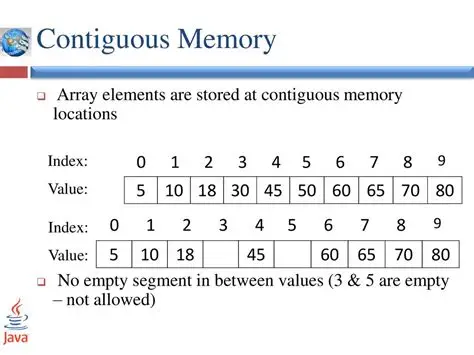
- Arrays store elements in contiguous memory locations
- Faster access compared to dynamic structures
- Predictable memory usage
Performance:
- Direct indexing without function call overhead
- Cache-friendly memory access patterns
- Essential for embedded systems and real-time applications
2. Array Declaration and Initialization
2.1 Basic Array Declaration
Python vs C Comparison:
| Python | C |
|---|---|
numbers = [1, 2, 3, 4, 5] |
int numbers[5] = {1, 2, 3, 4, 5}; |
grades = [] |
float grades[100]; |
name = "Alice" |
char name[10] = "Alice"; |
C Array Declaration Syntax:
data_type array_name[size];
data_type array_name[size] = {value1, value2, ...};
2.2 Different Initialization Methods
2.2.1 Complete Initialization
int numbers[5] = {10, 20, 30, 40, 50};
char vowels[5] = {'a', 'e', 'i', 'o', 'u'};
float prices[3] = {12.5, 25.0, 8.75};
2.2.2 Partial Initialization
int scores[10] = {95, 87, 92};  // First 3 elements initialized
                                 // Remaining 7 elements = 0
char grades[5] = {'A', 'B'};     // grades[0]='A', grades[1]='B'
                                 // grades[2]=grades[3]=grades[4]='\0'
2.2.3 Size Inference
int data[] = {1, 2, 3, 4, 5};    // Size automatically becomes 5
char message[] = "Hello World";   // Size becomes 12 (including '\0')
2.2.4 Zero Initialization
int zeros[100] = {0};            // All elements initialized to 0
char buffer[50] = "";            // All characters initialized to '\0'
2.2.5 Uninitialized Arrays (Dangerous!)
int uninitialized[10];           // Contains garbage values!
// Always initialize arrays before use
2.3 Array Size and Memory
Understanding Array Size:
int numbers[5];                  // 5 integers × 4 bytes = 20 bytes
char name[20];                   // 20 characters × 1 byte = 20 bytes
double values[10];               // 10 doubles × 8 bytes = 80 bytes

// Getting array size at compile time
int size = sizeof(numbers) / sizeof(numbers[0]);  // Result: 5
Python vs C Size Operations:
| Python | C |
|---|---|
len(list) |
sizeof(array) / sizeof(array[0]) |
list.append(item) |
Not possible with static arrays |
list.pop() |
Not possible with static arrays |
3. Array Indexing and Access
3.1 Basic Indexing
Python vs C Indexing:
| Operation | Python | C |
|---|---|---|
| First element | list[0] |
array[0] |
| Last element | list[-1] |
array[size-1] |
| Nth element | list[n] |
array[n] |
| Modify element | list[0] = 10 |
array[0] = 10; |
3.1.1 Valid Indexing Example
int numbers[5] = {10, 20, 30, 40, 50};

printf("First element: %d\n", numbers[0]);    // Output: 10
printf("Third element: %d\n", numbers[2]);    // Output: 30
printf("Last element: %d\n", numbers[4]);     // Output: 50

// Modifying elements
numbers[1] = 99;
printf("Modified second element: %d\n", numbers[1]);  // Output: 99
3.1.2 Index Bounds and Common Errors
Critical Difference from Python:
# Python - Safe bounds checking
my_list = [1, 2, 3, 4, 5]
print(my_list[10])  # Raises IndexError: list index out of range
// C - NO automatic bounds checking!
int my_array[5] = {1, 2, 3, 4, 5};
printf("%d\n", my_array[10]);  // Undefined behavior! May print garbage
my_array[10] = 999;           // Buffer overflow! May crash program
- Off-by-One Error:
int arr[5] = {1, 2, 3, 4, 5};
// WRONG: Accessing index 5 (valid indices: 0-4)
for (int i = 0; i <= 5; i++) {    // ERROR: i goes up to 5
    printf("%d ", arr[i]);
}

// CORRECT:
for (int i = 0; i < 5; i++) {     // i goes from 0 to 4
    printf("%d ", arr[i]);
}
- Negative Index Error:
int arr[5] = {1, 2, 3, 4, 5};
int index = -1;
printf("%d\n", arr[index]);  // Undefined behavior! C has no negative indexing
- Uninitialized Index:
int arr[10];
int i;                      // Uninitialized variable
printf("%d\n", arr[i]);     // Using uninitialized i as index - dangerous!
3.2 Safe Array Access Patterns
3.2.1 Bounds Checking Function
#include <stdio.h>
#include <stdbool.h>

bool is_valid_index(int index, int array_size) {
    return (index >= 0 && index < array_size);
}

int safe_access(int arr[], int size, int index) {
    if (is_valid_index(index, size)) {
        return arr[index];
    } else {
        printf("Error: Index %d out of bounds (0-%d)\n", index, size-1);
        return -1;  // Return error value
    }
}

int main() {
    int numbers[5] = {10, 20, 30, 40, 50};

    printf("Safe access: %d\n", safe_access(numbers, 5, 2));   // Valid
    printf("Safe access: %d\n", safe_access(numbers, 5, 10));  // Invalid

    return 0;
}
4. Array Input and Output Operations
4.1 Reading Array Elements
4.1.1 Reading with Known Size
#include <stdio.h>

int main() {
    int numbers[5];

    printf("Enter 5 integers:\n");
    for (int i = 0; i < 5; i++) {
        printf("Element %d: ", i + 1);
        scanf("%d", &numbers[i]);
    }

    printf("You entered: ");
    for (int i = 0; i < 5; i++) {
        printf("%d ", numbers[i]);
    }
    printf("\n");

    return 0;
}
4.1.2 Reading with User-Specified Size
#include <stdio.h>
#define MAX_SIZE 100

int main() {
    int arr[MAX_SIZE];
    int n;

    printf("How many numbers do you want to enter (max %d): ", MAX_SIZE);
    scanf("%d", &n);

    // Input validation
    if (n <= 0 || n > MAX_SIZE) {
        printf("Invalid size! Please enter between 1 and %d\n", MAX_SIZE);
        return 1;
    }

    printf("Enter %d numbers:\n", n);
    for (int i = 0; i < n; i++) {
        printf("Number %d: ", i + 1);
        scanf("%d", &arr[i]);
    }

    printf("Your numbers: ");
    for (int i = 0; i < n; i++) {
        printf("%d ", arr[i]);
    }
    printf("\n");

    return 0;
}
4.2 Displaying Array Elements
4.2.1 Basic Display
void print_array(int arr[], int size) {
    printf("Array contents: ");
    for (int i = 0; i < size; i++) {
        printf("%d ", arr[i]);
    }
    printf("\n");
}
4.2.2 Formatted Display
void print_array_formatted(int arr[], int size) {
    printf("┌");
    for (int i = 0; i < size; i++) {
        printf("────┬");
    }
    printf("\b┐\n");  // Backspace to replace last ┬ with ┐

    printf("│");
    for (int i = 0; i < size; i++) {
        printf("%3d │", arr[i]);
    }
    printf("\n");

    printf("└");
    for (int i = 0; i < size; i++) {
        printf("────┴");
    }
    printf("\b┘\n");

    printf(" ");
    for (int i = 0; i < size; i++) {
        printf("%3d  ", i);
    }
    printf("\n");
}
5. Common Array Operations
5.1 Array Traversal
5.1.1 Forward Traversal
// Python equivalent: for item in list:
for (int i = 0; i < size; i++) {
    printf("%d ", arr[i]);
}
5.1.2 Reverse Traversal
// Python equivalent: for item in reversed(list):
for (int i = size - 1; i >= 0; i--) {
    printf("%d ", arr[i]);
}
5.1.3 Traversal with Condition
// Print only even numbers
for (int i = 0; i < size; i++) {
    if (arr[i] % 2 == 0) {
        printf("%d ", arr[i]);
    }
}
5.2 Finding Maximum and Minimum
Python vs C Comparison:
| Python | C |
|---|---|
max(list) |
Manual implementation |
min(list) |
Manual implementation |
5.2.1 Finding Maximum
int find_max(int arr[], int size) {
    if (size <= 0) {
        printf("Error: Empty array\n");
        return INT_MIN;  // Return minimum integer value
    }

    int max = arr[0];  // Assume first element is maximum

    for (int i = 1; i < size; i++) {
        if (arr[i] > max) {
            max = arr[i];
        }
    }

    return max;
}
5.2.2 Finding Minimum
int find_min(int arr[], int size) {
    if (size <= 0) {
        printf("Error: Empty array\n");
        return INT_MAX;  // Return maximum integer value
    }

    int min = arr[0];

    for (int i = 1; i < size; i++) {
        if (arr[i] < min) {
            min = arr[i];
        }
    }

    return min;
}
5.2.3 Finding Both Max and Min with Position
#include <stdio.h>

typedef struct {
    int max_value;
    int max_index;
    int min_value;
    int min_index;
} MinMaxResult;

MinMaxResult find_min_max(int arr[], int size) {
    MinMaxResult result = {arr[0], 0, arr[0], 0};

    for (int i = 1; i < size; i++) {
        if (arr[i] > result.max_value) {
            result.max_value = arr[i];
            result.max_index = i;
        }
        if (arr[i] < result.min_value) {
            result.min_value = arr[i];
            result.min_index = i;
        }
    }

    return result;
}
5.3 Searching in Arrays
5.3.1 Linear Search
int linear_search(int arr[], int size, int target) {
    for (int i = 0; i < size; i++) {
        if (arr[i] == target) {
            return i;  // Return index of found element
        }
    }
    return -1;  // Element not found
}

// Usage example
int main() {
    int numbers[] = {10, 25, 8, 42, 15};
    int size = sizeof(numbers) / sizeof(numbers[0]);
    int target = 42;

    int index = linear_search(numbers, size, target);

    if (index != -1) {
        printf("Element %d found at index %d\n", target, index);
    } else {
        printf("Element %d not found\n", target);
    }

    return 0;
}
5.3.2 Count Occurrences
int count_occurrences(int arr[], int size, int target) {
    int count = 0;

    for (int i = 0; i < size; i++) {
        if (arr[i] == target) {
            count++;
        }
    }

    return count;
}
5.3.3 Find All Occurrences
#include <stdio.h>
#define MAX_INDICES 100

int find_all_occurrences(int arr[], int size, int target, int indices[]) {
    int count = 0;

    for (int i = 0; i < size && count < MAX_INDICES; i++) {
        if (arr[i] == target) {
            indices[count] = i;
            count++;
        }
    }

    return count;  // Number of occurrences found
}

// Usage example
int main() {
    int numbers[] = {1, 3, 7, 3, 9, 3, 2};
    int size = sizeof(numbers) / sizeof(numbers[0]);
    int target = 3;
    int indices[MAX_INDICES];

    int count = find_all_occurrences(numbers, size, target, indices);

    printf("Element %d found %d times at indices: ", target, count);
    for (int i = 0; i < count; i++) {
        printf("%d ", indices[i]);
    }
    printf("\n");

    return 0;
}
5.4 Array Modification Operations
5.4.1 Filling Arrays
void fill_array(int arr[], int size, int value) {
    for (int i = 0; i < size; i++) {
        arr[i] = value;
    }
}

// Fill with sequential numbers
void fill_sequence(int arr[], int size, int start) {
    for (int i = 0; i < size; i++) {
        arr[i] = start + i;
    }
}
5.4.2 Copying Arrays
void copy_array(int source[], int destination[], int size) {
    for (int i = 0; i < size; i++) {
        destination[i] = source[i];
    }
}

// Usage
int main() {
    int original[] = {1, 2, 3, 4, 5};
    int copy[5];

    copy_array(original, copy, 5);

    return 0;
}
5.4.3 Reversing Arrays
void reverse_array(int arr[], int size) {
    for (int i = 0; i < size / 2; i++) {
        // Swap elements
        int temp = arr[i];
        arr[i] = arr[size - 1 - i];
        arr[size - 1 - i] = temp;
    }
}
6. Mathematical Operations on Arrays
6.1 Statistical Operations
6.1.1 Sum and Average
#include <stdio.h>

int sum_array(int arr[], int size) {
    int sum = 0;
    for (int i = 0; i < size; i++) {
        sum += arr[i];
    }
    return sum;
}

double average_array(int arr[], int size) {
    if (size == 0) return 0.0;
    return (double)sum_array(arr, size) / size;
}

// Usage
int main() {
    int scores[] = {85, 92, 78, 96, 88};
    int size = 5;

    int total = sum_array(scores, size);
    double avg = average_array(scores, size);

    printf("Total: %d\n", total);
    printf("Average: %.2f\n", avg);

    return 0;
}
6.1.2 Standard Deviation
#include <math.h>

double standard_deviation(int arr[], int size) {
    if (size <= 1) return 0.0;

    double mean = average_array(arr, size);
    double sum_squared_diff = 0.0;

    for (int i = 0; i < size; i++) {
        double diff = arr[i] - mean;
        sum_squared_diff += diff * diff;
    }

    return sqrt(sum_squared_diff / (size - 1));
}
6.2 Array Comparison
6.2.1 Check if Arrays are Equal
#include <stdbool.h>

bool arrays_equal(int arr1[], int arr2[], int size) {
    for (int i = 0; i < size; i++) {
        if (arr1[i] != arr2[i]) {
            return false;
        }
    }
    return true;
}
6.2.2 Element-wise Operations
void add_arrays(int arr1[], int arr2[], int result[], int size) {
    for (int i = 0; i < size; i++) {
        result[i] = arr1[i] + arr2[i];
    }
}

void multiply_array_scalar(int arr[], int size, int scalar) {
    for (int i = 0; i < size; i++) {
        arr[i] *= scalar;
    }
}
7. Character Arrays and Strings
7.1 Character Arrays vs Strings
Understanding C Strings:
In C, strings are arrays of characters terminated by a null character ('\0').
// Character array (not necessarily a string)
char letters[5] = {'H', 'e', 'l', 'l', 'o'};

// String (null-terminated character array)
char greeting[6] = {'H', 'e', 'l', 'l', 'o', '\0'};

// Easier string initialization
char message[] = "Hello";  // Automatically adds '\0'
char name[20] = "Alice";   // name[0]='A', name[1]='l', ..., name[5]='\0'
7.2 String Input/Output
7.2.1 String Input Methods
#include <stdio.h>

int main() {
    char name[50];

    // Method 1: scanf (stops at whitespace)
    printf("Enter your first name: ");
    scanf("%s", name);  // No & needed for arrays

    // Method 2: fgets (reads entire line)
    printf("Enter your full name: ");
    fgets(name, sizeof(name), stdin);

    // Method 3: scanf with character set
    printf("Enter your name: ");
    scanf("%[^\n]", name);  // Read until newline

    printf("Hello, %s!\n", name);
    return 0;
}
7.2.2 String Output
char message[] = "Programming in C";

// Method 1: printf with %s
printf("Message: %s\n", message);

// Method 2: puts (automatically adds newline)
puts(message);

// Method 3: Character by character
for (int i = 0; message[i] != '\0'; i++) {
    printf("%c", message[i]);
}
printf("\n");
7.3 String Manipulation Functions
7.3.1 String Length
#include <string.h>

// Using library function
int len = strlen(str);

// Manual implementation
int string_length(char str[]) {
    int length = 0;
    while (str[length] != '\0') {
        length++;
    }
    return length;
}
7.3.2 String Copy
#include <string.h>

// Using library function
strcpy(destination, source);

// Manual implementation
void string_copy(char dest[], char src[]) {
    int i = 0;
    while (src[i] != '\0') {
        dest[i] = src[i];
        i++;
    }
    dest[i] = '\0';  // Don't forget null terminator!
}
7.3.3 String Concatenation
#include <string.h>

// Using library function
strcat(destination, source);

// Manual implementation
void string_concatenate(char dest[], char src[]) {
    int dest_len = string_length(dest);
    int i = 0;

    while (src[i] != '\0') {
        dest[dest_len + i] = src[i];
        i++;
    }
    dest[dest_len + i] = '\0';
}
7.3.4 String Comparison
#include <string.h>

// Using library function
int result = strcmp(str1, str2);
// Returns: 0 if equal, <0 if str1 < str2, >0 if str1 > str2

// Manual implementation
int string_compare(char str1[], char str2[]) {
    int i = 0;
    while (str1[i] != '\0' && str2[i] != '\0') {
        if (str1[i] < str2[i]) return -1;
        if (str1[i] > str2[i]) return 1;
        i++;
    }

    if (str1[i] == '\0' && str2[i] == '\0') return 0;
    return (str1[i] == '\0') ? -1 : 1;
}
7.4 Common String Operations
7.4.1 Count Characters/Words
int count_character(char str[], char ch) {
    int count = 0;
    for (int i = 0; str[i] != '\0'; i++) {
        if (str[i] == ch) {
            count++;
        }
    }
    return count;
}

int count_words(char str[]) {
    int words = 0;
    bool in_word = false;

    for (int i = 0; str[i] != '\0'; i++) {
        if (str[i] != ' ' && str[i] != '\t' && str[i] != '\n') {
            if (!in_word) {
                words++;
                in_word = true;
            }
        } else {
            in_word = false;
        }
    }

    return words;
}
7.4.2 String Reversal
void reverse_string(char str[]) {
    int len = string_length(str);

    for (int i = 0; i < len / 2; i++) {
        char temp = str[i];
        str[i] = str[len - 1 - i];
        str[len - 1 - i] = temp;
    }
}
7.4.3 Case Conversion
#include <ctype.h>

void to_uppercase(char str[]) {
    for (int i = 0; str[i] != '\0'; i++) {
        str[i] = toupper(str[i]);
    }
}

void to_lowercase(char str[]) {
    for (int i = 0; str[i] != '\0'; i++) {
        str[i] = tolower(str[i]);
    }
}

// Manual implementation for uppercase
void manual_to_uppercase(char str[]) {
    for (int i = 0; str[i] != '\0'; i++) {
        if (str[i] >= 'a' && str[i] <= 'z') {
            str[i] = str[i] - 'a' + 'A';
        }
    }
}
8. Multi-dimensional Arrays
8.1 Two-Dimensional Arrays
8.1.1 Declaration and Initialization
// Declaration
int matrix[3][4];  // 3 rows, 4 columns

// Initialization methods
int grid[2][3] = {
    {1, 2, 3},
    {4, 5, 6}
};

// Alternative initialization
int numbers[2][3] = {{1, 2, 3}, {4, 5, 6}};

// Partial initialization
int scores[3][2] = {
    {95, 87},
    {92, 78},
    {88}      // Last element becomes 0
};
8.1.2 Accessing 2D Array Elements
int matrix[3][4] = {
    {1,  2,  3,  4},
    {5,  6,  7,  8},
    {9, 10, 11, 12}
};

// Accessing elements
printf("Element at row 1, column 2: %d\n", matrix[1][2]);  // Output: 7

// Modifying elements
matrix[0][0] = 100;
matrix[2][3] = 999;
8.1.3 Input/Output for 2D Arrays
#include <stdio.h>

void input_matrix(int matrix[][4], int rows) {
    printf("Enter matrix elements:\n");
    for (int i = 0; i < rows; i++) {
        for (int j = 0; j < 4; j++) {
            printf("Element [%d][%d]: ", i, j);
            scanf("%d", &matrix[i][j]);
        }
    }
}

void print_matrix (int matrix[][4], int rows) {
    printf("Matrix:\n");
    for (int i = 0; i < rows; i++) {
        for (int j = 0; j < 4; j++) {
            printf("%d ", matrix[i][j]);
        }
        printf("\n");
    }
}