Algorithm Programming - EE
This course introduces the fundamental concepts of algorithms and programming using the C language. Students will learn how to analyze problems, design step-by-step solutions, and implement them in C. The course covers essential programming topics such as variables, data types, operators, control structures (selection and iteration), functions, arrays, pointers, and file handling.
Through lectures, hands-on coding exercises, and projects, students will develop problem-solving skills and a solid foundation in structured programming. By the end of the course, students are expected to be able to write efficient C programs, apply algorithmic thinking to solve computational problems, and understand the importance of programming discipline as a basis for more highly related engineering courses.
- Module 1 : Introduction to C
- 1. Introduction: From Python to C
- 2. Input/Output Operations
- 3. Variables and Data Types
- 4. Arithmetic Operators
- 5. Flow Control
- 6. More Migration Guide: From Python to C
- 7. Best Basic Practices and Style Guidelines
- 8. Practical Examples
- 9. Common Debugging Tips
- Module 2 : Functions in C
- 1. Introduction to Functions
- 2. Function Declaration, Definition, and Calling
- 3. Parameters and Arguments
- 4. Return Statement
- 5. Variable Scope and Lifetime
- 6. Bonus: Some C Library Functions
- 7. Recursion
- 8. Function Examples and Applications
- 9. Common Errors and Debugging
- Module 3 : Array (Static)
- 1. Introduction: From Python Lists to C Arrays
- 2. Array Declaration and Initialization
- 3. Array Indexing and Access
- 4. Array Input and Output Operations
- 5. Common Array Operations
- 6. Mathematical Operations on Arrays
- 7. Character Arrays and Strings
- 8. Multi-dimensional Arrays
- Module 4 : Pointers & Dynamic Array
- 1. Introduction to Pointers
- 2. Pointer Basics
- 3. Pointer Arithmetics
- 4. Pointers and Arrays
- 5. Pointers and Functions
- 6. Pointers and Strings
- 7. Dynamic Memory Allocation & Array
- 8. Common Pointer Pitfalls and Best Practices
- 9. Practical Examples with Dynamic Memory
- Module 5 : Data Types (Struct, Enum, TypeDef) & File I/O
- 1. Introduction to User-Defined Data Types
- 2. Structures (struct)
- 3. Enumerations (enum)
- 4. Type Definitions (typedef)
- 5. File Input/Output
- Module 6 : Linked List
- 1. Introduction to Linked Lists
- 2. Node Structure
- 3. Singly Linked List Operations
- 4. Complete Singly Linked List Example
- 5. Doubly Linked List
- 6. Circular Linked List
- 7. Advanced Linked List Operations
- 8. Practical Applications
- 9. Common Errors and Debugging
- Module 7: Searching & Sorting
- 1. Introduction to Searching
- 2. Linear Search
- 3. Binary Search
- 4. Introduction to Sorting
- 5. Simple Sorting Algorithms
- 6. Efficient Sorting Algorithms
- 7. Comparison of Sorting Algorithms
- 8. Practical Applications
- Module 8 : OOP (SOLID, Encapsulation, Abstraction)
- 1. Introduction: From Procedural to Object-Oriented Programming
- 2. C++ Basics: Essential Differences from C
- 3. Classes and Objects
- 4. Encapsulation
- 5. Abstraction
- 6. SOLID Principles
- 7. Constructors and Destructors
- Modul 9: OOP - Inheritance
- 1. Basic Concepts of Inheritance
- 2. Types of Inheritance and Method Overriding
- 3. Practical Applications and Best Practices
- Module 10 : OOP - Polymorphism
Module 1 : Introduction to C
Learning Objectives
- Understand the fundamental differences between Python and C programming languages
- Implement basic input/output operations in C
- Declare and use variables with appropriate data types
- Apply arithmetic operators in C expressions
- Design and implement flow control structures (conditionals and loops)
- Transition effectively from Python syntax to C syntax
1. Introduction: From Python to C
1.1 Key Differences Overview
| Aspect | Python | C |
|---|---|---|
| Compilation | Interpreted | Compiled |
| Type System | Dynamic typing | Static typing |
| Memory Management | Automatic | Manual |
| Syntax Style | Indentation-based | Brace-based |
| Performance | Slower execution | Faster execution |
| Development Speed | Faster to write | More verbose |
Some of you might ask, What does it mean by Static Typing vs Dynamic Typing ?
Dynamic Typing ( Python ):
- Variables can change their data type during program execution
- Type checking happens at runtime
- No need to declare variable types explicitly
- More flexible but can lead to runtime errors
# Python - Dynamic Typing
x = 5        # x is an integer
x = "Hello"  # Now x is a string (allowed!)
x = 3.14     # Now x is a float (also allowed!)
Static Typing ( C ):
- Variables must be declared with a specific data type
- Type checking happens at compile time
- Once declared, a variable cannot change its type
- Less flexible but catches type errors before program runs
// C - Static Typing
int x = 5;           // x is declared as integer
x = "Hello";         // ERROR! Cannot assign string to integer variable
float y = 3.14f;     // y must be declared as float to store decimal numbers
Advantages of Static Typing ( C ):
- Errors caught during compilation, not during execution
- Better performance (no runtime type checking needed)
- More predictable memory usage
- Clearer code documentation (types are explicit)
Advantages of Dynamic Typing ( Python ):
- Faster prototyping and development
- More flexible for rapid changes
- Less verbose code
- Easier for beginners to learn
1.2 Basic Program Structure
Python:
# Simple Python program
print("Hello, World!")
C:
#include <stdio.h>

int main() {
    printf("Hello, World!\n");
    return 0;
}
Key Points:
- C requires explicit inclusion of header files (such as
#include <stdio.h>) - Every C program must have a
main()function - C statements end with semicolons (
;) - C uses curly braces
{}to define code blocks - Functions must explicitly return a value except for void function (we will learn more about this on the next module)
2. Input/Output Operations
2.1 Output Operations
2.1.1 Basic Output - printf()
Function Signature:
int printf(const char *format, ...);
Python vs C Comparison:
| Python | C |
|---|---|
print("Hello") |
printf("Hello\n"); |
print("Value:", x) |
printf("Value: %d\n", x); |
print(f"x = {x}") |
printf("x = %d\n", x); |
Keep in mind that print() in python automatically creates a new line by default
2.1.2 Format Specifiers
| Data Type | Format Specifier | Example |
|---|---|---|
| int | %d or %i |
printf("%d", 42); |
| float | %f |
printf("%.2f", 3.14); |
| double | %lf |
printf("%.2lf", 3.14159); |
| char | %c |
printf("%c", 'A'); |
| string | %s |
printf("%s", "Hello"); |
| hexadecimal | %x or %X |
printf("%x", 255); |
| unsigned int | %u |
printf("%u", 42u); |
2.1.3 Advanced printf() Features
Width and Precision:
printf("%5d", 42);        // Right-aligned in 5 characters: "   42"
printf("%-5d", 42);       // Left-aligned in 5 characters: "42   "
printf("%05d", 42);       // Zero-padded: "00042"
printf("%.2f", 3.14159);  // 2 decimal places: "3.14"
printf("%8.2f", 3.14159); // 8 characters, 2 decimals: "    3.14"
2.1.4 Escape Characters
Escape characters are special character sequences that represent characters that are difficult or impossible to type directly. They start with a backslash (\).
Common Escape Characters:
| Escape Sequence | Character | Description | Example |
|---|---|---|---|
\n |
Newline | Moves cursor to next line | printf("Line 1\nLine 2"); |
\t |
Tab | Horizontal tab (8 spaces) | printf("Name:\tJohn"); |
\" |
Double Quote | Literal double quote | printf("He said \"Hello\""); |
\' |
Single Quote | Literal single quote | printf("It\'s working"); |
\\ |
Backslash | Literal backslash | printf("Path: C:\\Program Files"); |
\r |
Carriage Return | Return to beginning of line | printf("Loading\rDone"); |
\b |
Backspace | Move cursor back one position | printf("ABC\bD"); → "ABD" |
\0 |
Null Character | String terminator | char str[] = "Hi\0lo"; |
\a |
Alert (Bell) | System beep/alert sound | printf("\aError!"); |
\f |
Form Feed | Page break | printf("Page 1\fPage 2"); |
\v |
Vertical Tab | Vertical tab | printf("Line 1\vLine 2"); |
Python vs C Escape Characters:
| Purpose | Python | C |
|---|---|---|
| New line | print("Line 1\nLine 2") |
printf("Line 1\nLine 2"); |
| Tab spacing | print("Name:\tAge") |
printf("Name:\tAge"); |
| Quote in string | print("She said \"Hi\"") |
printf("She said \"Hi\""); |
| Backslash | print("C:\\folder") |
printf("C:\\\\folder"); |
Practical Examples:
// Creating formatted output with escape characters
printf("Student Information:\n");
printf("Name:\t\tJohn Doe\n");
printf("Age:\t\t20\n");
printf("GPA:\t\t3.75\n");

// Output:
// Student Information:
// Name:		John Doe
// Age:		20
// GPA:		3.75
// Using quotes within strings
printf("The teacher said, \"Programming is fun!\"\n");
// Output: The teacher said, "Programming is fun!"

// File paths (especially important for Windows)
printf("Save file to: C:\\Documents\\Programs\\myfile.txt\n");
// Output: Save file to: C:\Documents\Programs\myfile.txt
Important Notes:
- In C strings,
\0(null character) automatically terminates the string - When counting string length,
\n,\t, etc. each count as ONE character - Escape characters work in both printf() format strings and character/string literals
2.2 Input Operations
2.2.1 Basic Input - scanf()
Function Signature:
int scanf(const char *format, ...);
Python vs C Comparison:
| Python | C |
|---|---|
x = int(input()) |
scanf("%d", &x); |
name = input() |
scanf("%s", name); |
x = float(input()) |
scanf("%f", &x); |
2.2.2 Important scanf() Considerations
Address Operator (&):
- Most variables need
&before the variable name - Exception: strings (character arrays) don't need
&
int age;
char name[50];
float height;

scanf("%d", &age);     // & required for int
scanf("%s", name);     // & NOT needed for string
scanf("%f", &height);  // & required for float
Input Buffer Issues and Whitespace Handling:
The Whitespace Problem:
When you press Enter after typing input, scanf() reads the data but leaves the newline character (\n) in the input buffer. This can cause problems with subsequent input operations.
// Problematic code:
int num;
char ch;

printf("Enter a number: ");
scanf("%d", &num);              // User types "5" and presses Enter
                                // Buffer now contains: \n (leftover newline)
printf("Enter a character: ");
scanf("%c", &ch);               // This reads the leftover \n, not user input!
printf("Character: %c\n", ch);
// Outputs:
// Character: (it shows nothing because it prints a newline)
What happens step by step:
- User types "5" and presses Enter → Input buffer:
5\n scanf("%d", &num)reads "5" → Buffer remaining:\nscanf("%c", &ch)immediately reads the leftover\n- Program doesn't wait for new character input
Solutions:
Solution 1: Space before %c
int num;
char ch;

printf("Enter a number: ");
scanf("%d", &num);
printf("Enter a character: ");
scanf(" %c", &ch);  // Space before %c consumes all whitespace (spaces, tabs, newlines)
Solution 2: Explicit buffer clearing
int num;
char ch;

printf("Enter a number: ");
scanf("%d", &num);

// Clear the input buffer
while (getchar() != '\n');  // Read and discard until newline

printf("Enter a character: ");
scanf("%c", &ch);
Solution 3: Using getchar() to consume newline
int num;
char ch;

printf("Enter a number: ");
scanf("%d", &num);
getchar();  // Consume the leftover newline

printf("Enter a character: ");
scanf("%c", &ch);
Whitespace Characters in C:
\n(newline) - ASCII 10\t(tab) - ASCII 9\r(carriage return) - ASCII 13\f(form feed) - ASCII 12\v(vertical tab) - ASCII 11
Important scanf() Whitespace Rules:
%d,%f,%sautomatically skip leading whitespace%cdoes NOT skip whitespace (reads exactly one character)- Adding a space in format string (
%c) makes scanf() skip whitespace %[^\n]does not skip leading whitespace but stops at newline
Advanced scanf() Format Specifiers:
1. Character Set Specifiers [...]:
char name[50];

// Read only alphabetic characters
scanf("%[a-zA-Z]", name);

// Read everything except newline
scanf("%[^\n]", name);  // Reads entire line including spaces

// Read only digits
scanf("%[0-9]", name);

// Read only vowels
scanf("%[aeiouAEIOU]", name);
2. Excluding Character Sets [^...]:
char input[100];

// Read everything EXCEPT newline (gets full line with spaces)
scanf("%[^\n]", input);

// Read everything EXCEPT spaces and tabs
scanf("%[^ \t]", input);

// Read everything EXCEPT digits
scanf("%[^0-9]", input);

// Read until comma is encountered
scanf("%[^,]", input);
3. Width Specifiers:
char buffer[10];

// Read maximum 9 characters (leaving room for \0)
scanf("%9s", buffer);

// Read exactly 5 characters
scanf("%5c", buffer);
4. Practical Examples:
// Example 1: Reading full name (including spaces)
char full_name[100];
printf("Enter your full name: ");
scanf(" %[^\n]", full_name);  // Space before % consumes previous newline

// Example 2: Reading until specific delimiter
char email[50];
printf("Enter email: ");
scanf("%[^@]", email);  // Read until @ symbol

// Example 3: Input validation
char grade[10];
printf("Enter grade (A, B, C, D, F): ");
scanf("%[ABCDFabcdf]", grade);  // Only accept valid grades
5. Combining Multiple Inputs:
int day, month, year;
char separator;

// Reading date in format: dd/mm/yyyy or dd-mm-yyyy
printf("Enter date (dd/mm/yyyy or dd-mm-yyyy): ");
scanf("%d%c%d%c%d", &day, &separator, &month, &separator, &year);

// Alternative: reading with specific separators
printf("Enter date (dd/mm/yyyy): ");
scanf("%d/%d/%d", &day, &month, &year);
2.2.3 Alternative Input Methods
getchar() and putchar():
char ch;
ch = getchar();  // Read single character
putchar(ch);     // Output single character
fgets() for Safe String Input:
char name[50];
printf("Enter your name: ");
fgets(name, sizeof(name), stdin);
3. Variables and Data Types
3.1 Variable Declaration
Python vs C:
| Python | C |
|---|---|
x = 5 |
int x = 5; |
name = "John" |
char name[] = "John"; |
pi = 3.14 |
float pi = 3.14f; |
3.2 Basic Data Types
3.2.1 Integer Types
| Type | Size (bytes) | Range | Usage |
|---|---|---|---|
char |
1 | -128 to 127 | Small integers, characters |
short |
2 | -32,768 to 32,767 | Small integers |
int |
4 | -2,147,483,648 to 2,147,483,647 | Standard integers |
long |
4/8 | System dependent | Large integers |
long long |
8 | Very large range | Very large integers |
Unsigned Variants:
unsigned char uc;    // 0 to 255
unsigned int ui;     // 0 to 4,294,967,295
unsigned short us;   // 0 to 65,535
3.2.2 Floating-Point Types
| Type | Size | Precision | Range |
|---|---|---|---|
float |
4 bytes | ~7 digits | ±3.4 × 10^±38 |
double |
8 bytes | ~15 digits | ±1.7 × 10^±308 |
long double |
12/16 bytes | Extended precision | System dependent |
3.2.3 Character and String Types
Single Characters:
char letter = 'A';        // Single character
char digit = '5';         // Character representation of digit
char newline = '\n';      // Escape sequence
Strings (Character Arrays):
char name[20] = "John";           // Fixed-size array
char message[] = "Hello World";   // Size determined by initializer
char buffer[100];                 // Uninitialized array
Python vs C String Comparison:
| Python | C |
|---|---|
name = "John" |
char name[] = "John"; |
len(name) |
strlen(name) |
name[0] |
name[0] |
name + " Doe" |
strcat(name, " Doe"); |
3.3 Variable Declaration Rules
- Must declare before use (unlike Python)
- Case-sensitive (
age≠Age) - Cannot start with digits (
2xis invalid) - Cannot use keywords (
int,if,while, etc.) - Should use meaningful names (
student_countnotsc)
3.4 Constants
// Method 1: #define preprocessor directive
#define PI 3.14159
#define MAX_SIZE 100

// Method 2: const keyword
const int ARRAY_SIZE = 50;
const float GRAVITY = 9.81f;
Python vs C Constants:
| Python | C |
|---|---|
PI = 3.14159 |
#define PI 3.14159 |
PI = 3.14159 |
const float PI = 3.14159f; |
4. Arithmetic Operators
4.1 Basic Arithmetic Operators
| Operator | Operation | Python Example | C Example |
|---|---|---|---|
+ |
Addition | a + b |
a + b |
- |
Subtraction | a - b |
a - b |
* |
Multiplication | a * b |
a * b |
/ |
Division | a / b |
a / b |
% |
Modulus | a % b |
a % b |
4.2 Important Division Differences
Integer Division:
# Python 3
print(7 / 3)   # Output: 2.333...
print(7 // 3)  # Output: 2 (floor division)
// C
printf("%f\n", 7.0 / 3.0);  // Output: 2.333333
printf("%d\n", 7 / 3);      // Output: 2 (integer division)
printf("%f\n", (float)7 / 3); // Output: 2.333333 (type casting)
4.3 Assignment Operators
| Operator | Equivalent | Python | C |
|---|---|---|---|
= |
Basic assignment | x = 5 |
x = 5; |
+= |
Add and assign | x += 3 |
x += 3; |
-= |
Subtract and assign | x -= 3 |
x -= 3; |
*= |
Multiply and assign | x *= 3 |
x *= 3; |
/= |
Divide and assign | x /= 3 |
x /= 3; |
%= |
Modulus and assign | x %= 3 |
x %= 3; |
4.4 Increment and Decrement Operators
Pre-increment vs Post-increment:
int x = 5;
int y, z;

y = ++x;  // Pre-increment: x becomes 6, then y = 6
z = x++;  // Post-increment: z = 6, then x becomes 7

// Equivalent operations:
x = x + 1;  // Same as x++ or ++x when used alone
x += 1;     // Same as above
Python vs C:
| Python | C |
|---|---|
x += 1 |
x++ or ++x or x += 1 |
x -= 1 |
x-- or --x or x -= 1 |
4.5 Operator Precedence
| Priority | Operators | Associativity |
|---|---|---|
| 1 (Highest) | ++, -- (postfix) |
Left to right |
| 2 | ++, -- (prefix), +, - (unary) |
Right to left |
| 3 | *, /, % |
Left to right |
| 4 | +, - (binary) |
Left to right |
| 5 (Lowest) | =, +=, -=, etc. |
Right to left |
5. Flow Control
5.1 Conditional Statements
5.1.1 if Statement
Python vs C Syntax:
Python:
if condition:
    statement1
    statement2
elif another_condition:
    statement3
else:
    statement4
C:
if (condition) {
    statement1;
    statement2;
} else if (another_condition) {
    statement3;
} else {
    statement4;
}
Key Differences:
- C requires parentheses around conditions
- C uses curly braces
{}instead of indentation - C requires semicolons after statements
5.1.2 Relational Operators
| Operator | Meaning | Python | C |
|---|---|---|---|
== |
Equal to | a == b |
a == b |
!= |
Not equal to | a != b |
a != b |
< |
Less than | a < b |
a < b |
> |
Greater than | a > b |
a > b |
<= |
Less than or equal | a <= b |
a <= b |
>= |
Greater than or equal | a >= b |
a >= b |
5.1.3 Logical Operators
| Operator | Meaning | Python | C |
|---|---|---|---|
&& |
Logical AND | and or & |
&& |
|| |
Logical OR | or or | |
|| |
! |
Logical NOT | not or ~ |
! |
Examples in C :
// Python: if age >= 18 and score > 80:
if (age >= 18 && score > 80) {
    printf("Eligible for scholarship\n");
}

// Python: if not (x < 0 or x > 100):
if (!(x < 0 || x > 100)) {
    printf("Valid percentage\n");
}
5.1.4 Executing Code in if Conditions
While primarily used for conditions, C allows expressions that evaluate to a non-zero value (true) or zero (false) within the parentheses. This means you can sometimes perform assignments or function calls directly within the condition, though it's often discouraged for readability.
int x = 10;
if (x = 5) { // Assigns 5 to x, then evaluates to 5 (true)
    printf("x is now 5 and this code runs.\n");
}
5.1.5 Single Statement if:
If an if or else block contains only a single statement, the curly braces {} are optional. However, it's good practice to always use them to avoid ambiguity and potential errors when adding more statements later.
if (score > 90)
    printf("Excellent!\n");
else
    printf("Keep trying.\n");
5.1.6 switch Statement
C provides switch as an alternative to multiple if-else statements:
switch (variable) {
    case value1:
        // statements
        break;
    case value2:
        // statements
        break;
    default:
        // statements
        break;
}
Example:
int grade;
printf("Enter grade (1-5): ");
scanf("%d", &grade);

switch (grade) {
    case 5:
        printf("Excellent!\n");
        break;
    case 4:
        printf("Very Good!\n");
        break;
    case 3:
        printf("Good!\n");
        break;
    case 2:
        printf("Fair!\n");
        break;
    case 1:
        printf("Poor!\n");
        break;
    default:
        printf("Invalid grade!\n");
        break;
}
Understanding break and Fall-through:
In C's switch statement, the break keyword is essential. If break is omitted from a case block, execution will "fall through" to the next case block (and subsequent ones) until a break is encountered or the end of the switch statement is reached. This "fall-through" behavior can be intentionally used for specific logic, but it's a common source of bugs if not intended.
Example of Fall-through:
int day = 2; // Monday
switch (day) {
    case 1:
        printf("Weekend!\n");
        break;
    case 2:
    case 3:
    case 4:
    case 5:
        printf("Weekday.\n"); // Execution falls through from case 2, 3, 4 to 5
        break;
    case 6:
        printf("Weekend!\n");
        break;
    default:
        printf("Invalid day.\n");
        break;
}
// Output for day = 2: Weekday.
This example shows how case 2, case 3, case 4, and case 5 all execute the same printf("Weekday.\n"); because there are no break statements between them.
5.2 Iteration Statements (Loops)
5.2.1 for Loop
Python vs C Syntax:
Python:
for i in range(5):
    print(i)

for i in range(1, 10, 2):
    print(i)
C:
// Basic for loop
for (int i = 0; i < 5; i++) {
    printf("%d\n", i);
}

// Step by 2
for (int i = 1; i < 10; i += 2) {
    printf("%d\n", i);
}
For Loop Structure:
for (initialization; condition; increment/decrement) {
    // loop body
}
5.2.2 while Loop
Python vs C:
Python:
i = 0
while i < 5:
    print(i)
    i += 1
C:
int i = 0;
while (i < 5) {
    printf("%d\n", i);
    i++;
}
5.2.3 do-while Loop
C provides do-while loop (not available in Python):
int choice;
do {
    printf("Enter choice (1-3): ");
    scanf("%d", &choice);

    if (choice < 1 || choice > 3) {
        printf("Invalid choice! Try again.\n");
    }
} while (choice < 1 || choice > 3);
Key Difference: do-while executes the loop body at least once, even if the condition is initially false.
5.2.4 Loop Control Statements
| Statement | Python | C | Purpose |
|---|---|---|---|
break |
break |
break; |
Exit loop immediately |
continue |
continue |
continue; |
Skip to next iteration |
Example:
for (int i = 1; i <= 10; i++) {
    if (i % 2 == 0) {
        continue;  // Skip even numbers
    }
    if (i > 7) {
        break;     // Stop when i > 7
    }
    printf("%d ", i);  // Output: 1 3 5 7
}
6. More Migration Guide: From Python to C
6.1 Common Syntax Differences
| Feature | Python | C |
|---|---|---|
| Comments | # This is a comment |
// This is a comment |
| Block Comments | """Multi-line""" |
/* Multi-line */ |
| Code Blocks | Indentation | { } braces |
| Statement End | Line break | ; semicolon |
| Boolean Values | True, False |
1, 0 (or true, false with <stdbool.h>) |
6.2 Variable Declaration Migration
Python to C Translation Examples:
# Python
age = 25
height = 5.9
name = "Alice"
is_student = True
// C
int age = 25;
float height = 5.9f;
char name[] = "Alice";
int is_student = 1;  // or use bool with #include <stdbool.h>
6.3 Function Definition Migration (We will learn more about this on the next module)
Python:
def calculate_area(length, width):
    return length * width

result = calculate_area(5, 3)
print(result)
C:
#include <stdio.h>

// Function declaration (prototype)
int calculate_area(int length, int width);

int main() {
    int result = calculate_area(5, 3);
    printf("%d\n", result);
    return 0;
}

// Function definition
int calculate_area(int length, int width) {
    return length * width;
}
6.4 Common Pitfalls for Python Programmers
-
Forgetting Semicolons:
int x = 5 // ERROR: Missing semicolon int x = 5; // CORRECT -
Using = instead of == in conditions:
if (x = 5) { ... } // ERROR: Assignment, not comparison if (x == 5) { ... } // CORRECT: Comparison -
Forgetting & in scanf():
scanf("%d", x); // ERROR: Missing & scanf("%d", &x); // CORRECT -
Array Index Out of Bounds: (We will learn more about this on the next module)
int arr[5];
arr[5] = 10;  // ERROR: Index 5 is out of bounds (valid: 0-4)
arr[4] = 10;  // CORRECT: Last valid index
7. Best Basic Practices and Style Guidelines
7.1 Naming Conventions
- Variables: Use descriptive names (
student_count, notsc) - Constants: Use uppercase (
MAX_SIZE,PI) - Functions (we will learn more about this in the next module): Use verb-noun pattern (
calculate_area,print_result)
7.2 Code Organization
#include <stdio.h>        // System headers
#include <stdlib.h>

#define MAX_SIZE 100      // Constants

// Function prototypes (We will learn more about this in the next module)
int add(int a, int b);
void print_result(int result);

int main() {
    // Main program logic
    return 0;
}

// Function definitions (We will learn more about this in the next module)
int add(int a, int b) {
    return a + b;
}
7.3 Error Handling
Input Validation:
int num;
printf("Enter a positive number: ");
scanf("%d", &num)

if (num < 0) {
    printf("Invalid input!\n");
}
8. Practical Examples
8.1 Complete Program Examples
Example 1: Simple Calculator
#include <stdio.h>

int main() {
    float num1, num2, result;
    char operator;

    printf("Enter first number: ");
    scanf("%f", &num1);

    printf("Enter operator (+, -, *, /): ");
    scanf(" %c", &operator);

    printf("Enter second number: ");
    scanf("%f", &num2);

    switch (operator) {
        case '+':
            result = num1 + num2;
            break;
        case '-':
            result = num1 - num2;
            break;
        case '*':
            result = num1 * num2;
            break;
        case '/':
            if (num2 != 0) {
                result = num1 / num2;
            } else {
                printf("Error: Division by zero!\n");
                return 1;
            }
            break;
        default:
            printf("Error: Invalid operator!\n");
            return 1;
    }

    printf("%.2f %c %.2f = %.2f\n", num1, operator, num2, result);
    return 0;
}
Example 2: Grade Classification
#include <stdio.h>

int main() {
    int score;

    printf("Enter your score (0-100): ");
    scanf("%d", &score);

    if (score < 0 || score > 100) {
        printf("Invalid score!\n");
    } else if (score >= 90) {
        printf("Grade: A (Excellent)\n");
    } else if (score >= 80) {
        printf("Grade: B (Very Good)\n");
    } else if (score >= 70) {
        printf("Grade: C (Good)\n");
    } else if (score >= 60) {
        printf("Grade: D (Fair)\n");
    } else {
        printf("Grade: F (Fail)\n");
    }

    return 0;
}
8.2 Loop Examples
Example 1: Sum of Numbers
#include <stdio.h>

int main() {
    int n, sum = 0;

    printf("Enter a positive integer: ");
    scanf("%d", &n);

    for (int i = 1; i <= n; i++) {
        sum += i;
    }

    printf("Sum of numbers from 1 to %d is: %d\n", n, sum);
    return 0;
}
Example 2: Multiplication Table
#include <stdio.h>

int main() {
    int num;

    printf("Enter a number: ");
    scanf("%d", &num);

    printf("Multiplication table for %d:\n", num);
    for (int i = 1; i <= 10; i++) {
        printf("%d x %d = %d\n", num, i, num * i);
    }

    return 0;
}
9. Common Debugging Tips
9.1 Compilation Errors
- Missing semicolons: Add
;at the end of statements - Undeclared variables: Declare variables before using them
- Type mismatches: Ensure compatible types in assignments (this mostly happens in function parameters or calling, we will learn more about this on the next module)
- Missing headers: Include necessary header files
9.2 Runtime Errors
- Segmentation faults: Check array bounds and pointer usage.
- this error is the hardest part when it comes to debugging because its highly related to a wrong memory allocation or pointer usage such as accessing an unaccessible variable or array index. We will learn more about this in the next module
- Infinite loops: Verify loop conditions and increment/decrement
- Wrong output: Check format specifiers in printf/scanf
9.3 Debugging Techniques
// Add debug prints to trace program execution
printf("Debug: x = %d, y = %d\n", x, y);

// Check intermediate results
int temp = a + b;
printf("Intermediate result: %d\n", temp);
int result = temp * c;
Module 2 : Functions in C
Learning Objectives:
- Understand the concept and importance of functions in C programming
- Declare and define functions with proper syntax
- Use function parameters and return values effectively
- Apply different parameter passing mechanisms (pass by value)
- Understand variable scope and lifetime concepts
- Implement recursive functions
- Use standard library functions effectively
- Migrate from Python functions to C functions
- Debug common function-related errors
1. Introduction to Functions
1.1 What are Functions?
Functions are self-contained blocks of code that perform specific tasks. They are fundamental building blocks that help organize code, promote reusability, and make programs more modular and maintainable.
Benefits of Functions:
- Code Reusability: Write once, use multiple times
- Modularity: Break complex problems into smaller, manageable pieces
- Maintainability: Easier to debug, test, and modify
- Readability: Makes code more organized and understandable
- Abstraction: Hide implementation details from the caller
1.2 Why Use Functions? (Comparison with and without)
To understand the practical benefits of functions, let's consider a simple task: calculating the area of three different rectangles.
Without Functions:
#include <stdio.h>

int main() {
    // Rectangle 1
    int length1 = 10;
    int width1 = 5;
    int area1 = length1 * width1;
    printf("Area of Rectangle 1: %d\n", area1);

    // Rectangle 2
    int length2 = 12;
    int width2 = 8;
    int area2 = length2 * width2;
    printf("Area of Rectangle 2: %d\n", area2);

    // Rectangle 3
    int length3 = 7;
    int width3 = 3;
    int area3 = length3 * width3;
    printf("Area of Rectangle 3: %d\n", area3);

    return 0;
}
In this example, the logic for calculating the area is repeated three times. If we needed to change how the area is calculated (e.g., add a margin), we would have to modify each instance, which is error-prone and inefficient.
With Functions:
#include <stdio.h>

// Function to calculate rectangle area
int calculate_rectangle_area(int length, int width) {
    return length * width;
}

int main() {
    // Rectangle 1
    int area1 = calculate_rectangle_area(10, 5);
    printf("Area of Rectangle 1: %d\n", area1);

    // Rectangle 2
    int area2 = calculate_rectangle_area(12, 8);
    printf("Area of Rectangle 2: %d\n", area2);

    // Rectangle 3
    int area3 = calculate_rectangle_area(7, 3);
    printf("Area of Rectangle 3: %d\n", area3);

    return 0;
}
By using a function calculate_rectangle_area, we write the area calculation logic only once. This demonstrates:
- Reusability: The
calculate_rectangle_areafunction can be used multiple times with different inputs. - Readability: The
mainfunction becomes cleaner and easier to understand, as the details of area calculation are encapsulated within the function. - Maintainability: If the area calculation logic needs to change, we only need to modify it in one place (inside the function definition), and all calls to that function will automatically use the updated logic.
1.3 Python vs C Functions Comparison
| Aspect | Python | C |
|---|---|---|
| Declaration | Not required | Function prototype usually required (unless defined before use) |
| Definition | def function_name(): |
return_type function_name() { } |
| Return Type | Dynamic (any type) | Must be explicitly declared |
| Parameters | Dynamic typing | Static typing required |
| Call Before Definition | Allowed | Requires prototype |
| Multiple Return Values | return a, b |
Use pointers or structures |
Python Example:
def add_numbers(a, b):
    return a + b

result = add_numbers(5, 3)
print(result)  # Output: 8
C Equivalent:
#include <stdio.h>

// Function declaration (prototype)
int add_numbers(int a, int b);

int main() {
    int result = add_numbers(5, 3);
    printf("%d\n", result);  // Output: 8
    return 0;
}

// Function definition
int add_numbers(int a, int b) {
    return a + b;
}
2. Function Declaration, Definition, and Calling
2.1 Function Anatomy
A C function consists of several parts:
return_type function_name(parameter_list) {
    // Function body
    // Local variables
    // Statements
    return value; // (if return_type is not void)
}
Components:
- Return Type: Data type of the value returned (int, float, char, void, etc.)
- Function Name: Identifier for the function
- Parameter List: Input values (formal parameters)
- Function Body: Statements enclosed in braces
- Return Statement: Returns control and optionally a value
2.2 Function Declaration (Prototype)
Function prototypes declare the function's interface before its actual definition. They are necessary when a function is called before its definition in the source code. This allows the compiler to check for correct usage and enables forward referencing. If a function is defined before it is called, a prototype is not strictly necessary.
Syntax:
return_type function_name(parameter_types);
Examples:
// Function prototypes
int add(int a, int b);                    // Two int parameters, returns int
float calculate_area(float length, float width);  // Two float parameters, returns float
void print_message(void);                 // No parameters, no return value
char get_grade(int score);               // One int parameter, returns char
Important Notes:
- Prototypes end with semicolon (
;) - Parameter names are optional in prototypes (but recommended for clarity)
- Must match exactly with function definition
2.3 Function Definition
The function definition contains the actual implementation:
#include <stdio.h>

// Function prototype
int multiply(int x, int y);

int main() {
    int result = multiply(4, 5);
    printf("Result: %d\n", result);
    return 0;
}

// Function definition
int multiply(int x, int y) {
    int product = x * y;
    return product;
}
2.4 Function Calling
After a function has been declared (prototyped) and defined, it can be executed, or "called," from another part of the program (e.g., from main() or another function). When a function is called, the program's control is transferred to that function.
Syntax for Calling a Function:
function_name(arguments);
function_name: The name of the function to be executed.arguments: The values (actual parameters) passed to the function. These must match the type and order of the parameters in the function's declaration.
Example:
In the main() function of the previous example, multiply(4, 5); is a function call.
int main() {
    int result = multiply(4, 5); // Calling the 'multiply' function
    printf("Result: %d\n", result);
    return 0;
}
Here, 4 and 5 are the arguments passed to the multiply function. The return value of multiply is then stored in the result variable.
2.5 void Functions
Keep in mind : Functions that don't return a value use void as the return type:
#include <stdio.h>

void print_header(void);
void print_line(int length);

int main() {
    print_header();
    print_line(30);
    return 0;
}

void print_header(void) {
    printf("=== STUDENT MANAGEMENT SYSTEM ===\n");
}

void print_line(int length) {
    for (int i = 0; i < length; i++) {
        printf("-");
    }
    printf("\n");
}
3. Parameters and Arguments
3.1 Terminology
- Parameters (Formal Parameters): Variables in the function definition
- Arguments (Actual Parameters): Values passed when calling the function
// 'a' and 'b' are parameters
int add(int a, int b) {
    return a + b;
}

int main() {
    int x = 5, y = 3;
    // 'x' and 'y' are arguments
    int result = add(x, y);
    return 0;
}
3.2 Parameter Passing in C
C uses pass by value as its primary parameter passing mechanism. This means:
- A copy of the argument's value is made
- Changes to parameters inside the function don't affect the original variables
- The original variables remain unchanged
Example:
#include <stdio.h>

void modify_value(int num) {
    num = 100;  // This only changes the local copy
    printf("Inside function: %d\n", num);  // Output: 100
}

int main() {
    int original = 50;
    printf("Before function call: %d\n", original);  // Output: 50

    modify_value(original);

    printf("After function call: %d\n", original);   // Output: 50 (unchanged!)
    return 0;
}
3.3 Python vs C Parameter Passing
Python:
def modify_list(lst):
    lst.append(4)  # Modifies the original list

my_list = [1, 2, 3]
modify_list(my_list)
print(my_list)  # Output: [1, 2, 3, 4]
C (Basic Types):
void modify_number(int num) {
    num = 100;  // Only modifies the copy
}

int main() {
    int number = 50;
    modify_number(number);
    // number is still 50
    return 0;
}
3.4 Multiple Parameters
Functions can have multiple parameters of different types:
#include <stdio.h>

// Function to calculate compound interest
float calculate_compound_interest(float principal, float rate, int time, int n) {
    float amount = principal;
    float rate_per_period = rate / (100.0 * n);
    int total_periods = n * time;

    for (int i = 0; i < total_periods; i++) {
        amount *= (1 + rate_per_period);
    }

    return amount - principal;  // Return only the interest
}

int main() {
    float principal = 1000.0;
    float annual_rate = 5.0;    // 5% per year
    int years = 2;
    int compounding_freq = 4;   // Quarterly

    float interest = calculate_compound_interest(principal, annual_rate, years, compounding_freq);

    printf("Principal: $%.2f\n", principal);
    printf("Interest earned: $%.2f\n", interest);
    printf("Total amount: $%.2f\n", principal + interest);

    return 0;
}
4. Return Statement
4.1 Basic Return Usage
The return statement serves two purposes:
- Return control to the calling function
- Return a value (optional, depending on function type)
// Function that returns a value
int get_maximum(int a, int b) {
    if (a > b) {
        return a;
    } else {
        return b;
    }
}

// Function that returns without a value
void print_status(int score) {
    if (score < 0) {
        printf("Invalid score!\n");
        return;  // Early exit
    }

    if (score >= 60) {
        printf("Passed!\n");
    } else {
        printf("Failed!\n");
    }
    // Implicit return at end of void function
}
4.2 Multiple Return Statements
A function can have multiple return statements, but only one will execute:
char determine_grade(int score) {
    if (score >= 90) {
        return 'A';
    }
    if (score >= 80) {
        return 'B';
    }
    if (score >= 70) {
        return 'C';
    }
    if (score >= 60) {
        return 'D';
    }
    return 'F';  // Default case
}
4.3 Returning Different Data Types
#include <stdio.h>

// Return integer
int get_absolute(int num) {
    if (num < 0) {
        return -num;
    } else {
        return num;
    }
}

// Return float
float celsius_to_fahrenheit(float celsius) {
    return (celsius * 9.0 / 5.0) + 32.0;
}

// Return character
char get_letter_grade(float percentage) {
    if (percentage >= 85.0) return 'A';
    if (percentage >= 75.0) return 'B';
    if (percentage >= 65.0) return 'C';
    if (percentage >= 50.0) return 'D';
    return 'F';
}

int main() {
    printf("Absolute value of -15: %d\n", get_absolute(-15));
    printf("25°C in Fahrenheit: %.1f°F\n", celsius_to_fahrenheit(25.0));
    printf("Grade for 78.5%%: %c\n", get_letter_grade(78.5));
    return 0;
}
5. Variable Scope and Lifetime
5.1 Local Variables
Variables declared inside a function are local to that function:
- Scope: Only accessible within the function where they're declared
- Lifetime: Created when function is called, destroyed when function returns
- Storage: Usually on the stack
#include <stdio.h>

void function_a() {
    int local_var = 10;  // Local to function_a
    printf("In function_a: %d\n", local_var);
}

void function_b() {
    int local_var = 20;  // Different variable, local to function_b
    printf("In function_b: %d\n", local_var);
}

int main() {
    int local_var = 5;   // Local to main
    printf("In main: %d\n", local_var);

    function_a();  // Output: In function_a: 10
    function_b();  // Output: In function_b: 20

    printf("Back in main: %d\n", local_var);  // Still 5
    return 0;
}
5.2 Global Variables
Variables declared outside all functions are global:
- Scope: Accessible from any function in the program
- Lifetime: Exist for the entire program execution
- Storage: In static memory area
#include <stdio.h>

// Global variables
int global_counter = 0;
float global_sum = 0.0;

void increment_counter() {
    global_counter++;  // Can access global variable
    printf("Counter: %d\n", global_counter);
}

void add_to_sum(float value) {
    global_sum += value;  // Can modify global variable
    printf("Sum: %.2f\n", global_sum);
}

int main() {
    increment_counter();  // Counter: 1
    increment_counter();  // Counter: 2

    add_to_sum(10.5);     // Sum: 10.50
    add_to_sum(7.3);      // Sum: 17.80

    printf("Final values - Counter: %d, Sum: %.2f\n", global_counter, global_sum);
    return 0;
}
5.3 Variable Shadowing
When a local variable has the same name as a global variable, the local variable "shadows" the global one:
#include <stdio.h>

int value = 100;  // Global variable

void test_shadowing() {
    int value = 50;  // Local variable shadows the global one
    printf("Local value: %d\n", value);  // Prints 50
}

int main() {
    printf("Global value: %d\n", value);  // Prints 100
    test_shadowing();
    printf("Global value after function: %d\n", value);  // Still 100
    return 0;
}
5.4 Best Practices for Variable Scope
- Minimize global variables: Use them sparingly
- Prefer local variables: Keep data close to where it's used
- Use meaningful names: Avoid naming conflicts
- Initialize variables: Always initialize before use
// Good practice
int calculate_area(int length, int width) {
    int area = length * width;  // Local variable, clearly named
    return area;
}

// Avoid this
int x, y, z;  // Global variables - hard to track
int calc(int a, int b) {
    z = a * b;  // Modifying global state
    return z;
}
6. Bonus: Some C Library Functions
Throughout this module, we've focused on defining our own functions. However, C also provides a rich set of built-in functions, known as Standard Library Functions. These functions are pre-written and grouped into various libraries (e.g., <stdio.h>, <stdlib.h>, <math.h>) to perform common tasks like input/output, memory management, and mathematical operations. When you use functions like printf() or scanf(), you are actually calling functions that have been defined in the standard input/output library (stdio.h). These functions abstract away complex implementations, allowing you to use them easily by simply including their respective header files.
6.1 Mathematical Functions
Include <math.h> header for mathematical functions:
#include <stdio.h>
#include <math.h>

int main() {
    double angle = 45.0;
    double radians = angle * M_PI / 180.0;  // Convert to radians

    printf("Mathematical Functions:\n");
    printf("sqrt(16) = %.2f\n", sqrt(16.0));           // Square root
    printf("pow(2, 3) = %.2f\n", pow(2.0, 3.0));       // 2^3
    printf("sin(45°) = %.4f\n", sin(radians));         // Sine
    printf("cos(45°) = %.4f\n", cos(radians));         // Cosine
    printf("log(10) = %.4f\n", log(10.0));             // Natural log
    printf("log10(100) = %.2f\n", log10(100.0));       // Base-10 log
    printf("ceil(4.3) = %.0f\n", ceil(4.3));           // Ceiling
    printf("floor(4.7) = %.0f\n", floor(4.7));         // Floor
    printf("fabs(-5.5) = %.1f\n", fabs(-5.5));         // Absolute value

    return 0;
}
Note: When compiling programs that use <math.h>, you might need to link the math library:
gcc -o program program.c -lm
6.2 String Functions
Include <string.h> header for string manipulation:
#include <stdio.h>
#include <string.h>

int main() {
    char str1[50] = "Hello";
    char str2[50] = "World";
    char str3[100];

    // String length
    printf("Length of '%s': %lu\n", str1, strlen(str1));

    // String copy
    strcpy(str3, str1);
    printf("After strcpy: str3 = '%s'\n", str3);

    // String concatenation
    strcat(str3, " ");
    strcat(str3, str2);
    printf("After strcat: str3 = '%s'\n", str3);

    // String comparison
    if (strcmp(str1, "Hello") == 0) {
        printf("str1 equals 'Hello'\n");
    }

    return 0;
}
6.3 Character Functions
Include <ctype.h> for character testing and conversion:
#include <stdio.h>
#include <ctype.h>

int main() {
    char ch = 'A';

    printf("Character testing for '%c':\n", ch);
    printf("isalpha: %d\n", isalpha(ch));      // Is alphabetic?
    printf("isdigit: %d\n", isdigit(ch));      // Is digit?
    printf("isupper: %d\n", isupper(ch));      // Is uppercase?
    printf("islower: %d\n", islower(ch));      // Is lowercase?
    printf("isspace: %d\n", isspace(ch));      // Is whitespace?

    printf("Lowercase: %c\n", tolower(ch));    // Convert to lowercase
    printf("Uppercase: %c\n", toupper('a'));   // Convert to uppercase

    return 0;
}
7. Recursion
7.1 Understanding Recursion
Recursion is a programming technique where a function calls itself. Every recursive function needs:
- Base case: Condition that stops the recursion
- Recursive case: Function calls itself with modified parameters
7.2 Python vs C Recursion
Python Factorial:
def factorial(n):
    if n == 0 or n == 1:
        return 1
    else:
        return n * factorial(n - 1)
C Factorial:
#include <stdio.h>

int factorial(int n) {
    // Base case
    if (n == 0 || n == 1) {
        return 1;
    }
    // Recursive case
    else {
        return n * factorial(n - 1);
    }
}

int main() {
    int num = 5;
    printf("%d! = %d\n", num, factorial(num));  // Output: 5! = 120
    return 0;
}
7.3 How Recursion Works
Factorial(5) execution trace:
factorial(5) = 5 * factorial(4)
             = 5 * 4 * factorial(3)
             = 5 * 4 * 3 * factorial(2)
             = 5 * 4 * 3 * 2 * factorial(1)
             = 5 * 4 * 3 * 2 * 1
             = 120
7.4 More Recursive Examples
Fibonacci Sequence
#include <stdio.h>

int fibonacci(int n) {
    // Base cases
    if (n == 0) return 0;
    if (n == 1) return 1;

    // Recursive case
    return fibonacci(n - 1) + fibonacci(n - 2);
}

int main() {
    printf("Fibonacci sequence:\n");
    for (int i = 0; i < 10; i++) {
        printf("F(%d) = %d\n", i, fibonacci(i));
    }
    return 0;
}
Power Calculation
#include <stdio.h>

double power(double base, int exponent) {
    // Base case
    if (exponent == 0) {
        return 1.0;
    }

    // Handle negative exponents
    if (exponent < 0) {
        return 1.0 / power(base, -exponent);
    }

    // Recursive case
    return base * power(base, exponent - 1);
}

int main() {
    printf("2^5 = %.2f\n", power(2.0, 5));    // Output: 32.00
    printf("3^-2 = %.4f\n", power(3.0, -2));  // Output: 0.1111
    return 0;
}
Sum of Array Elements (Preview for next module)
#include <stdio.h>

int sum_array(int arr[], int size) {
    // Base case
    if (size == 0) {
        return 0;
    }

    // Recursive case
    return arr[size - 1] + sum_array(arr, size - 1);
}

int main() {
    int numbers[] = {1, 2, 3, 4, 5};
    int array_size = 5;

    printf("Sum = %d\n", sum_array(numbers, array_size));  // Output: 15
    return 0;
}
7.5 Recursion vs Iteration
Advantages of Recursion:
- More natural for certain problems (tree traversal, mathematical definitions)
- Cleaner, more readable code for some algorithms
- Elegant solution for divide-and-conquer problems
Disadvantages of Recursion:
- Higher memory usage (function call stack)
- Slower execution due to function call overhead
- Risk of stack overflow for deep recursion
- It can causes Crash or freezes when things go wrong (the reasons are already mentioned right above)
When to Use Recursion:
- Mathematical sequences (factorial, fibonacci)
- Tree and graph algorithms
- Divide and conquer problems
- When the problem naturally breaks down into similar subproblems
8. Function Examples and Applications
8.1 Menu-Driven Program
#include <stdio.h>

// Function prototypes
void display_menu(void);
int get_choice(void);
void calculator_add(void);
void calculator_multiply(void);
void display_table(int num);

int main() {
    int choice;

    do {
        display_menu();
        choice = get_choice();

        switch (choice) {
            case 1:
                calculator_add();
                break;
            case 2:
                calculator_multiply();
                break;
            case 3:
                printf("Enter number for multiplication table: ");
                int num;
                scanf("%d", &num);
                display_table(num);
                break;
            case 4:
                printf("Thank you for using the calculator!\n");
                break;
            default:
                printf("Invalid choice! Please try again.\n");
        }

        if (choice != 4) {
            printf("\nPress Enter to continue...");
            getchar();
            getchar();  // Clear buffer
        }

    } while (choice != 4);

    return 0;
}

void display_menu(void) {
    printf("\n=== SIMPLE CALCULATOR ===\n");
    printf("1. Addition\n");
    printf("2. Multiplication\n");
    printf("3. Multiplication Table\n");
    printf("4. Exit\n");
    printf("========================\n");
}

int get_choice(void) {
    int choice;
    printf("Enter your choice (1-4): ");
    scanf("%d", &choice);
    return choice;
}

void calculator_add(void) {
    float num1, num2;
    printf("Enter first number: ");
    scanf("%f", &num1);
    printf("Enter second number: ");
    scanf("%f", &num2);
    printf("Result: %.2f + %.2f = %.2f\n", num1, num2, num1 + num2);
}

void calculator_multiply(void) {
    float num1, num2;
    printf("Enter first number: ");
    scanf("%f", &num1);
    printf("Enter second number: ");
    scanf("%f", &num2);
    printf("Result: %.2f × %.2f = %.2f\n", num1, num2, num1 * num2);
}

void display_table(int num) {
    printf("\nMultiplication table for %d:\n", num);
    printf("-------------------------\n");
    for (int i = 1; i <= 10; i++) {
        printf("%d × %d = %d\n", num, i, num * i);
    }
}
8.2 Temperature Conversion Program
#include <stdio.h>

// Function prototypes
float celsius_to_fahrenheit(float celsius);
float fahrenheit_to_celsius(float fahrenheit);
float celsius_to_kelvin(float celsius);
float kelvin_to_celsius(float kelvin);
void display_conversion_table(void);

int main() {
    int choice;
    float temp, result;

    printf("=== TEMPERATURE CONVERTER ===\n");
    printf("1. Celsius to Fahrenheit\n");
    printf("2. Fahrenheit to Celsius\n");
    printf("3. Celsius to Kelvin\n");
    printf("4. Kelvin to Celsius\n");
    printf("5. Display Conversion Table\n");
    printf("============================\n");

    printf("Enter choice (1-5): ");
    scanf("%d", &choice);

    switch (choice) {
        case 1:
            printf("Enter temperature in Celsius: ");
            scanf("%f", &temp);
            result = celsius_to_fahrenheit(temp);
            printf("%.2f°C = %.2f°F\n", temp, result);
            break;

        case 2:
            printf("Enter temperature in Fahrenheit: ");
            scanf("%f", &temp);
            result = fahrenheit_to_celsius(temp);
            printf("%.2f°F = %.2f°C\n", temp, result);
            break;

        case 3:
            printf("Enter temperature in Celsius: ");
            scanf("%f", &temp);
            result = celsius_to_kelvin(temp);
            printf("%.2f°C = %.2fK\n", temp, result);
            break;

        case 4:
            printf("Enter temperature in Kelvin: ");
            scanf("%f", &temp);
            if (temp < 0) {
                printf("Error: Temperature cannot be below 0 Kelvin!\n");
            } else {
                result = kelvin_to_celsius(temp);
                printf("%.2fK = %.2f°C\n", temp, result);
            }
            break;

        case 5:
            display_conversion_table();
            break;

        default:
            printf("Invalid choice!\n");
    }

    return 0;
}

float celsius_to_fahrenheit(float celsius) {
    return (celsius * 9.0 / 5.0) + 32.0;
}

float fahrenheit_to_celsius(float fahrenheit) {
    return (fahrenheit - 32.0) * 5.0 / 9.0;
}

float celsius_to_kelvin(float celsius) {
    return celsius + 273.15;
}

float kelvin_to_celsius(float kelvin) {
    return kelvin - 273.15;
}

void display_conversion_table(void) {
    printf("\n=== TEMPERATURE CONVERSION TABLE ===\n");
    printf("Celsius  | Fahrenheit | Kelvin\n");
    printf("---------+------------+--------\n");

    for (int c = 0; c <= 100; c += 10) {
        float f = celsius_to_fahrenheit(c);
        float k = celsius_to_kelvin(c);
        printf("%8d | %10.1f | %6.1f\n", c, f, k);
    }
}
9. Common Errors and Debugging
9.1 Function Declaration Errors
Error 1: Missing Function Prototype
// ERROR: Function used before declaration
int main() {
    int result = add_numbers(5, 3);  // Error: 'add_numbers' not declared
    return 0;
}

int add_numbers(int a, int b) {
    return a + b;
}
Solution:
// CORRECT: Add function prototype
int add_numbers(int a, int b);  // Function prototype

int main() {
    int result = add_numbers(5, 3);  // Now it works
    return 0;
}

int add_numbers(int a, int b) {
    return a + b;
}
9.2 Return Type Mismatches
Error 2: Wrong Return Type
// ERROR: Function declared to return int but returns float
int divide(int a, int b) {
    return a / b;  // Integer division, loses decimal part
}

int main() {
    printf("Result: %d\n", divide(7, 2));  // Output: 3 (not 3.5)
    return 0;
}
Solution:
// CORRECT: Use appropriate return type
float divide(int a, int b) {
    return (float)a / b;  // Cast to float for proper division
}

int main() {
    printf("Result: %.2f\n", divide(7, 2));  // Output: 3.50
    return 0;
}
9.3 Parameter Issues
Error 3: Expecting Changes to Original Variables
void swap(int a, int b) {
    int temp = a;
    a = b;
    b = temp;
    printf("Inside function: a=%d, b=%d\n", a, b);  // Values swapped
}

int main() {
    int x = 5, y = 10;
    swap(x, y);
    printf("In main: x=%d, y=%d\n", x, y);  // x=5, y=10 (unchanged!)
    return 0;
}
Understanding: This behavior is correct in C due to pass by value. To actually swap values, you would need pointers (weill be covered in module about "Pointer").
9.4 Debugging Techniques for Functions
1. Add Debug Prints:
int factorial(int n) {
    printf("DEBUG: factorial(%d) called\n", n);  // Debug output

    if (n == 0 || n == 1) {
        printf("DEBUG: base case reached, returning 1\n");
        return 1;
    } else {
        int result = n * factorial(n - 1);
        printf("DEBUG: factorial(%d) = %d\n", n, result);
        return result;
    }
}
2. Test Functions Independently:
// Test individual functions with known inputs
int main() {
    // Test factorial function
    assert(factorial(0) == 1);
    assert(factorial(1) == 1);
    assert(factorial(5) == 120);
    printf("All factorial tests passed!\n");

    return 0;
}
3. Check Function Signatures:
- Verify prototype matches definition
- Check parameter types and count
- Ensure return type is correct
Module 3 : Array (Static)
By the end of this module, students will be able to:
- Understand the fundamental differences between Python lists and C arrays
- Declare and initialize static arrays with appropriate data types
- Access and manipulate array elements using indexing
- Implement common array operations (traversal, searching, sorting)
- Work with multi-dimensional arrays
- Apply string manipulation using character arrays
- Debug common array-related errors and memory issues
- Transition effectively from Python list operations to C array operations
1. Introduction: From Python Lists to C Arrays
1.1 Key Differences Overview
| Aspect | Python Lists | C Arrays |
|---|---|---|
| Size | Dynamic (can grow/shrink) | Fixed size (static) |
| Type | Can store mixed types | Single type only |
| Memory | Automatic management | Manual bounds checking |
| Declaration | list = [1, 2, 3] |
int arr[5] = {1, 2, 3, 4, 5}; |
| Bounds Checking | Automatic (raises IndexError) | No automatic checking |
| Performance | Slower (overhead) | Faster (direct memory access) |
1.2 Why Arrays Matter in C
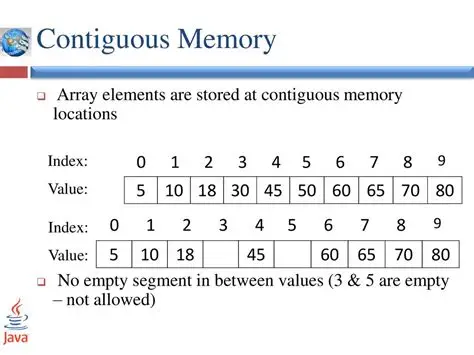
Memory Efficiency:
- Arrays store elements in contiguous memory locations
- Faster access compared to dynamic structures
- Predictable memory usage
Performance:
- Direct indexing without function call overhead
- Cache-friendly memory access patterns
- Essential for embedded systems and real-time applications
2. Array Declaration and Initialization
2.1 Basic Array Declaration
Python vs C Comparison:
| Python | C |
|---|---|
numbers = [1, 2, 3, 4, 5] |
int numbers[5] = {1, 2, 3, 4, 5}; |
grades = [] |
float grades[100]; |
name = "Alice" |
char name[10] = "Alice"; |
C Array Declaration Syntax:
data_type array_name[size];
data_type array_name[size] = {value1, value2, ...};
2.2 Different Initialization Methods
2.2.1 Complete Initialization
int numbers[5] = {10, 20, 30, 40, 50};
char vowels[5] = {'a', 'e', 'i', 'o', 'u'};
float prices[3] = {12.5, 25.0, 8.75};
2.2.2 Partial Initialization
int scores[10] = {95, 87, 92};  // First 3 elements initialized
                                 // Remaining 7 elements = 0
char grades[5] = {'A', 'B'};     // grades[0]='A', grades[1]='B'
                                 // grades[2]=grades[3]=grades[4]='\0'
2.2.3 Size Inference
int data[] = {1, 2, 3, 4, 5};    // Size automatically becomes 5
char message[] = "Hello World";   // Size becomes 12 (including '\0')
2.2.4 Zero Initialization
int zeros[100] = {0};            // All elements initialized to 0
char buffer[50] = "";            // All characters initialized to '\0'
2.2.5 Uninitialized Arrays (Dangerous!)
int uninitialized[10];           // Contains garbage values!
// Always initialize arrays before use
2.3 Array Size and Memory
Understanding Array Size:
int numbers[5];                  // 5 integers × 4 bytes = 20 bytes
char name[20];                   // 20 characters × 1 byte = 20 bytes
double values[10];               // 10 doubles × 8 bytes = 80 bytes

// Getting array size at compile time
int size = sizeof(numbers) / sizeof(numbers[0]);  // Result: 5
Python vs C Size Operations:
| Python | C |
|---|---|
len(list) |
sizeof(array) / sizeof(array[0]) |
list.append(item) |
Not possible with static arrays |
list.pop() |
Not possible with static arrays |
3. Array Indexing and Access
3.1 Basic Indexing
Python vs C Indexing:
| Operation | Python | C |
|---|---|---|
| First element | list[0] |
array[0] |
| Last element | list[-1] |
array[size-1] |
| Nth element | list[n] |
array[n] |
| Modify element | list[0] = 10 |
array[0] = 10; |
3.1.1 Valid Indexing Example
int numbers[5] = {10, 20, 30, 40, 50};

printf("First element: %d\n", numbers[0]);    // Output: 10
printf("Third element: %d\n", numbers[2]);    // Output: 30
printf("Last element: %d\n", numbers[4]);     // Output: 50

// Modifying elements
numbers[1] = 99;
printf("Modified second element: %d\n", numbers[1]);  // Output: 99
3.1.2 Index Bounds and Common Errors
Critical Difference from Python:
# Python - Safe bounds checking
my_list = [1, 2, 3, 4, 5]
print(my_list[10])  # Raises IndexError: list index out of range
// C - NO automatic bounds checking!
int my_array[5] = {1, 2, 3, 4, 5};
printf("%d\n", my_array[10]);  // Undefined behavior! May print garbage
my_array[10] = 999;           // Buffer overflow! May crash program
- Off-by-One Error:
int arr[5] = {1, 2, 3, 4, 5};
// WRONG: Accessing index 5 (valid indices: 0-4)
for (int i = 0; i <= 5; i++) {    // ERROR: i goes up to 5
    printf("%d ", arr[i]);
}

// CORRECT:
for (int i = 0; i < 5; i++) {     // i goes from 0 to 4
    printf("%d ", arr[i]);
}
- Negative Index Error:
int arr[5] = {1, 2, 3, 4, 5};
int index = -1;
printf("%d\n", arr[index]);  // Undefined behavior! C has no negative indexing
- Uninitialized Index:
int arr[10];
int i;                      // Uninitialized variable
printf("%d\n", arr[i]);     // Using uninitialized i as index - dangerous!
3.2 Safe Array Access Patterns
3.2.1 Bounds Checking Function
#include <stdio.h>
#include <stdbool.h>

bool is_valid_index(int index, int array_size) {
    return (index >= 0 && index < array_size);
}

int safe_access(int arr[], int size, int index) {
    if (is_valid_index(index, size)) {
        return arr[index];
    } else {
        printf("Error: Index %d out of bounds (0-%d)\n", index, size-1);
        return -1;  // Return error value
    }
}

int main() {
    int numbers[5] = {10, 20, 30, 40, 50};

    printf("Safe access: %d\n", safe_access(numbers, 5, 2));   // Valid
    printf("Safe access: %d\n", safe_access(numbers, 5, 10));  // Invalid

    return 0;
}
4. Array Input and Output Operations
4.1 Reading Array Elements
4.1.1 Reading with Known Size
#include <stdio.h>

int main() {
    int numbers[5];

    printf("Enter 5 integers:\n");
    for (int i = 0; i < 5; i++) {
        printf("Element %d: ", i + 1);
        scanf("%d", &numbers[i]);
    }

    printf("You entered: ");
    for (int i = 0; i < 5; i++) {
        printf("%d ", numbers[i]);
    }
    printf("\n");

    return 0;
}
4.1.2 Reading with User-Specified Size
#include <stdio.h>
#define MAX_SIZE 100

int main() {
    int arr[MAX_SIZE];
    int n;

    printf("How many numbers do you want to enter (max %d): ", MAX_SIZE);
    scanf("%d", &n);

    // Input validation
    if (n <= 0 || n > MAX_SIZE) {
        printf("Invalid size! Please enter between 1 and %d\n", MAX_SIZE);
        return 1;
    }

    printf("Enter %d numbers:\n", n);
    for (int i = 0; i < n; i++) {
        printf("Number %d: ", i + 1);
        scanf("%d", &arr[i]);
    }

    printf("Your numbers: ");
    for (int i = 0; i < n; i++) {
        printf("%d ", arr[i]);
    }
    printf("\n");

    return 0;
}
4.2 Displaying Array Elements
4.2.1 Basic Display
void print_array(int arr[], int size) {
    printf("Array contents: ");
    for (int i = 0; i < size; i++) {
        printf("%d ", arr[i]);
    }
    printf("\n");
}
4.2.2 Formatted Display
void print_array_formatted(int arr[], int size) {
    printf("┌");
    for (int i = 0; i < size; i++) {
        printf("────┬");
    }
    printf("\b┐\n");  // Backspace to replace last ┬ with ┐

    printf("│");
    for (int i = 0; i < size; i++) {
        printf("%3d │", arr[i]);
    }
    printf("\n");

    printf("└");
    for (int i = 0; i < size; i++) {
        printf("────┴");
    }
    printf("\b┘\n");

    printf(" ");
    for (int i = 0; i < size; i++) {
        printf("%3d  ", i);
    }
    printf("\n");
}
5. Common Array Operations
5.1 Array Traversal
5.1.1 Forward Traversal
// Python equivalent: for item in list:
for (int i = 0; i < size; i++) {
    printf("%d ", arr[i]);
}
5.1.2 Reverse Traversal
// Python equivalent: for item in reversed(list):
for (int i = size - 1; i >= 0; i--) {
    printf("%d ", arr[i]);
}
5.1.3 Traversal with Condition
// Print only even numbers
for (int i = 0; i < size; i++) {
    if (arr[i] % 2 == 0) {
        printf("%d ", arr[i]);
    }
}
5.2 Finding Maximum and Minimum
Python vs C Comparison:
| Python | C |
|---|---|
max(list) |
Manual implementation |
min(list) |
Manual implementation |
5.2.1 Finding Maximum
int find_max(int arr[], int size) {
    if (size <= 0) {
        printf("Error: Empty array\n");
        return INT_MIN;  // Return minimum integer value
    }

    int max = arr[0];  // Assume first element is maximum

    for (int i = 1; i < size; i++) {
        if (arr[i] > max) {
            max = arr[i];
        }
    }

    return max;
}
5.2.2 Finding Minimum
int find_min(int arr[], int size) {
    if (size <= 0) {
        printf("Error: Empty array\n");
        return INT_MAX;  // Return maximum integer value
    }

    int min = arr[0];

    for (int i = 1; i < size; i++) {
        if (arr[i] < min) {
            min = arr[i];
        }
    }

    return min;
}
5.2.3 Finding Both Max and Min with Position
#include <stdio.h>

typedef struct {
    int max_value;
    int max_index;
    int min_value;
    int min_index;
} MinMaxResult;

MinMaxResult find_min_max(int arr[], int size) {
    MinMaxResult result = {arr[0], 0, arr[0], 0};

    for (int i = 1; i < size; i++) {
        if (arr[i] > result.max_value) {
            result.max_value = arr[i];
            result.max_index = i;
        }
        if (arr[i] < result.min_value) {
            result.min_value = arr[i];
            result.min_index = i;
        }
    }

    return result;
}
5.3 Searching in Arrays
5.3.1 Linear Search
int linear_search(int arr[], int size, int target) {
    for (int i = 0; i < size; i++) {
        if (arr[i] == target) {
            return i;  // Return index of found element
        }
    }
    return -1;  // Element not found
}

// Usage example
int main() {
    int numbers[] = {10, 25, 8, 42, 15};
    int size = sizeof(numbers) / sizeof(numbers[0]);
    int target = 42;

    int index = linear_search(numbers, size, target);

    if (index != -1) {
        printf("Element %d found at index %d\n", target, index);
    } else {
        printf("Element %d not found\n", target);
    }

    return 0;
}
5.3.2 Count Occurrences
int count_occurrences(int arr[], int size, int target) {
    int count = 0;

    for (int i = 0; i < size; i++) {
        if (arr[i] == target) {
            count++;
        }
    }

    return count;
}
5.3.3 Find All Occurrences
#include <stdio.h>
#define MAX_INDICES 100

int find_all_occurrences(int arr[], int size, int target, int indices[]) {
    int count = 0;

    for (int i = 0; i < size && count < MAX_INDICES; i++) {
        if (arr[i] == target) {
            indices[count] = i;
            count++;
        }
    }

    return count;  // Number of occurrences found
}

// Usage example
int main() {
    int numbers[] = {1, 3, 7, 3, 9, 3, 2};
    int size = sizeof(numbers) / sizeof(numbers[0]);
    int target = 3;
    int indices[MAX_INDICES];

    int count = find_all_occurrences(numbers, size, target, indices);

    printf("Element %d found %d times at indices: ", target, count);
    for (int i = 0; i < count; i++) {
        printf("%d ", indices[i]);
    }
    printf("\n");

    return 0;
}
5.4 Array Modification Operations
5.4.1 Filling Arrays
void fill_array(int arr[], int size, int value) {
    for (int i = 0; i < size; i++) {
        arr[i] = value;
    }
}

// Fill with sequential numbers
void fill_sequence(int arr[], int size, int start) {
    for (int i = 0; i < size; i++) {
        arr[i] = start + i;
    }
}
5.4.2 Copying Arrays
void copy_array(int source[], int destination[], int size) {
    for (int i = 0; i < size; i++) {
        destination[i] = source[i];
    }
}

// Usage
int main() {
    int original[] = {1, 2, 3, 4, 5};
    int copy[5];

    copy_array(original, copy, 5);

    return 0;
}
5.4.3 Reversing Arrays
void reverse_array(int arr[], int size) {
    for (int i = 0; i < size / 2; i++) {
        // Swap elements
        int temp = arr[i];
        arr[i] = arr[size - 1 - i];
        arr[size - 1 - i] = temp;
    }
}
6. Mathematical Operations on Arrays
6.1 Statistical Operations
6.1.1 Sum and Average
#include <stdio.h>

int sum_array(int arr[], int size) {
    int sum = 0;
    for (int i = 0; i < size; i++) {
        sum += arr[i];
    }
    return sum;
}

double average_array(int arr[], int size) {
    if (size == 0) return 0.0;
    return (double)sum_array(arr, size) / size;
}

// Usage
int main() {
    int scores[] = {85, 92, 78, 96, 88};
    int size = 5;

    int total = sum_array(scores, size);
    double avg = average_array(scores, size);

    printf("Total: %d\n", total);
    printf("Average: %.2f\n", avg);

    return 0;
}
6.1.2 Standard Deviation
#include <math.h>

double standard_deviation(int arr[], int size) {
    if (size <= 1) return 0.0;

    double mean = average_array(arr, size);
    double sum_squared_diff = 0.0;

    for (int i = 0; i < size; i++) {
        double diff = arr[i] - mean;
        sum_squared_diff += diff * diff;
    }

    return sqrt(sum_squared_diff / (size - 1));
}
6.2 Array Comparison
6.2.1 Check if Arrays are Equal
#include <stdbool.h>

bool arrays_equal(int arr1[], int arr2[], int size) {
    for (int i = 0; i < size; i++) {
        if (arr1[i] != arr2[i]) {
            return false;
        }
    }
    return true;
}
6.2.2 Element-wise Operations
void add_arrays(int arr1[], int arr2[], int result[], int size) {
    for (int i = 0; i < size; i++) {
        result[i] = arr1[i] + arr2[i];
    }
}

void multiply_array_scalar(int arr[], int size, int scalar) {
    for (int i = 0; i < size; i++) {
        arr[i] *= scalar;
    }
}
7. Character Arrays and Strings
7.1 Character Arrays vs Strings
Understanding C Strings:
In C, strings are arrays of characters terminated by a null character ('\0').
// Character array (not necessarily a string)
char letters[5] = {'H', 'e', 'l', 'l', 'o'};

// String (null-terminated character array)
char greeting[6] = {'H', 'e', 'l', 'l', 'o', '\0'};

// Easier string initialization
char message[] = "Hello";  // Automatically adds '\0'
char name[20] = "Alice";   // name[0]='A', name[1]='l', ..., name[5]='\0'
7.2 String Input/Output
7.2.1 String Input Methods
#include <stdio.h>

int main() {
    char name[50];

    // Method 1: scanf (stops at whitespace)
    printf("Enter your first name: ");
    scanf("%s", name);  // No & needed for arrays

    // Method 2: fgets (reads entire line)
    printf("Enter your full name: ");
    fgets(name, sizeof(name), stdin);

    // Method 3: scanf with character set
    printf("Enter your name: ");
    scanf("%[^\n]", name);  // Read until newline

    printf("Hello, %s!\n", name);
    return 0;
}
7.2.2 String Output
char message[] = "Programming in C";

// Method 1: printf with %s
printf("Message: %s\n", message);

// Method 2: puts (automatically adds newline)
puts(message);

// Method 3: Character by character
for (int i = 0; message[i] != '\0'; i++) {
    printf("%c", message[i]);
}
printf("\n");
7.3 String Manipulation Functions
7.3.1 String Length
#include <string.h>

// Using library function
int len = strlen(str);

// Manual implementation
int string_length(char str[]) {
    int length = 0;
    while (str[length] != '\0') {
        length++;
    }
    return length;
}
7.3.2 String Copy
#include <string.h>

// Using library function
strcpy(destination, source);

// Manual implementation
void string_copy(char dest[], char src[]) {
    int i = 0;
    while (src[i] != '\0') {
        dest[i] = src[i];
        i++;
    }
    dest[i] = '\0';  // Don't forget null terminator!
}
7.3.3 String Concatenation
#include <string.h>

// Using library function
strcat(destination, source);

// Manual implementation
void string_concatenate(char dest[], char src[]) {
    int dest_len = string_length(dest);
    int i = 0;

    while (src[i] != '\0') {
        dest[dest_len + i] = src[i];
        i++;
    }
    dest[dest_len + i] = '\0';
}
7.3.4 String Comparison
#include <string.h>

// Using library function
int result = strcmp(str1, str2);
// Returns: 0 if equal, <0 if str1 < str2, >0 if str1 > str2

// Manual implementation
int string_compare(char str1[], char str2[]) {
    int i = 0;
    while (str1[i] != '\0' && str2[i] != '\0') {
        if (str1[i] < str2[i]) return -1;
        if (str1[i] > str2[i]) return 1;
        i++;
    }

    if (str1[i] == '\0' && str2[i] == '\0') return 0;
    return (str1[i] == '\0') ? -1 : 1;
}
7.4 Common String Operations
7.4.1 Count Characters/Words
int count_character(char str[], char ch) {
    int count = 0;
    for (int i = 0; str[i] != '\0'; i++) {
        if (str[i] == ch) {
            count++;
        }
    }
    return count;
}

int count_words(char str[]) {
    int words = 0;
    bool in_word = false;

    for (int i = 0; str[i] != '\0'; i++) {
        if (str[i] != ' ' && str[i] != '\t' && str[i] != '\n') {
            if (!in_word) {
                words++;
                in_word = true;
            }
        } else {
            in_word = false;
        }
    }

    return words;
}
7.4.2 String Reversal
void reverse_string(char str[]) {
    int len = string_length(str);

    for (int i = 0; i < len / 2; i++) {
        char temp = str[i];
        str[i] = str[len - 1 - i];
        str[len - 1 - i] = temp;
    }
}
7.4.3 Case Conversion
#include <ctype.h>

void to_uppercase(char str[]) {
    for (int i = 0; str[i] != '\0'; i++) {
        str[i] = toupper(str[i]);
    }
}

void to_lowercase(char str[]) {
    for (int i = 0; str[i] != '\0'; i++) {
        str[i] = tolower(str[i]);
    }
}

// Manual implementation for uppercase
void manual_to_uppercase(char str[]) {
    for (int i = 0; str[i] != '\0'; i++) {
        if (str[i] >= 'a' && str[i] <= 'z') {
            str[i] = str[i] - 'a' + 'A';
        }
    }
}
8. Multi-dimensional Arrays
8.1 Two-Dimensional Arrays
8.1.1 Declaration and Initialization
// Declaration
int matrix[3][4];  // 3 rows, 4 columns

// Initialization methods
int grid[2][3] = {
    {1, 2, 3},
    {4, 5, 6}
};

// Alternative initialization
int numbers[2][3] = {{1, 2, 3}, {4, 5, 6}};

// Partial initialization
int scores[3][2] = {
    {95, 87},
    {92, 78},
    {88}      // Last element becomes 0
};
8.1.2 Accessing 2D Array Elements
int matrix[3][4] = {
    {1,  2,  3,  4},
    {5,  6,  7,  8},
    {9, 10, 11, 12}
};

// Accessing elements
printf("Element at row 1, column 2: %d\n", matrix[1][2]);  // Output: 7

// Modifying elements
matrix[0][0] = 100;
matrix[2][3] = 999;
8.1.3 Input/Output for 2D Arrays
#include <stdio.h>

void input_matrix(int matrix[][4], int rows) {
    printf("Enter matrix elements:\n");
    for (int i = 0; i < rows; i++) {
        for (int j = 0; j < 4; j++) {
            printf("Element [%d][%d]: ", i, j);
            scanf("%d", &matrix[i][j]);
        }
    }
}

void print_matrix (int matrix[][4], int rows) {
    printf("Matrix:\n");
    for (int i = 0; i < rows; i++) {
        for (int j = 0; j < 4; j++) {
            printf("%d ", matrix[i][j]);
        }
        printf("\n");
    }
}
Module 4 : Pointers & Dynamic Array
By the end of this module, students will be able to:
- Understand the concept and purpose of pointers in C
- Declare and initialize pointers correctly
- Use pointer operators (& and *) effectively
- Perform pointer arithmetic operations
- Work with pointers and arrays
- Pass pointers to functions
- Understand the relationship between pointers and strings
- Allocate and manage dynamic memory
- Work with dynamic arrays
- Avoid common pointer-related errors and pitfalls
- Apply pointers in practical programming scenarios
1. Introduction to Pointers
1.1 What are Pointers?
A pointer is a variable that stores the memory address of another variable. Instead of holding a data value directly, a pointer "points to" the location in memory where the data is stored.
Analogy: Think of computer memory like a street with houses:
- Each house (memory location) has an address (memory address)
- Each house contains something (data value)
- A pointer is like writing down a house address on paper
- You can use that address to find and access the house
Why Use Pointers?
- Dynamic Memory Allocation: Create variables at runtime
- Efficient Array/String Manipulation: Access elements without copying
- Function Parameter Passing: Modify variables from within functions
- Data Structures: Build linked lists, trees, graphs, etc.
- System Programming: Direct memory access and hardware interaction
1.2 Memory Addresses
Every variable in C is stored at a specific memory location, identified by a unique address.
#include <stdio.h>

int main() {
    int age = 25;
    float height = 5.9f;
    char grade = 'A';

    printf("Value of age: %d\n", age);
    printf("Address of age: %p\n", (void*)&age);

    printf("Value of height: %.1f\n", height);
    printf("Address of height: %p\n", (void*)&height);

    printf("Value of grade: %c\n", grade);
    printf("Address of grade: %p\n", (void*)&grade);

    return 0;
}

/* Output (addresses will vary):
Value of age: 25
Address of age: 0x7ffd5c8e4a3c
Value of height: 5.9
Address of height: 0x7ffd5c8e4a38
Value of grade: A
Address of grade: 0x7ffd5c8e4a37
*/
Key Points:
- Memory addresses are typically displayed in hexadecimal (base 16)
- The
&operator gets the address of a variable - Format specifier
%pprints pointer/address values - Adjacent variables may have addresses close to each other
2. Pointer Basics
2.1 Declaring Pointers
Syntax:
data_type *pointer_name;
Examples:
int *ptr;        // Pointer to an integer
float *fptr;     // Pointer to a float
char *cptr;      // Pointer to a character
double *dptr;    // Pointer to a double
Important Notes:
- The
*(asterisk) indicates that the variable is a pointer - The asterisk can be placed next to the type or the variable name
- All three declarations below are equivalent:
int *ptr; int* ptr; int * ptr; - Convention: Most C programmers use
int *ptrstyle
Multiple Pointer Declaration:
int *p1, *p2, *p3;    // Three pointers to int
int *p1, p2, *p3;     // p1 and p3 are pointers, p2 is int
int* p1, p2, p3;      // Only p1 is pointer! p2 and p3 are int
2.2 Pointer Operators
There are two main operators for working with pointers:
| Operator | Name | Description | Example |
|---|---|---|---|
& |
Address-of | Gets the memory address of a variable | &variable |
* |
Dereference | Accesses the value at the address stored in pointer | *pointer |
2.3 Initializing Pointers
Method 1: Initialize with address of existing variable
int num = 42;
int *ptr = #  // ptr now points to num
Method 2: Initialize to NULL
int *ptr = NULL; // Pointer points to nothing (safe initialization)
Method 3: Uninitialized (DANGEROUS)
int *ptr; // Contains garbage value - DO NOT USE until initialized!
Visual Representation:
Memory Layout:

Variable: num = 42
Address:  0x1000
         ┌──────┐
0x1000:  │  42  │  num
         └──────┘

Variable: ptr
Address:  0x2000
         ┌────────┐
0x2000:  │ 0x1000 │  ptr (points to num)
         └────────┘
2.4 Using Pointers - The & and * Operators
#include <stdio.h>
int main() {
int num = 100;
int *ptr;
ptr = # // Store address of num in ptr
printf("Value of num: %d\n", num); // Direct access
printf("Address of num: %p\n", (void*)&num); // Address of num
printf("Value of ptr: %p\n", (void*)ptr); // Address stored in ptr
printf("Value pointed to by ptr: %d\n", *ptr); // Dereference ptr
// Modify through pointer
*ptr = 200;
printf("\nAfter *ptr = 200:\n");
printf("Value of num: %d\n", num); // num changed!
printf("Value pointed to by ptr: %d\n", *ptr);
return 0;
}
/* Output:
Value of num: 100
Address of num: 0x7ffd5c8e4a3c
Value of ptr: 0x7ffd5c8e4a3c
Value pointed to by ptr: 100
After *ptr = 200:
Value of num: 200
Value pointed to by ptr: 200
*/
Understanding the Operations:
int num = 42;
int *ptr = #

// These are equivalent:
num = 100;     // Direct modification
*ptr = 100;    // Indirect modification through pointer

// Both operations change the same memory location
3. Pointer Arithmetics
3. Pointer Arithmetic
Pointers can be incremented, decremented, and compared. When you perform arithmetic on pointers, the operation takes into account the size of the data type being pointed to.
3.1 Basic Pointer Arithmetic Operations
| Operation | Description | Example |
|---|---|---|
ptr++ |
Move to next element | ptr = ptr + 1 |
ptr-- |
Move to previous element | ptr = ptr - 1 |
ptr + n |
Move n elements forward | ptr = ptr + 3 |
ptr - n |
Move n elements backward | ptr = ptr - 2 |
ptr2 - ptr1 |
Distance between pointers | Number of elements |
3.2 How Pointer Arithmetic Works
When you add 1 to a pointer, it doesn't increase by 1 byte—it increases by the size of the data type:
#include <stdio.h>

int main() {
    int arr[] = {10, 20, 30, 40, 50};
    int *ptr = arr;  // Points to first element

    printf("Address of ptr: %p, Value: %d\n", (void*)ptr, *ptr);

    ptr++;  // Move to next integer (adds sizeof(int) bytes)
    printf("Address of ptr: %p, Value: %d\n", (void*)ptr, *ptr);

    ptr++;  // Move to next integer
    printf("Address of ptr: %p, Value: %d\n", (void*)ptr, *ptr);

    return 0;
}

/* Output (addresses will vary):
Address of ptr: 0x7ffd5c8e4a20, Value: 10
Address of ptr: 0x7ffd5c8e4a24, Value: 20  (increased by 4 bytes for int)
Address of ptr: 0x7ffd5c8e4a28, Value: 30  (increased by 4 bytes again)
*/
Memory Layout:
Array: arr[] = {10, 20, 30, 40, 50}

       ┌────┬────┬────┬────┬────┐
       │ 10 │ 20 │ 30 │ 40 │ 50 │
       └────┴────┴────┴────┴────┘
        ↑    ↑    ↑
      ptr  ptr+1 ptr+2
     0x100 0x104 0x108  (assuming 4-byte int)
3.3 Pointer Arithmetic Examples
#include <stdio.h>

int main() {
    int numbers[] = {100, 200, 300, 400, 500};
    int *ptr = numbers;

    // Access elements using pointer arithmetic
    printf("First element: %d\n", *ptr);           // 100
    printf("Second element: %d\n", *(ptr + 1));    // 200
    printf("Third element: %d\n", *(ptr + 2));     // 300
    printf("Fifth element: %d\n", *(ptr + 4));     // 500

    // Equivalent array notation
    printf("\nUsing array notation:\n");
    printf("First element: %d\n", ptr[0]);         // 100
    printf("Second element: %d\n", ptr[1]);        // 200
    printf("Third element: %d\n", ptr[2]);         // 300

    // Distance between pointers
    int *start = &numbers[0];
    int *end = &numbers[4];
    printf("\nDistance between pointers: %ld elements\n", end - start);

    return 0;
}
3.4 Valid and Invalid Pointer Operations
Valid Operations:
int arr[5];
int *ptr = arr;

ptr++;           // Valid: increment pointer
ptr--;           // Valid: decrement pointer
ptr = ptr + 3;   // Valid: add integer to pointer
ptr = ptr - 2;   // Valid: subtract integer from pointer
int diff = ptr2 - ptr1;  // Valid: subtract two pointers (same type)
if (ptr1 < ptr2) { }     // Valid: compare pointers
Invalid Operations:
ptr = ptr * 2;    // INVALID: cannot multiply pointers
ptr = ptr / 2;    // INVALID: cannot divide pointers
ptr = ptr + ptr2; // INVALID: cannot add two pointers
4. Pointers and Arrays
Arrays and pointers have a very close relationship in C. In many contexts, an array name acts as a pointer to its first element.
4.1 Array Name as Pointer
#include <stdio.h>

int main() {
    int arr[5] = {10, 20, 30, 40, 50};

    // Array name is a pointer to first element
    printf("Address of arr: %p\n", (void*)arr);
    printf("Address of arr[0]: %p\n", (void*)&arr[0]);
    printf("These addresses are the same!\n\n");

    // Access elements using pointer notation
    printf("arr[0] = %d, *arr = %d\n", arr[0], *arr);
    printf("arr[1] = %d, *(arr+1) = %d\n", arr[1], *(arr + 1));
    printf("arr[2] = %d, *(arr+2) = %d\n", arr[2], *(arr + 2));

    return 0;
}
4.2 Relationship Between Arrays and Pointers
Key Equivalences:
int arr[5] = {10, 20, 30, 40, 50};
int *ptr = arr;

// These are equivalent:
arr[i]  ≡  *(arr + i)
arr[i]  ≡  ptr[i]
arr[i]  ≡  *(ptr + i)
&arr[i] ≡  (arr + i)
&arr[i] ≡  (ptr + i)
Visual Representation:
Array: arr[5] = {10, 20, 30, 40, 50}

Index:     0    1    2    3    4
         ┌────┬────┬────┬────┬────┐
arr -->  │ 10 │ 20 │ 30 │ 40 │ 50 │
         └────┴────┴────┴────┴────┘
          ↑
        arr, &arr[0], arr+0, *(arr+0)
               ↑
          arr+1, &arr[1], *(arr+1)
                    ↑
               arr+2, &arr[2], *(arr+2)
4.3 Traversing Arrays with Pointers
Method 1: Using array indexing
int arr[5] = {10, 20, 30, 40, 50};

for (int i = 0; i < 5; i++) {
    printf("%d ", arr[i]);
}
Method 2: Using pointer arithmetic
int arr[5] = {10, 20, 30, 40, 50};
int *ptr = arr;

for (int i = 0; i < 5; i++) {
    printf("%d ", *(ptr + i));
}
Method 3: Incrementing pointer
int arr[5] = {10, 20, 30, 40, 50};
int *ptr = arr;
int *end = arr + 5;

while (ptr < end) {
    printf("%d ", *ptr);
    ptr++;
}
4.4 Important Difference: Array vs Pointer
int arr[5] = {1, 2, 3, 4, 5};
int *ptr = arr;

// This is VALID:
ptr = ptr + 1;  // ptr can be modified
ptr++;          // ptr can be incremented

// This is INVALID:
arr = arr + 1;  // ERROR! Array name is a constant pointer
arr++;          // ERROR! Cannot modify array name

// However, this is valid:
int *ptr2 = arr + 1;  // Create new pointer pointing to arr[1]
Key Difference:
arris a constant pointer (cannot be reassigned)ptris a pointer variable (can be modified)
5. Pointers and Functions
Pointers are essential for functions to modify variables from the calling code and to work efficiently with arrays.
5.1 Pass by Value vs Pass by Reference
Pass by Value (Without Pointers):
#include <stdio.h>

void tryToChange(int x) {
    x = 100;  // Only changes local copy
    printf("Inside function: x = %d\n", x);
}

int main() {
    int num = 50;
    printf("Before function: num = %d\n", num);
    tryToChange(num);
    printf("After function: num = %d\n", num);  // num unchanged!
    return 0;
}

/* Output:
Before function: num = 50
Inside function: x = 100
After function: num = 50
*/
Pass by Reference (With Pointers):
#include <stdio.h>

void actuallyChange(int *x) {
    *x = 100;  // Changes the original variable
    printf("Inside function: *x = %d\n", *x);
}

int main() {
    int num = 50;
    printf("Before function: num = %d\n", num);
    actuallyChange(&num);  // Pass address
    printf("After function: num = %d\n", num);  // num changed!
    return 0;
}

/* Output:
Before function: num = 50
Inside function: *x = 100
After function: num = 100
*/
5.2 Why scanf() Requires &
Now we understand why scanf() needs the & operator:
int age;
scanf("%d", &age);  // Pass address so scanf can modify age

// What happens inside scanf (simplified):
void scanf(const char *format, int *ptr) {
    // Read input value
    int value = /* read from keyboard */;
    *ptr = value;  // Store in the address provided
}
5.3 Functions Returning Multiple Values
Since C functions can only return one value, pointers allow us to "return" multiple values:
#include <stdio.h>

// Function to find both quotient and remainder
void divide(int dividend, int divisor, int *quotient, int *remainder) {
    *quotient = dividend / divisor;
    *remainder = dividend % divisor;
}

int main() {
    int a = 17, b = 5;
    int q, r;

    divide(a, b, &q, &r);

    printf("%d divided by %d:\n", a, b);
    printf("Quotient: %d\n", q);
    printf("Remainder: %d\n", r);

    return 0;
}
5.4 Swapping Values Using Pointers
A classic example of pointer usage:
#include <stdio.h>

// WRONG: This doesn't swap the original variables
void wrongSwap(int x, int y) {
    int temp = x;
    x = y;
    y = temp;
}

// CORRECT: This swaps the original variables
void correctSwap(int *x, int *y) {
    int temp = *x;
    *x = *y;
    *y = temp;
}

int main() {
    int a = 10, b = 20;

    printf("Before swap: a = %d, b = %d\n", a, b);
    wrongSwap(a, b);
    printf("After wrongSwap: a = %d, b = %d\n", a, b);  // No change

    correctSwap(&a, &b);
    printf("After correctSwap: a = %d, b = %d\n", a, b);  // Swapped!

    return 0;
}
5.5 Passing Arrays to Functions
When passing arrays to functions, you're actually passing a pointer:
#include <stdio.h>

// These function declarations are equivalent:
void printArray1(int arr[], int size);
void printArray2(int *arr, int size);

void printArray1(int arr[], int size) {
    for (int i = 0; i < size; i++) {
        printf("%d ", arr[i]);
    }
    printf("\n");
}

int main() {
    int numbers[] = {10, 20, 30, 40, 50};
    int size = sizeof(numbers) / sizeof(numbers[0]);

    printArray1(numbers, size);

    return 0;
}
Important Note:
void function(int arr[]) {
    // Inside function, sizeof(arr) gives size of pointer, not array!
    int size = sizeof(arr);  // This gives 8 (size of pointer on 64-bit)
    // WRONG! Does not give array size
}

int main() {
    int numbers[5] = {1, 2, 3, 4, 5};
    int size = sizeof(numbers) / sizeof(numbers[0]);  // This is correct
    function(numbers);
    return 0;
}
6. Pointers and Strings
In C, strings are arrays of characters, so pointers work naturally with strings.
6.1 String Representation
char str1[] = "Hello";     // Array notation
char *str2 = "Hello";      // Pointer notation

// Both represent the same thing in memory:
// 'H' 'e' 'l' 'l' 'o' '\0'
Memory Layout:
str1: char array (modifiable)
┌───┬───┬───┬───┬───┬────┐
│ H │ e │ l │ l │ o │ \0 │
└───┴───┴───┴───┴───┴────┘

str2: pointer to string literal (read-only)
     ┌───────┐
str2 │ addr  │────> "Hello\0" (in read-only memory)
     └───────┘
6.2 String Traversal Using Pointers
#include <stdio.h>

void printString(char *str) {
    while (*str != '\0') {  // Until null terminator
        printf("%c", *str);
        str++;  // Move to next character
    }
    printf("\n");
}

int main() {
    char message[] = "Hello, World!";
    printString(message);
    return 0;
}
6.3 String Length Using Pointers
#include <stdio.h>

int stringLength(char *str) {
    int length = 0;
    while (*str != '\0') {
        length++;
        str++;
    }
    return length;
}

// Alternative using pointer arithmetic
int stringLength2(char *str) {
    char *start = str;
    while (*str != '\0') {
        str++;
    }
    return str - start;  // Pointer subtraction
}

int main() {
    char text[] = "Programming";
    printf("Length: %d\n", stringLength(text));
    return 0;
}
6.4 String Copy Using Pointers
#include <stdio.h>

void stringCopy(char *dest, char *src) {
    while (*src != '\0') {
        *dest = *src;
        dest++;
        src++;
    }
    *dest = '\0';  // Don't forget null terminator!
}

// More elegant version
void stringCopy2(char *dest, char *src) {
    while ((*dest++ = *src++));  // Copy until '\0' (which is 0/false)
}

int main() {
    char source[] = "Hello";
    char destination[50];

    stringCopy(destination, source);
    printf("Copied string: %s\n", destination);

    return 0;
}
7. Dynamic Memory Allocation & Array
7.1 Introduction to Dynamic Memory
Up until now, we've used static memory allocation where array sizes must be known at compile time:
int arr[100]; // Size fixed at compile time
Problems with static allocation:
- Waste memory if you allocate too much
- Run out of space if you allocate too little
- Cannot adjust size during program execution
Dynamic memory allocation solves these problems by allowing you to allocate memory at runtime using special functions.
7.2 Memory Layout in C
┌─────────────────────────────────┐
│         Stack                   │  ← Local variables, function calls
│  (grows downward)               │     Automatically managed
│            ↓                    │
├─────────────────────────────────┤
│                                 │
│         (free space)            │
│                                 │
│            ↑                    │
├─────────────────────────────────┤
│         Heap                    │  ← Dynamic memory allocation
│  (grows upward)                 │     Manually managed (malloc/free)
├─────────────────────────────────┤
│    Data Segment                 │  ← Global and static variables
├─────────────────────────────────┤
│    Code Segment                 │  ← Program instructions
└─────────────────────────────────┘
7.3 Dynamic Memory Functions
C provides four main functions for dynamic memory management (defined in <stdlib.h>):
| Function | Purpose | Syntax |
|---|---|---|
malloc() |
Allocates memory | void* malloc(size_t size) |
calloc() |
Allocates and initializes to zero | void* calloc(size_t n, size_t size) |
realloc() |
Resizes allocated memory | void* realloc(void* ptr, size_t size) |
free() |
Releases allocated memory | void free(void* ptr) |
7.4 malloc() - Memory Allocation
Purpose: Allocates a block of memory of specified size (in bytes)
Syntax:
void* malloc(size_t size);
Returns:
- Pointer to allocated memory on success
NULLif allocation fails
Example:
#include <stdio.h>
#include <stdlib.h>

int main() {
    int *ptr;
    int n = 5;

    // Allocate memory for 5 integers
    ptr = (int*)malloc(n * sizeof(int));

    // Check if allocation was successful
    if (ptr == NULL) {
        printf("Memory allocation failed!\n");
        return 1;
    }

    // Use the allocated memory
    for (int i = 0; i < n; i++) {
        ptr[i] = i * 10;
    }

    // Print values
    printf("Values: ");
    for (int i = 0; i < n; i++) {
        printf("%d ", ptr[i]);
    }
    printf("\n");

    // Free the allocated memory
    free(ptr);
    ptr = NULL;  // Good practice

    return 0;
}
Important Notes:
- Always multiply by
sizeof(data_type)to get correct byte size - Always check if
malloc()returnsNULL - Always cast the return value:
(int*)malloc(...) - Memory allocated by
malloc()contains garbage values
7.5 calloc() - Contiguous Allocation
Purpose: Allocates memory and initializes all bytes to zero
Syntax:
void* calloc(size_t n, size_t size);
Parameters:
n: Number of elementssize: Size of each element
Example:
#include <stdio.h>
#include <stdlib.h>

int main() {
    int *ptr;
    int n = 5;

    // Allocate and initialize memory for 5 integers
    ptr = (int*)calloc(n, sizeof(int));

    if (ptr == NULL) {
        printf("Memory allocation failed!\n");
        return 1;
    }

    // Print values (all will be 0)
    printf("Initial values: ");
    for (int i = 0; i < n; i++) {
        printf("%d ", ptr[i]);
    }
    printf("\n");

    free(ptr);
    ptr = NULL;

    return 0;
}

/* Output:
Initial values: 0 0 0 0 0
*/
malloc() vs calloc():
| Feature | malloc() | calloc() |
|---|---|---|
| Parameters | 1 (total bytes) | 2 (number, size) |
| Initialization | Garbage values | All zeros |
| Speed | Faster | Slightly slower |
| Use case | When you'll initialize values | When you need zero-initialized memory |
7.6 realloc() - Resize Memory
Purpose: Changes the size of previously allocated memory
Syntax:
void* realloc(void* ptr, size_t new_size);
Example:
#include <stdio.h>
#include <stdlib.h>

int main() {
    int *ptr;
    int n = 5;

    // Initial allocation
    ptr = (int*)malloc(n * sizeof(int));
    if (ptr == NULL) {
        printf("Memory allocation failed!\n");
        return 1;
    }

    // Fill initial array
    for (int i = 0; i < n; i++) {
        ptr[i] = i + 1;
    }

    printf("Initial array (size %d): ", n);
    for (int i = 0; i < n; i++) {
        printf("%d ", ptr[i]);
    }
    printf("\n");

    // Resize to 10 elements
    n = 10;
    ptr = (int*)realloc(ptr, n * sizeof(int));

    if (ptr == NULL) {
        printf("Memory reallocation failed!\n");
        return 1;
    }

    // Fill new elements
    for (int i = 5; i < n; i++) {
        ptr[i] = i + 1;
    }

    printf("Resized array (size %d): ", n);
    for (int i = 0; i < n; i++) {
        printf("%d ", ptr[i]);
    }
    printf("\n");

    free(ptr);
    ptr = NULL;

    return 0;
}

/* Output:
Initial array (size 5): 1 2 3 4 5
Resized array (size 10): 1 2 3 4 5 6 7 8 9 10
*/
Important Notes about realloc():
- If
new_sizeis larger, existing data is preserved, new space is uninitialized - If
new_sizeis smaller, data is truncated - May move the block to a new location (address may change)
- If realloc fails, original pointer remains valid
- If
ptrisNULL, behaves likemalloc()
7.7 free() - Deallocate Memory
Purpose: Releases memory back to the system
Syntax:
void free(void* ptr);
Example:
int *ptr = (int*)malloc(100 * sizeof(int));

// Use the memory...

free(ptr);     // Release memory
ptr = NULL;    // Set to NULL to avoid dangling pointer
Important Rules:
- Only free memory that was allocated with malloc/calloc/realloc
- Free each block exactly once
- Don't use memory after freeing it
- Set pointer to NULL after freeing (good practice)
7.8 Dynamic Arrays - Complete Example
#include <stdio.h>
#include <stdlib.h>

int main() {
    int n;
    int *arr;

    printf("Enter number of elements: ");
    scanf("%d", &n);

    // Allocate memory dynamically
    arr = (int*)malloc(n * sizeof(int));

    if (arr == NULL) {
        printf("Memory allocation failed!\n");
        return 1;
    }

    // Input values
    printf("Enter %d integers:\n", n);
    for (int i = 0; i < n; i++) {
        scanf("%d", &arr[i]);
    }

    // Process: find sum and average
    int sum = 0;
    for (int i = 0; i < n; i++) {
        sum += arr[i];
    }
    double average = (double)sum / n;

    // Output results
    printf("\nArray elements: ");
    for (int i = 0; i < n; i++) {
        printf("%d ", arr[i]);
    }
    printf("\nSum: %d\n", sum);
    printf("Average: %.2f\n", average);

    // Free allocated memory
    free(arr);
    arr = NULL;

    return 0;
}
7.9 Dynamic 2D Arrays
Method 1: Array of Pointers (Rows can have different lengths)
#include <stdio.h>
#include <stdlib.h>

int main() {
    int rows = 3, cols = 4;
    int **matrix;

    // Allocate array of row pointers
    matrix = (int**)malloc(rows * sizeof(int*));

    // Allocate each row
    for (int i = 0; i < rows; i++) {
        matrix[i] = (int*)malloc(cols * sizeof(int));
    }

    // Fill matrix
    int value = 1;
    for (int i = 0; i < rows; i++) {
        for (int j = 0; j < cols; j++) {
            matrix[i][j] = value++;
        }
    }

    // Print matrix
    printf("Matrix:\n");
    for (int i = 0; i < rows; i++) {
        for (int j = 0; j < cols; j++) {
            printf("%3d ", matrix[i][j]);
        }
        printf("\n");
    }

    // Free memory
    for (int i = 0; i < rows; i++) {
        free(matrix[i]);
    }
    free(matrix);
    matrix = NULL;

    return 0;
}
Method 2: Single Contiguous Block
#include <stdio.h>
#include <stdlib.h>

int main() {
    int rows = 3, cols = 4;
    int *matrix;

    // Allocate as single block
    matrix = (int*)malloc(rows * cols * sizeof(int));

    if (matrix == NULL) {
        printf("Memory allocation failed!\n");
        return 1;
    }

    // Fill matrix using formula: matrix[i][j] = matrix[i * cols + j]
    int value = 1;
    for (int i = 0; i < rows; i++) {
        for (int j = 0; j < cols; j++) {
            matrix[i * cols + j] = value++;
        }
    }

    // Print matrix
    printf("Matrix:\n");
    for (int i = 0; i < rows; i++) {
        for (int j = 0; j < cols; j++) {
            printf("%3d ", matrix[i * cols + j]);
        }
        printf("\n");
    }

    // Free memory (single free needed)
    free(matrix);
    matrix = NULL;

    return 0;
}
7.10 Dynamic Memory Best Practices
1. Always Check for NULL
int *ptr = (int*)malloc(n * sizeof(int));
if (ptr == NULL) {
    fprintf(stderr, "Memory allocation failed!\n");
    exit(1);
}
2. Always Free Allocated Memory
// Allocate
int *data = (int*)malloc(100 * sizeof(int));

// Use data...

// Free when done
free(data);
data = NULL;
3. Don't Double Free
int *ptr = (int*)malloc(10 * sizeof(int));
free(ptr);
free(ptr);  // ERROR! Double free - undefined behavior
4. Don't Use After Free
int *ptr = (int*)malloc(10 * sizeof(int));
free(ptr);
ptr[0] = 5;  // ERROR! Using freed memory
5. Match Every malloc with free
void function() {
    int *ptr = (int*)malloc(100 * sizeof(int));
    // Use ptr...
    free(ptr);  // Don't forget!
}
7.11 Memory Leaks
A memory leak occurs when allocated memory is not freed:
Example of Memory Leak:
void badFunction() {
    int *ptr = (int*)malloc(1000 * sizeof(int));
    // Use ptr...
    return;  // BUG! Memory not freed - leaked!
}

int main() {
    for (int i = 0; i < 1000; i++) {
        badFunction();  // Leaks memory every iteration
    }
    return 0;
}
Fixed Version:
void goodFunction() {
    int *ptr = (int*)malloc(1000 * sizeof(int));
    // Use ptr...
    free(ptr);  // Properly freed
    return;
}
Another Common Leak:
int *ptr = (int*)malloc(100 * sizeof(int));
ptr = (int*)malloc(200 * sizeof(int));  // LEAK! Lost reference to first block
Fixed:
int *ptr = (int*)malloc(100 * sizeof(int));
free(ptr);  // Free first
ptr = (int*)malloc(200 * sizeof(int));  // Then allocate new
8. Common Pointer Pitfalls and Best Practices
8.1 Uninitialized Pointers
WRONG:
int *ptr;      // Uninitialized - contains garbage address
*ptr = 42;     // DANGER! Writing to unknown memory location
               // May cause segmentation fault
CORRECT:
int *ptr = NULL;   // Initialize to NULL
int num = 0;
ptr = #        // Assign valid address before use
*ptr = 42;         // Now safe to dereference
8.2 Dangling Pointers
A dangling pointer points to memory that has been freed or is no longer valid:
WRONG:
int *ptr;
{
    int num = 42;
    ptr = #
}  // num goes out of scope here
// ptr is now dangling - points to invalid memory
printf("%d", *ptr);  // DANGER! Undefined behavior
CORRECT:
int num = 42;
int *ptr = #
// Use ptr while num is in scope
printf("%d", *ptr);  // Safe
Dangling Pointer with free():
int *ptr = (int*)malloc(sizeof(int));
*ptr = 42;
free(ptr);
// ptr is now dangling
printf("%d", *ptr);  // DANGER! Undefined behavior

// Better:
free(ptr);
ptr = NULL;  // Set to NULL after freeing
if (ptr != NULL) {
    printf("%d", *ptr);  // This check prevents the error
}
8.3 NULL Pointer Dereference
WRONG:
int *ptr = NULL;
*ptr = 42;  // CRASH! Cannot dereference NULL pointer
CORRECT:
int *ptr = NULL;

if (ptr != NULL) {  // Always check before dereferencing
    *ptr = 42;
} else {
    printf("Error: NULL pointer\n");
}
8.4 Array Bounds with Pointers
WRONG:
int arr[5] = {1, 2, 3, 4, 5};
int *ptr = arr;
int value = *(ptr + 10);  // Out of bounds! Undefined behavior
CORRECT:
int arr[5] = {1, 2, 3, 4, 5};
int *ptr = arr;
int size = 5;

for (int i = 0; i < size; i++) {
    printf("%d ", *(ptr + i));  // Safe: within bounds
}
8.5 Returning Pointer to Local Variable
WRONG:
int* createNumber() {
int num = 42;
return # // DANGER! num is destroyed after function returns
}
int main() {
int *ptr = createNumber();
printf("%d", *ptr); // Undefined behavior - dangling pointer
return 0;
}
CORRECT - Using Dynamic Allocation:
int* createNumber() {
int *num = (int*)malloc(sizeof(int));
*num = 42;
return num; // Safe - memory persists
}
int main() {
int *ptr = createNumber();
printf("%d", *ptr);
free(ptr); // Don't forget to free!
return 0;
}
CORRECT - Using Static Variable:
int* createNumber() {
static int num = 42; // Static - persists after function returns
return #
}
8.6 Best Practices Summary
-
Always initialize pointers
int *ptr = NULL; // Good int *ptr; // Bad -
Check for NULL before dereferencing
if (ptr != NULL) { *ptr = value; } -
Set pointers to NULL after freeing
free(ptr); ptr = NULL; -
Be careful with pointer arithmetic
// Ensure you don't go out of array bounds if (ptr + i < arr + size) { // Safe to access } -
Use const for pointers that shouldn't modify data
void printString(const char *str) { // str cannot be used to modify the string } -
Match every malloc with free
int *ptr = (int*)malloc(100 * sizeof(int)); // Use ptr... free(ptr);
9. Practical Examples with Dynamic Memory
9.1 Dynamic Array with User Input
#include <stdio.h>
#include <stdlib.h>
int main() {
int n, *arr;
printf("How many numbers do you want to enter? ");
scanf("%d", &n);
// Allocate memory
arr = (int*)malloc(n * sizeof(int));
if (arr == NULL) {
printf("Memory allocation failed!\n");
return 1;
}
// Input
printf("Enter %d numbers:\n", n);
for (int i = 0; i < n; i++) {
scanf("%d", &arr[i]);
}
// Find min and max
int min = arr[0], max = arr[0];
for (int i = 1; i < n; i++) {
if (arr[i] < min) min = arr[i];
if (arr[i] > max) max = arr[i];
}
printf("Minimum: %d\n", min);
printf("Maximum: %d\n", max);
free(arr);
return 0;
}
9.2 Growing Array (Dynamic Resize)
#include <stdio.h>
#include <stdlib.h>
int main() {
int capacity = 2;
int size = 0;
int *arr;
int input;
// Initial allocation
arr = (int*)malloc(capacity * sizeof(int));
if (arr == NULL) {
printf("Memory allocation failed!\n");
return 1;
}
printf("Enter integers (enter -1 to stop):\n");
while (1) {
scanf("%d", &input);
if (input == -1) break;
// Check if we need more space
if (size >= capacity) {
capacity *= 2; // Double the capacity
arr = (int*)realloc(arr, capacity * sizeof(int));
if (arr == NULL) {
printf("Memory reallocation failed!\n");
return 1;
}
printf("Array resized to capacity: %d\n", capacity);
}
arr[size++] = input;
}
// Print results
printf("\nYou entered %d numbers:\n", size);
for (int i = 0; i < size; i++) {
printf("%d ", arr[i]);
}
printf("\n");
free(arr);
return 0;
}
9.3 Dynamic String Operations
#include <stdio.h>
#include <stdlib.h>
#include <string.h>
char* concatenateStrings(const char *s1, const char *s2) {
int len1 = strlen(s1);
int len2 = strlen(s2);
// Allocate memory for result
char *result = (char*)malloc((len1 + len2 + 1) * sizeof(char));
if (result == NULL) {
return NULL;
}
// Copy first string
strcpy(result, s1);
// Concatenate second string
strcat(result, s2);
return result;
}
int main() {
char str1[] = "Hello, ";
char str2[] = "World!";
char *combined = concatenateStrings(str1, str2);
if (combined != NULL) {
printf("Result: %s\n", combined);
free(combined);
}
return 0;
}
9.4 Remove Duplicates from Dynamic Array
#include <stdio.h>
#include <stdlib.h>
int* removeDuplicates(int *arr, int size, int *newSize) {
// Allocate worst-case size (all unique)
int *result = (int*)malloc(size * sizeof(int));
if (result == NULL) {
return NULL;
}
int count = 0;
for (int i = 0; i < size; i++) {
int isDuplicate = 0;
// Check if current element already exists in result
for (int j = 0; j < count; j++) {
if (arr[i] == result[j]) {
isDuplicate = 1;
break;
}
}
if (!isDuplicate) {
result[count++] = arr[i];
}
}
// Resize to actual size needed
result = (int*)realloc(result, count * sizeof(int));
*newSize = count;
return result;
}
int main() {
int arr[] = {1, 2, 3, 2, 4, 1, 5, 3, 6};
int size = sizeof(arr) / sizeof(arr[0]);
int newSize;
printf("Original array: ");
for (int i = 0; i < size; i++) {
printf("%d ", arr[i]);
}
printf("\n");
int *unique = removeDuplicates(arr, size, &newSize);
if (unique != NULL) {
printf("Array without duplicates: ");
for (int i = 0; i < newSize; i++) {
printf("%d ", unique[i]);
}
printf("\n");
free(unique);
}
return 0;
}
9.5 Dynamic Matrix Operations
#include <stdio.h>
#include <stdlib.h>
// Allocate matrix
int** createMatrix(int rows, int cols) {
int **matrix = (int**)malloc(rows * sizeof(int*));
if (matrix == NULL) return NULL;
for (int i = 0; i < rows; i++) {
matrix[i] = (int*)malloc(cols * sizeof(int));
if (matrix[i] == NULL) {
// Free already allocated rows
for (int j = 0; j < i; j++) {
free(matrix[j]);
}
free(matrix);
return NULL;
}
}
return matrix;
}
// Free matrix
void freeMatrix(int **matrix, int rows) {
for (int i = 0; i < rows; i++) {
free(matrix[i]);
}
free(matrix);
}
// Multiply two matrices
int** multiplyMatrices(int **A, int **B, int r1, int c1, int c2) {
int **result = createMatrix(r1, c2);
if (result == NULL) return NULL;
for (int i = 0; i < r1; i++) {
for (int j = 0; j < c2; j++) {
result[i][j] = 0;
for (int k = 0; k < c1; k++) {
result[i][j] += A[i][k] * B[k][j];
}
}
}
return result;
}
int main() {
int r1 = 2, c1 = 3, c2 = 2;
// Create matrices
int **A = createMatrix(r1, c1);
int **B = createMatrix(c1, c2);
// Fill matrix A
printf("Matrix A:\n");
int val = 1;
for (int i = 0; i < r1; i++) {
for (int j = 0; j < c1; j++) {
A[i][j] = val++;
printf("%d ", A[i][j]);
}
printf("\n");
}
// Fill matrix B
printf("\nMatrix B:\n");
val = 1;
for (int i = 0; i < c1; i++) {
for (int j = 0; j < c2; j++) {
B[i][j] = val++;
printf("%d ", B[i][j]);
}
printf("\n");
}
// Multiply
int **C = multiplyMatrices(A, B, r1, c1, c2);
printf("\nMatrix C (A × B):\n");
for (int i = 0; i < r1; i++) {
for (int j = 0; j < c2; j++) {
printf("%d ", C[i][j]);
}
printf("\n");
}
// Free all matrices
freeMatrix(A, r1);
freeMatrix(B, c1);
freeMatrix(C, r1);
return 0;
}
Module 5 : Data Types (Struct, Enum, TypeDef) & File I/O
By the end of this module, students will be able to:
- Understand and implement user-defined data types using `struct`
- Utilize `enum` for creating readable constant sets
- Apply `typedef` to create type aliases for better code readability
- Perform file input/output operations in C
- Handle text and binary files effectively
- Design programs that persist data using files
- Combine structs with file I/O for data management systems
1. Introduction to User-Defined Data Types
1.1 Why User-Defined Types?
In previous modules, we learned about basic data types like int, float, char, etc. These are sufficient for simple programs, but real-world applications often require more complex data structures.
Example Problem: Suppose you want to store information about a student:
// Without user-defined types - difficult to manage
int student_id = 12345;
char student_name[50] = "Alice Johnson";
float student_gpa = 3.75;
int student_age = 20;
char student_major[30] = "Electrical Engineering";
// If you have 100 students, you need 500 variables!
User-defined types solve this problem by allowing us to group related data together.
2. Structures (struct)
2.1 What is a Structure?
A structure is a user-defined data type that groups variables of different types under a single name. Think of it as creating your own custom data type.
Python vs C Comparison:
| Python | C |
|---|---|
| Uses classes or dictionaries | Uses struct |
student = {"name": "Alice", "age": 20} |
struct Student student; |
| Dynamic typing | Static typing |
2.2 Declaring a Structure
Basic Syntax:
struct structure_name {
data_type member1;
data_type member2;
// ... more members
};
Example - Student Structure:
struct Student {
int id;
char name[50];
float gpa;
int age;
char major[30];
};
Important Notes:
- Structure declaration ends with a semicolon
; - Members can be of any data type (including other structures)
- The structure declaration itself doesn't allocate memory
2.3 Creating Structure Variables
Method 1: After Structure Declaration
struct Student {
int id;
char name[50];
float gpa;
};
// Create variables
struct Student student1;
struct Student student2, student3;
Method 2: During Structure Declaration
struct Student {
int id;
char name[50];
float gpa;
} student1, student2;
Method 3: Anonymous Structure (less common)
struct {
int id;
char name[50];
float gpa;
} student1, student2;
2.4 Initializing Structure Variables
Method 1: Member-by-Member Assignment
struct Student s1;
s1.id = 12345;
strcpy(s1.name, "Alice Johnson"); // Note: Use strcpy for strings
s1.gpa = 3.75;
Method 2: Initialization at Declaration
struct Student s1 = {12345, "Alice Johnson", 3.75};
Method 3: Designated Initializers (C99 and later)
struct Student s1 = {
.id = 12345,
.name = "Alice Johnson",
.gpa = 3.75
};
Method 4: Partial Initialization
struct Student s1 = {12345}; // Only id is initialized, others are 0/NULL
2.5 Accessing Structure Members
Use the dot operator (.) to access structure members:
struct Student s1;
// Writing to members
s1.id = 12345;
s1.gpa = 3.75;
strcpy(s1.name, "Alice Johnson");
// Reading from members
printf("Student ID: %d\n", s1.id);
printf("Student Name: %s\n", s1.name);
printf("Student GPA: %.2f\n", s1.gpa);
2.6 Nested Structures
Structures can contain other structures as members:
struct Date {
int day;
int month;
int year;
};
struct Student {
int id;
char name[50];
float gpa;
struct Date birthDate; // Nested structure
};
// Usage
struct Student s1;
s1.id = 12345;
s1.birthDate.day = 15;
s1.birthDate.month = 8;
s1.birthDate.year = 2003;
printf("Birth Date: %d/%d/%d\n",
s1.birthDate.day,
s1.birthDate.month,
s1.birthDate.year);
2.7 Array of Structures
You can create arrays of structures to handle multiple records:
struct Student {
int id;
char name[50];
float gpa;
};
// Array of 100 students
struct Student students[100];
// Accessing elements
students[0].id = 12345;
strcpy(students[0].name, "Alice");
students[0].gpa = 3.75;
// Loop through all students
for (int i = 0; i < 100; i++) {
printf("Student %d: %s (GPA: %.2f)\n",
students[i].id,
students[i].name,
students[i].gpa);
}
2.8 Pointers to Structures
You can use pointers with structures:
struct Student s1 = {12345, "Alice", 3.75};
struct Student *ptr = &s1;
// Method 1: Using (*ptr).member
printf("ID: %d\n", (*ptr).id);
// Method 2: Using ptr->member (preferred)
printf("ID: %d\n", ptr->id);
printf("Name: %s\n", ptr->name);
printf("GPA: %.2f\n", ptr->gpa);
The Arrow Operator (->):
ptr->memberis equivalent to(*ptr).member- Much cleaner and more readable
- Commonly used when passing structures to functions
2.9 Structures and Functions
Passing by Value:
void printStudent(struct Student s) {
printf("ID: %d\n", s.id);
printf("Name: %s\n", s.name);
printf("GPA: %.2f\n", s.gpa);
}
// Usage
struct Student s1 = {12345, "Alice", 3.75};
printStudent(s1); // Entire structure is copied
Passing by Reference (Pointer):
void updateGPA(struct Student *s, float newGPA) {
s->gpa = newGPA;
}
// Usage
struct Student s1 = {12345, "Alice", 3.75};
updateGPA(&s1, 3.85); // Pass address of structure
printf("Updated GPA: %.2f\n", s1.gpa); // Output: 3.85
Returning Structures from Functions:
struct Student createStudent(int id, char *name, float gpa) {
struct Student s;
s.id = id;
strcpy(s.name, name);
s.gpa = gpa;
return s;
}
// Usage
struct Student s1 = createStudent(12345, "Alice", 3.75);
2.10 Practical Example: Student Database
#include <stdio.h>
#include <string.h>
struct Student {
int id;
char name[50];
float gpa;
int age;
};
// Function to input student data
void inputStudent(struct Student *s) {
printf("Enter Student ID: ");
scanf("%d", &s->id);
printf("Enter Student Name: ");
scanf(" %[^\n]", s->name);
printf("Enter Student GPA: ");
scanf("%f", &s->gpa);
printf("Enter Student Age: ");
scanf("%d", &s->age);
}
// Function to display student data
void displayStudent(struct Student s) {
printf("\n--- Student Information ---\n");
printf("ID: %d\n", s.id);
printf("Name: %s\n", s.name);
printf("GPA: %.2f\n", s.gpa);
printf("Age: %d\n", s.age);
}
int main() {
struct Student students[3];
// Input data for 3 students
for (int i = 0; i < 3; i++) {
printf("\nEnter details for student %d:\n", i + 1);
inputStudent(&students[i]);
}
// Display all students
printf("\n\n=== All Students ===\n");
for (int i = 0; i < 3; i++) {
displayStudent(students[i]);
}
return 0;
}
3. Enumerations (enum)
3.1 What is an Enumeration?
An enumeration is a user-defined data type consisting of a set of named integer constants. Enums make code more readable by replacing "magic numbers" with meaningful names.
Python vs C Comparison:
| Python | C |
|---|---|
| No built-in enum (uses constants) | Has enum keyword |
RED = 0; GREEN = 1; BLUE = 2 |
enum Color {RED, GREEN, BLUE}; |
3.2 Declaring an Enum
Basic Syntax:
enum enum_name {
constant1,
constant2,
constant3
};
Example:
enum Day {
SUNDAY, // 0
MONDAY, // 1
TUESDAY, // 2
WEDNESDAY, // 3
THURSDAY, // 4
FRIDAY, // 5
SATURDAY // 6
};
Key Points:
- By default, the first constant is assigned value 0
- Each subsequent constant is incremented by 1
- You can explicitly assign values
3.3 Custom Values in Enums
enum Status {
SUCCESS = 1,
FAILURE = 0,
PENDING = -1
};
enum Month {
JANUARY = 1,
FEBRUARY, // 2
MARCH, // 3
APRIL, // 4
MAY, // 5
JUNE, // 6
JULY, // 7
AUGUST, // 8
SEPTEMBER, // 9
OCTOBER, // 10
NOVEMBER, // 11
DECEMBER // 12
};
3.4 Using Enums
#include <stdio.h>
enum Day {
SUNDAY, MONDAY, TUESDAY, WEDNESDAY,
THURSDAY, FRIDAY, SATURDAY
};
int main() {
enum Day today = WEDNESDAY;
printf("Today is day number: %d\n", today); // Output: 3
if (today == WEDNESDAY) {
printf("It's the middle of the week!\n");
}
// Using enum in switch statement
switch (today) {
case MONDAY:
printf("Start of work week\n");
break;
case FRIDAY:
printf("TGIF!\n");
break;
case SATURDAY:
case SUNDAY:
printf("Weekend!\n");
break;
default:
printf("Regular work day\n");
}
return 0;
}
3.5 Enums with Structures
Combining enums with structures creates powerful data models:
enum Grade {
GRADE_A = 90,
GRADE_B = 80,
GRADE_C = 70,
GRADE_D = 60,
GRADE_F = 0
};
enum StudentStatus {
ACTIVE,
GRADUATED,
SUSPENDED,
WITHDRAWN
};
struct Student {
int id;
char name[50];
enum Grade grade;
enum StudentStatus status;
};
int main() {
struct Student s1 = {
.id = 12345,
.name = "Alice",
.grade = GRADE_A,
.status = ACTIVE
};
printf("Student: %s\n", s1.name);
if (s1.status == ACTIVE) {
printf("Status: Active Student\n");
}
if (s1.grade >= GRADE_B) {
printf("Good performance!\n");
}
return 0;
}
3.6 Practical Example: Traffic Light System
#include <stdio.h>
enum TrafficLight {
RED,
YELLOW,
GREEN
};
void displayLightAction(enum TrafficLight light) {
switch (light) {
case RED:
printf("STOP! Red light is on.\n");
break;
case YELLOW:
printf("CAUTION! Yellow light is on.\n");
break;
case GREEN:
printf("GO! Green light is on.\n");
break;
default:
printf("Invalid light state.\n");
}
}
int main() {
enum TrafficLight currentLight = RED;
printf("Traffic Light Simulation:\n\n");
for (int i = 0; i < 3; i++) {
displayLightAction(currentLight);
// Cycle through lights
if (currentLight == RED) {
currentLight = GREEN;
} else if (currentLight == GREEN) {
currentLight = YELLOW;
} else {
currentLight = RED;
}
printf("Waiting...\n\n");
}
return 0;
}
4. Type Definitions (typedef)
4.1 What is typedef?
typedef creates aliases (alternative names) for existing data types. It makes code more readable and easier to maintain.
Basic Syntax:
typedef existing_type new_name;
4.2 typedef with Basic Types
// Create aliases for basic types
typedef int Integer;
typedef float Real;
typedef char Character;
// Usage
Integer age = 25;
Real temperature = 36.5;
Character grade = 'A';
4.3 typedef with Structures
Without typedef:
struct Student {
int id;
char name[50];
float gpa;
};
// Must always use "struct Student"
struct Student s1;
struct Student students[100];
With typedef - Method 1:
struct Student {
int id;
char name[50];
float gpa;
};
typedef struct Student Student;
// Now can use just "Student"
Student s1;
Student students[100];
With typedef - Method 2 (Combined):
typedef struct Student {
int id;
char name[50];
float gpa;
} Student;
// Usage
Student s1;
Student students[100];
With typedef - Method 3 (Anonymous struct):
typedef struct {
int id;
char name[50];
float gpa;
} Student;
// Usage
Student s1;
4.4 typedef with Enums
typedef enum {
MONDAY,
TUESDAY,
WEDNESDAY,
THURSDAY,
FRIDAY,
SATURDAY,
SUNDAY
} Day;
// Usage
Day today = WEDNESDAY;
Day weekend[2] = {SATURDAY, SUNDAY};
4.5 typedef with Pointers
typedef int* IntPtr;
typedef struct Student* StudentPtr;
// Usage
IntPtr p1, p2; // Both are int pointers
StudentPtr sptr; // Student pointer
4.6 typedef with Arrays
typedef int IntArray[10];
typedef char String[100];
// Usage
IntArray numbers; // Same as: int numbers[10];
String name; // Same as: char name[100];
4.7 Practical Example: Complex Data Types
#include <stdio.h>
#include <string.h>
// Define enumeration for course grades
typedef enum {
GRADE_A = 4,
GRADE_B = 3,
GRADE_C = 2,
GRADE_D = 1,
GRADE_F = 0
} Grade;
// Define structure for a course
typedef struct {
char code[10];
char name[50];
int credits;
Grade grade;
} Course;
// Define structure for a student
typedef struct {
int id;
char name[50];
Course courses[5];
int numCourses;
float gpa;
} Student;
// Function to calculate GPA
float calculateGPA(Student *s) {
int totalCredits = 0;
float totalPoints = 0.0;
for (int i = 0; i < s->numCourses; i++) {
totalCredits += s->courses[i].credits;
totalPoints += s->courses[i].credits * s->courses[i].grade;
}
if (totalCredits == 0) return 0.0;
return totalPoints / totalCredits;
}
int main() {
Student student = {
.id = 12345,
.name = "Alice Johnson",
.numCourses = 3
};
// Add courses
strcpy(student.courses[0].code, "EE101");
strcpy(student.courses[0].name, "Circuit Analysis");
student.courses[0].credits = 3;
student.courses[0].grade = GRADE_A;
strcpy(student.courses[1].code, "MATH201");
strcpy(student.courses[1].name, "Calculus II");
student.courses[1].credits = 4;
student.courses[1].grade = GRADE_B;
strcpy(student.courses[2].code, "CS101");
strcpy(student.courses[2].name, "Programming");
student.courses[2].credits = 3;
student.courses[2].grade = GRADE_A;
// Calculate and display GPA
student.gpa = calculateGPA(&student);
printf("Student: %s (ID: %d)\n", student.name, student.id);
printf("GPA: %.2f\n\n", student.gpa);
printf("Courses:\n");
for (int i = 0; i < student.numCourses; i++) {
printf(" %s - %s (%d credits): Grade %d\n",
student.courses[i].code,
student.courses[i].name,
student.courses[i].credits,
student.courses[i].grade);
}
return 0;
}
5. File Input/Output
5.1 Why File I/O?
So far, all our programs lose their data when they terminate. File I/O allows programs to:
- Save data permanently
- Read data from external sources
- Create logs and reports
- Share data between programs
Python vs C File Operations:
| Python | C |
|---|---|
f = open("file.txt", "r") |
FILE *f = fopen("file.txt", "r"); |
f.write("text") |
fprintf(f, "text"); |
content = f.read() |
fscanf(f, "%s", buffer); |
f.close() |
fclose(f); |
5.2 File Pointer
In C, files are accessed through file pointers of type FILE*:
FILE *filePointer;
The FILE type is defined in <stdio.h>.
5.3 Opening Files - fopen()
Function Signature:
FILE *fopen(const char *filename, const char *mode);
File Opening Modes:
| Mode | Description | If File Exists | If File Doesn't Exist |
|---|---|---|---|
"r" |
Read only | Opens file | Returns NULL |
"w" |
Write only | Overwrites content | Creates new file |
"a" |
Append | Appends to end | Creates new file |
"r+" |
Read and write | Opens file | Returns NULL |
"w+" |
Read and write | Overwrites content | Creates new file |
"a+" |
Read and append | Opens file | Creates new file |
"rb" |
Read binary | Opens file | Returns NULL |
"wb" |
Write binary | Overwrites content | Creates new file |
"ab" |
Append binary | Appends to end | Creates new file |
Example:
FILE *file;
// Open file for reading
file = fopen("data.txt", "r");
// Always check if file opened successfully
if (file == NULL) {
printf("Error: Could not open file!\n");
return 1;
}
// ... file operations ...
fclose(file);
5.4 Closing Files - fclose()
Always close files after use to:
- Free system resources
- Ensure all data is written to disk
- Prevent data corruption
int fclose(FILE *filePointer);
Returns:
0on successEOFon error
Example:
FILE *file = fopen("data.txt", "r");
if (file != NULL) {
// ... operations ...
fclose(file);
}
5.5 Reading from Text Files
5.5.1 fscanf() - Formatted Input
Similar to scanf(), but reads from a file:
int fscanf(FILE *stream, const char *format, ...);
Example:
FILE *file = fopen("numbers.txt", "r");
if (file == NULL) {
printf("Error opening file!\n");
return 1;
}
int num;
while (fscanf(file, "%d", &num) == 1) {
printf("Read: %d\n", num);
}
fclose(file);
5.5.2 fgets() - Line Input
Reads a line from a file:
char *fgets(char *str, int n, FILE *stream);
Example:
FILE *file = fopen("text.txt", "r");
if (file == NULL) {
printf("Error opening file!\n");
return 1;
}
char line[256];
while (fgets(line, sizeof(line), file) != NULL) {
printf("%s", line);
}
fclose(file);
5.5.3 fgetc() - Character Input
Reads a single character:
int fgetc(FILE *stream);
Example:
FILE *file = fopen("text.txt", "r");
if (file == NULL) {
printf("Error opening file!\n");
return 1;
}
int ch;
while ((ch = fgetc(file)) != EOF) {
putchar(ch);
}
fclose(file);
5.6 Writing to Text Files
5.6.1 fprintf() - Formatted Output
Similar to printf(), but writes to a file:
int fprintf(FILE *stream, const char *format, ...);
Example:
FILE *file = fopen("output.txt", "w");
if (file == NULL) {
printf("Error opening file!\n");
return 1;
}
fprintf(file, "Student ID: %d\n", 12345);
fprintf(file, "Name: %s\n", "Alice Johnson");
fprintf(file, "GPA: %.2f\n", 3.75);
fclose(file);
5.6.2 fputs() - String Output
Writes a string to a file:
int fputs(const char *str, FILE *stream);
Example:
FILE *file = fopen("output.txt", "w");
if (file == NULL) {
printf("Error opening file!\n");
return 1;
}
fputs("Hello, World!\n", file);
fputs("This is a test.\n", file);
fclose(file);
5.6.3 fputc() - Character Output
Writes a single character:
int fputc(int char, FILE *stream);
Example:
FILE *file = fopen("output.txt", "w");
if (file == NULL) {
printf("Error opening file!\n");
return 1;
}
for (char ch = 'A'; ch <= 'Z'; ch++) {
fputc(ch, file);
}
fclose(file);
5.7 File Position Functions
5.7.1 fseek() - Move File Pointer
int fseek(FILE *stream, long offset, int origin);
Origin values:
SEEK_SET- Beginning of fileSEEK_CUR- Current positionSEEK_END- End of file
Example:
FILE *file = fopen("data.txt", "r");
// Move to beginning
fseek(file, 0, SEEK_SET);
// Move 10 bytes from current position
fseek(file, 10, SEEK_CUR);
// Move to end of file
fseek(file, 0, SEEK_END);
5.7.2 ftell() - Get Current Position
long ftell(FILE *stream);
Example:
FILE *file = fopen("data.txt", "r");
long position = ftell(file);
printf("Current position: %ld\n", position);
5.7.3 rewind() - Reset to Beginning
void rewind(FILE *stream);
Example:
FILE *file = fopen("data.txt", "r");
// Read some data...
rewind(file); // Go back to beginning
5.8 Checking End of File - feof()
int feof(FILE *stream);
Returns non-zero if end of file is reached.
Example:
FILE *file = fopen("data.txt", "r");
char ch;
while (!feof(file)) {
ch = fgetc(file);
if (ch != EOF) {
putchar(ch);
}
}
fclose(file);
5.9 Practical Example: Student Records Manager
#include <stdio.h>
#include <string.h>
typedef struct {
int id;
char name[50];
float gpa;
int age;
} Student;
// Save student to file
void saveStudent(const char *filename, Student s) {
FILE *file = fopen(filename, "a"); // Append mode
if (file == NULL) {
printf("Error opening file!\n");
return;
}
fprintf(file, "%d,%s,%.2f,%d\n", s.id, s.name, s.gpa, s.age);
fclose(file);
printf("Student record saved successfully!\n");
}
// Load all students from file
void loadStudents(const char *filename) {
FILE *file = fopen(filename, "r");
if (file == NULL) {
printf("No records found!\n");
return;
}
Student s;
printf("\n=== Student Records ===\n");
while (fscanf(file, "%d,%49[^,],%f,%d\n",
&s.id, s.name, &s.gpa, &s.age) == 4) {
printf("ID: %d | Name: %s | GPA: %.2f | Age: %d\n",
s.id, s.name, s.gpa, s.age);
}
fclose(file);
}
// Search for student by ID
int searchStudent(const char *filename, int searchID) {
FILE *file = fopen(filename, "r");
if (file == NULL) {
printf("Error opening file!\n");
return 0;
}
Student s;
while (fscanf(file, "%d,%49[^,],%f,%d\n",
&s.id, s.name, &s.gpa, &s.age) == 4) {
if (s.id == searchID) {
printf("\n--- Student Found ---\n");
printf("ID: %d\n", s.id);
printf("Name: %s\n", s.name);
printf("GPA: %.2f\n", s.gpa);
printf("Age: %d\n", s.age);
fclose(file);
return 1;
}
}
fclose(file);
printf("Student not found!\n");
return 0;
}
int main() {
int choice;
Student s;
do {
printf("\n=== Student Management System ===\n");
printf("1. Add Student\n");
printf("2. View All Students\n");
printf("3. Search Student by ID\n");
printf("4. Exit\n");
printf("Enter choice: ");
scanf("%d", &choice);
switch (choice) {
case 1:
printf("\nEnter Student ID: ");
scanf("%d", &s.id);
printf("Enter Student Name: ");
scanf(" %[^\n]", s.name);
printf("Enter Student GPA: ");
scanf("%f", &s.gpa);
printf("Enter Student Age: ");
scanf("%d", &s.age);
saveStudent("students.txt", s);
break;
case 2:
loadStudents("students.txt");
break;
case 3: {
int searchID;
printf("\nEnter Student ID to search: ");
scanf("%d", &searchID);
searchStudent("students.txt", searchID);
break;
}
case 4:
printf("Exiting program...\n");
break;
default:
printf("Invalid choice!\n");
}
} while (choice != 4);
return 0;
}
5.10 Binary File Operations
Binary files store data in raw binary format, which is more efficient for storing structures.
5.10.1 Writing Binary Data - fwrite()
size_t fwrite(const void *ptr, size_t size, size_t nmemb, FILE *stream);
Parameters:
ptr- Pointer to data to writesize- Size of each elementnmemb- Number of elementsstream- File pointer
Example:
typedef struct {
int id;
char name[50];
float gpa;
} Student;
Student s = {12345, "Alice Johnson", 3.75};
FILE *file = fopen("students.dat", "wb");
if (file != NULL) {
fwrite(&s, sizeof(Student), 1, file);
fclose(file);
}
5.10.2 Reading Binary Data - fread()
size_t fread(void *ptr, size_t size, size_t nmemb, FILE *stream);
Parameters:
ptr- Pointer to memory where data will be storedsize- Size of each elementnmemb- Number of elementsstream- File pointer
Example:
Student s;
FILE *file = fopen("students.dat", "rb");
if (file != NULL) {
while (fread(&s, sizeof(Student), 1, file) == 1) {
printf("ID: %d, Name: %s, GPA: %.2f\n",
s.id, s.name, s.gpa);
}
fclose(file);
}
5.10.3 Binary vs Text Files
| Aspect | Text Files | Binary Files |
|---|---|---|
| Human Readable | Yes | No |
| Size | Larger | Smaller |
| Speed | Slower | Faster |
| Portability | More portable | Less portable |
| Precision | May lose precision | Full precision |
| Best for | Configuration files, logs | Large data, structures |
5.11 Complete Binary File Example
#include <stdio.h>
#include <string.h>
typedef struct {
int id;
char name[50];
float gpa;
int age;
} Student;
// Save student to binary file
void saveStudentBinary(const char *filename, Student s) {
FILE *file = fopen(filename, "ab"); // Append binary
if (file == NULL) {
printf("Error opening file!\n");
return;
}
fwrite(&s, sizeof(Student), 1, file);
fclose(file);
printf("Student saved to binary file!\n");
}
// Load all students from binary file
void loadStudentsBinary(const char *filename) {
FILE *file = fopen(filename, "rb"); // Read binary
if (file == NULL) {
printf("No records found!\n");
return;
}
Student s;
printf("\n=== Student Records (Binary) ===\n");
while (fread(&s, sizeof(Student), 1, file) == 1) {
printf("ID: %d | Name: %s | GPA: %.2f | Age: %d\n",
s.id, s.name, s.gpa, s.age);
}
fclose(file);
}
// Count number of records in binary file
int countRecords(const char *filename) {
FILE *file = fopen(filename, "rb");
if (file == NULL) {
return 0;
}
// Seek to end of file
fseek(file, 0, SEEK_END);
// Get file size
long fileSize = ftell(file);
fclose(file);
// Calculate number of records
return fileSize / sizeof(Student);
}
// Update student record by ID
int updateStudent(const char *filename, int id, Student newData) {
FILE *file = fopen(filename, "rb+"); // Read and write binary
if (file == NULL) {
printf("Error opening file!\n");
return 0;
}
Student s;
int found = 0;
long position = 0;
// Search for student
while (fread(&s, sizeof(Student), 1, file) == 1) {
if (s.id == id) {
// Move back to the position of this record
fseek(file, position, SEEK_SET);
// Write updated data
fwrite(&newData, sizeof(Student), 1, file);
found = 1;
printf("Student record updated!\n");
break;
}
position = ftell(file);
}
fclose(file);
if (!found) {
printf("Student ID %d not found!\n", id);
}
return found;
}
// Delete student record by ID
int deleteStudent(const char *filename, int id) {
FILE *file = fopen(filename, "rb");
FILE *temp = fopen("temp.dat", "wb");
if (file == NULL || temp == NULL) {
printf("Error opening files!\n");
return 0;
}
Student s;
int found = 0;
// Copy all records except the one to delete
while (fread(&s, sizeof(Student), 1, file) == 1) {
if (s.id == id) {
found = 1;
continue; // Skip this record
}
fwrite(&s, sizeof(Student), 1, temp);
}
fclose(file);
fclose(temp);
// Replace original file with temp file
remove(filename);
rename("temp.dat", filename);
if (found) {
printf("Student record deleted!\n");
} else {
printf("Student ID %d not found!\n", id);
}
return found;
}
int main() {
int choice;
Student s;
do {
printf("\n=== Student Management System (Binary Files) ===\n");
printf("1. Add Student\n");
printf("2. View All Students\n");
printf("3. Count Records\n");
printf("4. Update Student\n");
printf("5. Delete Student\n");
printf("6. Exit\n");
printf("Enter choice: ");
scanf("%d", &choice);
switch (choice) {
case 1:
printf("\nEnter Student ID: ");
scanf("%d", &s.id);
printf("Enter Student Name: ");
scanf(" %[^\n]", s.name);
printf("Enter Student GPA: ");
scanf("%f", &s.gpa);
printf("Enter Student Age: ");
scanf("%d", &s.age);
saveStudentBinary("students.dat", s);
break;
case 2:
loadStudentsBinary("students.dat");
break;
case 3: {
int count = countRecords("students.dat");
printf("\nTotal records: %d\n", count);
break;
}
case 4: {
int updateID;
printf("\nEnter Student ID to update: ");
scanf("%d", &updateID);
printf("Enter new Student Name: ");
scanf(" %[^\n]", s.name);
printf("Enter new Student GPA: ");
scanf("%f", &s.gpa);
printf("Enter new Student Age: ");
scanf("%d", &s.age);
s.id = updateID;
updateStudent("students.dat", updateID, s);
break;
}
case 5: {
int deleteID;
printf("\nEnter Student ID to delete: ");
scanf("%d", &deleteID);
deleteStudent("students.dat", deleteID);
break;
}
case 6:
printf("Exiting program...\n");
break;
default:
printf("Invalid choice!\n");
}
} while (choice != 6);
return 0;
}
Module 6 : Linked List
By the end of this module, students will be able to:
- Understand the concept and structure of linked lists
- Differentiate between arrays and linked lists
- Implement singly linked lists in C
- Perform basic operations: insertion, deletion, traversal, and searching
- Understand doubly linked lists and circular linked lists
- Apply linked lists to solve real-world problems
- Debug common linked list errors
- Analyze time and space complexity of linked list operations
1. Introduction to Linked Lists
1.1 What is a Linked List?
A linked list is a linear data structure where elements are not stored in contiguous memory locations. Instead, each element (called a node) contains:
- Data: The actual value stored
- Pointer(s): Reference to the next (and possibly previous) node
Analogy: Think of a linked list like a treasure hunt:
- Each clue (node) contains information (data)
- Each clue also tells you where to find the next clue (pointer)
- You start at the first clue (head)
- The last clue says "End of hunt" (NULL pointer)
Visual Representation:
Array (Contiguous Memory):
┌────┬────┬────┬────┬────┐
│ 10 │ 20 │ 30 │ 40 │ 50 │
└────┴────┴────┴────┴────┘
[0] [1] [2] [3] [4]
Linked List (Non-contiguous Memory):
HEAD
↓
┌────┬────┐ ┌────┬────┐ ┌────┬────┐ ┌────┬────┐
│ 10 │ ●──┼───→│ 20 │ ●──┼───→│ 30 │ ●──┼───→│ 40 │NULL│
└────┴────┘ └────┴────┘ └────┴────┘ └────┴────┘
data next data next data next data next
1.2 Why Use Linked Lists?
Advantages:
- Dynamic Size: Can grow or shrink at runtime
- Easy Insertion/Deletion: No need to shift elements
- Memory Efficient: Allocate memory only when needed
- Flexible Structure: Can implement stacks, queues, graphs
Disadvantages:
- No Random Access: Must traverse from beginning
- Extra Memory: Requires space for pointers
- Sequential Access: Slower than arrays for direct access
- Cache Performance: Poor cache locality
1.3 Types of Linked Lists
1. Singly Linked List
HEAD → [data|next] → [data|next] → [data|NULL]
2. Doubly Linked List
HEAD ⇄ [prev|data|next] ⇄ [prev|data|next] ⇄ [prev|data|NULL]
3. Circular Linked List
HEAD → [data|next] → [data|next] → [data|next] ──┐
↑ │
└─────────────────────────────────────────────────┘
4. Circular Doubly Linked List
HEAD ⇄ [prev|data|next] ⇄ [prev|data|next] ──┐
↑ │
└────────────────────────────────────────────┘
1.4 Linked List vs Array
| Feature | Array | Linked List |
|---|---|---|
| Memory Allocation | Contiguous | Non-contiguous |
| Size | Fixed | Dynamic |
| Access Time | O(1) | O(n) |
| Insertion (beginning) | O(n) | O(1) |
| Insertion (end) | O(1) | O(n) or O(1) with tail |
| Deletion (beginning) | O(n) | O(1) |
| Memory Usage | Less (no pointers) | More (pointers) |
| Cache Performance | Better | Worse |
| Random Access | Yes | No |
2. Node Structure
2.1 Defining a Node
In C, a node is typically defined using a structure:
// Definition of a node
struct Node {
int data; // Data part
struct Node *next; // Pointer to next node
};
Memory Layout:
Single Node in Memory:
┌──────────┬──────────┐
│ data │ next │
│ (int) │ (pointer)│
└──────────┴──────────┘
4 bytes 8 bytes (on 64-bit system)
2.2 Creating a Node
Method 1: Static Allocation (Limited)
struct Node node1;
node1.data = 10;
node1.next = NULL;
Method 2: Dynamic Allocation (Recommended)
#include <stdio.h>
#include <stdlib.h>
struct Node {
int data;
struct Node *next;
};
int main() {
// Allocate memory for new node
struct Node *newNode = (struct Node*)malloc(sizeof(struct Node));
// Check if allocation successful
if (newNode == NULL) {
printf("Memory allocation failed!\n");
return 1;
}
// Initialize node
newNode->data = 10;
newNode->next = NULL;
printf("Node created with data: %d\n", newNode->data);
// Free memory when done
free(newNode);
return 0;
}
2.3 The Arrow Operator (->)
When working with pointers to structures, use the arrow operator:
struct Node *ptr;
// These are equivalent:
ptr->data = 10; // Arrow operator (preferred)
(*ptr).data = 10; // Dereference then dot operator
Why use ->?
- More readable
- Less typing
- Standard convention in C
3. Singly Linked List Operations
3.1 Creating an Empty List
#include <stdio.h>
#include <stdlib.h>
struct Node {
int data;
struct Node *next;
};
// Initialize head pointer
struct Node *head = NULL;
3.2 Insertion Operations
3.2.1 Insert at Beginning
void insertAtBeginning(struct Node **head, int value) {
// Create new node
struct Node *newNode = (struct Node*)malloc(sizeof(struct Node));
if (newNode == NULL) {
printf("Memory allocation failed!\n");
return;
}
// Set data and next pointer
newNode->data = value;
newNode->next = *head;
// Update head
*head = newNode;
}
// Usage
int main() {
struct Node *head = NULL;
insertAtBeginning(&head, 30);
insertAtBeginning(&head, 20);
insertAtBeginning(&head, 10);
// List now: 10 → 20 → 30 → NULL
return 0;
}
Visual Steps:
Initial: head → NULL
Step 1: Create node with data = 10
newNode → [10|NULL]
Step 2: Point newNode->next to current head
newNode → [10|●] → NULL
Step 3: Update head to newNode
head → [10|NULL]
Step 4: Insert 20
head → [20|●] → [10|NULL]
Step 5: Insert 30
head → [30|●] → [20|●] → [10|NULL]
Time Complexity: O(1) Space Complexity: O(1)
3.2.2 Insert at End
void insertAtEnd(struct Node **head, int value) {
// Create new node
struct Node *newNode = (struct Node*)malloc(sizeof(struct Node));
if (newNode == NULL) {
printf("Memory allocation failed!\n");
return;
}
newNode->data = value;
newNode->next = NULL;
// If list is empty
if (*head == NULL) {
*head = newNode;
return;
}
// Traverse to last node
struct Node *temp = *head;
while (temp->next != NULL) {
temp = temp->next;
}
// Insert at end
temp->next = newNode;
}
Visual Steps:
List: head → [10|●] → [20|●] → [30|NULL]
Step 1: Create newNode with data = 40
newNode → [40|NULL]
Step 2: Traverse to last node
temp moves: [10] → [20] → [30]
Step 3: Connect last node to newNode
head → [10|●] → [20|●] → [30|●] → [40|NULL]
Time Complexity: O(n) - must traverse entire list Space Complexity: O(1)
3.2.3 Insert at Position
void insertAtPosition(struct Node **head, int value, int position) {
// Create new node
struct Node *newNode = (struct Node*)malloc(sizeof(struct Node));
if (newNode == NULL) {
printf("Memory allocation failed!\n");
return;
}
newNode->data = value;
// Insert at beginning (position 0)
if (position == 0) {
newNode->next = *head;
*head = newNode;
return;
}
// Traverse to position-1
struct Node *temp = *head;
for (int i = 0; i < position - 1 && temp != NULL; i++) {
temp = temp->next;
}
// Check if position is valid
if (temp == NULL) {
printf("Invalid position!\n");
free(newNode);
return;
}
// Insert node
newNode->next = temp->next;
temp->next = newNode;
}
Visual Steps (Insert 25 at position 2):
Initial: head → [10|●] → [20|●] → [30|NULL]
0 1 2
Step 1: Create newNode [25|NULL]
Step 2: Traverse to position 1 (position - 1)
temp → [20|●]
Step 3: Connect newNode
newNode->next = temp->next (points to 30)
[25|●] → [30|NULL]
Step 4: Connect temp to newNode
temp->next = newNode
head → [10|●] → [20|●] → [25|●] → [30|NULL]
Time Complexity: O(n) Space Complexity: O(1)
3.3 Deletion Operations
3.3.1 Delete from Beginning
void deleteFromBeginning(struct Node **head) {
// Check if list is empty
if (*head == NULL) {
printf("List is empty!\n");
return;
}
// Store current head
struct Node *temp = *head;
// Move head to next node
*head = (*head)->next;
// Free old head
free(temp);
}
Visual Steps:
Initial: head → [10|●] → [20|●] → [30|NULL]
Step 1: temp = head
temp → [10|●] → [20|●] → [30|NULL]
head → [10|●] → [20|●] → [30|NULL]
Step 2: head = head->next
head → [20|●] → [30|NULL]
temp → [10|●] (to be freed)
Step 3: free(temp)
head → [20|●] → [30|NULL]
Time Complexity: O(1) Space Complexity: O(1)
3.3.2 Delete from End
void deleteFromEnd(struct Node **head) {
// Check if list is empty
if (*head == NULL) {
printf("List is empty!\n");
return;
}
// If only one node
if ((*head)->next == NULL) {
free(*head);
*head = NULL;
return;
}
// Traverse to second-last node
struct Node *temp = *head;
while (temp->next->next != NULL) {
temp = temp->next;
}
// Delete last node
free(temp->next);
temp->next = NULL;
}
Visual Steps:
Initial: head → [10|●] → [20|●] → [30|NULL]
Step 1: Traverse to second-last node
temp → [20|●] → [30|NULL]
Step 2: Free last node
free(temp->next)
Step 3: Set second-last to NULL
head → [10|●] → [20|NULL]
Time Complexity: O(n) Space Complexity: O(1)
3.3.3 Delete at Position
void deleteAtPosition(struct Node **head, int position) {
// Check if list is empty
if (*head == NULL) {
printf("List is empty!\n");
return;
}
// Delete first node
if (position == 0) {
struct Node *temp = *head;
*head = (*head)->next;
free(temp);
return;
}
// Traverse to position-1
struct Node *temp = *head;
for (int i = 0; i < position - 1 && temp != NULL; i++) {
temp = temp->next;
}
// Check if position is valid
if (temp == NULL || temp->next == NULL) {
printf("Invalid position!\n");
return;
}
// Delete node
struct Node *nodeToDelete = temp->next;
temp->next = nodeToDelete->next;
free(nodeToDelete);
}
Time Complexity: O(n) Space Complexity: O(1)
3.3.4 Delete by Value
void deleteByValue(struct Node **head, int value) {
// Check if list is empty
if (*head == NULL) {
printf("List is empty!\n");
return;
}
// If head node contains the value
if ((*head)->data == value) {
struct Node *temp = *head;
*head = (*head)->next;
free(temp);
return;
}
// Search for the node
struct Node *temp = *head;
while (temp->next != NULL && temp->next->data != value) {
temp = temp->next;
}
// If value not found
if (temp->next == NULL) {
printf("Value %d not found!\n", value);
return;
}
// Delete node
struct Node *nodeToDelete = temp->next;
temp->next = nodeToDelete->next;
free(nodeToDelete);
}
Time Complexity: O(n) Space Complexity: O(1)
3.4 Traversal and Display
void displayList(struct Node *head) {
if (head == NULL) {
printf("List is empty!\n");
return;
}
struct Node *temp = head;
printf("List: ");
while (temp != NULL) {
printf("%d", temp->data);
if (temp->next != NULL) {
printf(" → ");
}
temp = temp->next;
}
printf(" → NULL\n");
}
// Alternative: Using for loop
void displayList2(struct Node *head) {
printf("List: ");
for (struct Node *temp = head; temp != NULL; temp = temp->next) {
printf("%d → ", temp->data);
}
printf("NULL\n");
}
Time Complexity: O(n) Space Complexity: O(1)
3.5 Searching
int search(struct Node *head, int value) {
struct Node *temp = head;
int position = 0;
while (temp != NULL) {
if (temp->data == value) {
return position; // Found at position
}
temp = temp->next;
position++;
}
return -1; // Not found
}
// Usage
int main() {
struct Node *head = NULL;
insertAtEnd(&head, 10);
insertAtEnd(&head, 20);
insertAtEnd(&head, 30);
int pos = search(head, 20);
if (pos != -1) {
printf("Found at position: %d\n", pos);
} else {
printf("Not found!\n");
}
return 0;
}
Time Complexity: O(n) Space Complexity: O(1)
3.6 Length of List
int getLength(struct Node *head) {
int count = 0;
struct Node *temp = head;
while (temp != NULL) {
count++;
temp = temp->next;
}
return count;
}
// Recursive version
int getLengthRecursive(struct Node *head) {
if (head == NULL) {
return 0;
}
return 1 + getLengthRecursive(head->next);
}
Time Complexity: O(n) Space Complexity: O(1) for iterative, O(n) for recursive
4. Complete Singly Linked List Example
#include <stdio.h>
#include <stdlib.h>
// Node structure
struct Node {
int data;
struct Node *next;
};
// Function prototypes
void insertAtBeginning(struct Node **head, int value);
void insertAtEnd(struct Node **head, int value);
void insertAtPosition(struct Node **head, int value, int position);
void deleteFromBeginning(struct Node **head);
void deleteFromEnd(struct Node **head);
void deleteAtPosition(struct Node **head, int position);
void deleteByValue(struct Node **head, int value);
void displayList(struct Node *head);
int search(struct Node *head, int value);
int getLength(struct Node *head);
void freeList(struct Node **head);
int main() {
struct Node *head = NULL;
printf("=== Linked List Operations Demo ===\n\n");
// Insert operations
printf("Inserting elements...\n");
insertAtBeginning(&head, 10);
insertAtBeginning(&head, 5);
insertAtEnd(&head, 20);
insertAtEnd(&head, 25);
insertAtPosition(&head, 15, 2);
printf("After insertions: ");
displayList(head);
printf("Length: %d\n\n", getLength(head));
// Search operation
int searchValue = 15;
int pos = search(head, searchValue);
if (pos != -1) {
printf("Value %d found at position %d\n\n", searchValue, pos);
} else {
printf("Value %d not found\n\n", searchValue);
}
// Delete operations
printf("Deleting from beginning...\n");
deleteFromBeginning(&head);
displayList(head);
printf("Deleting from end...\n");
deleteFromEnd(&head);
displayList(head);
printf("Deleting at position 1...\n");
deleteAtPosition(&head, 1);
displayList(head);
printf("Deleting value 10...\n");
deleteByValue(&head, 10);
displayList(head);
printf("\nFinal length: %d\n", getLength(head));
// Clean up
freeList(&head);
printf("Memory freed.\n");
return 0;
}
// Function implementations
void insertAtBeginning(struct Node **head, int value) {
struct Node *newNode = (struct Node*)malloc(sizeof(struct Node));
if (newNode == NULL) {
printf("Memory allocation failed!\n");
return;
}
newNode->data = value;
newNode->next = *head;
*head = newNode;
}
void insertAtEnd(struct Node **head, int value) {
struct Node *newNode = (struct Node*)malloc(sizeof(struct Node));
if (newNode == NULL) {
printf("Memory allocation failed!\n");
return;
}
newNode->data = value;
newNode->next = NULL;
if (*head == NULL) {
*head = newNode;
return;
}
struct Node *temp = *head;
while (temp->next != NULL) {
temp = temp->next;
}
temp->next = newNode;
}
void insertAtPosition(struct Node **head, int value, int position) {
struct Node *newNode = (struct Node*)malloc(sizeof(struct Node));
if (newNode == NULL) {
printf("Memory allocation failed!\n");
return;
}
newNode->data = value;
if (position == 0) {
newNode->next = *head;
*head = newNode;
return;
}
struct Node *temp = *head;
for (int i = 0; i < position - 1 && temp != NULL; i++) {
temp = temp->next;
}
if (temp == NULL) {
printf("Invalid position!\n");
free(newNode);
return;
}
newNode->next = temp->next;
temp->next = newNode;
}
void deleteFromBeginning(struct Node **head) {
if (*head == NULL) {
printf("List is empty!\n");
return;
}
struct Node *temp = *head;
*head = (*head)->next;
free(temp);
}
void deleteFromEnd(struct Node **head) {
if (*head == NULL) {
printf("List is empty!\n");
return;
}
if ((*head)->next == NULL) {
free(*head);
*head = NULL;
return;
}
struct Node *temp = *head;
while (temp->next->next != NULL) {
temp = temp->next;
}
free(temp->next);
temp->next = NULL;
}
void deleteAtPosition(struct Node **head, int position) {
if (*head == NULL) {
printf("List is empty!\n");
return;
}
if (position == 0) {
struct Node *temp = *head;
*head = (*head)->next;
free(temp);
return;
}
struct Node *temp = *head;
for (int i = 0; i < position - 1 && temp != NULL; i++) {
temp = temp->next;
}
if (temp == NULL || temp->next == NULL) {
printf("Invalid position!\n");
return;
}
struct Node *nodeToDelete = temp->next;
temp->next = nodeToDelete->next;
free(nodeToDelete);
}
void deleteByValue(struct Node **head, int value) {
if (*head == NULL) {
printf("List is empty!\n");
return;
}
if ((*head)->data == value) {
struct Node *temp = *head;
*head = (*head)->next;
free(temp);
return;
}
struct Node *temp = *head;
while (temp->next != NULL && temp->next->data != value) {
temp = temp->next;
}
if (temp->next == NULL) {
printf("Value %d not found!\n", value);
return;
}
struct Node *nodeToDelete = temp->next;
temp->next = nodeToDelete->next;
free(nodeToDelete);
}
void displayList(struct Node *head) {
if (head == NULL) {
printf("List is empty!\n");
return;
}
struct Node *temp = head;
while (temp != NULL) {
printf("%d", temp->data);
if (temp->next != NULL) {
printf(" → ");
}
temp = temp->next;
}
printf(" → NULL\n");
}
int search(struct Node *head, int value) {
struct Node *temp = head;
int position = 0;
while (temp != NULL) {
if (temp->data == value) {
return position;
}
temp = temp->next;
position++;
}
return -1;
}
int getLength(struct Node *head) {
int count = 0;
struct Node *temp = head;
while (temp != NULL) {
count++;
temp = temp->next;
}
return count;
}
void freeList(struct Node **head) {
struct Node *temp;
while (*head != NULL) {
temp = *head;
*head = (*head)->next;
free(temp);
}
}
5. Doubly Linked List
5.1 Node Structure
struct DNode {
int data;
struct DNode *prev; // Pointer to previous node
struct DNode *next; // Pointer to next node
};
Visual Representation:
NULL ← [prev|10|next] ⇄ [prev|20|next] ⇄ [prev|30|next] → NULL
↑
HEAD
5.2 Advantages of Doubly Linked List
- Bidirectional Traversal: Can move forward and backward
- Easy Deletion: Don't need previous node reference
- Easier Insertion: Can insert before a node easily
Disadvantages:
- More Memory: Extra pointer per node
- Complex Operations: Must update two pointers
5.3 Basic Operations
5.3.1 Insert at Beginning
void insertAtBeginning(struct DNode **head, int value) {
// Create new node
struct DNode *newNode = (struct DNode*)malloc(sizeof(struct DNode));
if (newNode == NULL) {
printf("Memory allocation failed!\n");
return;
}
newNode->data = value;
newNode->prev = NULL;
newNode->next = *head;
// Update head's prev if list not empty
if (*head != NULL) {
(*head)->prev = newNode;
}
*head = newNode;
}
Visual Steps:
Initial: head → [NULL|10|●] ⇄ [●|20|NULL]
Step 1: Create newNode [NULL|5|NULL]
Step 2: Connect newNode to head
newNode: [NULL|5|●] → [NULL|10|●]
Step 3: Update head's prev
[NULL|5|●] ⇄ [●|10|●]
Step 4: Update head
head → [NULL|5|●] ⇄ [●|10|●] ⇄ [●|20|NULL]
5.3.2 Insert at End
void insertAtEnd(struct DNode **head, int value) {
struct DNode *newNode = (struct DNode*)malloc(sizeof(struct DNode));
if (newNode == NULL) {
printf("Memory allocation failed!\n");
return;
}
newNode->data = value;
newNode->next = NULL;
// If list is empty
if (*head == NULL) {
newNode->prev = NULL;
*head = newNode;
return;
}
// Traverse to last node
struct DNode *temp = *head;
while (temp->next != NULL) {
temp = temp->next;
}
// Insert at end
temp->next = newNode;
newNode->prev = temp;
}
5.3.3 Delete Node
void deleteNode(struct DNode **head, struct DNode *nodeToDelete) {
// Check if list or node is NULL
if (*head == NULL || nodeToDelete == NULL) {
return;
}
// If node is head
if (*head == nodeToDelete) {
*head = nodeToDelete->next;
}
// Update next's prev pointer
if (nodeToDelete->next != NULL) {
nodeToDelete->next->prev = nodeToDelete->prev;
}
// Update prev's next pointer
if (nodeToDelete->prev != NULL) {
nodeToDelete->prev->next = nodeToDelete->next;
}
free(nodeToDelete);
}
5.3.4 Reverse Traversal
void displayReverse(struct DNode *head) {
if (head == NULL) {
printf("List is empty!\n");
return;
}
// Go to last node
struct DNode *temp = head;
while (temp->next != NULL) {
temp = temp->next;
}
// Traverse backward
printf("List (reverse): ");
while (temp != NULL) {
printf("%d", temp->data);
if (temp->prev != NULL) {
printf(" ← ");
}
temp = temp->prev;
}
printf("\n");
}
6. Circular Linked List
6.1 Structure
In a circular linked list, the last node points back to the first node (or head).
struct Node {
int data;
struct Node *next;
};
Visual Representation:
┌───────────────────────────┐
↓ │
HEAD → [10|●] → [20|●] → [30|●] ──┘
6.2 Operations
6.2.1 Insert at Beginning
void insertAtBeginning(struct Node **head, int value) {
struct Node *newNode = (struct Node*)malloc(sizeof(struct Node));
if (newNode == NULL) {
printf("Memory allocation failed!\n");
return;
}
newNode->data = value;
// If list is empty
if (*head == NULL) {
newNode->next = newNode; // Points to itself
*head = newNode;
return;
}
// Find last node
struct Node *temp = *head;
while (temp->next != *head) {
temp = temp->next;
}
// Insert at beginning
newNode->next = *head;
temp->next = newNode;
*head = newNode;
}
6.2.2 Display Circular List
void displayCircular(struct Node *head) {
if (head == NULL) {
printf("List is empty!\n");
return;
}
struct Node *temp = head;
printf("List: ");
do {
printf("%d", temp->data);
temp = temp->next;
if (temp != head) {
printf(" → ");
}
} while (temp != head);
printf(" → (back to %d)\n", head->data);
}
6.2.3 Delete Node
void deleteNode(struct Node **head, int value) {
if (*head == NULL) {
printf("List is empty!\n");
return;
}
struct Node *temp = *head;
struct Node *prev = NULL;
// If head node contains the value
if (temp->data == value) {
// If only one node
if (temp->next == *head) {
free(temp);
*head = NULL;
return;
}
// Find last node
while (temp->next != *head) {
temp = temp->next;
}
// Delete head
temp->next = (*head)->next;
free(*head);
*head = temp->next;
return;
}
// Search for the node
prev = *head;
temp = (*head)->next;
while (temp != *head && temp->data != value) {
prev = temp;
temp = temp->next;
}
// If value not found
if (temp == *head) {
printf("Value %d not found!\n", value);
return;
}
// Delete node
prev->next = temp->next;
free(temp);
}
6.2.4 Count Nodes
int countNodes(struct Node *head) {
if (head == NULL) {
return 0;
}
int count = 1;
struct Node *temp = head->next;
while (temp != head) {
count++;
temp = temp->next;
}
return count;
}
7. Advanced Linked List Operations
7.1 Reverse a Singly Linked List
Method 1: Iterative
void reverseList(struct Node **head) {
struct Node *prev = NULL;
struct Node *current = *head;
struct Node *next = NULL;
while (current != NULL) {
// Store next
next = current->next;
// Reverse current node's pointer
current->next = prev;
// Move pointers one position ahead
prev = current;
current = next;
}
*head = prev;
}
Visual Steps:
Initial: head → [10|●] → [20|●] → [30|NULL]
Step 1: prev=NULL, current=[10], next=[20]
NULL ← [10] [20|●] → [30|NULL]
Step 2: prev=[10], current=[20], next=[30]
NULL ← [10] ← [20] [30|NULL]
Step 3: prev=[20], current=[30], next=NULL
NULL ← [10] ← [20] ← [30]
Final: head → [30|●] → [20|●] → [10|NULL]
Time Complexity: O(n) Space Complexity: O(1)
Method 2: Recursive
struct Node* reverseRecursive(struct Node *head) {
// Base case: empty list or single node
if (head == NULL || head->next == NULL) {
return head;
}
// Reverse the rest of the list
struct Node *newHead = reverseRecursive(head->next);
// Make next node point back
head->next->next = head;
head->next = NULL;
return newHead;
}
// Wrapper function
void reverseListRecursive(struct Node **head) {
*head = reverseRecursive(*head);
}
Time Complexity: O(n) Space Complexity: O(n) - recursion stack
7.2 Find Middle Element
Method 1: Two-Pass
int findMiddle(struct Node *head) {
if (head == NULL) {
printf("List is empty!\n");
return -1;
}
// Count nodes
int count = 0;
struct Node *temp = head;
while (temp != NULL) {
count++;
temp = temp->next;
}
// Go to middle
temp = head;
for (int i = 0; i < count / 2; i++) {
temp = temp->next;
}
return temp->data;
}
Method 2: Slow-Fast Pointer (Optimal)
int findMiddleFast(struct Node *head) {
if (head == NULL) {
printf("List is empty!\n");
return -1;
}
struct Node *slow = head;
struct Node *fast = head;
// Fast moves 2 steps, slow moves 1 step
while (fast != NULL && fast->next != NULL) {
slow = slow->next;
fast = fast->next->next;
}
return slow->data;
}
Visual Steps:
List: [10] → [20] → [30] → [40] → [50] → NULL
Step 1: slow=[10], fast=[10]
Step 2: slow=[20], fast=[30]
Step 3: slow=[30], fast=[50]
Step 4: fast->next=NULL, stop
Middle: 30
Time Complexity: O(n) Space Complexity: O(1)
7.3 Detect Cycle (Floyd's Algorithm)
int hasCycle(struct Node *head) {
if (head == NULL) {
return 0;
}
struct Node *slow = head;
struct Node *fast = head;
while (fast != NULL && fast->next != NULL) {
slow = slow->next;
fast = fast->next->next;
// If they meet, there's a cycle
if (slow == fast) {
return 1;
}
}
return 0; // No cycle
}
Visual Representation:
Cycle Example:
┌──────────────┐
↓ │
[10] → [20] → [30] → [40]
↑ ↓
└─────┘
Without cycle:
[10] → [20] → [30] → [40] → NULL
Time Complexity: O(n) Space Complexity: O(1)
7.4 Remove Duplicates from Sorted List
void removeDuplicates(struct Node *head) {
if (head == NULL) {
return;
}
struct Node *current = head;
while (current->next != NULL) {
if (current->data == current->next->data) {
// Duplicate found
struct Node *temp = current->next;
current->next = temp->next;
free(temp);
} else {
current = current->next;
}
}
}
Visual Steps:
8. Practical Applications
8.1 Polynomial Addition
#include <stdio.h>
#include <stdlib.h>
// Node for polynomial term
struct PolyNode {
int coeff; // Coefficient
int exp; // Exponent
struct PolyNode *next;
};
// Insert term in descending order of exponent
void insertTerm(struct PolyNode **poly, int coeff, int exp) {
struct PolyNode *newNode = (struct PolyNode*)malloc(sizeof(struct PolyNode));
newNode->coeff = coeff;
newNode->exp = exp;
newNode->next = NULL;
if (*poly == NULL || (*poly)->exp < exp) {
newNode->next = *poly;
*poly = newNode;
} else {
struct PolyNode *temp = *poly;
while (temp->next != NULL && temp->next->exp > exp) {
temp = temp->next;
}
newNode->next = temp->next;
temp->next = newNode;
}
}
// Add two polynomials
struct PolyNode* addPolynomials(struct PolyNode *poly1, struct PolyNode *poly2) {
struct PolyNode *result = NULL;
while (poly1 != NULL && poly2 != NULL) {
if (poly1->exp > poly2->exp) {
insertTerm(&result, poly1->coeff, poly1->exp);
poly1 = poly1->next;
} else if (poly1->exp < poly2->exp) {
insertTerm(&result, poly2->coeff, poly2->exp);
poly2 = poly2->next;
} else {
// Same exponent - add coefficients
int sumCoeff = poly1->coeff + poly2->coeff;
if (sumCoeff != 0) {
insertTerm(&result, sumCoeff, poly1->exp);
}
poly1 = poly1->next;
poly2 = poly2->next;
}
}
// Add remaining terms
while (poly1 != NULL) {
insertTerm(&result, poly1->coeff, poly1->exp);
poly1 = poly1->next;
}
while (poly2 != NULL) {
insertTerm(&result, poly2->coeff, poly2->exp);
poly2 = poly2->next;
}
return result;
}
// Display polynomial
void displayPoly(struct PolyNode *poly) {
if (poly == NULL) {
printf("0\n");
return;
}
while (poly != NULL) {
printf("%dx^%d", poly->coeff, poly->exp);
poly = poly->next;
if (poly != NULL) {
printf(" + ");
}
}
printf("\n");
}
int main() {
struct PolyNode *poly1 = NULL;
struct PolyNode *poly2 = NULL;
// Create first polynomial: 5x^3 + 4x^2 + 2
insertTerm(&poly1, 5, 3);
insertTerm(&poly1, 4, 2);
insertTerm(&poly1, 2, 0);
// Create second polynomial: 3x^3 + 2x + 1
insertTerm(&poly2, 3, 3);
insertTerm(&poly2, 2, 1);
insertTerm(&poly2, 1, 0);
printf("Polynomial 1: ");
displayPoly(poly1);
printf("Polynomial 2: ");
displayPoly(poly2);
struct PolyNode *result = addPolynomials(poly1, poly2);
printf("Sum: ");
displayPoly(result);
return 0;
}
/* Output:
Polynomial 1: 5x^3 + 4x^2 + 2x^0
Polynomial 2: 3x^3 + 2x^1 + 1x^0
Sum: 8x^3 + 4x^2 + 2x^1 + 3x^0
*/
8.2 Music Playlist Implementation
#include <stdio.h>
#include <stdlib.h>
#include <string.h>
struct Song {
char title[100];
char artist[100];
int duration; // in seconds
struct Song *next;
};
// Add song to playlist
void addSong(struct Song **playlist, const char *title, const char *artist, int duration) {
struct Song *newSong = (struct Song*)malloc(sizeof(struct Song));
strcpy(newSong->title, title);
strcpy(newSong->artist, artist);
newSong->duration = duration;
newSong->next = NULL;
if (*playlist == NULL) {
*playlist = newSong;
} else {
struct Song *temp = *playlist;
while (temp->next != NULL) {
temp = temp->next;
}
temp->next = newSong;
}
}
// Display playlist
void displayPlaylist(struct Song *playlist) {
if (playlist == NULL) {
printf("Playlist is empty!\n");
return;
}
int count = 1;
printf("\n=== Playlist ===\n");
while (playlist != NULL) {
printf("%d. %s - %s (%d:%02d)\n",
count++,
playlist->title,
playlist->artist,
playlist->duration / 60,
playlist->duration % 60);
playlist = playlist->next;
}
}
// Remove song by title
void removeSong(struct Song **playlist, const char *title) {
if (*playlist == NULL) {
printf("Playlist is empty!\n");
return;
}
// If first song matches
if (strcmp((*playlist)->title, title) == 0) {
struct Song *temp = *playlist;
*playlist = (*playlist)->next;
free(temp);
printf("Song removed: %s\n", title);
return;
}
// Search for song
struct Song *temp = *playlist;
while (temp->next != NULL && strcmp(temp->next->title, title) != 0) {
temp = temp->next;
}
if (temp->next == NULL) {
printf("Song not found: %s\n", title);
return;
}
struct Song *toRemove = temp->next;
temp->next = toRemove->next;
free(toRemove);
printf("Song removed: %s\n", title);
}
// Calculate total duration
int totalDuration(struct Song *playlist) {
int total = 0;
while (playlist != NULL) {
total += playlist->duration;
playlist = playlist->next;
}
return total;
}
int main() {
struct Song *myPlaylist = NULL;
// Add songs
addSong(&myPlaylist, "Bohemian Rhapsody", "Queen", 354);
addSong(&myPlaylist, "Stairway to Heaven", "Led Zeppelin", 482);
addSong(&myPlaylist, "Hotel California", "Eagles", 391);
addSong(&myPlaylist, "Imagine", "John Lennon", 183);
displayPlaylist(myPlaylist);
int total = totalDuration(myPlaylist);
printf("\nTotal duration: %d:%02d\n", total / 60, total % 60);
// Remove a song
removeSong(&myPlaylist, "Hotel California");
displayPlaylist(myPlaylist);
return 0;
}
8.3 Browser History (Back/Forward Navigation)
#include <stdio.h>
#include <stdlib.h>
#include <string.h>
struct Page {
char url[200];
struct Page *prev;
struct Page *next;
};
struct Browser {
struct Page *current;
};
// Visit new page
void visitPage(struct Browser *browser, const char *url) {
struct Page *newPage = (struct Page*)malloc(sizeof(struct Page));
strcpy(newPage->url, url);
newPage->next = NULL;
if (browser->current != NULL) {
// Clear forward history
struct Page *temp = browser->current->next;
while (temp != NULL) {
struct Page *toDelete = temp;
temp = temp->next;
free(toDelete);
}
browser->current->next = newPage;
newPage->prev = browser->current;
} else {
newPage->prev = NULL;
}
browser->current = newPage;
printf("Visited: %s\n", url);
}
// Go back
void goBack(struct Browser *browser) {
if (browser->current == NULL || browser->current->prev == NULL) {
printf("Cannot go back!\n");
return;
}
browser->current = browser->current->prev;
printf("Back to: %s\n", browser->current->url);
}
// Go forward
void goForward(struct Browser *browser) {
if (browser->current == NULL || browser->current->next == NULL) {
printf("Cannot go forward!\n");
return;
}
browser->current = browser->current->next;
printf("Forward to: %s\n", browser->current->url);
}
// Display current page
void displayCurrent(struct Browser *browser) {
if (browser->current == NULL) {
printf("No page loaded!\n");
} else {
printf("Current page: %s\n", browser->current->url);
}
}
int main() {
struct Browser browser = {NULL};
visitPage(&browser, "https://google.com");
visitPage(&browser, "https://github.com");
visitPage(&browser, "https://stackoverflow.com");
printf("\n");
goBack(&browser);
goBack(&browser);
printf("\n");
goForward(&browser);
printf("\n");
visitPage(&browser, "https://reddit.com");
printf("\n");
displayCurrent(&browser);
return 0;
}
9. Common Errors and Debugging
9.1 Memory Leaks
Problem:
void createList() {
struct Node *head = (struct Node*)malloc(sizeof(struct Node));
head->data = 10;
head->next = NULL;
// MEMORY LEAK! head is lost when function returns
}
Solution:
struct Node* createList() {
struct Node *head = (struct Node*)malloc(sizeof(struct Node));
head->data = 10;
head->next = NULL;
return head; // Return pointer to caller
}
// In main:
struct Node *myList = createList();
// ... use list ...
freeList(&myList); // Free memory when done
9.2 Dereferencing NULL Pointer
Problem:
void insertAtEnd(struct Node **head, int value) {
struct Node *temp = *head;
while (temp->next != NULL) { // CRASH if head is NULL!
temp = temp->next;
}
// ...
}
Solution:
void insertAtEnd(struct Node **head, int value) {
struct Node *newNode = (struct Node*)malloc(sizeof(struct Node));
newNode->data = value;
newNode->next = NULL;
if (*head == NULL) { // Check for NULL first!
*head = newNode;
return;
}
struct Node *temp = *head;
while (temp->next != NULL) {
temp = temp->next;
}
temp->next = newNode;
}
9.3 Lost Node References
Problem:
void deleteNode(struct Node **head, int position) {
struct Node *temp = *head;
for (int i = 0; i < position - 1; i++) {
temp = temp->next;
}
temp->next = temp->next->next; // MEMORY LEAK! Node not freed
}
Solution:
void deleteNode(struct Node **head, int position) {
struct Node *temp = *head;
for (int i = 0; i < position - 1; i++) {
temp = temp->next;
}
struct Node *nodeToDelete = temp->next; // Save reference
temp->next = nodeToDelete->next;
free(nodeToDelete); // Free memory
}
9.4 Infinite Loop in Circular List
Problem:
void display(struct Node *head) {
struct Node *temp = head;
while (temp != NULL) { // Never NULL in circular list!
printf("%d ", temp->data);
temp = temp->next;
}
}
Solution:
void displayCircular(struct Node *head) {
if (head == NULL) return;
struct Node *temp = head;
do {
printf("%d ", temp->data);
temp = temp->next;
} while (temp != head); // Check if back to head
}
9.5 Incorrect Pointer Updates
Problem:
void insertAtBeginning(struct Node *head, int value) {
struct Node *newNode = (struct Node*)malloc(sizeof(struct Node));
newNode->data = value;
newNode->next = head;
head = newNode; // Only changes local copy!
}
Solution:
void insertAtBeginning(struct Node **head, int value) {
struct Node *newNode = (struct Node*)malloc(sizeof(struct Node));
newNode->data = value;
newNode->next = *head;
*head = newNode; // Updates actual head pointer
}
9.6 Debugging Techniques
Print Node Addresses
void debugList(struct Node *head) {
printf("\n=== Debug Info ===\n");
struct Node *temp = head;
int count = 0;
while (temp != NULL) {
printf("Node %d:\n", count++);
printf(" Address: %p\n", (void*)temp);
printf(" Data: %d\n", temp->data);
printf(" Next: %p\n", (void*)temp->next);
temp = temp->next;
}
printf("==================\n\n");
}
Check List Integrity
int checkListIntegrity(struct Node *head) {
if (head == NULL) {
return 1; // Empty list is valid
}
struct Node *slow = head;
struct Node *fast = head;
// Check for cycles
while (fast != NULL && fast->next != NULL) {
slow = slow->next;
fast = fast->next->next;
if (slow == fast) {
printf("ERROR: Cycle detected!\n");
return 0;
}
}
printf("List integrity: OK\n");
return 1;
}
Visualize List
void visualizeList(struct Node *head) {
if (head == NULL) {
printf("NULL\n");
return;
}
struct Node *temp = head;
printf("HEAD → ");
while (temp != NULL) {
printf("[%d]", temp->data);
temp = temp->next;
if (temp != NULL) {
printf(" → ");
}
}
printf(" → NULL\n");
}
9.7 Common Error Messages
Segmentation Fault:
- Dereferencing NULL pointer
- Accessing freed memory
- Buffer overflow
Memory Leak:
- Not freeing allocated memory
- Losing references to nodes
- Not calling free() on all nodes
Infinite Loop:
- Wrong termination condition
- Circular list without proper check
- Pointer not advancing
9.8 Preventive Measures
// Always check malloc return value
struct Node *newNode = (struct Node*)malloc(sizeof(struct Node));
if (newNode == NULL) {
fprintf(stderr, "Memory allocation failed!\n");
return NULL;
}
// Check for NULL before dereferencing
if (head != NULL) {
// Safe to use head->data
}
// Free all nodes before exiting
void freeList(struct Node **head) {
struct Node *temp;
while (*head != NULL) {
temp = *head;
*head = (*head)->next;
free(temp);
}
}
// Set pointers to NULL after freeing
free(node);
node = NULL;
// Use assertions for debugging
#include <assert.h>
assert(head != NULL); // Program stops if false
Module 7: Searching & Sorting
By the end of this module, students will be able to:
- Understand fundamental searching algorithms and their applications
- Implement linear and binary search algorithms
- Understand various sorting algorithms and their characteristics
- Analyze time and space complexity of searching and sorting algorithms
- Compare different algorithms and choose appropriate ones for specific problems
- Implement sorting algorithms in C
- Optimize searching and sorting operations
- Apply searching and sorting to solve real-world problems
1. Introduction to Searching
1.1 What is Searching?
Searching is the process of finding a particular element or checking if an element exists in a data structure (array, linked list, tree, etc.).
Real-World Analogies:
- Finding a book in a library
- Searching for a contact in your phone
- Looking up a word in a dictionary
- Finding a file on your computer
Types of Searching:
- Linear Search - Sequential search through elements
- Binary Search - Divide and conquer approach (requires sorted data)
- Jump Search - Jumping ahead by fixed steps
- Interpolation Search - Improved binary search for uniformly distributed data
- Exponential Search - Finding range then binary search
Note: There's actually a lot more searching algorithms, but we'll focus on the most common ones.
1.2 Why Study Searching Algorithms?
Importance:
- One of the most common operations in programming
- Critical for database queries
- Essential for data retrieval systems
- Foundation for more complex algorithms
- Performance impact on large datasets
Performance Metrics:
- Best Case: Minimum number of comparisons
- Average Case: Expected number of comparisons
- Worst Case: Maximum number of comparisons
- Space Complexity: Extra memory required
2. Linear Search
2.1 Concept
Linear Search (also called Sequential Search) checks every element in the array sequentially until the target is found or the end is reached.
How it works:
- Start from the first element
- Compare each element with the target
- If match found, return the position
- If end reached without match, return -1
Visual Representation:
Array: [10, 25, 30, 15, 40, 35]
Target: 15
Step 1: Check 10 ≠ 15
Step 2: Check 25 ≠ 15
Step 3: Check 30 ≠ 15
Step 4: Check 15 = 15 ✓ Found at index 3!
2.2 Implementation
Basic Linear Search
#include <stdio.h>
int linearSearch(int arr[], int n, int target) {
for (int i = 0; i < n; i++) {
if (arr[i] == target) {
return i; // Return index if found
}
}
return -1; // Return -1 if not found
}
int main() {
int arr[] = {10, 25, 30, 15, 40, 35};
int n = sizeof(arr) / sizeof(arr[0]);
int target = 15;
int result = linearSearch(arr, n, target);
if (result != -1) {
printf("Element %d found at index %d\n", target, result);
} else {
printf("Element %d not found\n", target);
}
return 0;
}
Linear Search with Count
int linearSearchCount(int arr[], int n, int target, int *comparisons) {
*comparisons = 0;
for (int i = 0; i < n; i++) {
(*comparisons)++;
if (arr[i] == target) {
return i;
}
}
return -1;
}
// Usage
int main() {
int arr[] = {10, 25, 30, 15, 40, 35};
int n = sizeof(arr) / sizeof(arr[0]);
int target = 15;
int comparisons = 0;
int result = linearSearchCount(arr, n, target, &comparisons);
printf("Result: %d\n", result);
printf("Comparisons made: %d\n", comparisons);
return 0;
}
Find All Occurrences
void linearSearchAll(int arr[], int n, int target) {
int found = 0;
printf("Element %d found at indices: ", target);
for (int i = 0; i < n; i++) {
if (arr[i] == target) {
printf("%d ", i);
found = 1;
}
}
if (!found) {
printf("Not found");
}
printf("\n");
}
int main() {
int arr[] = {10, 25, 30, 25, 40, 25};
int n = sizeof(arr) / sizeof(arr[0]);
linearSearchAll(arr, n, 25);
// Output: Element 25 found at indices: 1 3 5
return 0;
}
2.3 Complexity Analysis
| Case | Time Complexity | Description |
|---|---|---|
| Best Case | O(1) | Element found at first position |
| Average Case | O(n) | Element found in middle |
| Worst Case | O(n) | Element at last position or not found |
| Space Complexity | O(1) | No extra space needed |
Visualization:
Best Case (1 comparison):
[15, 25, 30, ...] → Found immediately!
Average Case (n/2 comparisons):
[10, 25, 30, 15, ...] → Found in middle
Worst Case (n comparisons):
[10, 25, 30, 40, 35, 15] → Found at end
or
[10, 25, 30, 40, 35, 20] → Not found (checked all)
2.4 Advantages and Disadvantages
Advantages:
- Simple to implement
- Works on unsorted arrays
- No preprocessing required
- Works well for small datasets
- No extra memory needed
Disadvantages:
- Slow for large datasets
- Inefficient compared to other algorithms
- Time complexity increases linearly
When to Use:
- Small datasets (n < 100)
- Unsorted data
- When simplicity is priority
- When data changes frequently
3. Binary Search
3.1 Concept
Binary Search is a fast search algorithm that works on sorted arrays by repeatedly dividing the search interval in half.
Prerequisites:
- Array must be sorted
- Random access to elements (arrays work well)
How it works:
- Compare target with middle element
- If match found, return position
- If target is smaller, search left half
- If target is larger, search right half
- Repeat until found or search space is empty
Visual Representation:
Sorted Array: [10, 15, 25, 30, 35, 40, 50]
Target: 35
Step 1: Check middle (30)
[10, 15, 25, 30, | 35, 40, 50]
^
35 > 30, search right half
Step 2: Check middle of right half (40)
[35, 40, 50]
^
35 < 40, search left half
Step 3: Check middle of remaining (35)
[35]
^
35 = 35, Found at index 4!
3.2 Implementation
Iterative Binary Search
#include <stdio.h>
int binarySearch(int arr[], int n, int target) {
int left = 0;
int right = n - 1;
while (left <= right) {
int mid = left + (right - left) / 2; // Avoid overflow
// Check if target is at mid
if (arr[mid] == target) {
return mid;
}
// If target is greater, ignore left half
if (arr[mid] < target) {
left = mid + 1;
}
// If target is smaller, ignore right half
else {
right = mid - 1;
}
}
return -1; // Element not found
}
int main() {
int arr[] = {10, 15, 25, 30, 35, 40, 50};
int n = sizeof(arr) / sizeof(arr[0]);
int target = 35;
int result = binarySearch(arr, n, target);
if (result != -1) {
printf("Element %d found at index %d\n", target, result);
} else {
printf("Element %d not found\n", target);
}
return 0;
}
Why mid = left + (right - left) / 2?
// This can overflow for large values:
int mid = (left + right) / 2;
// This is safer:
int mid = left + (right - left) / 2;
// Example of overflow:
// left = 2^30, right = 2^30
// (left + right) = 2^31 → overflow in 32-bit int
// left + (right - left) / 2 = no overflow
Recursive Binary Search
int binarySearchRecursive(int arr[], int left, int right, int target) {
// Base case: element not found
if (left > right) {
return -1;
}
int mid = left + (right - left) / 2;
// Element found at mid
if (arr[mid] == target) {
return mid;
}
// Search in left half
if (arr[mid] > target) {
return binarySearchRecursive(arr, left, mid - 1, target);
}
// Search in right half
return binarySearchRecursive(arr, mid + 1, right, target);
}
// Wrapper function
int binarySearch(int arr[], int n, int target) {
return binarySearchRecursive(arr, 0, n - 1, target);
}
Binary Search with Comparison Count
int binarySearchCount(int arr[], int n, int target, int *comparisons) {
int left = 0;
int right = n - 1;
*comparisons = 0;
while (left <= right) {
int mid = left + (right - left) / 2;
(*comparisons)++;
if (arr[mid] == target) {
return mid;
}
if (arr[mid] < target) {
left = mid + 1;
} else {
right = mid - 1;
}
}
return -1;
}
int main() {
int arr[] = {10, 15, 25, 30, 35, 40, 50, 60, 70, 80};
int n = sizeof(arr) / sizeof(arr[0]);
int target = 35;
int comparisons = 0;
int result = binarySearchCount(arr, n, target, &comparisons);
printf("Result: %d\n", result);
printf("Comparisons: %d\n", comparisons);
printf("Linear search would need: %d comparisons\n", result + 1);
return 0;
}
3.3 Complexity Analysis
| Case | Time Complexity | Description |
|---|---|---|
| Best Case | O(1) | Element found at middle |
| Average Case | O(log n) | Typical search |
| Worst Case | O(log n) | Element at edge or not found |
| Space Complexity | O(1) iterative, O(log n) recursive | Stack space for recursion |
Comparison with Linear Search:
Array size: 1,000,000 elements
Linear Search:
- Average: 500,000 comparisons
- Worst: 1,000,000 comparisons
Binary Search:
- Average: 20 comparisons
- Worst: 20 comparisons
Speed improvement: ~50,000x faster!
Growth Comparison:
n Linear Search Binary Search
10 10 4
100 100 7
1,000 1,000 10
10,000 10,000 14
100,000 100,000 17
3.4 Binary Search Variations
Find First Occurrence
int findFirstOccurrence(int arr[], int n, int target) {
int left = 0;
int right = n - 1;
int result = -1;
while (left <= right) {
int mid = left + (right - left) / 2;
if (arr[mid] == target) {
result = mid;
right = mid - 1; // Continue searching in left half
}
else if (arr[mid] < target) {
left = mid + 1;
}
else {
right = mid - 1;
}
}
return result;
}
Visual Example:
Array: [10, 20, 20, 20, 30, 40]
Target: 20
Regular binary search might return index 1, 2, or 3
First occurrence will always return index 1
Find Last Occurrence
int findLastOccurrence(int arr[], int n, int target) {
int left = 0;
int right = n - 1;
int result = -1;
while (left <= right) {
int mid = left + (right - left) / 2;
if (arr[mid] == target) {
result = mid;
left = mid + 1; // Continue searching in right half
}
else if (arr[mid] < target) {
left = mid + 1;
}
else {
right = mid - 1;
}
}
return result;
}
Count Occurrences
int countOccurrences(int arr[], int n, int target) {
int first = findFirstOccurrence(arr, n, target);
if (first == -1) {
return 0; // Element not found
}
int last = findLastOccurrence(arr, n, target);
return last - first + 1;
}
int main() {
int arr[] = {10, 20, 20, 20, 30, 40};
int n = sizeof(arr) / sizeof(arr[0]);
int count = countOccurrences(arr, n, 20);
printf("20 occurs %d times\n", count);
// Output: 20 occurs 3 times
return 0;
}
Find Insert Position
int searchInsertPosition(int arr[], int n, int target) {
int left = 0;
int right = n - 1;
while (left <= right) {
int mid = left + (right - left) / 2;
if (arr[mid] == target) {
return mid;
}
else if (arr[mid] < target) {
left = mid + 1;
}
else {
right = mid - 1;
}
}
return left; // Position where target should be inserted
}
int main() {
int arr[] = {10, 20, 30, 50, 60};
int n = sizeof(arr) / sizeof(arr[0]);
printf("Insert 25 at position: %d\n", searchInsertPosition(arr, n, 25));
printf("Insert 35 at position: %d\n", searchInsertPosition(arr, n, 35));
printf("Insert 70 at position: %d\n", searchInsertPosition(arr, n, 70));
return 0;
}
3.5 When to Use Binary Search
Use Binary Search when:
- Data is sorted
- Need fast searching (large datasets)
- Data doesn't change frequently
- Random access is available (arrays)
Don't use Binary Search when:
- Data is unsorted (sorting overhead)
- Small datasets (linear search is simpler)
- Data changes frequently
- Sequential access only (linked lists)
4. Introduction to Sorting
4.1 What is Sorting?
Sorting is the process of arranging elements in a specific order (ascending or descending).
Why Sort?
- Faster Searching: Enables binary search
- Data Organization: Makes data easier to understand
- Algorithm Requirements: Many algorithms require sorted input
- Data Presentation: Better user experience
- Finding Duplicates: Easier with sorted data
Real-World Examples:
- Sorting contacts alphabetically
- Arranging files by date
- Organizing products by price
- Ranking search results
- Leaderboards in games
4.2 Sorting Algorithm Categories
1. By Complexity:
- Simple: Bubble, Selection, Insertion Sort - O(n²)
- Efficient: Merge, Quick, Heap Sort - O(n log n)
- Special: Counting, Radix, Bucket Sort - O(n)
2. By Method:
- Comparison-based: Compare elements to sort
- Non-comparison: Use element properties
3. By Stability:
- Stable: Preserves relative order of equal elements
- Unstable: May change relative order
4. By Memory:
- In-place: O(1) extra space
- Out-of-place: O(n) extra space
4.3 Sorting Algorithm Comparison Table
| Algorithm | Best | Average | Worst | Space | Stable | Method |
|---|---|---|---|---|---|---|
| Bubble Sort | O(n) | O(n²) | O(n²) | O(1) | Yes | Exchange |
| Selection Sort | O(n²) | O(n²) | O(n²) | O(1) | No | Selection |
| Insertion Sort | O(n) | O(n²) | O(n²) | O(1) | Yes | Insertion |
| Merge Sort | O(n log n) | O(n log n) | O(n log n) | O(n) | Yes | Divide & Conquer |
| Quick Sort | O(n log n) | O(n log n) | O(n²) | O(log n) | No | Divide & Conquer |
| Heap Sort | O(n log n) | O(n log n) | O(n log n) | O(1) | No | Selection |
| Counting Sort | O(n+k) | O(n+k) | O(n+k) | O(k) | Yes | Non-comparison |
| Radix Sort | O(d(n+k)) | O(d(n+k)) | O(d(n+k)) | O(n+k) | Yes | Non-comparison |
5. Simple Sorting Algorithms
5.1 Bubble Sort
Concept
Bubble Sort repeatedly steps through the list, compares adjacent elements, and swaps them if they're in the wrong order.
How it works:
- Compare adjacent elements
- Swap if in wrong order
- Repeat for all elements
- After each pass, largest element "bubbles" to the end
Visual Example:
Initial: [64, 34, 25, 12, 22, 11, 90]
Pass 1:
[34, 64, 25, 12, 22, 11, 90] → 64 > 34, swap
[34, 25, 64, 12, 22, 11, 90] → 64 > 25, swap
[34, 25, 12, 64, 22, 11, 90] → 64 > 12, swap
[34, 25, 12, 22, 64, 11, 90] → 64 > 22, swap
[34, 25, 12, 22, 11, 64, 90] → 64 > 11, swap
[34, 25, 12, 22, 11, 64, 90] → 64 < 90, no swap
→ 90 is in correct position!
Pass 2:
[25, 34, 12, 22, 11, 64, 90]
...continues until sorted...
Final: [11, 12, 22, 25, 34, 64, 90]
Implementation
Basic Bubble Sort:
#include <stdio.h>
void bubbleSort(int arr[], int n) {
for (int i = 0; i < n - 1; i++) {
// Last i elements are already in place
for (int j = 0; j < n - i - 1; j++) {
// Swap if element is greater than next
if (arr[j] > arr[j + 1]) {
int temp = arr[j];
arr[j] = arr[j + 1];
arr[j + 1] = temp;
}
}
}
}
void printArray(int arr[], int n) {
for (int i = 0; i < n; i++) {
printf("%d ", arr[i]);
}
printf("\n");
}
int main() {
int arr[] = {64, 34, 25, 12, 22, 11, 90};
int n = sizeof(arr) / sizeof(arr[0]);
printf("Original array: ");
printArray(arr, n);
bubbleSort(arr, n);
printf("Sorted array: ");
printArray(arr, n);
return 0;
}
Optimized Bubble Sort (with flag):
void bubbleSortOptimized(int arr[], int n) {
for (int i = 0; i < n - 1; i++) {
int swapped = 0; // Flag to detect if any swap happened
for (int j = 0; j < n - i - 1; j++) {
if (arr[j] > arr[j + 1]) {
int temp = arr[j];
arr[j] = arr[j + 1];
arr[j + 1] = temp;
swapped = 1;
}
}
// If no swaps, array is sorted
if (swapped == 0) {
break;
}
}
}
Why Optimization Helps:
Nearly sorted array: [11, 12, 22, 25, 34, 64, 63]
Without optimization: 6 passes (always)
With optimization: 2 passes (stops when no swaps)
For already sorted array: [11, 12, 22, 25, 34, 64, 90]
Without: O(n²)
With: O(n) - only 1 pass!
Bubble Sort with Visualization:
void bubbleSortVisualize(int arr[], int n) {
printf("\n=== Bubble Sort Visualization ===\n");
for (int i = 0; i < n - 1; i++) {
printf("\nPass %d:\n", i + 1);
int swapped = 0;
for (int j = 0; j < n - i - 1; j++) {
printf(" Compare %d and %d: ", arr[j], arr[j + 1]);
if (arr[j] > arr[j + 1]) {
int temp = arr[j];
arr[j] = arr[j + 1];
arr[j + 1] = temp;
printf("Swap → ");
swapped = 1;
} else {
printf("No swap → ");
}
printArray(arr, n);
}
if (swapped == 0) {
printf(" Array is sorted!\n");
break;
}
}
}
Complexity Analysis
Time Complexity:
- Best Case: O(n) - already sorted (with optimization)
- Average Case: O(n²)
- Worst Case: O(n²) - reverse sorted
Space Complexity: O(1) - in-place sorting
Comparisons and Swaps:
For array of size n:
- Comparisons: n(n-1)/2
- Swaps (worst case): n(n-1)/2
Example with n=5:
- Comparisons: 5×4/2 = 10
- Maximum swaps: 10
When to Use
Use Bubble Sort when:
- Educational purposes
- Very small datasets (n < 10)
- Nearly sorted data (with optimization)
- Simplicity is priority
Don't use when:
- Large datasets
- Performance is critical
- Production code
5.2 Selection Sort
Concept
Selection Sort divides the array into sorted and unsorted parts, repeatedly selects the minimum element from unsorted part and places it at the beginning.
How it works:
- Find minimum element in unsorted part
- Swap with first element of unsorted part
- Move boundary of sorted part
- Repeat until array is sorted
Visual Example:
Initial: [64, 25, 12, 22, 11]
↑ unsorted part
Pass 1: Find minimum (11)
[64, 25, 12, 22, 11]
↑ minimum
[11, 25, 12, 22, 64] → swap 11 and 64
↑ ↑ unsorted part
sorted
Pass 2: Find minimum (12)
[11, 25, 12, 22, 64]
↑ minimum
[11, 12, 25, 22, 64] → swap 12 and 25
↑ ↑ ↑ unsorted
sorted
Pass 3: Find minimum (22)
[11, 12, 25, 22, 64]
↑ minimum
[11, 12, 22, 25, 64] → swap 22 and 25
Pass 4: Find minimum (25)
[11, 12, 22, 25, 64]
↑ already minimum
No swap needed
Final: [11, 12, 22, 25, 64]
Implementation
#include <stdio.h>
void selectionSort(int arr[], int n) {
for (int i = 0; i < n - 1; i++) {
// Find minimum element in unsorted part
int minIndex = i;
for (int j = i + 1; j < n; j++) {
if (arr[j] < arr[minIndex]) {
minIndex = j;
}
}
// Swap minimum with first element of unsorted part
if (minIndex != i) {
int temp = arr[i];
arr[i] = arr[minIndex];
arr[minIndex] = temp;
}
}
}
void printArray(int arr[], int n) {
for (int i = 0; i < n; i++) {
printf("%d ", arr[i]);
}
printf("\n");
}
int main() {
int arr[] = {64, 25, 12, 22, 11};
int n = sizeof(arr) / sizeof(arr[0]);
printf("Original array: ");
printArray(arr, n);
selectionSort(arr, n);
printf("Sorted array: ");
printArray(arr, n);
return 0;
}
Selection Sort with Visualization:
void selectionSortVisualize(int arr[], int n) {
printf("\n=== Selection Sort Visualization ===\n");
for (int i = 0; i < n - 1; i++) {
printf("\nPass %d: ", i + 1);
// Print sorted part
printf("Sorted[");
for (int k = 0; k < i; k++) {
printf("%d", arr[k]);
if (k < i - 1) printf(", ");
}
printf("] ");
int minIndex = i;
printf("Finding minimum in unsorted part...\n");
for (int j = i + 1; j < n; j++) {
if (arr[j] < arr[minIndex]) {
minIndex = j;
}
}
printf(" Minimum: %d at index %d\n", arr[minIndex], minIndex);
if (minIndex != i) {
printf(" Swapping %d and %d\n", arr[i], arr[minIndex]);
int temp = arr[i];
arr[i] = arr[minIndex];
arr[minIndex] = temp;
} else {
printf(" Already in correct position\n");
}
printf(" Result: ");
printArray(arr, n);
}
}
Finding Maximum (Descending Order):
void selectionSortDescending(int arr[], int n) {
for (int i = 0; i < n - 1; i++) {
// Find maximum element in unsorted part
int maxIndex = i;
for (int j = i + 1; j < n; j++) {
if (arr[j] > arr[maxIndex]) { // Changed to >
maxIndex = j;
}
}
// Swap
if (maxIndex != i) {
int temp = arr[i];
arr[i] = arr[maxIndex];
arr[maxIndex] = temp;
}
}
}
Complexity Analysis
Time Complexity:
- Best Case: O(n²)
- Average Case: O(n²)
- Worst Case: O(n²)
- Always O(n²) regardless of input!
Space Complexity: O(1) - in-place sorting
Comparisons and Swaps:
For array of size n:
- Comparisons: n(n-1)/2 (always)
- Swaps: O(n) - maximum n-1 swaps
Advantage: Minimum number of swaps!
Comparison with Bubble Sort:
Array: [5, 4, 3, 2, 1]
Bubble Sort:
- Comparisons: 10
- Swaps: 10
Selection Sort:
- Comparisons: 10
- Swaps: 2 (only swap 5↔1, then 4↔2)
→ Selection Sort better when swaps are expensive!
Stability Issue
Selection Sort is NOT stable:
Input: [4a, 3, 4b, 2]
Output: [2, 3, 4b, 4a] ← Order of 4a and 4b changed!
Why? When we swap 4a with 2, 4b comes before 4a
When to Use
Use Selection Sort when:
- Swaps are expensive (writing to flash memory)
- Small datasets
- Memory writes must be minimized
- Simplicity needed
Don't use when:
- Stability required
- Large datasets
- Performance critical
5.3 Insertion Sort
Concept
Insertion Sort builds the final sorted array one item at a time by inserting each element into its correct position.
Analogy: Like sorting playing cards in your hand:
- Pick one card at a time
- Insert it into correct position among sorted cards
- Shift other cards to make space
How it works:
- Start with second element
- Compare with elements in sorted part (left side)
- Shift larger elements to the right
- Insert element in correct position
- Repeat for all elements
Visual Example:
Initial: [12, 11, 13, 5, 6]
Pass 1: Insert 11
[12, 11, 13, 5, 6]
↑ ↑
sorted | to insert
12 > 11, shift 12 right
[11, 12, 13, 5, 6]
↑ ↑
sorted
Pass 2: Insert 13
[11, 12, 13, 5, 6]
↑ ↑ ↑
sorted | to insert
13 > 12, already in position
[11, 12, 13, 5, 6]
↑ ↑ ↑
sorted
Pass 3: Insert 5
[11, 12, 13, 5, 6]
↑ ↑ ↑ ↑
sorted | to insert
13 > 5, shift right → [11, 12, 13, 13, 6]
12 > 5, shift right → [11, 12, 12, 13, 6]
11 > 5, shift right → [11, 11, 12, 13, 6]
Insert 5 at position 0 → [5, 11, 12, 13, 6]
Pass 4: Insert 6
[5, 11, 12, 13, 6]
↑ ↑ ↑ ↑ ↑
sorted | to insert
13 > 6, shift right → [5, 11, 12, 13, 13]
12 > 6, shift right → [5, 11, 12, 12, 13]
11 > 6, shift right → [5, 11, 11, 12, 13]
5 < 6, insert at position 1 → [5, 6, 11, 12, 13]
Final: [5, 6, 11, 12, 13]
Implementation
Basic Insertion Sort:
#include <stdio.h>
void insertionSort(int arr[], int n) {
for (int i = 1; i < n; i++) {
int key = arr[i]; // Element to be inserted
int j = i - 1;
// Move elements greater than key one position ahead
while (j >= 0 && arr[j] > key) {
arr[j + 1] = arr[j];
j--;
}
// Insert key at correct position
arr[j + 1] = key;
}
}
void printArray(int arr[], int n) {
for (int i = 0; i < n; i++) {
printf("%d ", arr[i]);
}
printf("\n");
}
int main() {
int arr[] = {12, 11, 13, 5, 6};
int n = sizeof(arr) / sizeof(arr[0]);
printf("Original array: ");
printArray(arr, n);
insertionSort(arr, n);
printf("Sorted array: ");
printArray(arr, n);
return 0;
}
Insertion Sort with Visualization:
void insertionSortVisualize(int arr[], int n) {
printf("\n=== Insertion Sort Visualization ===\n");
printf("Initial: ");
printArray(arr, n);
for (int i = 1; i < n; i++) {
int key = arr[i];
int j = i - 1;
printf("\nPass %d: Insert %d\n", i, key);
printf(" Sorted part: [");
for (int k = 0; k < i; k++) {
printf("%d", arr[k]);
if (k < i - 1) printf(", ");
}
printf("]\n");
int shifts = 0;
while (j >= 0 && arr[j] > key) {
arr[j + 1] = arr[j];
j--;
shifts++;
}
arr[j + 1] = key;
printf(" Shifts: %d\n", shifts);
printf(" Result: ");
printArray(arr, n);
}
}
Descending Order:
void insertionSortDescending(int arr[], int n) {
for (int i = 1; i < n; i++) {
int key = arr[i];
int j = i - 1;
// Change condition to arr[j] < key
while (j >= 0 && arr[j] < key) {
arr[j + 1] = arr[j];
j--;
}
arr[j + 1] = key;
}
}
Binary Insertion Sort (Optimization):
// Find position using binary search
int binarySearch(int arr[], int item, int low, int high) {
while (low <= high) {
int mid = low + (high - low) / 2;
if (arr[mid] == item) {
return mid + 1;
}
else if (arr[mid] < item) {
low = mid + 1;
}
else {
high = mid - 1;
}
}
return low;
}
void binaryInsertionSort(int arr[], int n) {
for (int i = 1; i < n; i++) {
int key = arr[i];
// Find position using binary search
int pos = binarySearch(arr, key, 0, i - 1);
// Shift elements
for (int j = i - 1; j >= pos; j--) {
arr[j + 1] = arr[j];
}
// Insert key
arr[pos] = key;
}
}
Insertion Sort for Linked List:
struct Node {
int data;
struct Node *next;
};
void sortedInsert(struct Node **head, struct Node *newNode) {
// If list is empty or new node should be first
if (*head == NULL || (*head)->data >= newNode->data) {
newNode->next = *head;
*head = newNode;
return;
}
// Find position to insert
struct Node *current = *head;
while (current->next != NULL && current->next->data < newNode->data) {
current = current->next;
}
newNode->next = current->next;
current->next = newNode;
}
void insertionSortList(struct Node **head) {
struct Node *sorted = NULL;
struct Node *current = *head;
while (current != NULL) {
struct Node *next = current->next;
sortedInsert(&sorted, current);
current = next;
}
*head = sorted;
}
Complexity Analysis
Time Complexity:
- Best Case: O(n) - already sorted
- Average Case: O(n²)
- Worst Case: O(n²) - reverse sorted
Space Complexity: O(1) - in-place sorting
Detailed Analysis:
Best Case (sorted): [1, 2, 3, 4, 5]
- Comparisons: n-1 (each element compared once)
- Shifts: 0
- Time: O(n)
Worst Case (reverse sorted): [5, 4, 3, 2, 1]
- Comparisons: 1+2+3+...+(n-1) = n(n-1)/2
- Shifts: Same as comparisons
- Time: O(n²)
Average Case (random):
- Comparisons: ~n²/4
- Shifts: ~n²/4
- Time: O(n²)
Performance on Different Inputs:
void testInsertionSort() {
// Already sorted
int sorted[] = {1, 2, 3, 4, 5};
printf("Sorted array: Fast! O(n)\n");
// Reverse sorted
int reverse[] = {5, 4, 3, 2, 1};
printf("Reverse array: Slow! O(n²)\n");
// Nearly sorted
int nearlySorted[] = {1, 2, 4, 3, 5};
printf("Nearly sorted: Fast! O(n)\n");
// Few elements out of place
int fewMoves[] = {2, 1, 3, 4, 5};
printf("Few out of place: Fast!\n");
}
Advantages
- Simple implementation
- Stable - preserves relative order
- In-place - O(1) extra space
- Adaptive - O(n) for nearly sorted data
- Online - can sort as data arrives
Stability Example:
Input: [4a, 3, 4b, 2]
Output: [2, 3, 4a, 4b] ← Order preserved!
When to Use
Use Insertion Sort when:
- Small datasets (n < 50)
- Nearly sorted data
- Stability required
- Online sorting (data arriving in real-time)
- Linked lists (no shifting overhead)
Don't use when:
- Large datasets
- Random data
- Performance critical
Real-World Applications:
- Sorting small files
- Hybrid sorting (used in TimSort)
- Online algorithms
- Sorting linked lists
6. Efficient Sorting Algorithms
6.1 Merge Sort
Concept
Merge Sort is a divide-and-conquer algorithm that divides the array into halves, recursively sorts them, and then merges the sorted halves.
Divide and Conquer Strategy:
- Divide: Split array into two halves
- Conquer: Recursively sort each half
- Combine: Merge the two sorted halves
Visual Example:
Initial Array: [38, 27, 43, 3, 9, 82, 10]
DIVIDE Phase:
[38, 27, 43, 3, 9, 82, 10]
/ \
[38, 27, 43, 3] [9, 82, 10]
/ \ / \
[38, 27] [43, 3] [9, 82] [10]
/ \ / \ / \ |
[38] [27] [43] [3] [9] [82] [10]
MERGE Phase:
[38] [27] [43] [3] [9] [82] [10]
\ / \ / \ / |
[27, 38] [3, 43] [9, 82] [10]
\ / \ /
[3, 27, 38, 43] [9, 10, 82]
\ /
[3, 9, 10, 27, 38, 43, 82]
Implementation
Merge Sort Algorithm:
#include <stdio.h>
#include <stdlib.h>
// Merge two sorted subarrays
void merge(int arr[], int left, int mid, int right) {
int n1 = mid - left + 1; // Size of left subarray
int n2 = right - mid; // Size of right subarray
// Create temporary arrays
int *L = (int*)malloc(n1 * sizeof(int));
int *R = (int*)malloc(n2 * sizeof(int));
// Copy data to temporary arrays
for (int i = 0; i < n1; i++) {
L[i] = arr[left + i];
}
for (int j = 0; j < n2; j++) {
R[j] = arr[mid + 1 + j];
}
// Merge the temporary arrays back
int i = 0; // Initial index of left subarray
int j = 0; // Initial index of right subarray
int k = left; // Initial index of merged array
while (i < n1 && j < n2) {
if (L[i] <= R[j]) {
arr[k] = L[i];
i++;
} else {
arr[k] = R[j];
j++;
}
k++;
}
// Copy remaining elements of L[]
while (i < n1) {
arr[k] = L[i];
i++;
k++;
}
// Copy remaining elements of R[]
while (j < n2) {
arr[k] = R[j];
j++;
k++;
}
free(L);
free(R);
}
// Main merge sort function
void mergeSort(int arr[], int left, int right) {
if (left < right) {
int mid = left + (right - left) / 2;
// Sort first half
mergeSort(arr, left, mid);
// Sort second half
mergeSort(arr, mid + 1, right);
// Merge the sorted halves
merge(arr, left, mid, right);
}
}
void printArray(int arr[], int n) {
for (int i = 0; i < n; i++) {
printf("%d ", arr[i]);
}
printf("\n");
}
int main() {
int arr[] = {38, 27, 43, 3, 9, 82, 10};
int n = sizeof(arr) / sizeof(arr[0]);
printf("Original array: ");
printArray(arr, n);
mergeSort(arr, 0, n - 1);
printf("Sorted array: ");
printArray(arr, n);
return 0;
}
Merge Sort with Visualization:
void mergeSortVisualize(int arr[], int left, int right, int depth) {
if (left < right) {
// Print indentation based on recursion depth
for (int i = 0; i < depth; i++) printf(" ");
printf("Divide: [");
for (int i = left; i <= right; i++) {
printf("%d", arr[i]);
if (i < right) printf(", ");
}
printf("]\n");
int mid = left + (right - left) / 2;
mergeSortVisualize(arr, left, mid, depth + 1);
mergeSortVisualize(arr, mid + 1, right, depth + 1);
merge(arr, left, mid, right);
// Print result after merge
for (int i = 0; i < depth; i++) printf(" ");
printf("Merge: [");
for (int i = left; i <= right; i++) {
printf("%d", arr[i]);
if (i < right) printf(", ");
}
printf("]\n");
}
}
Iterative Merge Sort:
void mergeSortIterative(int arr[], int n) {
// Start with merge subarrays of size 1, then 2, 4, 8, ...
for (int currSize = 1; currSize < n; currSize *= 2) {
// Pick starting index of left sub array
for (int leftStart = 0; leftStart < n - 1; leftStart += 2 * currSize) {
// Find ending point of left subarray
int mid = leftStart + currSize - 1;
// Find ending point of right subarray
int rightEnd = (leftStart + 2 * currSize - 1 < n - 1) ?
leftStart + 2 * currSize - 1 : n - 1;
// Merge subarrays
if (mid < rightEnd) {
merge(arr, leftStart, mid, rightEnd);
}
}
}
}
Complexity Analysis
Time Complexity:
- Best Case: O(n log n)
- Average Case: O(n log n)
- Worst Case: O(n log n)
- Always O(n log n)!
Space Complexity: O(n) - requires temporary arrays
Why O(n log n)?
Tree height: log₂(n) levels
Work at each level: n comparisons/copies
Total work = height × work per level
= log₂(n) × n
= O(n log n)
Example with n=8:
Level 0: [8 elements] → n operations
Level 1: [4,4] → n operations (4+4)
Level 2: [2,2,2,2] → n operations (2+2+2+2)
Level 3: [1,1,1,1,1,1,1,1] → n operations
Total levels = log₂(8) = 3
Total operations = 3n = O(n log n)
Comparison with Simple Sorts:
n=1,000:
- Insertion Sort: ~500,000 operations
- Merge Sort: ~10,000 operations
→ 50x faster!
n=1,000,000:
- Insertion Sort: ~500 billion operations
- Merge Sort: ~20 million operations
→ 25,000x faster!
Advantages and Disadvantages
Advantages:
- Guaranteed O(n log n) - always efficient
- Stable - preserves relative order
- Predictable - no worst-case scenarios
- Good for linked lists - O(1) space possible
- Parallelizable - can sort halves independently
Disadvantages:
- O(n) space - requires temporary storage
- Not in-place - not memory efficient
- Overhead - slower than Quick Sort in practice
- Not adaptive - doesn't benefit from sorted data
When to Use
Use Merge Sort when:
- Guaranteed O(n log n) required
- Stability is important
- Working with linked lists
- External sorting (large files)
- Parallel processing available
Don't use when:
- Memory is limited
- In-place sorting required
- Small datasets (overhead not worth it)
6.2 Quick Sort
Concept
Quick Sort is a divide-and-conquer algorithm that picks a pivot element and partitions the array around it, then recursively sorts the subarrays.
How it works:
- Choose Pivot: Select an element as pivot
- Partition: Rearrange so elements < pivot are left, elements > pivot are right
- Recursively sort: Sort left and right subarrays
Visual Example:
Initial: [10, 80, 30, 90, 40, 50, 70]
Pick pivot = 70 (last element)
Partition:
[10, 30, 40, 50] 70 [80, 90]
← less than 70 greater than 70 →
Recursively sort left: [10, 30, 40, 50]
Pick pivot = 50
[10, 30, 40] 50 []
Recursively sort right: [80, 90]
Pick pivot = 90
[80] 90 []
Final: [10, 30, 40, 50, 70, 80, 90]
Partitioning Process:
Array: [10, 80, 30, 90, 40, 50, 70]
Pivot: 70 (last element)
i = -1 (tracks position of smaller elements)
j = 0 (scans through array)
j=0: arr[0]=10 < 70 → swap arr[++i] with arr[j]
[10, 80, 30, 90, 40, 50, 70]
i
j=1: arr[1]=80 > 70 → no swap
[10, 80, 30, 90, 40, 50, 70]
i
j=2: arr[2]=30 < 70 → swap arr[++i] with arr[j]
[10, 30, 80, 90, 40, 50, 70]
i
j=3: arr[3]=90 > 70 → no swap
j=4: arr[4]=40 < 70 → swap arr[++i] with arr[j]
[10, 30, 40, 90, 80, 50, 70]
i
j=5: arr[5]=50 < 70 → swap arr[++i] with arr[j]
[10, 30, 40, 50, 80, 90, 70]
i
Finally: Place pivot at i+1
[10, 30, 40, 50, 70, 90, 80]
↑
pivot in place
Implementation
Quick Sort with Last Element as Pivot:
#include <stdio.h>
// Swap two elements
void swap(int *a, int *b) {
int temp = *a;
*a = *b;
*b = temp;
}
// Partition function
int partition(int arr[], int low, int high) {
int pivot = arr[high]; // Choose last element as pivot
int i = low - 1; // Index of smaller element
for (int j = low; j < high; j++) {
// If current element is smaller than pivot
if (arr[j] < pivot) {
i++;
swap(&arr[i], &arr[j]);
}
}
// Place pivot in correct position
swap(&arr[i + 1], &arr[high]);
return i + 1;
}
// Quick sort function
void quickSort(int arr[], int low, int high) {
if (low < high) {
// Partition index
int pi = partition(arr, low, high);
// Recursively sort elements before and after partition
quickSort(arr, low, pi - 1);
quickSort(arr, pi + 1, high);
}
}
void printArray(int arr[], int n) {
for (int i = 0; i < n; i++) {
printf("%d ", arr[i]);
}
printf("\n");
}
int main() {
int arr[] = {10, 80, 30, 90, 40, 50, 70};
int n = sizeof(arr) / sizeof(arr[0]);
printf("Original array: ");
printArray(arr, n);
quickSort(arr, 0, n - 1);
printf("Sorted array: ");
printArray(arr, n);
return 0;
}
Quick Sort with Middle Element as Pivot:
int partitionMiddle(int arr[], int low, int high) {
int mid = low + (high - low) / 2;
int pivot = arr[mid];
// Move pivot to end
swap(&arr[mid], &arr[high]);
int i = low - 1;
for (int j = low; j < high; j++) {
if (arr[j] < pivot) {
i++;
swap(&arr[i], &arr[j]);
}
}
swap(&arr[i + 1], &arr[high]);
return i + 1;
}
Quick Sort with Random Pivot:
#include <stdlib.h>
#include <time.h>
int partitionRandom(int arr[], int low, int high) {
// Generate random pivot index
srand(time(NULL));
int randomIndex = low + rand() % (high - low + 1);
// Move pivot to end
swap(&arr[randomIndex], &arr[high]);
return partition(arr, low, high);
}
void quickSortRandom(int arr[], int low, int high) {
if (low < high) {
int pi = partitionRandom(arr, low, high);
quickSortRandom(arr, low, pi - 1);
quickSortRandom(arr, pi + 1, high);
}
}
Quick Sort with Visualization:
void quickSortVisualize(int arr[], int low, int high, int depth) {
if (low < high) {
// Print indentation
for (int i = 0; i < depth; i++) printf(" ");
printf("Sorting: [");
for (int i = low; i <= high; i++) {
printf("%d", arr[i]);
if (i < high) printf(", ");
}
printf("] Pivot=%d\n", arr[high]);
int pi = partition(arr, low, high);
// Print result
for (int i = 0; i < depth; i++) printf(" ");
printf("Result: [");
for (int i = low; i <= high; i++) {
if (i == pi) printf("*");
printf("%d", arr[i]);
if (i == pi) printf("*");
if (i < high) printf(", ");
}
printf("]\n");
quickSortVisualize(arr, low, pi - 1, depth + 1);
quickSortVisualize(arr, pi + 1, high, depth + 1);
}
}
Three-Way Partitioning (for duplicates):
void quickSort3Way(int arr[], int low, int high) {
if (low >= high) return;
int pivot = arr[high];
int i = low;
int lt = low; // Elements < pivot
int gt = high; // Elements > pivot
while (i <= gt) {
if (arr[i] < pivot) {
swap(&arr[lt++], &arr[i++]);
}
else if (arr[i] > pivot) {
swap(&arr[i], &arr[gt--]);
}
else {
i++;
}
}
quickSort3Way(arr, low, lt - 1);
quickSort3Way(arr, gt + 1, high);
}
Complexity Analysis
Time Complexity:
- Best Case: O(n log n) - balanced partitions
- Average Case: O(n log n)
- Worst Case: O(n²) - unbalanced partitions
Space Complexity: O(log n) - recursion stack
Best Case (Balanced Partition):
Each partition divides array in half
[8 elements]
/ \
[4] [4]
/ \ / \
[2] [2] [2] [2]
/ \ / \ / \ / \
[1][1][1][1] [1][1][1][1]
Height = log₂(n)
Work per level = n
Total = O(n log n)
Worst Case (Unbalanced Partition):
Sorted or reverse sorted with bad pivot choice
[5, 4, 3, 2, 1] pivot = 1
↓
[1] [5, 4, 3, 2] pivot = 2
↓
[2] [5, 4, 3] pivot = 3
↓
[3] [5, 4]
↓
[4] [5]
Height = n
Work = n + (n-1) + (n-2) + ... + 1
= n(n+1)/2
= O(n²)
Avoiding Worst Case:
- Random Pivot: Makes worst case unlikely
- Median-of-Three: Use median of first, middle, last
- Three-Way Partition: Handle duplicates efficiently
Advantages and Disadvantages
Advantages:
- Fast in practice - usually faster than Merge Sort
- In-place - O(log n) space only
- Cache-friendly - good locality of reference
- Parallelizable - can sort partitions independently
Disadvantages:
- Unstable - doesn't preserve relative order
- O(n²) worst case - rare but possible
- Not adaptive - doesn't benefit from sorted data
- Recursive - stack overflow for deep recursion
Pivot Selection Strategies
1. Last Element (Simple):
int pivot = arr[high];
- Simple but vulnerable to sorted input
2. First Element:
int pivot = arr[low];
- Same issue as last element
3. Middle Element:
int mid = low + (high - low) / 2;
int pivot = arr[mid];
- Better for sorted input
4. Random Element:
int randomIndex = low + rand() % (high - low + 1);
int pivot = arr[randomIndex];
- Probabilistically avoids worst case
5. Median-of-Three:
int medianOfThree(int arr[], int low, int high) {
int mid = low + (high - low) / 2;
if (arr[low] > arr[mid])
swap(&arr[low], &arr[mid]);
if (arr[low] > arr[high])
swap(&arr[low], &arr[high]);
if (arr[mid] > arr[high])
swap(&arr[mid], &arr[high]);
return mid;
}
- Best practical choice
When to Use
Use Quick Sort when:
- Average case performance matters
- Memory is limited (in-place)
- Cache performance important
- Large datasets
- Stability not required
Don't use when:
- Worst case must be avoided
- Stability required
- Small datasets
- Stack space is limited
Comparison with Merge Sort:
Quick Sort Merge Sort
Time (avg): O(n log n) O(n log n)
Time (worst): O(n²) O(n log n)
Space: O(log n) O(n)
Stable: No Yes
In-place: Yes No
Cache: Better Worse
Practice: Faster Slower
7. Comparison of Sorting Algorithms
7.1 Performance Summary
// Test all sorting algorithms
#include <time.h>
void testSortingAlgorithms() {
int sizes[] = {100, 1000, 10000};
for (int s = 0; s < 3; s++) {
int n = sizes[s];
printf("\n=== Array Size: %d ===\n", n);
// Test each algorithm
int *arr = generateRandomArray(n);
clock_t start = clock();
bubbleSort(arr, n);
clock_t end = clock();
printf("Bubble Sort: %.4f seconds\n",
(double)(end - start) / CLOCKS_PER_SEC);
// Repeat for other algorithms...
free(arr);
}
}
7.2 When to Use Which Algorithm
Decision Tree:
Is n < 50?
├─ Yes → Use Insertion Sort (simple, fast for small n)
└─ No → Is stability required?
├─ Yes → Use Merge Sort
└─ No → Is memory limited?
├─ Yes → Use Quick Sort (in-place)
└─ No → Use Merge Sort (guaranteed O(n log n))
By Data Characteristics:
Nearly sorted →Insertion Sort (O(n))
Reverse sorted → Any O(n log n) algorithm
Random data → Quick Sort (fastest in practice)
Many duplicates → Quick Sort 3-way
Small data → Insertion Sort
Large data → Merge Sort or Quick Sort
Linked list → Merge Sort (O(1) space)
Stability needed → Merge Sort or Insertion Sort
Memory limited → Quick Sort or Heap Sort
7.3 Hybrid Sorting Approaches
IntroSort (Introspective Sort):
void introSort(int arr[], int low, int high, int depthLimit) {
int n = high - low + 1;
// Use Insertion Sort for small arrays
if (n < 16) {
insertionSort(arr + low, n);
return;
}
// Switch to Heap Sort if recursion too deep
if (depthLimit == 0) {
heapSort(arr + low, n);
return;
}
// Use Quick Sort
int pi = partition(arr, low, high);
introSort(arr, low, pi - 1, depthLimit - 1);
introSort(arr, pi + 1, high, depthLimit - 1);
}
// Wrapper function
void sort(int arr[], int n) {
int depthLimit = 2 * log2(n);
introSort(arr, 0, n - 1, depthLimit);
}
TimSort (Python's default sort):
- Combination of Merge Sort and Insertion Sort
- Identifies natural runs in data
- Uses Insertion Sort for small runs
- Merges runs using Merge Sort
8. Practical Applications
8.1 Search and Sort Combined
#include <stdio.h>
#include <stdlib.h>
#include <string.h>
// Student structure
typedef struct {
int id;
char name[50];
float gpa;
} Student;
// Compare functions for sorting
int compareByID(const void *a, const void *b) {
return ((Student*)a)->id - ((Student*)b)->id;
}
int compareByGPA(const void *a, const void *b) {
float diff = ((Student*)b)->gpa - ((Student*)a)->gpa;
return (diff > 0) ? 1 : (diff < 0) ? -1 : 0;
}
int compareByName(const void *a, const void *b) {
return strcmp(((Student*)a)->name, ((Student*)b)->name);
}
// Binary search by ID
int searchByID(Student students[], int n, int targetID) {
int left = 0, right = n - 1;
while (left <= right) {
int mid = left + (right - left) / 2;
if (students[mid].id == targetID) {
return mid;
}
else if (students[mid].id < targetID) {
left = mid + 1;
}
else {
right = mid - 1;
}
}
return -1;
}
// Linear search by name
int searchByName(Student students[], int n, const char *name) {
for (int i = 0; i < n; i++) {
if (strcmp(students[i].name, name) == 0) {
return i;
}
}
return -1;
}
// Print students
void printStudents(Student students[], int n) {
printf("\n%-10s %-20s %-8s\n", "ID", "Name", "GPA");
printf("----------------------------------------\n");
for (int i = 0; i < n; i++) {
printf("%-10d %-20s %.2f\n",
students[i].id, students[i].name, students[i].gpa);
}
}
int main() {
Student students[] = {
{1003, "Alice Johnson", 3.8},
{1001, "Bob Smith", 3.5},
{1005, "Charlie Brown", 3.9},
{1002, "Diana Prince", 3.7},
{1004, "Eve Wilson", 3.6}
};
int n = sizeof(students) / sizeof(students[0]);
printf("=== Student Database ===\n");
printf("\nOriginal Data:");
printStudents(students, n);
// Sort by ID
qsort(students, n, sizeof(Student), compareByID);
printf("\nSorted by ID:");
printStudents(students, n);
// Search by ID
int targetID = 1003;
int index = searchByID(students, n, targetID);
if (index != -1) {
printf("\nStudent with ID %d: %s (GPA: %.2f)\n",
targetID, students[index].name, students[index].gpa);
}
// Sort by GPA (descending)
qsort(students, n, sizeof(Student), compareByGPA);
printf("\nSorted by GPA (highest first):");
printStudents(students, n);
// Sort by Name
qsort(students, n, sizeof(Student), compareByName);
printf("\nSorted by Name:");
printStudents(students, n);
return 0;
}
8.2 Finding Kth Largest Element
// Partition function (same as Quick Sort)
int partition(int arr[], int low, int high) {
int pivot = arr[high];
int i = low - 1;
for (int j = low; j < high; j++) {
if (arr[j] <= pivot) {
i++;
int temp = arr[i];
arr[i] = arr[j];
arr[j] = temp;
}
}
int temp = arr[i + 1];
arr[i + 1] = arr[high];
arr[high] = temp;
return i + 1;
}
// Quick Select algorithm - O(n) average time
int findKthLargest(int arr[], int low, int high, int k) {
if (low == high) {
return arr[low];
}
int pi = partition(arr, low, high);
int length = high - pi + 1;
if (length == k) {
return arr[pi];
}
else if (length > k) {
return findKthLargest(arr, pi + 1, high, k);
}
else {
return findKthLargest(arr, low, pi - 1, k - length);
}
}
int main() {
int arr[] = {3, 2, 1, 5, 6, 4};
int n = sizeof(arr) / sizeof(arr[0]);
int k = 2;
int result = findKthLargest(arr, 0, n - 1, k);
printf("%dth largest element: %d\n", k, result);
// Output: 2nd largest element: 5
return 0;
}
8.3 Merge Two Sorted Arrays
#include <stdio.h>
#include <stdlib.h>
int* mergeSortedArrays(int arr1[], int n1, int arr2[], int n2) {
int *result = (int*)malloc((n1 + n2) * sizeof(int));
int i = 0, j = 0, k = 0;
// Merge while both arrays have elements
while (i < n1 && j < n2) {
if (arr1[i] <= arr2[j]) {
result[k++] = arr1[i++];
} else {
result[k++] = arr2[j++];
}
}
// Copy remaining elements from arr1
while (i < n1) {
result[k++] = arr1[i++];
}
// Copy remaining elements from arr2
while (j < n2) {
result[k++] = arr2[j++];
}
return result;
}
int main() {
int arr1[] = {1, 3, 5, 7};
int arr2[] = {2, 4, 6, 8};
int n1 = sizeof(arr1) / sizeof(arr1[0]);
int n2 = sizeof(arr2) / sizeof(arr2[0]);
int *merged = mergeSortedArrays(arr1, n1, arr2, n2);
printf("Merged array: ");
for (int i = 0; i < n1 + n2; i++) {
printf("%d ", merged[i]);
}
printf("\n");
free(merged);
return 0;
}
8.4 Finding Median
// Find median of unsorted array
double findMedian(int arr[], int n) {
// Sort the array first
quickSort(arr, 0, n - 1);
// Find median
if (n % 2 == 0) {
// Even number of elements - average of two middle
return (arr[n/2 - 1] + arr[n/2]) / 2.0;
} else {
// Odd number of elements - middle element
return arr[n/2];
}
}
int main() {
int arr1[] = {3, 1, 4, 1, 5, 9, 2};
int arr2[] = {6, 5, 3, 5, 8, 9};
printf("Median of arr1: %.1f\n", findMedian(arr1, 7));
printf("Median of arr2: %.1f\n", findMedian(arr2, 6));
return 0;
}
8.5 Removing Duplicates from Sorted Array
int removeDuplicates(int arr[], int n) {
if (n == 0 || n == 1) {
return n;
}
int j = 0; // Index for unique elements
for (int i = 0; i < n - 1; i++) {
if (arr[i] != arr[i + 1]) {
arr[j++] = arr[i];
}
}
arr[j++] = arr[n - 1]; // Add last element
return j; // New length
}
int main() {
int arr[] = {1, 1, 2, 2, 2, 3, 4, 4, 5};
int n = sizeof(arr) / sizeof(arr[0]);
printf("Original: ");
for (int i = 0; i < n; i++) {
printf("%d ", arr[i]);
}
printf("\n");
int newLength = removeDuplicates(arr, n);
printf("After removing duplicates: ");
for (int i = 0; i < newLength; i++) {
printf("%d ", arr[i]);
}
printf("\n");
return 0;
}
8.6 Finding Intersection of Two Arrays
void findIntersection(int arr1[], int n1, int arr2[], int n2) {
// Sort both arrays first
quickSort(arr1, 0, n1 - 1);
quickSort(arr2, 0, n2 - 1);
printf("Intersection: ");
int i = 0, j = 0;
while (i < n1 && j < n2) {
if (arr1[i] < arr2[j]) {
i++;
}
else if (arr1[i] > arr2[j]) {
j++;
}
else {
// Elements are equal
printf("%d ", arr1[i]);
i++;
j++;
}
}
printf("\n");
}
int main() {
int arr1[] = {1, 3, 4, 5, 7};
int arr2[] = {2, 3, 5, 6};
findIntersection(arr1, 5, arr2, 4);
// Output: Intersection: 3 5
return 0;
}
8.7 Sorting Strings
#include <stdio.h>
#include <string.h>
void sortStrings(char *arr[], int n) {
for (int i = 0; i < n - 1; i++) {
for (int j = 0; j < n - i - 1; j++) {
if (strcmp(arr[j], arr[j + 1]) > 0) {
// Swap pointers
char *temp = arr[j];
arr[j] = arr[j + 1];
arr[j + 1] = temp;
}
}
}
}
int main() {
char *fruits[] = {"Banana", "Apple", "Orange", "Mango", "Grape"};
int n = 5;
printf("Original: ");
for (int i = 0; i < n; i++) {
printf("%s ", fruits[i]);
}
printf("\n");
sortStrings(fruits, n);
printf("Sorted: ");
for (int i = 0; i < n; i++) {
printf("%s ", fruits[i]);
}
printf("\n");
return 0;
}
Module 8 : OOP (SOLID, Encapsulation, Abstraction)
By the end of this module, students will be able to:
- Understand the fundamental concepts of Object-Oriented Programming (OOP)
- Transition from procedural C programming to OOP in C++
- Implement classes and objects in C++
- Apply encapsulation principles using access specifiers
- Understand and implement abstraction concepts
- Apply SOLID principles in basic C++ programs
1. Introduction: From Procedural to Object-Oriented Programming
1.1 What is Object-Oriented Programming?
Object-Oriented Programming (OOP) is a programming paradigm that organizes code around objects rather than functions and logic. An object is a data structure that contains both data (attributes) and code (methods) that operates on that data.
Key Paradigm Comparison:
| Aspect | Procedural (C) | Object-Oriented (C++) |
|---|---|---|
| Focus | Functions and procedures | Objects and classes |
| Data & Functions | Separate | Bundled together |
| Code Organization | By functionality | By entities/objects |
| Data Protection | Limited (global/local) | Strong (access specifiers) |
| Code Reuse | Function reuse | Inheritance & polymorphism |
| Maintenance | Harder for large projects | Easier through modularity |
1.2 The Four Pillars of OOP
- Encapsulation: Bundling data and methods that operate on that data within a single unit (class), hiding internal details
- Abstraction: Showing only essential features while hiding implementation details
- Inheritance: Creating new classes from existing classes, promoting code reuse
- Polymorphism: Ability of objects to take many forms, allowing different implementations of the same interface
1.3 Real-World Analogy
Think of a car:
- Object: Your specific car (e.g., a red Toyota Camry 2020)
- Class: The blueprint/design for all Toyota Camry cars
- Attributes (data): color, model, year, speed, fuel level
- Methods (functions): start(), accelerate(), brake(), turn()
- Encapsulation: You don't need to know how the engine works internally; you just use the steering wheel and pedals
- Abstraction: The dashboard shows you speed and fuel, hiding complex engine computations
2. C++ Basics: Essential Differences from C
2.1 Basic Syntax Differences
C vs C++ Comparison:
| Feature | C | C++ |
|---|---|---|
| File Extension | .c |
.cpp |
| Input/Output | scanf(), printf() |
cin, cout |
| Header Files | #include <stdio.h> |
#include <iostream> |
| Namespace | Not used | using namespace std; |
| Comments | /* */ and // |
/* */ and // (preferred) |
| Boolean Type | int (0/1) |
bool (true/false) |
| String Type | char[] |
string class |
2.2 Hello World Comparison
C Program:
#include <stdio.h>
int main() {
printf("Hello, World!\n");
return 0;
}
C++ Program:
#include <iostream>
using namespace std;
int main() {
cout << "Hello, World!" << endl;
return 0;
}
2.3 Input/Output in C++
Basic I/O Operations:
#include <iostream>
using namespace std;
int main() {
int age;
string name;
float height;
// Output (cout with insertion operator <<)
cout << "Enter your name: ";
// Input (cin with extraction operator >>)
cin >> name;
cout << "Enter your age: ";
cin >> age;
cout << "Enter your height (m): ";
cin >> height;
// Multiple outputs
cout << "Name: " << name << endl;
cout << "Age: " << age << " years" << endl;
cout << "Height: " << height << " meters" << endl;
return 0;
}
C vs C++ I/O Comparison:
| Operation | C | C++ |
|---|---|---|
| Output integer | printf("%d", x); |
cout << x; |
| Output float | printf("%.2f", x); |
cout << fixed << setprecision(2) << x; |
| Output string | printf("%s", str); |
cout << str; |
| Input integer | scanf("%d", &x); |
cin >> x; |
| Input string | scanf("%s", str); |
cin >> str; |
| Multiple inputs | scanf("%d %d", &a, &b); |
cin >> a >> b; |
Reading a Full Line:
#include <iostream>
#include <string>
using namespace std;
int main() {
string fullName;
cout << "Enter your full name: ";
getline(cin, fullName); // Reads entire line including spaces
cout << "Hello, " << fullName << "!" << endl;
return 0;
}
Important Note on cin Buffer:
int age;
string name;
cin >> age; // User enters "25" and presses Enter
// Buffer now contains the newline character
cin.ignore(); // Clear the newline from buffer
getline(cin, name); // Now can read full line properly
3. Classes and Objects
3.1 Understanding Classes and Objects
Definition:
- Class: A blueprint or template for creating objects (like a cookie cutter)
- Object: An instance of a class (like a cookie made from the cutter)
Real-World Example:
Class: Student (blueprint)
- Attributes: name, ID, GPA
- Methods: study(), takeExam(), getGPA()
Objects (instances):
- student1: "Alice", "S001", 3.8
- student2: "Bob", "S002", 3.5
- student3: "Charlie", "S003", 3.9
3.2 Defining a Class
Basic Class Syntax:
class ClassName {
private:
// Private members (data and functions)
// Only accessible within the class
public:
// Public members
// Accessible from outside the class
protected:
// Protected members
// Accessible in derived classes (inheritance)
};
Simple Example:
#include <iostream>
#include <string>
using namespace std;
class Student {
private:
string name;
int id;
float gpa;
public:
// Constructor
Student(string n, int i, float g) {
name = n;
id = i;
gpa = g;
}
// Member functions (methods)
void displayInfo() {
cout << "Name: " << name << endl;
cout << "ID: " << id << endl;
cout << "GPA: " << gpa << endl;
}
void study() {
cout << name << " is studying..." << endl;
}
float getGPA() {
return gpa;
}
void setGPA(float newGPA) {
if (newGPA >= 0.0 && newGPA <= 4.0) {
gpa = newGPA;
} else {
cout << "Invalid GPA!" << endl;
}
}
};
int main() {
// Creating objects
Student student1("Alice", 1001, 3.8);
Student student2("Bob", 1002, 3.5);
// Using objects
student1.displayInfo();
cout << endl;
student2.study();
cout << "Bob's GPA: " << student2.getGPA() << endl;
student2.setGPA(3.7);
cout << "Updated GPA: " << student2.getGPA() << endl;
return 0;
}
3.3 Procedural vs OOP: A Practical Comparison
Procedural Approach (C):
#include <stdio.h>
#include <string.h>
// Separate data structure
struct Student {
char name[50];
int id;
float gpa;
};
// Separate functions
void displayStudent(struct Student s) {
printf("Name: %s\n", s.name);
printf("ID: %d\n", s.id);
printf("GPA: %.2f\n", s.gpa);
}
void studyStudent(struct Student s) {
printf("%s is studying...\n", s.name);
}
float getGPA(struct Student s) {
return s.gpa;
}
int main() {
struct Student student1;
strcpy(student1.name, "Alice");
student1.id = 1001;
student1.gpa = 3.8;
displayStudent(student1);
studyStudent(student1);
return 0;
}
OOP Approach (C++):
#include <iostream>
#include <string>
using namespace std;
class Student {
private:
string name;
int id;
float gpa;
public:
Student(string n, int i, float g) : name(n), id(i), gpa(g) {}
void display() {
cout << "Name: " << name << endl;
cout << "ID: " << id << endl;
cout << "GPA: " << gpa << endl;
}
void study() {
cout << name << " is studying..." << endl;
}
float getGPA() { return gpa; }
};
int main() {
Student student1("Alice", 1001, 3.8);
student1.display();
student1.study();
return 0;
}
Key Advantages of OOP:
- Encapsulation: Data and functions are bundled together
- Data Protection: Private members prevent unauthorized access
- Cleaner Syntax: Methods are called directly on objects
- Better Organization: Related functionality is grouped together
4. Encapsulation
4.1 What is Encapsulation?
Encapsulation is the bundling of data (attributes) and methods that operate on that data within a single unit (class), while restricting direct access to some of the object's components.
Purpose:
- Data Hiding: Protect internal state from unauthorized access
- Controlled Access: Provide public methods to access/modify private data
- Flexibility: Change internal implementation without affecting external code
- Validation: Enforce rules when setting data
4.2 Access Specifiers
Three Access Levels:
| Specifier | Access Within Class | Access in Derived Class | Access from Outside |
|---|---|---|---|
private |
✓ | ✗ | ✗ |
protected |
✓ | ✓ | ✗ |
public |
✓ | ✓ | ✓ |
Visual Representation:
┌─────────────────────────────────┐
│ Class: BankAccount │
├─────────────────────────────────┤
│ private: │
│ - balance (hidden) │ ← Cannot access from outside
│ - accountNumber (hidden) │
├─────────────────────────────────┤
│ public: │
│ + deposit(amount) │ ← Can access from outside
│ + withdraw(amount) │
│ + getBalance() │
└─────────────────────────────────┘
4.3 Implementing Encapsulation
Bad Practice (No Encapsulation):
class BankAccount {
public:
string accountNumber;
double balance; // Anyone can modify this directly!
};
int main() {
BankAccount acc;
acc.balance = 1000.0;
// Problem: Direct modification allows invalid states
acc.balance = -500.0; // Negative balance! Bad!
acc.balance = 999999999.99; // Unrealistic amount
return 0;
}
Good Practice (With Encapsulation):
#include <iostream>
#include <string>
using namespace std;
class BankAccount {
private:
string accountNumber;
double balance;
string ownerName;
public:
// Constructor
BankAccount(string accNum, string owner, double initialBalance = 0.0) {
accountNumber = accNum;
ownerName = owner;
balance = (initialBalance >= 0) ? initialBalance : 0.0;
}
// Getter methods (accessors)
double getBalance() const {
return balance;
}
string getAccountNumber() const {
return accountNumber;
}
string getOwnerName() const {
return ownerName;
}
// Setter methods with validation (mutators)
bool deposit(double amount) {
if (amount > 0) {
balance += amount;
cout << "Deposited: $" << amount << endl;
return true;
}
cout << "Invalid deposit amount!" << endl;
return false;
}
bool withdraw(double amount) {
if (amount > 0 && amount <= balance) {
balance -= amount;
cout << "Withdrawn: $" << amount << endl;
return true;
}
cout << "Invalid withdrawal or insufficient funds!" << endl;
return false;
}
void displayInfo() const {
cout << "Account: " << accountNumber << endl;
cout << "Owner: " << ownerName << endl;
cout << "Balance: $" << balance << endl;
}
};
int main() {
BankAccount acc("ACC001", "Alice Johnson", 1000.0);
acc.displayInfo();
cout << endl;
acc.deposit(500.0);
acc.withdraw(200.0);
acc.withdraw(2000.0); // Will fail - insufficient funds
cout << "\nFinal balance: $" << acc.getBalance() << endl;
// acc.balance = -500; // ERROR: Cannot access private member
return 0;
}
Output:
Account: ACC001
Owner: Alice Johnson
Balance: $1000
Deposited: $500
Withdrawn: $200
Invalid withdrawal or insufficient funds!
Final balance: $1300
4.4 Benefits of Encapsulation
1. Data Validation:
class Temperature {
private:
double celsius;
public:
void setCelsius(double temp) {
if (temp >= -273.15) { // Absolute zero
celsius = temp;
} else {
cout << "Invalid temperature!" << endl;
}
}
double getCelsius() const { return celsius; }
double getFahrenheit() const { return (celsius * 9.0/5.0) + 32; }
};
2. Read-Only Properties:
class Person {
private:
string ssn; // Social Security Number
public:
Person(string socialSecNum) : ssn(socialSecNum) {}
// Only getter, no setter - SSN is read-only
string getSSN() const { return ssn; }
};
3. Internal Implementation Changes:
class Circle {
private:
double radius;
// We could change to store diameter instead later
public:
void setRadius(double r) {
if (r > 0) radius = r;
}
double getArea() const {
return 3.14159 * radius * radius;
}
// External code doesn't need to change if we modify internal storage
};
4.5 Const Member Functions
Purpose: Indicate that a method does not modify object state
class Rectangle {
private:
double width, height;
public:
Rectangle(double w, double h) : width(w), height(h) {}
// Const member functions - promise not to modify data
double getWidth() const { return width; }
double getHeight() const { return height; }
double getArea() const { return width * height; }
double getPerimeter() const { return 2 * (width + height); }
// Non-const member functions - can modify data
void setWidth(double w) { width = w; }
void setHeight(double h) { height = h; }
};
int main() {
const Rectangle rect(5.0, 3.0); // Const object
cout << rect.getArea(); // OK - const function
// rect.setWidth(10); // ERROR - can't call non-const function on const object
return 0;
}
5. Abstraction
5.1 What is Abstraction?
Abstraction is the concept of hiding complex implementation details and showing only the essential features of an object. It focuses on what an object does rather than how it does it.
Real-World Analogy:
- When you drive a car, you use the steering wheel, pedals, and gear shift
- You don't need to know how the engine, transmission, or brake system work internally
- The car's interface (steering, pedals) is the abstraction of complex mechanisms
Abstraction vs Encapsulation:
| Aspect | Encapsulation | Abstraction |
|---|---|---|
| Focus | Data hiding (how to hide) | Implementation hiding (what to show) |
| Achieved by | Access specifiers (private/public) | Abstract classes, interfaces |
| Purpose | Protect data | Simplify complexity |
| Level | Class level | Design level |
5.2 Levels of Abstraction
Example: Coffee Machine
// High-level abstraction (user interface)
class CoffeeMachine {
public:
void makeCoffee() {
// User just presses button
grindBeans();
heatWater();
brew();
dispense();
}
private:
// Low-level implementation details (hidden)
void grindBeans() { /* Complex grinding mechanism */ }
void heatWater() { /* Temperature control system */ }
void brew() { /* Pressure and timing control */ }
void dispense() { /* Dispensing mechanism */ }
};
User's Perspective:
int main() {
CoffeeMachine machine;
machine.makeCoffee(); // Simple interface, complex implementation hidden
return 0;
}
5.3 Implementing Abstraction in C++
Method 1: Using Regular Classes (Practical Abstraction)
#include <iostream>
#include <string>
using namespace std;
class EmailService {
private:
// Complex implementation details hidden
string smtpServer;
int port;
string username;
string password;
void connectToServer() {
cout << "Connecting to SMTP server..." << endl;
// Complex network code
}
void authenticate() {
cout << "Authenticating..." << endl;
// Complex authentication logic
}
void encodeMessage(string message) {
cout << "Encoding message..." << endl;
// Complex encoding algorithm
}
void transmit(string to, string message) {
cout << "Transmitting to " << to << "..." << endl;
// Complex transmission protocol
}
void disconnectFromServer() {
cout << "Disconnecting..." << endl;
// Cleanup code
}
public:
EmailService(string server, string user, string pass)
: smtpServer(server), port(587), username(user), password(pass) {}
// Simple public interface - abstracts away complexity
void sendEmail(string recipient, string subject, string body) {
cout << "\n=== Sending Email ===" << endl;
connectToServer();
authenticate();
encodeMessage(body);
transmit(recipient, body);
disconnectFromServer();
cout << "Email sent successfully!" << endl;
}
};
int main() {
EmailService emailer("smtp.gmail.com", "user@example.com", "password");
// User only needs to call one simple method
emailer.sendEmail("friend@example.com",
"Hello",
"Just saying hi!");
return 0;
}
Output:
=== Sending Email ===
Connecting to SMTP server...
Authenticating...
Encoding message...
Transmitting to friend@example.com...
Disconnecting...
Email sent successfully!
5.4 Abstract Classes and Pure Virtual Functions
Abstract Class: A class that cannot be instantiated and serves as a base for other classes.
Pure Virtual Function: A virtual function with no implementation, declared with = 0.
Syntax:
class AbstractClassName {
public:
virtual void pureVirtualFunction() = 0; // Pure virtual function
virtual void anotherFunction() = 0;
void regularFunction() {
// Regular implementation
}
};
Complete Example:
#include <iostream>
#include <string>
using namespace std;
// Abstract base class - defines interface
class Shape {
protected:
string color;
public:
Shape(string c) : color(c) {}
// Pure virtual functions - must be implemented by derived classes
virtual double getArea() = 0;
virtual double getPerimeter() = 0;
virtual void displayInfo() = 0;
// Regular function with implementation
string getColor() { return color; }
void setColor(string c) { color = c; }
};
// Concrete class 1: Circle
class Circle : public Shape {
private:
double radius;
public:
Circle(string c, double r) : Shape(c), radius(r) {}
// Implementing abstract methods
double getArea() override {
return 3.14159 * radius * radius;
}
double getPerimeter() override {
return 2 * 3.14159 * radius;
}
void displayInfo() override {
cout << "Circle [Color: " << color << ", Radius: " << radius << "]" << endl;
cout << "Area: " << getArea() << endl;
cout << "Perimeter: " << getPerimeter() << endl;
}
};
// Concrete class 2: Rectangle
class Rectangle : public Shape {
private:
double width, height;
public:
Rectangle(string c, double w, double h)
: Shape(c), width(w), height(h) {}
double getArea() override {
return width * height;
}
double getPerimeter() override {
return 2 * (width + height);
}
void displayInfo() override {
cout << "Rectangle [Color: " << color
<< ", Width: " << width << ", Height: " << height << "]" << endl;
cout << "Area: " << getArea() << endl;
cout << "Perimeter: " << getPerimeter() << endl;
}
};
int main() {
// Shape shape("red"); // ERROR: Cannot instantiate abstract class
Circle circle("Red", 5.0);
Rectangle rect("Blue", 4.0, 6.0);
circle.displayInfo();
cout << endl;
rect.displayInfo();
// Polymorphic behavior
Shape* shapes[2];
shapes[0] = &circle;
shapes[1] = ▭
cout << "\n=== Using Polymorphism ===" << endl;
for (int i = 0; i < 2; i++) {
shapes[i]->displayInfo();
cout << endl;
}
return 0;
}
5.5 Interface-Like Classes in C++
Pure Abstract Class (Interface):
// Interface - all methods are pure virtual
class Drawable {
public:
virtual void draw() = 0;
virtual void erase() = 0;
virtual ~Drawable() {} // Virtual destructor
};
class Movable {
public:
virtual void moveUp() = 0;
virtual void moveDown() = 0;
virtual void moveLeft() = 0;
virtual void moveRight() = 0;
virtual ~Movable() {}
};
// Class implementing multiple interfaces
class GameCharacter : public Drawable, public Movable {
private:
int x, y;
string name;
public:
GameCharacter(string n, int posX, int posY)
: name(n), x(posX), y(posY) {}
// Implement Drawable interface
void draw() override {
cout << "Drawing " << name << " at (" << x << ", " << y << ")" << endl;
}
void erase() override {
cout << "Erasing " << name << endl;
}
// Implement Movable interface
void moveUp() override { y++; }
void moveDown() override { y--; }
void moveLeft() override { x--; }
void moveRight() override { x++; }
};
int main() {
GameCharacter hero("Hero", 10, 20);
hero.draw();
hero.moveRight();
hero.moveUp();
hero.draw();
return 0;
}
5.6 Benefits of Abstraction
1. Simplification:
// User doesn't need to know implementation details
DatabaseConnection db("localhost", "mydb", "user", "pass");
db.connect();
db.executeQuery("SELECT * FROM users");
db.close();
2. Flexibility:
class PaymentProcessor {
public:
virtual void processPayment(double amount) = 0;
};
class CreditCardProcessor : public PaymentProcessor {
void processPayment(double amount) override {
// Credit card specific implementation
}
};
class PayPalProcessor : public PaymentProcessor {
void processPayment(double amount) override {
// PayPal specific implementation
}
};
3. Maintainability:
- Change implementation without affecting user code
- Add new implementations without modifying existing code
6. SOLID Principles
6.1 Introduction to SOLID
SOLID is an acronym for five design principles that make software designs more understandable, flexible, and maintainable.
| Letter | Principle | Core Idea |
|---|---|---|
| S | Single Responsibility | A class should have one reason to change |
| O | Open/Closed | Open for extension, closed for modification |
| L | Liskov Substitution | Derived classes must be substitutable for base classes |
| I | Interface Segregation | Many specific interfaces are better than one general interface |
| D | Dependency Inversion | Depend on abstractions, not concretions |
6.2 S - Single Responsibility Principle (SRP)
Definition: A class should have only one reason to change, meaning it should have only one job or responsibility.
Bad Example (Multiple Responsibilities):
// This class has too many responsibilities!
class Employee {
private:
string name;
double salary;
public:
// Responsibility 1: Employee data management
void setName(string n) { name = n; }
string getName() { return name; }
void setSalary(double s) { salary = s; }
double getSalary() { return salary; }
// Responsibility 2: Salary calculation
double calculateTax() {
return salary * 0.2;
}
double calculateBonus() {
return salary * 0.1;
}
// Responsibility 3: Database operations
void saveToDatabase() {
cout << "Saving employee to database..." << endl;
}
void loadFromDatabase() {
cout << "Loading employee from database..." << endl;
}
// Responsibility 4: Report generation
void printPaySlip() {
cout << "Printing pay slip..." << endl;
}
};
Good Example (Single Responsibility):
// Each class has ONE clear responsibility
// 1. Employee data management
class Employee {
private:
string name;
string id;
double salary;
public:
Employee(string n, string i, double s)
: name(n), id(i), salary(s) {}
string getName() const { return name; }
string getId() const { return id; }
double getSalary() const { return salary; }
void setSalary(double s) { salary = s; }
};
// 2. Salary calculations
class SalaryCalculator {
public:
double calculateTax(const Employee& emp) {
return emp.getSalary() * 0.2;
}
double calculateBonus(const Employee& emp) {
return emp.getSalary() * 0.1;
}
double calculateNetSalary(const Employee& emp) {
return emp.getSalary() - calculateTax(emp) + calculateBonus(emp);
}
};
// 3. Database operations
class EmployeeRepository {
public:
void save(const Employee& emp) {
cout << "Saving employee " << emp.getId() << " to database..." << endl;
}
Employee* load(string id) {
cout << "Loading employee " << id << " from database..." << endl;
return nullptr; // Simplified
}
};
// 4. Report generation
class PaySlipGenerator {
private:
SalaryCalculator calculator;
public:
void generatePaySlip(const Employee& emp) {
cout << "\n===== PAY SLIP =====" << endl;
cout << "Employee: " << emp.getName() << endl;
cout << "ID: " << emp.getId() << endl;
cout << "Gross Salary: $" << emp.getSalary() << endl;
cout << "Tax: $" << calculator.calculateTax(emp) << endl;
cout << "Bonus: $" << calculator.calculateBonus(emp) << endl;
cout << "Net Salary: $" << calculator.calculateNetSalary(emp) << endl;
cout << "====================" << endl;
}
};
int main() {
Employee emp("Alice Johnson", "E001", 5000.0);
SalaryCalculator calc;
EmployeeRepository repo;
PaySlipGenerator payslip;
payslip.generatePaySlip(emp);
repo.save(emp);
return 0;
}
Benefits:
- Easier to understand and maintain
- Changes in one responsibility don't affect others
- Easier to test individual components
- Better code organization
6.3 O - Open/Closed Principle (OCP)
Definition: Software entities should be open for extension but closed for modification. You should be able to add new functionality without changing existing code.
Bad Example (Violates OCP):
class Rectangle {
public:
double width, height;
};
class Circle {
public:
double radius;
};
// This class needs modification every time we add a new shape
class AreaCalculator {
public:
double calculateArea(void* shape, string shapeType) {
if (shapeType == "Rectangle") {
Rectangle* rect = (Rectangle*)shape;
return rect->width * rect->height;
}
else if (shapeType == "Circle") {
Circle* circle = (Circle*)shape;
return 3.14159 * circle->radius * circle->radius;
}
// Need to modify this function for every new shape!
// else if (shapeType == "Triangle") { ... }
return 0;
}
};
Good Example (Follows OCP):
#include <iostream>
#include <vector>
#include <memory>
using namespace std;
// Abstract base class
class Shape {
public:
virtual double calculateArea() = 0;
virtual string getName() = 0;
virtual ~Shape() {}
};
// Concrete shapes - extending without modifying existing code
class Rectangle : public Shape {
private:
double width, height;
public:
Rectangle(double w, double h) : width(w), height(h) {}
double calculateArea() override {
return width * height;
}
string getName() override {
return "Rectangle";
}
};
class Circle : public Shape {
private:
double radius;
public:
Circle(double r) : radius(r) {}
double calculateArea() override {
return 3.14159 * radius * radius;
}
string getName() override {
return "Circle";
}
};
// NEW shape - no modification to existing code needed!
class Triangle : public Shape {
private:
double base, height;
public:
Triangle(double b, double h) : base(b), height(h) {}
double calculateArea() override {
return 0.5 * base * height;
}
string getName() override {
return "Triangle";
}
};
// This class doesn't need modification when adding new shapes
class AreaCalculator {
public:
void printArea(Shape* shape) {
cout << shape->getName() << " area: "
<< shape->calculateArea() << endl;
}
double getTotalArea(vector<Shape*> shapes) {
double total = 0;
for (Shape* shape : shapes) {
total += shape->calculateArea();
}
return total;
}
};
int main() {
Rectangle rect(5, 3);
Circle circle(4);
Triangle triangle(6, 8);
AreaCalculator calculator;
calculator.printArea(&rect);
calculator.printArea(&circle);
calculator.printArea(&triangle);
vector<Shape*> shapes = {&rect, &circle, &triangle};
cout << "Total area: " << calculator.getTotalArea(shapes) << endl;
return 0;
}
Benefits:
- Add new features without breaking existing code
- Reduces risk of introducing bugs
- Promotes code reuse through inheritance
- Makes the system more maintainable
6.4 L - Liskov Substitution Principle (LSP)
Definition: Objects of a derived class should be able to replace objects of the base class without breaking the application. In other words, derived classes must be substitutable for their base classes.
Bad Example (Violates LSP):
class Bird {
public:
virtual void fly() {
cout << "Flying..." << endl;
}
};
class Sparrow : public Bird {
public:
void fly() override {
cout << "Sparrow flying..." << endl;
}
};
// Ostrich is a bird but can't fly!
class Ostrich : public Bird {
public:
void fly() override {
throw runtime_error("Ostrich can't fly!");
// This breaks LSP - can't substitute Ostrich for Bird
}
};
void makeBirdFly(Bird* bird) {
bird->fly(); // Will crash if bird is an Ostrich!
}
Good Example (Follows LSP):
#include <iostream>
#include <string>
using namespace std;
// Better abstraction
class Bird {
protected:
string name;
public:
Bird(string n) : name(n) {}
virtual void eat() {
cout << name << " is eating..." << endl;
}
virtual void makeSound() = 0;
string getName() { return name; }
};
// Separate interface for flying ability
class FlyingBird : public Bird {
public:
FlyingBird(string n) : Bird(n) {}
virtual void fly() {
cout << name << " is flying..." << endl;
}
};
// Flying birds
class Sparrow : public FlyingBird {
public:
Sparrow() : FlyingBird("Sparrow") {}
void makeSound() override {
cout << "Chirp chirp!" << endl;
}
};
class Eagle : public FlyingBird {
public:
Eagle() : FlyingBird("Eagle") {}
void makeSound() override {
cout << "Screech!" << endl;
}
};
// Non-flying bird - doesn't inherit fly()
class Ostrich : public Bird {
public:
Ostrich() : Bird("Ostrich") {}
void makeSound() override {
cout << "Boom boom!" << endl;
}
void run() {
cout << name << " is running fast..." << endl;
}
};
class Penguin : public Bird {
public:
Penguin() : Bird("Penguin") {}
void makeSound() override {
cout << "Honk honk!" << endl;
}
void swim() {
cout << name << " is swimming..." << endl;
}
};
int main() {
Sparrow sparrow;
Eagle eagle;
Ostrich ostrich;
Penguin penguin;
// All birds can make sounds and eat
Bird* birds[] = {&sparrow, &eagle, &ostrich, &penguin};
cout << "=== All birds can do these ===" << endl;
for (Bird* bird : birds) {
bird->makeSound();
bird->eat();
cout << endl;
}
// Only flying birds can fly
cout << "=== Only flying birds ===" << endl;
FlyingBird* flyingBirds[] = {&sparrow, &eagle};
for (FlyingBird* bird : flyingBirds) {
bird->fly();
}
// Specialized behaviors
cout << "\n=== Specialized behaviors ===" << endl;
ostrich.run();
penguin.swim();
return 0;
}
Real-World Example:
// Bad: Square inheriting from Rectangle violates LSP
class Rectangle {
protected:
double width, height;
public:
virtual void setWidth(double w) { width = w; }
virtual void setHeight(double h) { height = h; }
double getArea() { return width * height; }
};
class Square : public Rectangle {
public:
void setWidth(double w) override {
width = height = w; // Problem: setting width also sets height!
}
void setHeight(double h) override {
width = height = h; // Problem: setting height also sets width!
}
};
// This function expects Rectangle behavior
void processRectangle(Rectangle* rect) {
rect->setWidth(5);
rect->setHeight(4);
// Expected area: 20
// But if rect is a Square, area will be 16!
cout << "Area: " << rect->getArea() << endl;
}
Better Design:
class Shape {
public:
virtual double getArea() = 0;
virtual ~Shape() {}
};
class Rectangle : public Shape {
private:
double width, height;
public:
Rectangle(double w, double h) : width(w), height(h) {}
void setWidth(double w) { width = w; }
void setHeight(double h) { height = h; }
double getArea() override {
return width * height;
}
};
class Square : public Shape {
private:
double side;
public:
Square(double s) : side(s) {}
void setSide(double s) { side = s; }
double getArea() override {
return side * side;
}
};
Benefits:
- Ensures polymorphism works correctly
- Prevents unexpected behavior in derived classes
- Makes code more reliable and predictable
6.5 I - Interface Segregation Principle (ISP)
Definition: No client should be forced to depend on methods it does not use. It's better to have many specific interfaces than one general-purpose interface.
Bad Example (Violates ISP):
// Fat interface - forces classes to implement methods they don't need
class Worker {
public:
virtual void work() = 0;
virtual void eat() = 0;
virtual void sleep() = 0;
virtual void attendMeeting() = 0;
virtual void writeCode() = 0;
virtual void designUI() = 0;
};
// Robot worker doesn't eat or sleep!
class RobotWorker : public Worker {
public:
void work() override {
cout << "Robot working..." << endl;
}
void eat() override {
// Robots don't eat! But forced to implement
throw runtime_error("Robots don't eat!");
}
void sleep() override {
// Robots don't sleep! But forced to implement
throw runtime_error("Robots don't sleep!");
}
void attendMeeting() override {
throw runtime_error("Robots don't attend meetings!");
}
void writeCode() override {
cout << "Robot writing code..." << endl;
}
void designUI() override {
throw runtime_error("Robots don't design UI!");
}
};
// Manager doesn't write code!
class Manager : public Worker {
public:
void work() override {
cout << "Manager working..." << endl;
}
void eat() override {
cout << "Manager eating..." << endl;
}
void sleep() override {
cout << "Manager sleeping..." << endl;
}
void attendMeeting() override {
cout << "Manager attending meeting..." << endl;
}
void writeCode() override {
// Managers don't write code! But forced to implement
throw runtime_error("Managers don't write code!");
}
void designUI() override {
throw runtime_error("Managers don't design UI!");
}
};
Good Example (Follows ISP):
#include <iostream>
#include <string>
using namespace std;
// Segregated interfaces - small, specific interfaces
interface Workable {
public:
virtual void work() = 0;
virtual ~Workable() {}
};
class Eatable {
public:
virtual void eat() = 0;
virtual ~Eatable() {}
};
class Sleepable {
public:
virtual void sleep() = 0;
virtual ~Sleepable() {}
};
class Codable {
public:
virtual void writeCode() = 0;
virtual ~Codable() {}
};
class Designable {
public:
virtual void designUI() = 0;
virtual ~Designable() {}
};
class Manageable {
public:
virtual void attendMeeting() = 0;
virtual void delegateTasks() = 0;
virtual ~Manageable() {}
};
// Now classes only implement interfaces they need
class Developer : public Workable, public Eatable, public Sleepable, public Codable {
private:
string name;
public:
Developer(string n) : name(n) {}
void work() override {
cout << name << " (Developer) is working..." << endl;
}
void eat() override {
cout << name << " is eating..." << endl;
}
void sleep() override {
cout << name << " is sleeping..." << endl;
}
void writeCode() override {
cout << name << " is writing code..." << endl;
}
};
class Designer : public Workable, public Eatable, public Sleepable, public Designable {
private:
string name;
public:
Designer(string n) : name(n) {}
void work() override {
cout << name << " (Designer) is working..." << endl;
}
void eat() override {
cout << name << " is eating..." << endl;
}
void sleep() override {
cout << name << " is sleeping..." << endl;
}
void designUI() override {
cout << name << " is designing UI..." << endl;
}
};
class Manager : public Workable, public Eatable, public Sleepable, public Manageable {
private:
string name;
public:
Manager(string n) : name(n) {}
void work() override {
cout << name << " (Manager) is working..." << endl;
}
void eat() override {
cout << name << " is eating..." << endl;
}
void sleep() override {
cout << name << " is sleeping..." << endl;
}
void attendMeeting() override {
cout << name << " is attending meeting..." << endl;
}
void delegateTasks() override {
cout << name << " is delegating tasks..." << endl;
}
};
class RobotWorker : public Workable, public Codable {
private:
string model;
public:
RobotWorker(string m) : model(m) {}
void work() override {
cout << model << " (Robot) is working 24/7..." << endl;
}
void writeCode() override {
cout << model << " is writing code..." << endl;
}
// No eat() or sleep() - robots don't need these!
};
int main() {
Developer dev("Alice");
Designer des("Bob");
Manager mgr("Carol");
RobotWorker robot("R2D2");
cout << "=== Developer ===" << endl;
dev.work();
dev.writeCode();
dev.eat();
cout << "\n=== Designer ===" << endl;
des.work();
des.designUI();
des.sleep();
cout << "\n=== Manager ===" << endl;
mgr.work();
mgr.attendMeeting();
mgr.delegateTasks();
cout << "\n=== Robot ===" << endl;
robot.work();
robot.writeCode();
// robot.eat(); // Doesn't exist - good!
return 0;
}
Benefits:
- Classes only depend on methods they actually use
- More flexible and maintainable code
- Easier to understand class responsibilities
- Reduces coupling between classes
6.6 D - Dependency Inversion Principle (DIP)
Definition:
- High-level modules should not depend on low-level modules. Both should depend on abstractions.
- Abstractions should not depend on details. Details should depend on abstractions.
Bad Example (Violates DIP):
// Low-level modules (concrete implementations)
class MySQLDatabase {
public:
void connect() {
cout << "Connecting to MySQL..." << endl;
}
void executeQuery(string query) {
cout << "Executing MySQL query: " << query << endl;
}
};
// High-level module directly depends on low-level module
class UserService {
private:
MySQLDatabase database; // Direct dependency on concrete class!
public:
void getUser(int id) {
database.connect();
database.executeQuery("SELECT * FROM users WHERE id = " + to_string(id));
}
// If we want to switch to PostgreSQL, we must modify this class!
};
Good Example (Follows DIP):
#include <iostream>
#include <string>
#include <memory>
using namespace std;
// Abstraction (high-level interface)
class Database {
public:
virtual void connect() = 0;
virtual void executeQuery(string query) = 0;
virtual ~Database() {}
};
// Low-level modules implement the abstraction
class MySQLDatabase : public Database {
public:
void connect() override {
cout << "Connecting to MySQL database..." << endl;
}
void executeQuery(string query) override {
cout << "MySQL executing: " << query << endl;
}
};
class PostgreSQLDatabase : public Database {
public:
void connect() override {
cout << "Connecting to PostgreSQL database..." << endl;
}
void executeQuery(string query) override {
cout << "PostgreSQL executing: " << query << endl;
}
};
class MongoDatabase : public Database {
public:
void connect() override {
cout << "Connecting to MongoDB..." << endl;
}
void executeQuery(string query) override {
cout << "MongoDB executing: " << query << endl;
}
};
// High-level module depends on abstraction, not concrete class
class UserService {
private:
Database* database; // Depends on abstraction!
public:
// Dependency injection through constructor
UserService(Database* db) : database(db) {}
void getUser(int id) {
database->connect();
database->executeQuery("SELECT * FROM users WHERE id = " + to_string(id));
}
void saveUser(string name, string email) {
database->connect();
database->executeQuery("INSERT INTO users (name, email) VALUES ('" +
name + "', '" + email + "')");
}
// Can easily switch database implementation!
void setDatabase(Database* db) {
database = db;
}
};
int main() {
// Create different database implementations
MySQLDatabase mysql;
PostgreSQLDatabase postgres;
MongoDatabase mongo;
// Inject dependency (database) into high-level module
cout << "=== Using MySQL ===" << endl;
UserService userService1(&mysql);
userService1.getUser(1);
userService1.saveUser("Alice", "alice@example.com");
cout << "\n=== Switching to PostgreSQL ===" << endl;
UserService userService2(&postgres);
userService2.getUser(2);
cout << "\n=== Switching to MongoDB ===" << endl;
UserService userService3(&mongo);
userService3.getUser(3);
return 0;
}
Another Example: Payment Processing
#include <iostream>
#include <string>
using namespace std;
// Abstraction
class PaymentProcessor {
public:
virtual bool processPayment(double amount) = 0;
virtual string getProcessorName() = 0;
virtual ~PaymentProcessor() {}
};
// Concrete implementations
class CreditCardProcessor : public PaymentProcessor {
public:
bool processPayment(double amount) override {
cout << "Processing $" << amount << " via Credit Card..." << endl;
return true;
}
string getProcessorName() override {
return "Credit Card";
}
};
class PayPalProcessor : public PaymentProcessor {
public:
bool processPayment(double amount) override {
cout << "Processing $" << amount << " via PayPal..." << endl;
return true;
}
string getProcessorName() override {
return "PayPal";
}
};
class BitcoinProcessor : public PaymentProcessor {
public:
bool processPayment(double amount) override {
cout << "Processing $" << amount << " via Bitcoin..." << endl;
return true;
}
string getProcessorName() override {
return "Bitcoin";
}
};
// High-level module depends on abstraction
class ShoppingCart {
private:
double total;
PaymentProcessor* paymentProcessor;
public:
ShoppingCart() : total(0), paymentProcessor(nullptr) {}
void addItem(double price) {
total += price;
cout << "Item added. Current total: $" << total << endl;
}
void setPaymentMethod(PaymentProcessor* processor) {
paymentProcessor = processor;
cout << "Payment method set to: " << processor->getProcessorName() << endl;
}
void checkout() {
if (paymentProcessor == nullptr) {
cout << "Error: No payment method selected!" << endl;
return;
}
cout << "\n=== Checkout ===" << endl;
cout << "Total amount: $" << total << endl;
if (paymentProcessor->processPayment(total)) {
cout << "Payment successful!" << endl;
total = 0;
} else {
cout << "Payment failed!" << endl;
}
}
};
int main() {
CreditCardProcessor creditCard;
PayPalProcessor paypal;
BitcoinProcessor bitcoin;
ShoppingCart cart;
cart.addItem(29.99);
cart.addItem(49.99);
cart.addItem(15.50);
cout << "\n--- Paying with Credit Card ---" << endl;
cart.setPaymentMethod(&creditCard);
cart.checkout();
cout << "\n--- New purchase ---" << endl;
cart.addItem(99.99);
cout << "\n--- Paying with PayPal ---" << endl;
cart.setPaymentMethod(&paypal);
cart.checkout();
cout << "\n--- Another purchase ---" << endl;
cart.addItem(199.99);
cout << "\n--- Paying with Bitcoin ---" << endl;
cart.setPaymentMethod(&bitcoin);
cart.checkout();
return 0;
}
Benefits:
- Easy to switch implementations
- Reduces coupling between modules
- More testable code (can inject mock dependencies)
- Promotes code reuse and flexibility
7. Constructors and Destructors
7.1 Constructors
Purpose: Special member function that initializes an object when it's created.
Types of Constructors:
#include <iostream>
#include <string>
using namespace std;
class Student {
private:
string name;
int id;
float gpa;
public:
// 1. Default Constructor
Student() {
name = "Unknown";
id = 0;
gpa = 0.0;
cout << "Default constructor called" << endl;
}
// 2. Parameterized Constructor
Student(string n, int i, float g) {
name = n;
id = i;
gpa = g;
cout << "Parameterized constructor called" << endl;
}
// 3. Constructor with Default Parameters
Student(string n, int i = 0, float g = 0.0) {
name = n;
id = i;
gpa = g;
}
// 4. Copy Constructor
Student(const Student& other) {
name = other.name;
id = other.id;
gpa = other.gpa;
cout << "Copy constructor called" << endl;
}
void display() {
cout << "Name: " << name << ", ID: " << id << ", GPA: " << gpa << endl;
}
};
int main() {
Student s1; // Default constructor
Student s2("Alice", 101, 3.8); // Parameterized constructor
Student s3 = s2; // Copy constructor
Student s4(s2); // Copy constructor (explicit)
s1.display();
s2.display();
s3.display();
return 0;
}
7.2 Member Initializer List
Preferred way to initialize member variables:
class Rectangle {
private:
double width;
double height;
const int id; // const members must use initializer list
public:
// Using initializer list (more efficient)
Rectangle(double w, double h, int i) : width(w), height(h), id(i) {
// Constructor body
}
// Alternative (less efficient - assigns after construction)
// Rectangle(double w, double h) {
// width = w;
// height = h;
// }
};
7.3 Destructors
Purpose: Special member function called when an object is destroyed, used for cleanup.
#include <iostream>
#include <string>
using namespace std;
class FileHandler {
private:
string filename;
bool isOpen;
public:
// Constructor
FileHandler(string fname) : filename(fname), isOpen(false) {
cout << "Opening file: " << filename << endl;
isOpen = true;
}
// Destructor
~FileHandler() {
if (isOpen) {
cout << "Closing file: " << filename << endl;
isOpen = false;
}
}
void writeData(string data) {
if (isOpen) {
cout << "Writing to " << filename << ": " << data << endl;
}
}
};
int main() {
{
FileHandler file1("data.txt");
file1.writeData("Hello World");
// Destructor automatically called when file1 goes out of scope
}
cout << "After block" << endl;
return 0;
// Destructor called for any remaining objects
}
Output:
Opening file: data.txt
Writing to data.txt: Hello World
Closing file: data.txt
After block
Modul 9: OOP - Inheritance
After completing this module, students are expected to:
- Understand the concept of inheritance in OOP
- Implement various types of inheritance in C++
- Use access specifiers in inheritance
- Understand the concept of method overriding
- Apply inheritance for code reusability
1. Basic Concepts of Inheritance
1.1 What is Inheritance?
Inheritance is a mechanism where a class (derived/child class) can inherit properties and methods from another class (base/parent class).
Real-World Analogy: Think of inheritance like family traits:
- A child inherits characteristics from parents (eye color, height)
- The child can also have unique characteristics
- The child can modify inherited traits (different hairstyle)
Benefits of Inheritance:
- Code Reusability: Write once, use in multiple classes
- Logical Hierarchy: Represents real-world relationships
- Easier Maintenance: Changes in base class automatically reflect in derived classes
- Polymorphism: Enables treating derived objects as base objects
1.2 Basic Syntax
// Base class (Parent)
class BaseClass {
// members
};
// Derived class (Child)
class DerivedClass : access_specifier BaseClass {
// additional members
};
Example:
#include <iostream>
#include <string>
using namespace std;
// Base class
class Animal {
protected:
string name;
int age;
public:
Animal(string n, int a) : name(n), age(a) {
cout << "Animal constructor called" << endl;
}
void eat() {
cout << name << " is eating..." << endl;
}
void sleep() {
cout << name << " is sleeping..." << endl;
}
void displayInfo() {
cout << "Name: " << name << ", Age: " << age << endl;
}
};
// Derived class
class Dog : public Animal {
private:
string breed;
public:
Dog(string n, int a, string b) : Animal(n, a), breed(b) {
cout << "Dog constructor called" << endl;
}
void bark() {
cout << name << " is barking: Woof! Woof!" << endl;
}
void displayDogInfo() {
displayInfo(); // Inherited method
cout << "Breed: " << breed << endl;
}
};
int main() {
Dog myDog("Buddy", 3, "Golden Retriever");
// Using inherited methods
myDog.eat();
myDog.sleep();
// Using derived class method
myDog.bark();
myDog.displayDogInfo();
return 0;
}
Output:
Animal constructor called
Dog constructor called
Buddy is eating...
Buddy is sleeping...
Buddy is barking: Woof! Woof!
Name: Buddy, Age: 3
Breed: Golden Retriever
1.3 Access Specifiers in Inheritance
Three Types of Inheritance:
| Base Class Member | public Inheritance | protected Inheritance | private Inheritance |
|---|---|---|---|
| public members | public | protected | private |
| protected members | protected | protected | private |
| private members | Not accessible | Not accessible | Not accessible |
Example:
#include <iostream>
using namespace std;
class Base {
private:
int privateVar;
protected:
int protectedVar;
public:
int publicVar;
Base() : privateVar(1), protectedVar(2), publicVar(3) {}
};
// Public Inheritance
class PublicDerived : public Base {
public:
void access() {
// privateVar = 10; // ERROR: private not accessible
protectedVar = 20; // OK: protected -> protected
publicVar = 30; // OK: public -> public
}
};
// Protected Inheritance
class ProtectedDerived : protected Base {
public:
void access() {
// privateVar = 10; // ERROR: private not accessible
protectedVar = 20; // OK: protected -> protected
publicVar = 30; // OK: public -> protected
}
};
// Private Inheritance
class PrivateDerived : private Base {
public:
void access() {
// privateVar = 10; // ERROR: private not accessible
protectedVar = 20; // OK: protected -> private
publicVar = 30; // OK: public -> private
}
};
int main() {
PublicDerived pub;
pub.publicVar = 100; // OK: public member accessible
// pub.protectedVar = 200; // ERROR: protected not accessible outside
ProtectedDerived prot;
// prot.publicVar = 100; // ERROR: public became protected
PrivateDerived priv;
// priv.publicVar = 100; // ERROR: public became private
return 0;
}
Best Practice: Use public inheritance for most cases (is-a relationship).
1.4 Constructor and Destructor in Inheritance
Execution Order:
- Construction: Base class constructor → Derived class constructor
- Destruction: Derived class destructor → Base class destructor
#include <iostream>
#include <string>
using namespace std;
class Vehicle {
protected:
string brand;
public:
Vehicle(string b) : brand(b) {
cout << "Vehicle constructor: " << brand << endl;
}
~Vehicle() {
cout << "Vehicle destructor: " << brand << endl;
}
};
class Car : public Vehicle {
private:
string model;
public:
Car(string b, string m) : Vehicle(b), model(m) {
cout << "Car constructor: " << model << endl;
}
~Car() {
cout << "Car destructor: " << model << endl;
}
};
class ElectricCar : public Car {
private:
int batteryCapacity;
public:
ElectricCar(string b, string m, int battery)
: Car(b, m), batteryCapacity(battery) {
cout << "ElectricCar constructor: " << batteryCapacity << " kWh" << endl;
}
~ElectricCar() {
cout << "ElectricCar destructor: " << batteryCapacity << " kWh" << endl;
}
};
int main() {
cout << "=== Creating ElectricCar ===" << endl;
ElectricCar tesla("Tesla", "Model 3", 75);
cout << "\n=== Destroying ElectricCar ===" << endl;
// Destructor called automatically when going out of scope
return 0;
}
Output:
=== Creating ElectricCar ===
Vehicle constructor: Tesla
Car constructor: Model 3
ElectricCar constructor: 75 kWh
=== Destroying ElectricCar ===
ElectricCar destructor: 75 kWh
Car destructor: Model 3
Vehicle destructor: Tesla
1.5 Practical Example: Employee Hierarchy
#include <iostream>
#include <string>
using namespace std;
class Employee {
protected:
string name;
int id;
double baseSalary;
public:
Employee(string n, int i, double salary)
: name(n), id(i), baseSalary(salary) {}
void displayBasicInfo() {
cout << "Name: " << name << endl;
cout << "ID: " << id << endl;
cout << "Base Salary: $" << baseSalary << endl;
}
void work() {
cout << name << " is working..." << endl;
}
virtual double calculateSalary() {
return baseSalary;
}
};
class Manager : public Employee {
private:
double bonus;
int teamSize;
public:
Manager(string n, int i, double salary, double b, int team)
: Employee(n, i, salary), bonus(b), teamSize(team) {}
void displayManagerInfo() {
displayBasicInfo();
cout << "Bonus: $" << bonus << endl;
cout << "Team Size: " << teamSize << endl;
}
void conductMeeting() {
cout << name << " is conducting a meeting..." << endl;
}
double calculateSalary() override {
return baseSalary + bonus;
}
};
class Developer : public Employee {
private:
string programmingLanguage;
int projectsCompleted;
public:
Developer(string n, int i, double salary, string lang, int projects)
: Employee(n, i, salary), programmingLanguage(lang),
projectsCompleted(projects) {}
void displayDeveloperInfo() {
displayBasicInfo();
cout << "Programming Language: " << programmingLanguage << endl;
cout << "Projects Completed: " << projectsCompleted << endl;
}
void writeCode() {
cout << name << " is writing " << programmingLanguage << " code..." << endl;
}
double calculateSalary() override {
return baseSalary + (projectsCompleted * 500);
}
};
int main() {
Manager mgr("Alice Johnson", 101, 8000, 2000, 10);
Developer dev("Bob Smith", 102, 6000, "C++", 5);
cout << "=== Manager Information ===" << endl;
mgr.displayManagerInfo();
mgr.work(); // Inherited
mgr.conductMeeting(); // Own method
cout << "Total Salary: $" << mgr.calculateSalary() << endl;
cout << "\n=== Developer Information ===" << endl;
dev.displayDeveloperInfo();
dev.work(); // Inherited
dev.writeCode(); // Own method
cout << "Total Salary: $" << dev.calculateSalary() << endl;
return 0;
}
2. Types of Inheritance and Method Overriding
2.1 Single Inheritance
Definition: One derived class inherits from one base class.
#include <iostream>
#include <string>
using namespace std;
class Person {
protected:
string name;
int age;
public:
Person(string n, int a) : name(n), age(a) {}
void introduce() {
cout << "Hi, I'm " << name << ", " << age << " years old." << endl;
}
};
class Student : public Person {
private:
string studentId;
double gpa;
public:
Student(string n, int a, string id, double g)
: Person(n, a), studentId(id), gpa(g) {}
void study() {
cout << name << " is studying..." << endl;
}
void showGPA() {
cout << "GPA: " << gpa << endl;
}
};
int main() {
Student s("Alice", 20, "S001", 3.8);
s.introduce(); // Inherited
s.study(); // Own method
s.showGPA(); // Own method
return 0;
}
2.2 Multilevel Inheritance
Definition: A class is derived from another derived class.
#include <iostream>
#include <string>
using namespace std;
// Level 1: Base class
class LivingBeing {
protected:
bool isAlive;
public:
LivingBeing() : isAlive(true) {
cout << "LivingBeing created" << endl;
}
void breathe() {
cout << "Breathing..." << endl;
}
};
// Level 2: Derived from LivingBeing
class Animal : public LivingBeing {
protected:
string species;
public:
Animal(string s) : species(s) {
cout << "Animal created: " << species << endl;
}
void move() {
cout << species << " is moving..." << endl;
}
};
// Level 3: Derived from Animal
class Dog : public Animal {
private:
string name;
public:
Dog(string n) : Animal("Canine"), name(n) {
cout << "Dog created: " << name << endl;
}
void bark() {
cout << name << " is barking!" << endl;
}
void showCapabilities() {
breathe(); // From LivingBeing
move(); // From Animal
bark(); // From Dog
}
};
int main() {
Dog myDog("Buddy");
cout << "\nDog capabilities:" << endl;
myDog.showCapabilities();
return 0;
}
Output:
LivingBeing created
Animal created: Canine
Dog created: Buddy
Dog capabilities:
Breathing...
Canine is moving...
Buddy is barking!
2.3 Multiple Inheritance
Definition: A class inherits from multiple base classes.
#include <iostream>
#include <string>
using namespace std;
class Engine {
protected:
int horsepower;
public:
Engine(int hp) : horsepower(hp) {
cout << "Engine: " << horsepower << " HP" << endl;
}
void start() {
cout << "Engine started: " << horsepower << " HP" << endl;
}
};
class GPS {
protected:
string currentLocation;
public:
GPS(string loc) : currentLocation(loc) {
cout << "GPS initialized at: " << loc << endl;
}
void navigate(string destination) {
cout << "Navigating from " << currentLocation
<< " to " << destination << endl;
}
};
class SmartCar : public Engine, public GPS {
private:
string model;
public:
SmartCar(string m, int hp, string loc)
: Engine(hp), GPS(loc), model(m) {
cout << "SmartCar created: " << model << endl;
}
void drive(string destination) {
cout << "\n=== Driving " << model << " ===" << endl;
start(); // From Engine
navigate(destination); // From GPS
cout << "Arrived at destination!" << endl;
}
};
int main() {
SmartCar tesla("Tesla Model S", 670, "New York");
tesla.drive("Boston");
return 0;
}
Output:
Engine: 670 HP
GPS initialized at: New York
SmartCar created: Tesla Model S
=== Driving Tesla Model S ===
Engine started: 670 HP
Navigating from New York to Boston
Arrived at destination!
Diamond Problem in Multiple Inheritance:
#include <iostream>
using namespace std;
class Device {
protected:
int powerConsumption;
public:
Device(int power) : powerConsumption(power) {
cout << "Device: " << power << "W" << endl;
}
};
// Problem: Both inherit from Device
class Printer : public Device {
public:
Printer(int power) : Device(power) {}
};
class Scanner : public Device {
public:
Scanner(int power) : Device(power) {}
};
// This creates two copies of Device!
class AllInOne : public Printer, public Scanner {
public:
AllInOne(int pPower, int sPower)
: Printer(pPower), Scanner(sPower) {}
// Now we have ambiguity!
};
// Solution: Virtual Inheritance
class DeviceVirtual {
protected:
int powerConsumption;
public:
DeviceVirtual(int power) : powerConsumption(power) {
cout << "Device: " << power << "W" << endl;
}
};
class PrinterVirtual : virtual public DeviceVirtual {
public:
PrinterVirtual(int power) : DeviceVirtual(power) {}
};
class ScannerVirtual : virtual public DeviceVirtual {
public:
ScannerVirtual(int power) : DeviceVirtual(power) {}
};
class AllInOneVirtual : public PrinterVirtual, public ScannerVirtual {
public:
AllInOneVirtual(int power)
: DeviceVirtual(power), PrinterVirtual(power), ScannerVirtual(power) {}
// Now only ONE copy of DeviceVirtual
};
int main() {
AllInOneVirtual device(50);
return 0;
}
2.4 Hierarchical Inheritance
Definition: Multiple derived classes inherit from a single base class.
#include <iostream>
#include <string>
using namespace std;
class Shape {
protected:
string color;
public:
Shape(string c) : color(c) {}
void displayColor() {
cout << "Color: " << color << endl;
}
virtual double getArea() = 0;
};
class Circle : public Shape {
private:
double radius;
public:
Circle(string c, double r) : Shape(c), radius(r) {}
double getArea() override {
return 3.14159 * radius * radius;
}
void display() {
cout << "Circle - ";
displayColor();
cout << "Radius: " << radius << endl;
cout << "Area: " << getArea() << endl;
}
};
class Rectangle : public Shape {
private:
double width, height;
public:
Rectangle(string c, double w, double h)
: Shape(c), width(w), height(h) {}
double getArea() override {
return width * height;
}
void display() {
cout << "Rectangle - ";
displayColor();
cout << "Width: " << width << ", Height: " << height << endl;
cout << "Area: " << getArea() << endl;
}
};
class Triangle : public Shape {
private:
double base, height;
public:
Triangle(string c, double b, double h)
: Shape(c), base(b), height(h) {}
double getArea() override {
return 0.5 * base * height;
}
void display() {
cout << "Triangle - ";
displayColor();
cout << "Base: " << base << ", Height: " << height << endl;
cout << "Area: " << getArea() << endl;
}
};
int main() {
Circle circle("Red", 5.0);
Rectangle rect("Blue", 4.0, 6.0);
Triangle tri("Green", 8.0, 5.0);
circle.display();
cout << endl;
rect.display();
cout << endl;
tri.display();
return 0;
}
2.5 Method Overriding
Definition: Redefining a base class method in a derived class.
#include <iostream>
#include <string>
using namespace std;
class Account {
protected:
string accountNumber;
double balance;
public:
Account(string acc, double bal)
: accountNumber(acc), balance(bal) {}
// Method to be overridden
virtual void withdraw(double amount) {
if (amount <= balance) {
balance -= amount;
cout << "Withdrawn: $" << amount << endl;
} else {
cout << "Insufficient funds!" << endl;
}
}
virtual void displayInfo() {
cout << "Account: " << accountNumber << endl;
cout << "Balance: $" << balance << endl;
}
double getBalance() { return balance; }
};
class SavingsAccount : public Account {
private:
double minimumBalance;
public:
SavingsAccount(string acc, double bal, double minBal)
: Account(acc, bal), minimumBalance(minBal) {}
// Override withdraw with additional constraint
void withdraw(double amount) override {
if (balance - amount >= minimumBalance) {
balance -= amount;
cout << "Withdrawn: $" << amount << endl;
} else {
cout << "Cannot withdraw: Minimum balance requirement!" << endl;
cout << "Minimum balance: $" << minimumBalance << endl;
}
}
void displayInfo() override {
Account::displayInfo(); // Call base class method
cout << "Minimum Balance: $" << minimumBalance << endl;
cout << "Account Type: Savings" << endl;
}
};
class CheckingAccount : public Account {
private:
double overdraftLimit;
public:
CheckingAccount(string acc, double bal, double overdraft)
: Account(acc, bal), overdraftLimit(overdraft) {}
// Override withdraw with overdraft feature
void withdraw(double amount) override {
if (balance + overdraftLimit >= amount) {
balance -= amount;
cout << "Withdrawn: $" << amount << endl;
if (balance < 0) {
cout << "Warning: Overdraft used! Balance: $" << balance << endl;
}
} else {
cout << "Cannot withdraw: Exceeds overdraft limit!" << endl;
}
}
void displayInfo() override {
Account::displayInfo();
cout << "Overdraft Limit: $" << overdraftLimit << endl;
cout << "Account Type: Checking" << endl;
}
};
int main() {
SavingsAccount savings("SA001", 5000, 1000);
CheckingAccount checking("CA001", 2000, 500);
cout << "=== Savings Account ===" << endl;
savings.displayInfo();
cout << "\nTrying to withdraw $4500..." << endl;
savings.withdraw(4500); // Should fail (below minimum)
cout << "\nTrying to withdraw $3000..." << endl;
savings.withdraw(3000); // Should succeed
cout << "\n=== Checking Account ===" << endl;
checking.displayInfo();
cout << "\nTrying to withdraw $2300..." << endl;
checking.withdraw(2300); // Should succeed with overdraft
return 0;
}
3. Practical Applications and Best Practices
3.1 Complete Example: University Management System
#include <iostream>
#include <vector>
#include <string>
using namespace std;
// Base class
class Person {
protected:
string name;
int id;
int age;
public:
Person(string n, int i, int a) : name(n), id(i), age(a) {}
virtual void displayInfo() {
cout << "Name: " << name << endl;
cout << "ID: " << id << endl;
cout << "Age: " << age << endl;
}
virtual string getRole() = 0; // Pure virtual
string getName() { return name; }
int getId() { return id; }
virtual ~Person() {}
};
// Derived class: Student
class Student : public Person {
private:
string major;
double gpa;
vector<string> courses;
public:
Student(string n, int i, int a, string m, double g)
: Person(n, i, a), major(m), gpa(g) {}
void enrollCourse(string course) {
courses.push_back(course);
cout << name << " enrolled in " << course << endl;
}
void displayInfo() override {
cout << "=== Student Information ===" << endl;
Person::displayInfo();
cout << "Major: " << major << endl;
cout << "GPA: " << gpa << endl;
cout << "Enrolled Courses: ";
if (courses.empty()) {
cout << "None" << endl;
} else {
cout << endl;
for (const string& course : courses) {
cout << " - " << course << endl;
}
}
}
string getRole() override {
return "Student";
}
void study() {
cout << name << " is studying..." << endl;
}
};
// Derived class: Faculty
class Faculty : public Person {
private:
string department;
double salary;
vector<string> coursesTeaching;
public:
Faculty(string n, int i, int a, string dept, double sal)
: Person(n, i, a), department(dept), salary(sal) {}
void assignCourse(string course) {
coursesTeaching.push_back(course);
cout << name << " assigned to teach " << course << endl;
}
void displayInfo() override {
cout << "=== Faculty Information ===" << endl;
Person::displayInfo();
cout << "Department: " << department << endl;
cout << "Salary: $" << salary << endl;
cout << "Courses Teaching: ";
if (coursesTeaching.empty()) {
cout << "None" << endl;
} else {
cout << endl;
for (const string& course : coursesTeaching) {
cout << " - " << course << endl;
}
}
}
string getRole() override {
return "Faculty";
}
void teach() {
cout << name << " is teaching..." << endl;
}
};
// Derived class: Staff
class Staff : public Person {
private:
string position;
string department;
double salary;
public:
Staff(string n, int i, int a, string pos, string dept, double sal)
: Person(n, i, a), position(pos), department(dept), salary(sal) {}
void displayInfo() override {
cout << "=== Staff Information ===" << endl;
Person::displayInfo();
cout << "Position: " << position << endl;
cout << "Department: " << department << endl;
cout << "Salary: $" << salary << endl;
}
string getRole() override {
return "Staff";
}
void work() {
cout << name << " (" << position << ") is working..." << endl;
}
};
// University class to manage all persons
class University {
private:
string universityName;
vector<Person*> members;
public:
University(string name) : universityName(name) {
cout << "University '" << universityName << "' initialized." << endl;
}
void addMember(Person* person) {
members.push_back(person);
cout << person->getRole() << " " << person->getName()
<< " added to " << universityName << endl;
}
void displayAllMembers() {
cout << "\n========== " << universityName << " - All Members ==========" << endl;
for (Person* member : members) {
member->displayInfo();
cout << "-------------------------------------------" << endl;
}
}
void displayByRole(string role) {
cout << "\n========== " << role << "s at " << universityName << " ==========" << endl;
bool found = false;
for (Person* member : members) {
if (member->getRole() == role) {
member->displayInfo();
cout << "-------------------------------------------" << endl;
found = true;
}
}
if (!found) {
cout << "No " << role << "s found." << endl;
}
}
Person* findMember(int id) {
for (Person* member : members) {
if (member->getId() == id) {
return member;
}
}
return nullptr;
}
~University() {
for (Person* member : members) {
delete member;
}
}
};
int main() {
University university("Tech University");
cout << "\n=== Adding Members ===" << endl;
// Add students
Student* s1 = new Student("Alice Johnson", 1001, 20, "Computer Science", 3.8);
Student* s2 = new Student("Bob Smith", 1002, 21, "Electrical Engineering", 3.6);
university.addMember(s1);
university.addMember(s2);
// Add faculty
Faculty* f1 = new Faculty("Dr. Carol White", 2001, 45, "Computer Science", 85000);
Faculty* f2 = new Faculty("Dr. David Brown", 2002, 50, "Electrical Engineering", 90000);
university.addMember(f1);
university.addMember(f2);
// Add staff
Staff* st1 = new Staff("Eve Davis", 3001, 35, "Administrator", "Administration", 50000);
university.addMember(st1);
// Assign courses
cout << "\n=== Assigning Courses ===" << endl;
f1->assignCourse("Data Structures");
f1->assignCourse("Algorithms");
f2->assignCourse("Circuit Analysis");
// Enroll students
cout << "\n=== Enrolling Students ===" << endl;
s1->enrollCourse("Data Structures");
s1->enrollCourse("Algorithms");
s2->enrollCourse("Circuit Analysis");
// Display all members
university.displayAllMembers();
// Display by role
university.displayByRole("Student");
university.displayByRole("Faculty");
// Polymorphic behavior
cout << "\n=== Daily Activities ===" << endl;
s1->study();
f1->teach();
st1->work();
return 0;
}
3.2 Best Practices
1. Use virtual Destructors in Base Classes
class Base {
public:
virtual ~Base() {} // IMPORTANT for polymorphism
};
2. Use override Keyword
class Derived : public Base {
public:
void someMethod() override { // Explicit override
// Implementation
}
};
3. Prefer Composition Over Inheritance When Appropriate
// Don't do: class Car : public Engine
// Do this:
class Car {
private:
Engine engine; // Has-a relationship
public:
Car() : engine() {}
};
4. Keep Base Class Interface Stable
// Good: Minimal, stable base class
class Shape {
public:
virtual double getArea() = 0;
virtual void draw() = 0;
virtual ~Shape() {}
};
5. Use protected for Members Needed by Derived Classes
class Base {
protected:
int valueNeededByDerived; // Accessible in derived classes
private:
int internalImplementation; // Not accessible in derived classes
};
3.3 Common Pitfalls and Solutions
Problem 1: Forgetting Virtual Destructor
// BAD: No virtual destructor
class Base {
public:
~Base() { cout << "Base destructor" << endl; }
};
class Derived : public Base {
private:
int* data;
public:
Derived() { data = new int[100]; }
~Derived() {
delete[] data;
cout << "Derived destructor" << endl;
}
};
int main() {
Base* obj = new Derived();
delete obj; // MEMORY LEAK! Only Base destructor called
return 0;
}
// GOOD: Virtual destructor
class Base {
public:
virtual ~Base() { cout << "Base destructor" << endl; }
};
class Derived : public Base {
private:
int* data;
public:
Derived() { data = new int[100]; }
~Derived() override {
delete[] data;
cout << "Derived destructor" << endl;
}
};
int main() {
Base* obj = new Derived();
delete obj; // Correct! Both destructors called
return 0;
}
Problem 2: Object Slicing
#include <iostream>
#include <string>
using namespace std;
class Animal {
public:
string type;
Animal() : type("Animal") {}
virtual void makeSound() { cout << "Generic sound" << endl; }
};
class Dog : public Animal {
public:
string breed;
Dog() : breed("Unknown") { type = "Dog"; }
void makeSound() override { cout << "Woof!" << endl; }
};
// BAD: Pass by value causes slicing
void processAnimal(Animal animal) {
animal.makeSound(); // Always calls Animal::makeSound()!
}
// GOOD: Pass by reference or pointer
void processAnimalCorrect(Animal& animal) {
animal.makeSound(); // Calls correct method
}
void processAnimalPointer(Animal* animal) {
animal->makeSound(); // Calls correct method
}
int main() {
Dog myDog;
cout << "=== Object Slicing (BAD) ===" << endl;
processAnimal(myDog); // Slicing occurs! Outputs: Generic sound
cout << "\n=== Using Reference (GOOD) ===" << endl;
processAnimalCorrect(myDog); // Outputs: Woof!
cout << "\n=== Using Pointer (GOOD) ===" << endl;
processAnimalPointer(&myDog); // Outputs: Woof!
return 0;
}
Problem 3: Calling Virtual Functions in Constructor
#include <iostream>
using namespace std;
class Base {
public:
Base() {
init(); // Calls Base::init(), not Derived::init()!
}
virtual void init() {
cout << "Base initialization" << endl;
}
};
class Derived : public Base {
public:
Derived() {
// Base constructor already called
}
void init() override {
cout << "Derived initialization" << endl;
}
};
int main() {
Derived d; // Output: Base initialization (not what we want!)
return 0;
}
// SOLUTION: Call init() explicitly after construction
class BaseSolution {
public:
BaseSolution() {
// Don't call virtual functions here
}
virtual void init() {
cout << "Base initialization" << endl;
}
};
class DerivedSolution : public BaseSolution {
public:
DerivedSolution() {
// Don't call init() in constructor
}
void init() override {
cout << "Derived initialization" << endl;
}
};
int main() {
DerivedSolution d;
d.init(); // Now calls Derived::init()
return 0;
}
Problem 4: Ambiguity in Multiple Inheritance
#include <iostream>
using namespace std;
class ClassA {
public:
void display() { cout << "ClassA" << endl; }
};
class ClassB {
public:
void display() { cout << "ClassB" << endl; }
};
class ClassC : public ClassA, public ClassB {
// Now ClassC has two display() methods!
};
int main() {
ClassC obj;
// obj.display(); // ERROR: Ambiguous! Which display()?
// SOLUTION 1: Explicitly specify which class
obj.ClassA::display();
obj.ClassB::display();
return 0;
}
// SOLUTION 2: Override in derived class
class ClassCSolution : public ClassA, public ClassB {
public:
void display() {
cout << "ClassC - calling both:" << endl;
ClassA::display();
ClassB::display();
}
};
3.4 Real-World Example: Vehicle Rental System
#include <iostream>
#include <vector>
#include <string>
using namespace std;
// Base class
class Vehicle {
protected:
string vehicleId;
string brand;
string model;
double dailyRate;
bool isRented;
public:
Vehicle(string id, string b, string m, double rate)
: vehicleId(id), brand(b), model(m), dailyRate(rate), isRented(false) {}
virtual void displayInfo() {
cout << "ID: " << vehicleId << endl;
cout << "Brand: " << brand << endl;
cout << "Model: " << model << endl;
cout << "Daily Rate: $" << dailyRate << endl;
cout << "Status: " << (isRented ? "Rented" : "Available") << endl;
}
virtual double calculateRentalCost(int days) {
return dailyRate * days;
}
virtual string getVehicleType() = 0;
void rent() {
if (!isRented) {
isRented = true;
cout << "Vehicle " << vehicleId << " rented successfully." << endl;
} else {
cout << "Vehicle " << vehicleId << " is already rented." << endl;
}
}
void returnVehicle() {
if (isRented) {
isRented = false;
cout << "Vehicle " << vehicleId << " returned successfully." << endl;
}
}
bool checkAvailability() { return !isRented; }
string getId() { return vehicleId; }
virtual ~Vehicle() {}
};
// Derived class: Car
class Car : public Vehicle {
private:
int numDoors;
string fuelType;
public:
Car(string id, string b, string m, double rate, int doors, string fuel)
: Vehicle(id, b, m, rate), numDoors(doors), fuelType(fuel) {}
void displayInfo() override {
cout << "\n=== CAR ===" << endl;
Vehicle::displayInfo();
cout << "Number of Doors: " << numDoors << endl;
cout << "Fuel Type: " << fuelType << endl;
}
double calculateRentalCost(int days) override {
double baseCost = Vehicle::calculateRentalCost(days);
// Premium fuel adds 10% to cost
if (fuelType == "Premium") {
baseCost *= 1.1;
}
return baseCost;
}
string getVehicleType() override {
return "Car";
}
};
// Derived class: Motorcycle
class Motorcycle : public Vehicle {
private:
int engineCC;
bool hasABS;
public:
Motorcycle(string id, string b, string m, double rate, int cc, bool abs)
: Vehicle(id, b, m, rate), engineCC(cc), hasABS(abs) {}
void displayInfo() override {
cout << "\n=== MOTORCYCLE ===" << endl;
Vehicle::displayInfo();
cout << "Engine CC: " << engineCC << endl;
cout << "ABS: " << (hasABS ? "Yes" : "No") << endl;
}
double calculateRentalCost(int days) override {
double baseCost = Vehicle::calculateRentalCost(days);
// Motorcycles get 20% discount for rentals over 7 days
if (days > 7) {
baseCost *= 0.8;
}
return baseCost;
}
string getVehicleType() override {
return "Motorcycle";
}
};
// Derived class: Truck
class Truck : public Vehicle {
private:
double loadCapacity; // in tons
bool hasLiftGate;
public:
Truck(string id, string b, string m, double rate, double capacity, bool liftGate)
: Vehicle(id, b, m, rate), loadCapacity(capacity), hasLiftGate(liftGate) {}
void displayInfo() override {
cout << "\n=== TRUCK ===" << endl;
Vehicle::displayInfo();
cout << "Load Capacity: " << loadCapacity << " tons" << endl;
cout << "Lift Gate: " << (hasLiftGate ? "Yes" : "No") << endl;
}
double calculateRentalCost(int days) override {
double baseCost = Vehicle::calculateRentalCost(days);
// Additional charge based on capacity
baseCost += (loadCapacity * 5 * days);
// Lift gate adds $10 per day
if (hasLiftGate) {
baseCost += (10 * days);
}
return baseCost;
}
string getVehicleType() override {
return "Truck";
}
};
// Rental system manager
class RentalSystem {
private:
string companyName;
vector<Vehicle*> fleet;
public:
RentalSystem(string name) : companyName(name) {
cout << "=== " << companyName << " Rental System Initialized ===" << endl;
}
void addVehicle(Vehicle* vehicle) {
fleet.push_back(vehicle);
cout << vehicle->getVehicleType() << " " << vehicle->getId()
<< " added to fleet." << endl;
}
void displayFleet() {
cout << "\n========== " << companyName << " - Fleet ==========" << endl;
for (Vehicle* vehicle : fleet) {
vehicle->displayInfo();
cout << "----------------------------------------" << endl;
}
}
void displayAvailableVehicles() {
cout << "\n========== Available Vehicles ==========" << endl;
bool found = false;
for (Vehicle* vehicle : fleet) {
if (vehicle->checkAvailability()) {
vehicle->displayInfo();
cout << "----------------------------------------" << endl;
found = true;
}
}
if (!found) {
cout << "No vehicles available." << endl;
}
}
Vehicle* findVehicle(string id) {
for (Vehicle* vehicle : fleet) {
if (vehicle->getId() == id) {
return vehicle;
}
}
return nullptr;
}
void rentVehicle(string id, int days) {
Vehicle* vehicle = findVehicle(id);
if (vehicle != nullptr) {
if (vehicle->checkAvailability()) {
vehicle->rent();
double cost = vehicle->calculateRentalCost(days);
cout << "Rental Duration: " << days << " days" << endl;
cout << "Total Cost: $" << cost << endl;
} else {
cout << "Vehicle is not available." << endl;
}
} else {
cout << "Vehicle not found." << endl;
}
}
void returnVehicle(string id) {
Vehicle* vehicle = findVehicle(id);
if (vehicle != nullptr) {
vehicle->returnVehicle();
} else {
cout << "Vehicle not found." << endl;
}
}
~RentalSystem() {
for (Vehicle* vehicle : fleet) {
delete vehicle;
}
}
};
int main() {
RentalSystem rental("QuickRent");
cout << "\n=== Adding Vehicles to Fleet ===" << endl;
rental.addVehicle(new Car("C001", "Toyota", "Camry", 50, 4, "Regular"));
rental.addVehicle(new Car("C002", "BMW", "M5", 120, 4, "Premium"));
rental.addVehicle(new Motorcycle("M001", "Harley", "Sportster", 40, 883, true));
rental.addVehicle(new Motorcycle("M002", "Honda", "CBR", 35, 600, false));
rental.addVehicle(new Truck("T001", "Ford", "F-150", 80, 2.5, true));
rental.addVehicle(new Truck("T002", "Chevrolet", "Silverado", 85, 3.0, false));
// Display all vehicles
rental.displayFleet();
// Rent some vehicles
cout << "\n=== Renting Vehicles ===" << endl;
rental.rentVehicle("C001", 3);
cout << endl;
rental.rentVehicle("M001", 10); // Gets discount (>7 days)
cout << endl;
rental.rentVehicle("T001", 5);
// Display available vehicles
rental.displayAvailableVehicles();
// Try to rent already rented vehicle
cout << "\n=== Trying to Rent Already Rented Vehicle ===" << endl;
rental.rentVehicle("C001", 2);
// Return vehicles
cout << "\n=== Returning Vehicles ===" << endl;
rental.returnVehicle("C001");
rental.returnVehicle("M001");
// Display available vehicles again
rental.displayAvailableVehicles();
return 0;
}
Module 10 : OOP - Polymorphism
After completing this module, students are expected to:
- Understand the concept of polymorphism in OOP
- Implement compile-time polymorphism (function and operator overloading)
- Implement runtime polymorphism (virtual functions)
- Use abstract classes and pure virtual functions
- Apply polymorphism for flexible and maintainable code
1. Basic Concepts of Polymorphism
1.1 What is Polymorphism?
Polymorphism means "many forms" - the ability of objects to take on multiple forms or behave differently based on their type.
Real-World Analogy: Think of a smartphone's "share" button:
Types of Polymorphism in C++:
-
Compile-Time Polymorphism (Static Binding)
- Function Overloading
- Operator Overloading
-
Runtime Polymorphism (Dynamic Binding)
- Virtual Functions
- Abstract Classes
Benefits of Polymorphism:
- Flexibility: Write code that works with different types
- Extensibility: Add new types without changing existing code
- Maintainability: Reduce code duplication
- Abstraction: Hide implementation details
1.2 Compile-Time vs Runtime Polymorphism
#include <iostream>
using namespace std;
// COMPILE-TIME POLYMORPHISM: Function Overloading
class Calculator {
public:
// Same function name, different parameters
int add(int a, int b) {
return a + b;
}
double add(double a, double b) {
return a + b;
}
int add(int a, int b, int c) {
return a + b + c;
}
};
// RUNTIME POLYMORPHISM: Virtual Functions
class Shape {
public:
virtual void draw() {
cout << "Drawing a shape" << endl;
}
virtual ~Shape() {}
};
class Circle : public Shape {
public:
void draw() override {
cout << "Drawing a circle" << endl;
}
};
class Rectangle : public Shape {
public:
void draw() override {
cout << "Drawing a rectangle" << endl;
}
};
int main() {
cout << "=== Compile-Time Polymorphism ===" << endl;
Calculator calc;
cout << "add(5, 3) = " << calc.add(5, 3) << endl;
cout << "add(5.5, 3.2) = " << calc.add(5.5, 3.2) << endl;
cout << "add(1, 2, 3) = " << calc.add(1, 2, 3) << endl;
cout << "\n=== Runtime Polymorphism ===" << endl;
Shape* shape1 = new Circle();
Shape* shape2 = new Rectangle();
shape1->draw(); // Calls Circle::draw()
shape2->draw(); // Calls Rectangle::draw()
delete shape1;
delete shape2;
return 0;
}
Output:
=== Compile-Time Polymorphism ===
add(5, 3) = 8
add(5.5, 3.2) = 8.7
add(1, 2, 3) = 6
=== Runtime Polymorphism ===
Drawing a circle
Drawing a rectangle
2. Compile-Time Polymorphism
2.1 Function Overloading
Definition: Multiple functions with the same name but different parameters.
#include <iostream>
#include <string>
using namespace std;
class Printer {
public:
// Overloaded print functions
void print(int value) {
cout << "Printing integer: " << value << endl;
}
void print(double value) {
cout << "Printing double: " << value << endl;
}
void print(string value) {
cout << "Printing string: " << value << endl;
}
void print(int value, int times) {
cout << "Printing " << value << " for " << times << " times: ";
for (int i = 0; i < times; i++) {
cout << value << " ";
}
cout << endl;
}
};
int main() {
Printer p;
p.print(42);
p.print(3.14);
p.print("Hello, World!");
p.print(7, 3);
return 0;
}
Rules for Function Overloading:
- Functions must have different parameter lists
- Return type alone is NOT enough to differentiate
- Parameter types, number, or order must differ
#include <iostream>
using namespace std;
class Example {
public:
// VALID overloads
void func(int x) { cout << "int: " << x << endl; }
void func(double x) { cout << "double: " << x << endl; }
void func(int x, int y) { cout << "two ints: " << x << ", " << y << endl; }
// INVALID: Only return type differs
// int func(int x) { return x; } // ERROR!
// VALID: Different parameter order
void process(int x, double y) { cout << "int, double" << endl; }
void process(double x, int y) { cout << "double, int" << endl; }
};
int main() {
Example ex;
ex.func(10);
ex.func(3.14);
ex.func(5, 7);
ex.process(5, 3.14);
ex.process(3.14, 5);
return 0;
}
2.2 Operator Overloading
Definition: Redefining operators to work with user-defined types.
Basic Syntax:
return_type operator symbol (parameters) {
// implementation
}
Example: Complex Number Class
#include <iostream>
using namespace std;
class Complex {
private:
double real;
double imag;
public:
Complex(double r = 0, double i = 0) : real(r), imag(i) {}
// Overload + operator
Complex operator+(const Complex& other) {
return Complex(real + other.real, imag + other.imag);
}
// Overload - operator
Complex operator-(const Complex& other) {
return Complex(real - other.real, imag - other.imag);
}
// Overload * operator
Complex operator*(const Complex& other) {
return Complex(
real * other.real - imag * other.imag,
real * other.imag + imag * other.real
);
}
// Overload == operator
bool operator==(const Complex& other) {
return (real == other.real && imag == other.imag);
}
// Overload << operator (friend function)
friend ostream& operator<<(ostream& out, const Complex& c) {
out << c.real;
if (c.imag >= 0)
out << " + " << c.imag << "i";
else
out << " - " << -c.imag << "i";
return out;
}
void display() {
cout << *this << endl;
}
};
int main() {
Complex c1(3, 4);
Complex c2(1, 2);
cout << "c1 = " << c1 << endl;
cout << "c2 = " << c2 << endl;
Complex c3 = c1 + c2;
cout << "c1 + c2 = " << c3 << endl;
Complex c4 = c1 - c2;
cout << "c1 - c2 = " << c4 << endl;
Complex c5 = c1 * c2;
cout << "c1 * c2 = " << c5 << endl;
if (c1 == c2)
cout << "c1 equals c2" << endl;
else
cout << "c1 not equals c2" << endl;
return 0;
}
Common Operators to Overload:
#include <iostream>
#include <string>
using namespace std;
class Vector2D {
private:
double x, y;
public:
Vector2D(double x = 0, double y = 0) : x(x), y(y) {}
// Arithmetic operators
Vector2D operator+(const Vector2D& v) {
return Vector2D(x + v.x, y + v.y);
}
Vector2D operator-(const Vector2D& v) {
return Vector2D(x - v.x, y - v.y);
}
Vector2D operator*(double scalar) {
return Vector2D(x * scalar, y * scalar);
}
// Compound assignment operators
Vector2D& operator+=(const Vector2D& v) {
x += v.x;
y += v.y;
return *this;
}
// Unary operators
Vector2D operator-() {
return Vector2D(-x, -y);
}
// Increment/Decrement
Vector2D& operator++() { // Prefix
++x;
++y;
return *this;
}
Vector2D operator++(int) { // Postfix
Vector2D temp = *this;
++(*this);
return temp;
}
// Comparison operators
bool operator==(const Vector2D& v) {
return (x == v.x && y == v.y);
}
bool operator!=(const Vector2D& v) {
return !(*this == v);
}
// Subscript operator
double& operator[](int index) {
if (index == 0) return x;
return y;
}
// Stream operators
friend ostream& operator<<(ostream& out, const Vector2D& v) {
out << "(" << v.x << ", " << v.y << ")";
return out;
}
friend istream& operator>>(istream& in, Vector2D& v) {
in >> v.x >> v.y;
return in;
}
};
int main() {
Vector2D v1(3, 4);
Vector2D v2(1, 2);
cout << "v1 = " << v1 << endl;
cout << "v2 = " << v2 << endl;
Vector2D v3 = v1 + v2;
cout << "v1 + v2 = " << v3 << endl;
Vector2D v4 = v1 * 2;
cout << "v1 * 2 = " << v4 << endl;
v1 += v2;
cout << "v1 after += v2: " << v1 << endl;
Vector2D v5 = -v1;
cout << "-v1 = " << v5 << endl;
++v2;
cout << "++v2 = " << v2 << endl;
cout << "v1[0] = " << v1[0] << ", v1[1] = " << v1[1] << endl;
return 0;
}
2.3 Practical Example: Fraction Class
#include <iostream>
using namespace std;
class Fraction {
private:
int numerator;
int denominator;
// Helper function to find GCD
int gcd(int a, int b) {
if (b == 0) return a;
return gcd(b, a % b);
}
// Simplify the fraction
void simplify() {
int g = gcd(abs(numerator), abs(denominator));
numerator /= g;
denominator /= g;
// Keep denominator positive
if (denominator < 0) {
numerator = -numerator;
denominator = -denominator;
}
}
public:
Fraction(int num = 0, int den = 1) : numerator(num), denominator(den) {
if (denominator == 0) {
cout << "Error: Denominator cannot be zero!" << endl;
denominator = 1;
}
simplify();
}
// Arithmetic operators
Fraction operator+(const Fraction& f) {
int num = numerator * f.denominator + f.numerator * denominator;
int den = denominator * f.denominator;
return Fraction(num, den);
}
Fraction operator-(const Fraction& f) {
int num = numerator * f.denominator - f.numerator * denominator;
int den = denominator * f.denominator;
return Fraction(num, den);
}
Fraction operator*(const Fraction& f) {
return Fraction(numerator * f.numerator, denominator * f.denominator);
}
Fraction operator/(const Fraction& f) {
return Fraction(numerator * f.denominator, denominator * f.numerator);
}
// Comparison operators
bool operator==(const Fraction& f) {
return (numerator == f.numerator && denominator == f.denominator);
}
bool operator<(const Fraction& f) {
return (numerator * f.denominator < f.numerator * denominator);
}
bool operator>(const Fraction& f) {
return f < *this;
}
// Stream operators
friend ostream& operator<<(ostream& out, const Fraction& f) {
if (f.denominator == 1)
out << f.numerator;
else
out << f.numerator << "/" << f.denominator;
return out;
}
friend istream& operator>>(istream& in, Fraction& f) {
char slash;
in >> f.numerator >> slash >> f.denominator;
f.simplify();
return in;
}
};
int main() {
Fraction f1(1, 2); // 1/2
Fraction f2(3, 4); // 3/4
cout << "f1 = " << f1 << endl;
cout << "f2 = " << f2 << endl;
Fraction sum = f1 + f2;
cout << "f1 + f2 = " << sum << endl;
Fraction diff = f1 - f2;
cout << "f1 - f2 = " << diff << endl;
Fraction prod = f1 * f2;
cout << "f1 * f2 = " << prod << endl;
Fraction quot = f1 / f2;
cout << "f1 / f2 = " << quot << endl;
if (f1 < f2)
cout << f1 << " is less than " << f2 << endl;
else
cout << f1 << " is not less than " << f2 << endl;
return 0;
}
2.4 Stream Operator (Advanced Theory)
The stream insertion operator (<<) is typically overloaded as a friend function because it does not logically belong to the class and needs access to the class’s private data. Let’s break down why.
2.4.1 Reason 1 — The left operand is not the class
When you write:
cout << obj;
The operator’s left-hand side is cout (an ostream object), not your class.
So the operator signature must look like:
ostream& operator<<(ostream& os, const MyClass& obj);
This means:
- It cannot be a member of
MyClass(because thenMyClasswould be the left operand). - It must be a free-standing function.
But this free function still needs to access obj’s private data → so you typically declare it as a friend.
Example Without Friend
It becomes impossible to access private members:
class Point {
private:
int x, y; // private
};
ostream& operator<<(ostream& os, const Point& p) {
os << p.x; // ERROR — x is private
return os;
}
Because operator<< is not a member function, it has no access to private members.
2.4.2 Reason 2 — Friend gives access to private data
To solve that, you declare it as a friend:
class Point {
private:
int x, y;
public:
Point(int x, int y) : x(x), y(y) {}
friend ostream& operator<<(ostream& os, const Point& p);
};
Now the non-member function has access to private members.
2.4.3 Reason 3 — Makes syntax natural
Overloading as a friend function allows this natural C++ syntax:
cout << obj1 << obj2;
If it were a member function, you’d need to write something like:
obj << cout; // awkward and reversed operands
This is not how streams are meant to be used.
2.4.4 Reason 4 — Works with chaining
Friend/global versions support chaining:
cout << a << b << c;
Which relies on:
return os;
So the next << works.
2.4.5 Stream Operator Summary
| Reason | Explanation |
|---|---|
Left operand is ostream |
So cannot be a member of your class |
| Needs access to private data | So it’s declared as friend |
| Natural syntax | Allows cout << obj instead of reversed order |
| Supports chaining | Returning ostream& works smoothly |
3. Runtime Polymorphism
3.1 Virtual Functions
Definition: Functions that can be overridden in derived classes and are resolved at runtime.
#include <iostream>
#include <string>
using namespace std;
class Animal {
protected:
string name;
public:
Animal(string n) : name(n) {}
// Virtual function
virtual void makeSound() {
cout << name << " makes a sound" << endl;
}
// Non-virtual function
void eat() {
cout << name << " is eating" << endl;
}
virtual ~Animal() {}
};
class Dog : public Animal {
public:
Dog(string n) : Animal(n) {}
void makeSound() override {
cout << name << " barks: Woof! Woof!" << endl;
}
};
class Cat : public Animal {
public:
Cat(string n) : Animal(n) {}
void makeSound() override {
cout << name << " meows: Meow! Meow!" << endl;
}
};
int main() {
// Runtime polymorphism with pointers
Animal* animal1 = new Dog("Buddy");
Animal* animal2 = new Cat("Whiskers");
cout << "=== Using Pointers ===" << endl;
animal1->makeSound(); // Calls Dog::makeSound()
animal2->makeSound(); // Calls Cat::makeSound()
animal1->eat(); // Calls Animal::eat() (non-virtual)
animal2->eat();
delete animal1;
delete animal2;
// Runtime polymorphism with references
cout << "\n=== Using References ===" << endl;
Dog dog("Max");
Cat cat("Luna");
Animal& ref1 = dog;
Animal& ref2 = cat;
ref1.makeSound(); // Calls Dog::makeSound()
ref2.makeSound(); // Calls Cat::makeSound()
return 0;
}
How Virtual Functions Work:
#include <iostream>
using namespace std;
class Base {
public:
virtual void func1() { cout << "Base::func1()" << endl; }
virtual void func2() { cout << "Base::func2()" << endl; }
void func3() { cout << "Base::func3()" << endl; }
};
class Derived : public Base {
public:
void func1() override { cout << "Derived::func1()" << endl; }
// func2() not overridden - uses Base version
void func3() { cout << "Derived::func3()" << endl; }
};
int main() {
Base* ptr = new Derived();
ptr->func1(); // Derived::func1() - virtual, overridden
ptr->func2(); // Base::func2() - virtual, not overridden
ptr->func3(); // Base::func3() - not virtual
delete ptr;
return 0;
}
3.2 Abstract Classes and Pure Virtual Functions
Definition: A class with at least one pure virtual function. Cannot be instantiated directly. Or else, it will return a Compile Time Error.
Syntax:
virtual return_type function_name() = 0;
Example: Payment System
#include <iostream>
#include <string>
using namespace std;
// Abstract base class
class Payment {
protected:
double amount;
string transactionId;
public:
Payment(double amt, string id) : amount(amt), transactionId(id) {}
// Pure virtual functions
virtual void processPayment() = 0;
virtual void displayReceipt() = 0;
virtual string getPaymentMethod() = 0;
// Concrete function
void showAmount() {
cout << "Amount: $" << amount << endl;
}
virtual ~Payment() {}
};
class CreditCardPayment : public Payment {
private:
string cardNumber;
string cvv;
public:
CreditCardPayment(double amt, string id, string card, string c)
: Payment(amt, id), cardNumber(card), cvv(c) {}
void processPayment() override {
cout << "Processing credit card payment..." << endl;
cout << "Card: ****" << cardNumber.substr(cardNumber.length() - 4) << endl;
cout << "Payment of $" << amount << " approved!" << endl;
}
void displayReceipt() override {
cout << "\n=== Credit Card Receipt ===" << endl;
cout << "Transaction ID: " << transactionId << endl;
showAmount();
cout << "Payment Method: " << getPaymentMethod() << endl;
cout << "Status: Completed" << endl;
}
string getPaymentMethod() override {
return "Credit Card";
}
};
class PayPalPayment : public Payment {
private:
string email;
public:
PayPalPayment(double amt, string id, string e)
: Payment(amt, id), email(e) {}
void processPayment() override {
cout << "Processing PayPal payment..." << endl;
cout << "Account: " << email << endl;
cout << "Payment of $" << amount << " approved!" << endl;
}
void displayReceipt() override {
cout << "\n=== PayPal Receipt ===" << endl;
cout << "Transaction ID: " << transactionId << endl;
showAmount();
cout << "PayPal Email: " << email << endl;
cout << "Payment Method: " << getPaymentMethod() << endl;
cout << "Status: Completed" << endl;
}
string getPaymentMethod() override {
return "PayPal";
}
};
class BankTransferPayment : public Payment {
private:
string accountNumber;
string bankName;
public:
BankTransferPayment(double amt, string id, string acc, string bank)
: Payment(amt, id), accountNumber(acc), bankName(bank) {}
void processPayment() override {
cout << "Processing bank transfer..." << endl;
cout << "Bank: " << bankName << endl;
cout << "Account: ****" << accountNumber.substr(accountNumber.length() - 4) << endl;
cout << "Payment of $" << amount << " initiated!" << endl;
cout << "Note: Transfer may take 1-3 business days" << endl;
}
void displayReceipt() override {
cout << "\n=== Bank Transfer Receipt ===" << endl;
cout << "Transaction ID: " << transactionId << endl;
showAmount();
cout << "Bank: " << bankName << endl;
cout << "Payment Method: " << getPaymentMethod() << endl;
cout << "Status: Pending" << endl;
}
string getPaymentMethod() override {
return "Bank Transfer";
}
};
// Payment processor using polymorphism
void executePayment(Payment* payment) {
payment->processPayment();
payment->displayReceipt();
}
int main() {
// Cannot instantiate abstract class
// Payment* p = new Payment(100, "TXN001"); // ERROR!
Payment* payment1 = new CreditCardPayment(250.50, "TXN001", "1234567890123456", "123");
Payment* payment2 = new PayPalPayment(89.99, "TXN002", "user@example.com");
Payment* payment3 = new BankTransferPayment(1500.00, "TXN003", "9876543210", "Bank of America");
cout << "=== Payment 1 ===" << endl;
executePayment(payment1);
cout << "\n=== Payment 2 ===" << endl;
executePayment(payment2);
cout << "\n=== Payment 3 ===" << endl;
executePayment(payment3);
delete payment1;
delete payment2;
delete payment3;
return 0;
}
3.3 Polymorphism with Arrays
#include <iostream>
#include <vector>
#include <string>
using namespace std;
// Abstract base class
class Employee {
protected:
string name;
int id;
public:
Employee(string n, int i) : name(n), id(i) {}
virtual double calculateSalary() = 0;
virtual void displayInfo() = 0;
virtual string getType() = 0;
string getName() { return name; }
virtual ~Employee() {}
};
class FullTimeEmployee : public Employee {
private:
double monthlySalary;
public:
FullTimeEmployee(string n, int i, double salary)
: Employee(n, i), monthlySalary(salary) {}
double calculateSalary() override {
return monthlySalary;
}
void displayInfo() override {
cout << "Full-Time: " << name << " (ID: " << id << ")" << endl;
cout << "Monthly Salary: $" << monthlySalary << endl;
}
string getType() override {
return "Full-Time";
}
};
class PartTimeEmployee : public Employee {
private:
double hourlyRate;
int hoursWorked;
public:
PartTimeEmployee(string n, int i, double rate, int hours)
: Employee(n, i), hourlyRate(rate), hoursWorked(hours) {}
double calculateSalary() override {
return hourlyRate * hoursWorked;
}
void displayInfo() override {
cout << "Part-Time: " << name << " (ID: " << id << ")" << endl;
cout << "Hourly Rate: $" << hourlyRate << ", Hours: " << hoursWorked << endl;
cout << "Total Pay: $" << calculateSalary() << endl;
}
string getType() override {
return "Part-Time";
}
};
class Contractor : public Employee {
private:
double projectFee;
int projectsCompleted;
public:
Contractor(string n, int i, double fee, int projects)
: Employee(n, i), projectFee(fee), projectsCompleted(projects) {}
double calculateSalary() override {
return projectFee * projectsCompleted;
}
void displayInfo() override {
cout << "Contractor: " << name << " (ID: " << id << ")" << endl;
cout << "Project Fee: $" << projectFee << ", Projects: " << projectsCompleted << endl;
cout << "Total Earnings: $" << calculateSalary() << endl;
}
string getType() override {
return "Contractor";
}
};
int main() {
// Polymorphic array
vector<Employee*> employees;
employees.push_back(new FullTimeEmployee("Alice Johnson", 101, 5000));
employees.push_back(new PartTimeEmployee("Bob Smith", 102, 25, 80));
employees.push_back(new Contractor("Carol White", 103, 3000, 4));
employees.push_back(new FullTimeEmployee("David Brown", 104, 6000));
employees.push_back(new PartTimeEmployee("Eve Davis", 105, 30, 60));
cout << "=== All Employees ===" << endl;
double totalPayroll = 0;
for (Employee* emp : employees) {
emp->displayInfo();
totalPayroll += emp->calculateSalary();
cout << "-----------------------------------" << endl;
}
cout << "\nTotal Payroll: $" << totalPayroll << endl;
// Count by type
int fullTime = 0, partTime = 0, contractors = 0;
for (Employee* emp : employees) {
string type = emp->getType();
if (type == "Full-Time") fullTime++;
else if (type == "Part-Time") partTime++;
else if (type == "Contractor") contractors++;
}
cout << "\n=== Employee Distribution ===" << endl;
cout << "Full-Time: " << fullTime << endl;
cout << "Part-Time: " << partTime << endl;
cout << "Contractors: " << contractors << endl;
// Cleanup
for (Employee* emp : employees) {
delete emp;
}
return 0;
}
3.4 The override Keyword
override is a contextual keyword in C++ (since C++11) that you place on a virtual function in a derived class to indicate your intention to override a virtual function declared in a base class. It does not change runtime semantics, but it instructs the compiler to verify that a matching virtual function exists in some base class. If no matching base virtual function is found, compilation fails.
Why override matters
- It turns silent mistakes (typos, wrong parameter types, wrong cv/ref qualifiers, incorrect exception specifications) into compile-time errors.
- It documents intent: future readers of the code see explicitly which functions are intended to participate in dynamic dispatch.
- It prevents subtle bugs where a derived method inadvertently creates a new function instead of overriding the base one.
Rules the compiler checks when you use override
- A base class has a function with the same name.
- The base function is
virtual(or already overrides another virtual). - The function signatures match exactly (parameter types, value category, cv-qualifiers).
- Return types are either identical or covariant (covariant return types allowed for pointers/references).
- Ref-qualifiers and
noexceptare considered part of the function type for matching. If any of these checks fail, the compiler issues an error.
Basic example (correct override)
#include <iostream>
using namespace std;
class Base {
public:
virtual void speak() {
cout << "Base speaking\n";
}
virtual ~Base() = default;
};
class Derived : public Base {
public:
void speak() override { // OK: matches Base::speak()
cout << "Derived speaking\n";
}
};
Derived::speak() is guaranteed by the compiler to override Base::speak(). If the signature differs, compilation fails.
Common mistakes override catches
- Typo in function name:
class Derived : public Base {
public:
void speek() override { } // error: no base function to override
};
- Signature mismatch (parameter types, cv/ref qualifiers):
class Base {
public:
virtual void f(int) {}
};
class Derived : public Base {
public:
void f(double) override {} // error: signature does not match
};
- Ref-qualifier mismatch:
class Base {
public:
virtual void g() & {} // lvalue-qualified
};
class Derived : public Base {
public:
void g() override {} // error: missing & qualifier, not matching
};
noexceptmismatch:
class Base {
public:
virtual void h() noexcept {}
};
class Derived : public Base {
public:
void h() override {} // error if noexcept mismatch is considered by the compiler
};
(Compilers may treat noexcept as part of the function type for override checks; using override helps catch inconsistencies.)
Covariant return types
Covariant returns are permitted when the return type in the derived override is a pointer or reference to a class derived from the base return type.
struct A { virtual ~A() = default; };
struct B : A {};
struct Base {
virtual A* clone() { return new A; }
};
struct Derived : Base {
B* clone() override { return new B; } // OK: covariant return type
};
override still applies; the compiler checks covariance rules.
override with final
You can combine override with final to both override a base virtual function and prevent further overrides in later derived classes.
struct Base {
virtual void foo();
};
struct A : Base {
void foo() override final; // overrides, and forbids further overrides
};
struct B : A {
void foo() override; // error: foo() is final in A
};
When to use override — best practices
- Use
overrideon every virtual function in a derived class that is intended to override a base virtual function. This is widely considered good style and recommended by C++ Core Guidelines. - Prefer
overrideeven in small codebases; it catches bugs early and documents intent. - Use
finaltogether withoverridewhen you want to block further overriding for design or performance reasons. - Use
= defaultor= deletefor special member functions as appropriate; those are separate matters but keep interfaces explicit.
Interaction with pure virtual functions and abstract classes
override works with pure virtual functions as well:
struct Interface {
virtual void op() = 0;
};
struct Impl : Interface {
void op() override { /* implementation */ } // required to make Impl concrete
};
If a derived class fails to override a pure virtual function, the derived class remains abstract. Marking an implementation with override ensures you intended to implement that pure virtual function.
3.5 Virtual Destructors
Why Virtual Destructors are Important:
#include <iostream>
using namespace std;
// WITHOUT virtual destructor (WRONG)
class BaseWrong {
public:
BaseWrong() { cout << "Base constructed" << endl; }
~BaseWrong() { cout << "Base destructed" << endl; }
};
class DerivedWrong : public BaseWrong {
private:
int* data;
public:
DerivedWrong() {
data = new int[100];
cout << "Derived constructed" << endl;
}
~DerivedWrong() {
delete[] data;
cout << "Derived destructed" << endl;
}
};
// WITH virtual destructor (CORRECT)
class BaseCorrect {
public:
BaseCorrect() { cout << "Base constructed" << endl; }
virtual ~BaseCorrect() { cout << "Base destructed" << endl; }
};
class DerivedCorrect : public BaseCorrect {
private:
int* data;
public:
DerivedCorrect() {
data = new int[100];
cout << "Derived constructed" << endl;
}
~DerivedCorrect() override {
delete[] data;
cout << "Derived destructed" << endl;
}
};
int main() {
cout << "=== WITHOUT Virtual Destructor (MEMORY LEAK!) ===" << endl;
BaseWrong* ptr1 = new DerivedWrong();
delete ptr1; // Only Base destructor called!
cout << "\n=== WITH Virtual Destructor (CORRECT) ===" << endl;
BaseCorrect* ptr2 = new DerivedCorrect();
delete ptr2; // Both destructors called!
return 0;
}
4. Practical Applications
4.1 Complete Example: Drawing Application
#include <iostream>
#include <vector>
#include <string>
#include <cmath>
using namespace std;
// Abstract base class
class Shape {
protected:
string color;
double x, y; // Position
public:
Shape(string c, double px, double py) : color(c), x(px), y(py) {}
// Pure virtual functions
virtual double getArea() = 0;
virtual double getPerimeter() = 0;
virtual void draw() = 0;
virtual string getType() = 0;
// Concrete functions
void move(double dx, double dy) {
x += dx;
y += dy;
cout << getType() << " moved to (" << x << ", " << y << ")" << endl;
}
void setColor(string c) {
color = c;
cout << getType() << " color changed to " << color << endl;
}
string getColor() { return color; }
virtual void displayInfo() {
cout << getType() << " at (" << x << ", " << y << ")" << endl;
cout << "Color: " << color << endl;
cout << "Area: " << getArea() << endl;
cout << "Perimeter: " << getPerimeter() << endl;
}
virtual ~Shape() {}
};
class Circle : public Shape {
private:
double radius;
public:
Circle(string c, double px, double py, double r)
: Shape(c, px, py), radius(r) {}
double getArea() override {
return 3.14159 * radius * radius;
}
double getPerimeter() override {
return 2 * 3.14159 * radius;
}
void draw() override {
cout << "Drawing " << color << " circle at (" << x << ", " << y
<< ") with radius " << radius << endl;
}
string getType() override {
return "Circle";
}
void displayInfo() override {
Shape::displayInfo();
cout << "Radius: " << radius << endl;
}
};
class Rectangle : public Shape {
private:
double width, height;
public:
Rectangle(string c, double px, double py, double w, double h)
: Shape(c, px, py), width(w), height(h) {}
double getArea() override {
return width * height;
}
double getPerimeter() override {
return 2 * (width + height);
}
void draw() override {
cout << "Drawing " << color << " rectangle at (" << x << ", " << y
<< ") with width " << width << " and height " << height << endl;
}
string getType() override {
return "Rectangle";
}
void displayInfo() override {
Shape::displayInfo();
cout << "Width: " << width << ", Height: " << height << endl;
}
};
class Triangle : public Shape {
private:
double base, height;
public:
Triangle(string c, double px, double py, double b, double h)
: Shape(c, px, py), base(b), height(h) {}
double getArea() override {
return 0.5 * base * height;
}
double getPerimeter() override {
// Simplified: assumes isosceles triangle
double side = sqrt((base/2)*(base/2) + height*height);
return base + 2*side;
}
void draw() override {
cout << "Drawing " << color << " triangle at (" << x << ", " << y
<< ") with base " << base << " and height " << height << endl;
}
string getType() override {
return "Triangle";
}
void displayInfo() override {
Shape::displayInfo();
cout << "Base: " << base << ", Height: " << height << endl;
}
};
// Canvas class to manage shapes
class Canvas {
private:
vector<Shape*> shapes;
public:
void addShape(Shape* shape) {
shapes.push_back(shape);
cout << shape->getType() << " added to canvas" << endl;
}
void drawAll() {
cout << "\n=== Drawing All Shapes ===" << endl;
for (Shape* shape : shapes) {
shape->draw();
}
}
void displayAllInfo() {
cout << "\n=== All Shapes Information ===" << endl;
for (size_t i = 0; i < shapes.size(); i++) {
cout << "\nShape " << (i+1) << ":" << endl;
shapes[i]->displayInfo();
cout << "-----------------------------------" << endl;
}
}
double getTotalArea() {
double total = 0;
for (Shape* shape : shapes) {
total += shape->getArea();
}
return total;
}
void removeShape(int index) {
if (index >= 0 && index < shapes.size()) {
delete shapes[index];
shapes.erase(shapes.begin() + index);
cout << "Shape removed" << endl;
}
}
~Canvas() {
for (Shape* shape : shapes) {
delete shape;
}
}
};
int main() {
Canvas canvas;
cout << "=== Creating Shapes ===" << endl;
canvas.addShape(new Circle("Red", 10, 10, 5));
canvas.addShape(new Rectangle("Blue", 20, 20, 10, 8));
canvas.addShape(new Triangle("Green", 30, 30, 6, 4));
canvas.addShape(new Circle("Yellow", 40, 40, 7));
canvas.drawAll();
canvas.displayAllInfo();
cout << "\nTotal area of all shapes: " << canvas.getTotalArea() << endl;
return 0;
}
4.2 Example: Game Character System
#include <iostream>
#include <vector>
#include <string>
using namespace std;
// Abstract base class
class GameCharacter {
protected:
string name;
int health;
int maxHealth;
int attackPower;
public:
GameCharacter(string n, int hp, int atk)
: name(n), health(hp), maxHealth(hp), attackPower(atk) {}
// Pure virtual functions
virtual void attack(GameCharacter* target) = 0;
virtual void specialAbility() = 0;
virtual string getClass() = 0;
// Concrete functions
void takeDamage(int damage) {
health -= damage;
if (health < 0) health = 0;
cout << name << " takes " << damage << " damage! Health: " << health << endl;
if (health == 0) {
cout << name << " has been defeated!" << endl;
}
}
void heal(int amount) {
health += amount;
if (health > maxHealth) health = maxHealth;
cout << name << " heals " << amount << " HP! Health: " << health << endl;
}
bool isAlive() {
return health > 0;
}
void displayStatus() {
cout << name << " (" << getClass() << ")" << endl;
cout << "Health: " << health << "/" << maxHealth << endl;
cout << "Attack Power: " << attackPower << endl;
}
string getName() { return name; }
int getAttackPower() { return attackPower; }
virtual ~GameCharacter() {}
};
class Warrior : public GameCharacter {
private:
int armor;
public:
Warrior(string n) : GameCharacter(n, 150, 25), armor(10) {}
void attack(GameCharacter* target) override {
cout << name << " swings sword at " << target->getName() << "!" << endl;
target->takeDamage(attackPower);
}
void specialAbility() override {
cout << name << " uses Shield Bash!" << endl;
cout << "Defense increased temporarily!" << endl;
armor += 5;
}
string getClass() override {
return "Warrior";
}
void takeDamage(int damage) {
int reducedDamage = damage - armor;
if (reducedDamage < 0) reducedDamage = 0;
cout << name << "'s armor blocks " << armor << " damage!" << endl;
GameCharacter::takeDamage(reducedDamage);
}
};
class Mage : public GameCharacter {
private:
int mana;
public:
Mage(string n) : GameCharacter(n, 80, 35), mana(100) {}
void attack(GameCharacter* target) override {
if (mana >= 10) {
cout << name << " casts Fireball at " << target->getName() << "!" << endl;
target->takeDamage(attackPower);
mana -= 10;
} else {
cout << name << " is out of mana!" << endl;
}
}
void specialAbility() override {
if (mana >= 30) {
cout << name << " casts Meteor Storm!" << endl;
cout << "Massive area damage!" << endl;
mana -= 30;
} else {
cout << name << " doesn't have enough mana!" << endl;
}
}
string getClass() override {
return "Mage";
}
void displayStatus() {
GameCharacter::displayStatus();
cout << "Mana: " << mana << endl;
}
};
class Archer : public GameCharacter {
private:
int arrows;
public:
Archer(string n) : GameCharacter(n, 100, 30), arrows(50) {}
void attack(GameCharacter* target) override {
if (arrows > 0) {
cout << name << " shoots arrow at " << target->getName() << "!" << endl;
target->takeDamage(attackPower);
arrows--;
} else {
cout << name << " is out of arrows!" << endl;
}
}
void specialAbility() override {
if (arrows >= 5) {
cout << name << " uses Multi-Shot!" << endl;
cout << "Fires multiple arrows!" << endl;
arrows -= 5;
} else {
cout << name << " doesn't have enough arrows!" << endl;
}
}
string getClass() override {
return "Archer";
}
void displayStatus() {
GameCharacter::displayStatus();
cout << "Arrows: " << arrows << endl;
}
};
int main() {
cout << "=== Character Creation ===" << endl;
vector<GameCharacter*> party;
party.push_back(new Warrior("Thorin"));
party.push_back(new Mage("Gandalf"));
party.push_back(new Archer("Legolas"));
cout << "\n=== Party Status ===" << endl;
for (GameCharacter* character : party) {
character->displayStatus();
cout << endl;
}
cout << "=== Battle Simulation ===" << endl;
GameCharacter* enemy = new Warrior("Orc");
cout << "\nEnemy appears: ";
enemy->displayStatus();
cout << "\n--- Round 1 ---" << endl;
party[0]->attack(enemy);
party[1]->attack(enemy);
party[2]->attack(enemy);
cout << "\n--- Round 2 ---" << endl;
party[0]->specialAbility();
party[1]->specialAbility();
party[2]->specialAbility();
// Cleanup
for (GameCharacter* character : party) {
delete character;
}
delete enemy;
return 0;
}
4.3 Best Practices
1. Always Use Virtual Destructors in Base Classes
class Base {
public:
virtual ~Base() {} // CRITICAL!
};
2. Use override Keyword
class Derived : public Base {
public:
void func() override { // Compiler checks
// implementation
}
};
3. Use Abstract Classes for Interfaces
class IDrawable {
public:
virtual void draw() = 0;
virtual ~IDrawable() {}
};
4. Prefer References or Pointers for Polymorphism
// GOOD: Using pointer or reference
void process(Shape* shape) {
shape->draw();
}
void process(Shape& shape) {
shape.draw();
}
// BAD: Pass by value causes slicing
void process(Shape shape) { // DON'T DO THIS
shape.draw();
}
5. Check for Null Pointers
Shape* shape = findShape(id);
if (shape != nullptr) {
shape->draw();
}